Solved USB Floppy Drive not working in Win7 Ultimate x64

bioNuke

New member
Member
Local time
4:50 AM
Messages
14
Location
QLD, Australia
Hi guys.

I'm new to the forum but I've read through this thread ( http://www.sevenforums.com/drivers/2042-usb-floppy-drive-driver-error.html ) and posted there as well but no response as yet, but it's an old thread so hence why I'm making this one.

I've a problem with getting hold of a vista sfloppy.sys file though. Can anyone tell me which version of vista I need for it / how to get it / or simply attach the file to a reply?

I've just finished trying the last suggestion now (installing xp vm and running the floppy as a virtual drive) - but it says the same messages that windows 7 does. Even if it did work it seems a little redundant to have to install our work software on a vm just to use a floppy drive.

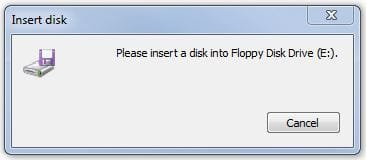
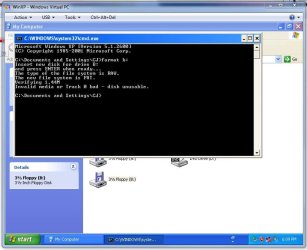
The messages I get are as follows:
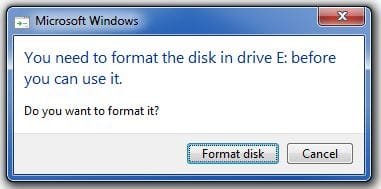
When I double click the drive in my computer:
The disk needs to be formatted. (Even if it works fine in a normal drive it will say this).
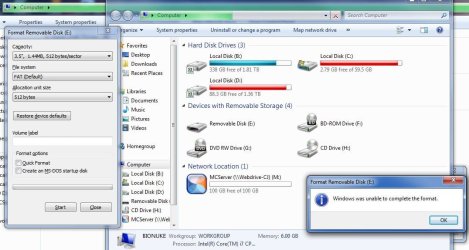
When I click format in the message above it says:
Windows cannot format the disk.
When I try using command line format it does the following:
Insert new disk for drive B:
and press ENTER when ready...
The type of the file system is RAW.
The new file system is FAT.
Verifying 1.44M
(Then it starts at 0% and after about 5-10 seconds displays the next line)
Invalid media or Track 0 bad - disk unusable.

At least it's more informative than the windows formatter (which is useless for floppy disks anyway in my experience).

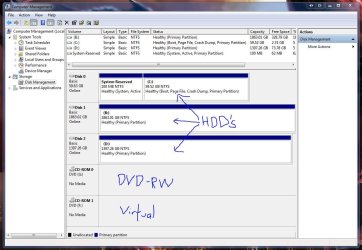
The floppy drive shows up in my computer but NOT in disk management.

I'm doing this on my PC at home which is running the same version of windows as our work computers (Windows 7 Ultimate x64). All the computers are consistent in their error messages.

Really need to get this working because I work with fairly dated industrial machines that only read floppy disks and we've just purchased a new PC which does not have the floppy IDE port on the mobo. If we can't read & write to floppy disks on the work pc there is no point in even having it and we will have just wasted $600 odd dollars.

Also, our old PC (which has a normal IDE floppy drive) is becoming unreliable due to age and overheating - hence why we spent the money on a new PC in the first place.

It's worth noting that the manufacturer of the industrial machines we use does have a USB adapter that you plug a flash drive into and put the other end (which is a floppy disk) into the machine but they want $600 for that too and we think that's a little unreasonable. Also, a newer machine that uses flash drives instead of floppy disks will cost at least $70,000 plus taxes so we'd prefer not to have to buy one!!!

Thanks in advance for any help anyone can offer.
bioNuke
 

Attachments
  • Capture.JPG
    Capture.JPG
    61.1 KB · Views: 198
  • Capture2.JPG
    Capture2.JPG
    13.5 KB · Views: 126
  • Capture3.JPG
    Capture3.JPG
    19.3 KB · Views: 122
  • Capture4.JPG
    Capture4.JPG
    92.2 KB · Views: 153

My Computer My Computer

At a glance

Windows 7 Ultimate x64 SP1Intel i5 2500K8Gb DDR3 1600MHz2 x Gigabyte GTX550 Ti's running in SLI
Computer Manufacturer/Model Number
Home built by myself.
OS
Windows 7 Ultimate x64 SP1
CPU
Intel i5 2500K
Motherboard
Asus Maximus Gene V
Memory
8Gb DDR3 1600MHz
Graphics Card(s)
2 x Gigabyte GTX550 Ti's running in SLI
Sound Card
mobo
Monitor(s) Displays
2 x Acer P444 24"
Screen Resolution
1920x1080 on both monitors
Hard Drives
WD 2TB 32M cache
PSU
can't remember
Case
Antec 900
Cooling
fan cooled
Internet Speed
ADSL2+ 18000/950
Welcome to the forum. And kudos (if that's still a word lol) for the well written accounts of the problem.

I've searched high and low for you on this one, and information regarding the issue is sketchy at best.

Microsoft tech support goes through the usual condescending path.

These are: does the issue effect other usb peripheral storage devices?

Run hardware trouble shoot... But in your case device manage does not recognise your drive

And finally update usb chipset drivers to the latest version.

Out of interest does the drive show up in disk drive management as a mass storage device, and or a drive without an associated letter?

(Your pictures may show this but I can't see them on my phone for some reason)

Sent from my BlackBerry 9900 using Tapatalk
 

My Computer My Computer

At a glance

Windows 7 Ultimate x64, & Mac OS X 10.9.2Intel Core i5 2500kCorsair Vengence 8gb 1866mhzNvidia GTX 770 OC
Computer type
PC/Desktop
Computer Manufacturer/Model Number
Built by badgers!!!
OS
Windows 7 Ultimate x64, & Mac OS X 10.9.2
CPU
Intel Core i5 2500k
Motherboard
Asus P8z68 LE
Memory
Corsair Vengence 8gb 1866mhz
Graphics Card(s)
Nvidia GTX 770 OC
Monitor(s) Displays
2x ASUS LED 22" IPS
Screen Resolution
3840x1080
Hard Drives
240GB Crucial M500 SSD
120gb Corsair Force 3 SSD
1TB Western Digital
PSU
Corsair HX650w Modular
Case
Corsair Air 540
Cooling
Corsair H60 Push/Pull
Keyboard
Corsair K70/ Logitech G27 wheel
Mouse
Saitek R.A.T 9
Internet Speed
Too slow!
Other Info
AMD fusion E350N Home server-Windows Home Server 2011 (also made by badgers!)
2011 Macbook 2.4ghz Core2Duo, 4gb ddr3, 120gb Ocz Vertex SSD
Welcome to the forum. And kudos (if that's still a word lol) for the well written accounts of the problem.
Thanks for the welcome and the compliment! I tried to be as thorough as possible because I know how frustrating it is (being the go-to-guy for tech support in my social / family / work circle) when someone says "Help! My computer is broken!". :P
I've searched high and low for you on this one, and information regarding the issue is sketchy at best.
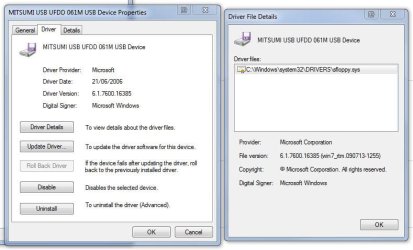
Tell me about it. The only time I found anything useful was after I viewed the driver details in device manager and it told me it uses sfloppy.sys, then I googled that.
That's how I found this awesome forum!!!
Microsoft tech support goes through the usual condescending path.

These are: does the issue effect other usb peripheral storage devices?
We can use flash drives and external hard disks without any problems, it's just the floppy drive.
Run hardware trouble shoot... But in your case device manage does not recognise your drive
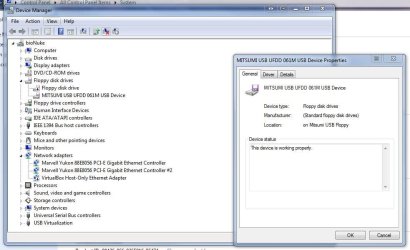
The device shows up in device manager just fine (see attached screenshots).
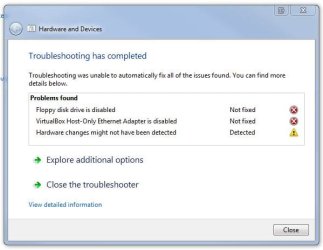
Hardware troubleshoot only detects that I have my virtual box lan adapter disabled and my internal floppy drive disabled (because I don't have one, didn't see any point in having the drive show up in my computer when it doesn't exist). I've attached a screenshot to show you what I mean.
I originally had the floppy drive enabled when I first plugged the USB one in, and it still didn't work so re-enabling the non-existent one won't help things any.
And finally update usb chipset drivers to the latest version.
Done and done. Unfortunately it still does the same thing :(
Out of interest does the drive show up in disk drive management as a mass storage device, and or a drive without an associated letter?

(Your pictures may show this but I can't see them on my phone for some reason)

Sent from my BlackBerry 9900 using Tapatalk
No it doesn't show up in disk management at all, just in My Computer (as a Floppy Disk Drive).
I've also attached a screenshot of this with some (badly drawn) additions for clarification.

Thanks for the help and suggestions, though! Keep 'em coming :)
bioNuke

P.S. It's so nice to not have anyone telling me to go get a Mac!!!
 

Attachments

  • Capture8.JPG
    Capture8.JPG
    109 KB · Views: 209
  • Capture7.JPG
    Capture7.JPG
    35.3 KB · Views: 206
  • Capture6.JPG
    Capture6.JPG
    54.1 KB · Views: 152
  • Capture5.JPG
    Capture5.JPG
    77.4 KB · Views: 182
Last edited:

My Computer My Computer

At a glance

Windows 7 Ultimate x64 SP1Intel i5 2500K8Gb DDR3 1600MHz2 x Gigabyte GTX550 Ti's running in SLI
Computer Manufacturer/Model Number
Home built by myself.
OS
Windows 7 Ultimate x64 SP1
CPU
Intel i5 2500K
Motherboard
Asus Maximus Gene V
Memory
8Gb DDR3 1600MHz
Graphics Card(s)
2 x Gigabyte GTX550 Ti's running in SLI
Sound Card
mobo
Monitor(s) Displays
2 x Acer P444 24"
Screen Resolution
1920x1080 on both monitors
Hard Drives
WD 2TB 32M cache
PSU
can't remember
Case
Antec 900
Cooling
fan cooled
Internet Speed
ADSL2+ 18000/950
Lol that was my next suggestion!! I'm also a mac person but shh don't want to become an outcast lol.

Did the drive come with any software? That can be ran in compatibility mode?

Also do you have access to a non windows 7 machine? An old laptop or anything, even your old unreliable pc at work.
Want to determine if this is a windows problem or other.

I'm determine to solve this one lol don't know why maybe its the fact you didn't start your thead with "HELP!?!?!?!?!?,?,?bhdijbfjk floppy won't work!!!!!"
I shall do some more research (it will help me avoid the work I'm being paid to do lol)

Sent from my BlackBerry 9900 using Tapatalk
 

My Computer My Computer

At a glance

Windows 7 Ultimate x64, & Mac OS X 10.9.2Intel Core i5 2500kCorsair Vengence 8gb 1866mhzNvidia GTX 770 OC
Computer type
PC/Desktop
Computer Manufacturer/Model Number
Built by badgers!!!
OS
Windows 7 Ultimate x64, & Mac OS X 10.9.2
CPU
Intel Core i5 2500k
Motherboard
Asus P8z68 LE
Memory
Corsair Vengence 8gb 1866mhz
Graphics Card(s)
Nvidia GTX 770 OC
Monitor(s) Displays
2x ASUS LED 22" IPS
Screen Resolution
3840x1080
Hard Drives
240GB Crucial M500 SSD
120gb Corsair Force 3 SSD
1TB Western Digital
PSU
Corsair HX650w Modular
Case
Corsair Air 540
Cooling
Corsair H60 Push/Pull
Keyboard
Corsair K70/ Logitech G27 wheel
Mouse
Saitek R.A.T 9
Internet Speed
Too slow!
Other Info
AMD fusion E350N Home server-Windows Home Server 2011 (also made by badgers!)
2011 Macbook 2.4ghz Core2Duo, 4gb ddr3, 120gb Ocz Vertex SSD
Ok I've come across a work around if all else fails (but being old tech second hand route maybe needed)

You cannot get a pci express floppy disk controller, but you can get an ISA floppy controller.

A ISA card won't work in a pci slot as they aren't backwards compatible. But you can get a ISA to pci slot adapter card..

If you see where I'm going with this lol

Sent from my BlackBerry 9900 using Tapatalk
 

My Computer My Computer

At a glance

Windows 7 Ultimate x64, & Mac OS X 10.9.2Intel Core i5 2500kCorsair Vengence 8gb 1866mhzNvidia GTX 770 OC
Computer type
PC/Desktop
Computer Manufacturer/Model Number
Built by badgers!!!
OS
Windows 7 Ultimate x64, & Mac OS X 10.9.2
CPU
Intel Core i5 2500k
Motherboard
Asus P8z68 LE
Memory
Corsair Vengence 8gb 1866mhz
Graphics Card(s)
Nvidia GTX 770 OC
Monitor(s) Displays
2x ASUS LED 22" IPS
Screen Resolution
3840x1080
Hard Drives
240GB Crucial M500 SSD
120gb Corsair Force 3 SSD
1TB Western Digital
PSU
Corsair HX650w Modular
Case
Corsair Air 540
Cooling
Corsair H60 Push/Pull
Keyboard
Corsair K70/ Logitech G27 wheel
Mouse
Saitek R.A.T 9
Internet Speed
Too slow!
Other Info
AMD fusion E350N Home server-Windows Home Server 2011 (also made by badgers!)
2011 Macbook 2.4ghz Core2Duo, 4gb ddr3, 120gb Ocz Vertex SSD
Just a random thought, but is it possible the USB floppy only handles DD disks (720KB) and you're trying to use HD 1.44MB disks with it? Sure would explain the complete failure to format.

As for why the drive doesn't show up in Disk Management, that's typical for logical drives as opposed to physical devices in Windows. Not to be confused with logical partitions on an MBR harddisk, logical drives are basically just emulated, virtual drives (like a RAM disk or a CD/DVD mounted image).

Maybe that's how the driver for the USB floppy works; by presenting the disk inside the physical floppy as a logical drive to Windows.

badger: good idea about the ISA card, but I'm afraid his mobo isn't going to have any ISA slots - those went the way of the dodo even before floppy controllers!
 

My Computer My Computer

At a glance

Windows 7 Professional SP1 32-bitIntel Core 2 Duo E6600 2.4GHz4GB DDR2-667 (4x1GB in dual-channel config)nVidia GeForce 9800 GT
Computer type
PC/Desktop
Computer Manufacturer/Model Number
Custom-built
OS
Windows 7 Professional SP1 32-bit
CPU
Intel Core 2 Duo E6600 2.4GHz
Motherboard
Asus PL5D2
Memory
4GB DDR2-667 (4x1GB in dual-channel config)
Graphics Card(s)
nVidia GeForce 9800 GT
Sound Card
Creative X-Fi XtremeMusic
Monitor(s) Displays
Acer P236H
Screen Resolution
1920x1200 (DVI)
Hard Drives
OCZ SSD Vertex Plus 60GB SATA (Firmware 3.55), 64MB cache
Hitachi HD321KJ SATA, 320GB, 7200rpm, 16MB cache
PSU
Antec TruePower 2.0
Case
Cooler Master Centurion
Cooling
Too many fans
Keyboard
Standard
Mouse
Microsoft wireless optical mouse
Internet Speed
AT&T U-verse (18mbit/sec)
Antivirus
Microsoft Security Essentials
Browser
Firefox
Other Info
Other devices:
Compaq CQ-60 laptop
Google Nexus 7 (2012) tablet
Nvidia SHIELD tablet (US/LTE)
Hardkernel ODROID-XU single-board computer (Samsung Exynos 5420)

My Computer My Computer

At a glance

Windows 7 Ultimate SP1 64-BitIntel Core i7 870 @ 2.93GHz8Gb Dual-Channel DDR3 @ 664MHznVidia GeForce GTX 460 1024MB dedicated RAM
Computer Manufacturer/Model Number
HP Pavilion Elite 495UK
OS
Windows 7 Ultimate SP1 64-Bit
CPU
Intel Core i7 870 @ 2.93GHz
Motherboard
MSI 2A9C (CPU1)
Memory
8Gb Dual-Channel DDR3 @ 664MHz
Graphics Card(s)
nVidia GeForce GTX 460 1024MB dedicated RAM
Sound Card
Realtek HD Audio
Monitor(s) Displays
HP2310i
Screen Resolution
1920 x 1080
Hard Drives
1x1954GB Hitachi HDS22020ALA 330 (RAID), 1x1954GB Hitachi External for backup and storage
PSU
460W
Case
HP Elite
Cooling
Air cooled
Keyboard
Logitech K750 solar-powered keyboard
Mouse
Logitech Wireless M180 mouse
Internet Speed
2Mb
Other Info
Pure Avanti Flow Internet Radio with iPod Dock, 64Gb iPod, HP USB Speakers, Sony MDR-V500 Headphones, Sony Vaio F-Series Laptop
badger: good idea about the ISA card, but I'm afraid his mobo isn't going to have any ISA slots - those went the way of the dodo even before floppy controllers!


Lol yeah I did add about a PCI to ISA adaptor.
I'm sure those are still in existence? Used to have one on my ancient AMD duron rig, never found a use for it lol.


Sent from my BlackBerry 9900 using Tapatalk
 

My Computer My Computer

At a glance

Windows 7 Ultimate x64, & Mac OS X 10.9.2Intel Core i5 2500kCorsair Vengence 8gb 1866mhzNvidia GTX 770 OC
Computer type
PC/Desktop
Computer Manufacturer/Model Number
Built by badgers!!!
OS
Windows 7 Ultimate x64, & Mac OS X 10.9.2
CPU
Intel Core i5 2500k
Motherboard
Asus P8z68 LE
Memory
Corsair Vengence 8gb 1866mhz
Graphics Card(s)
Nvidia GTX 770 OC
Monitor(s) Displays
2x ASUS LED 22" IPS
Screen Resolution
3840x1080
Hard Drives
240GB Crucial M500 SSD
120gb Corsair Force 3 SSD
1TB Western Digital
PSU
Corsair HX650w Modular
Case
Corsair Air 540
Cooling
Corsair H60 Push/Pull
Keyboard
Corsair K70/ Logitech G27 wheel
Mouse
Saitek R.A.T 9
Internet Speed
Too slow!
Other Info
AMD fusion E350N Home server-Windows Home Server 2011 (also made by badgers!)
2011 Macbook 2.4ghz Core2Duo, 4gb ddr3, 120gb Ocz Vertex SSD
Wow, thanks for all the replies lol. Sorry, I live in Australia so my hours of activity are a bit different from yours, hence the delayed response. :(

Did the drive come with any software? That can be ran in compatibility mode?

Unfortunately, no. No CD, DVD, Floppy or otherwise. I have looked around on the net as well, but couldn't find anything that worked. The model number of the device is FD-05PUB, no branding though. From memory I think I found it was a Teac, but with the amount of sleep I've been getting lately I wouldn't rely on that!

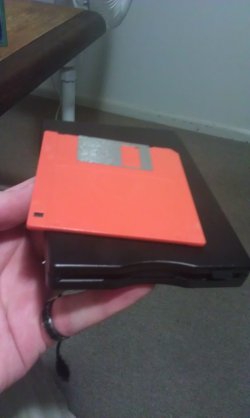
I've attached a couple of photos of the drive (what it looks like and the sticker on the bottom which shows model number etc). Sorry about the quality, my phone's camera is crap. Don't buy a HTC Desire Z!!!

Also do you have access to a non windows 7 machine? An old laptop or anything, even your old unreliable pc at work.
Want to determine if this is a windows problem or other.

I have two PC's at home and a laptop, all running Win7 x64, and two computers at work, both running Win7 x64. Lots of choices there! My parents use Vista x64 though, maybe I could take the drive over there and see if I have any luck. Might try that after work tomorrow.

I'm determine to solve this one lol don't know why maybe its the fact you didn't start your thead with "HELP!?!?!?!?!?,?,?bhdijbfjk floppy won't work!!!!!"
I shall do some more research (it will help me avoid the work I'm being paid to do lol)

Sent from my BlackBerry 9900 using Tapatalk

Thanks for all your efforts mate :)

Ok I've come across a work around if all else fails (but being old tech second hand route maybe needed)

You cannot get a pci express floppy disk controller, but you can get an ISA floppy controller.

A ISA card won't work in a pci slot as they aren't backwards compatible. But you can get a ISA to pci slot adapter card..

If you see where I'm going with this lol

Sent from my BlackBerry 9900 using Tapatalk

I've never even heard of an ISA slot lol, when I got into computers a Geforce2 was considered awesome, back when good old AGP was the go.

I shall have a look around though and see what I can find. Unfortunately I don't really know what I'm looking for but we'll see what I can rummage up. (I'll try googling 'PCI to ISA adapter' and 'ISA Floppy Controller' and see what turns up)

Just a random thought, but is it possible the USB floppy only handles DD disks (720KB) and you're trying to use HD 1.44MB disks with it? Sure would explain the complete failure to format.

That is indeed entirely possible but I fail to see why manufacturers would make a drive that only supports disks that I can't find anywhere. But hey, people have made worse decisions. Is there any way to check which type of floppy it supports? Other than actually using a 720K floppy, since I don't have one anywhere, and given floppy disks reliability, even if I found one it would probably be dead by now.

As for why the drive doesn't show up in Disk Management, that's typical for logical drives as opposed to physical devices in Windows. Not to be confused with logical partitions on an MBR harddisk, logical drives are basically just emulated, virtual drives (like a RAM disk or a CD/DVD mounted image).

Maybe that's how the driver for the USB floppy works; by presenting the disk inside the physical floppy as a logical drive to Windows.
That makes sense to me, however I have Daemon Tools installed with a virtual bluray drive and it shows up in my disk management... So maybe that isn't always the case?

Probably a long shot, but have you considered using XP Mode in a virtual PC?

http://www.sevenforums.com/tutorials/8247-windows-xp-mode-install-setup.html

I have indeed, see below quote from my original post:

I'm new to the forum but I've read through this thread ( http://www.sevenforums.com/drivers/2042-usb-floppy-drive-driver-error.html ) and posted there as well but no response as yet, but it's an old thread so hence why I'm making this one.

I've a problem with getting hold of a vista sfloppy.sys file though. Can anyone tell me which version of vista I need for it / how to get it / or simply attach the file to a reply?

I've just finished trying the last suggestion now (installing xp vm and running the floppy as a virtual drive) - but it says the same messages that windows 7 does. Even if it did work it seems a little redundant to have to install our work software on a vm just to use a floppy drive.

The messages I get are as follows:
When I double click the drive in my computer:
The disk needs to be formatted. (Even if it works fine in a normal drive it will say this).
When I click format in the message above it says:
Windows cannot format the disk.
When I try using command line format it does the following:
Insert new disk for drive B:
and press ENTER when ready...
The type of the file system is RAW.
The new file system is FAT.
Verifying 1.44M
(Then it starts at 0% and after about 5-10 seconds displays the next line)
Invalid media or Track 0 bad - disk unusable.

Thanks for all the suggestions guys!

The one thing I was most interested in though was in this thread: http://www.sevenforums.com/drivers/2042-usb-floppy-drive-driver-error.html

Apparently some people have had some luck getting usb floppy drives to work when they use an sfloppy.sys file from vista or xp. Unfortunately the posts in that thread were a bit unclear as to which version of xp/vista they got the file from. Since I don't own either of them I'll need to download an image of the disc to grab the file and I need to know which one to download. I know my problem is a bit different to theirs but at this point I'm ready to give it a go.

Any ideas?
 

Attachments

  • IMAG0016.jpg
    IMAG0016.jpg
    238 KB · Views: 38
  • IMAG0015.jpg
    IMAG0015.jpg
    149 KB · Views: 65

My Computer My Computer

At a glance

Windows 7 Ultimate x64 SP1Intel i5 2500K8Gb DDR3 1600MHz2 x Gigabyte GTX550 Ti's running in SLI
Computer Manufacturer/Model Number
Home built by myself.
OS
Windows 7 Ultimate x64 SP1
CPU
Intel i5 2500K
Motherboard
Asus Maximus Gene V
Memory
8Gb DDR3 1600MHz
Graphics Card(s)
2 x Gigabyte GTX550 Ti's running in SLI
Sound Card
mobo
Monitor(s) Displays
2 x Acer P444 24"
Screen Resolution
1920x1080 on both monitors
Hard Drives
WD 2TB 32M cache
PSU
can't remember
Case
Antec 900
Cooling
fan cooled
Internet Speed
ADSL2+ 18000/950
Well, I have a surprise for you :) The red floppy disk in your photo really is a DD 720KB disk, not a 1.44MB one. Now I wonder if the issue is actually reversed: trying to format a 720KB as 1.44MB = obvious failure.

You can tell by the holes at the corners opposite the metal slider. There's only one, which is the write protection. HD disks have another hole (without a slider to open/close the hole) on the other side identifying them as 1.44MB.

Regarding Daemon Tools showing up in Disk Management, well, that would be a true emulation of a physical drive vs. a simple logical drive - it just depends on how the device driver is implementing it, could be either one. But it's safe to say it really makes no difference in regard to the USB floppy working or not, so no worries there.

Try to format the floppy as 720K (must be specified as a commandline option with format). Does that work?

BTW, badger, I didn't see you mentioning an ISA-to-PCI adapter at first...did you edit your post after I replied, or was I just blind? (lol) :)
 

My Computer My Computer

At a glance

Windows 7 Professional SP1 32-bitIntel Core 2 Duo E6600 2.4GHz4GB DDR2-667 (4x1GB in dual-channel config)nVidia GeForce 9800 GT
Computer type
PC/Desktop
Computer Manufacturer/Model Number
Custom-built
OS
Windows 7 Professional SP1 32-bit
CPU
Intel Core 2 Duo E6600 2.4GHz
Motherboard
Asus PL5D2
Memory
4GB DDR2-667 (4x1GB in dual-channel config)
Graphics Card(s)
nVidia GeForce 9800 GT
Sound Card
Creative X-Fi XtremeMusic
Monitor(s) Displays
Acer P236H
Screen Resolution
1920x1200 (DVI)
Hard Drives
OCZ SSD Vertex Plus 60GB SATA (Firmware 3.55), 64MB cache
Hitachi HD321KJ SATA, 320GB, 7200rpm, 16MB cache
PSU
Antec TruePower 2.0
Case
Cooler Master Centurion
Cooling
Too many fans
Keyboard
Standard
Mouse
Microsoft wireless optical mouse
Internet Speed
AT&T U-verse (18mbit/sec)
Antivirus
Microsoft Security Essentials
Browser
Firefox
Other Info
Other devices:
Compaq CQ-60 laptop
Google Nexus 7 (2012) tablet
Nvidia SHIELD tablet (US/LTE)
Hardkernel ODROID-XU single-board computer (Samsung Exynos 5420)
Have you tried attaching the USB floppy drive to another computer? It is possible that it is faulty, in much the same way as an external USB HDD enclosure can become faulty (I've had a couple of those).
 

My Computer My Computer

At a glance

Windows 8.1 Pro RTM x64Intel Core-i5-3570K 4-core @ 3.4GHz (Ivy Brid...4 x 4GB DDR3-1600 Corsair Vengeance CMZ8GX3M2...MSI GeForce GTX770 Gaming OC 2GB
Computer type
PC/Desktop
Computer Manufacturer/Model Number
Dwarf Dwf/11/2012 r09/2013
OS
Windows 8.1 Pro RTM x64
CPU
Intel Core-i5-3570K 4-core @ 3.4GHz (Ivy Bridge) (OC 4.4GHz)
Motherboard
ASRock Z77 Extreme4-M
Memory
4 x 4GB DDR3-1600 Corsair Vengeance CMZ8GX3M2A1600C9B (16GB)
Graphics Card(s)
MSI GeForce GTX770 Gaming OC 2GB
Sound Card
Realtek High Definition on board solution (ALC 898)
Monitor(s) Displays
ViewSonic VA1912w Widescreen (VGA)
Screen Resolution
1440x900
Hard Drives
OCZ Agility 3 SSD 120GB SATA III x2 (RAID 0)
Samsung HD501LJ 500GB SATA II x2
Hitachi HDS721010CLA332 1TB SATA II
Iomega 1.5TB Ext USB 2.0
WD 2.0TB Ext USB 3.0
PSU
XFX Pro Series 850W Semi-Modular
Case
Gigabyte IF233
Cooling
1 x 120mm Front Inlet 1 x 120mm Rear Exhaust
Keyboard
Microsoft Comfort Curve Keyboard 3000 (USB)
Mouse
Microsoft Comfort Mouse 3000 for Business (USB)
Internet Speed
NetGear DG834Gv3 ADSL Modem/Router (Ethernet) ~4.0 Mb/s (O2)
Antivirus
Avast! 8.0.1497
Browser
IE 11
Other Info
Optical Drive: HL-DT-ST BD-RE BH10LS30 SATA Bluray
Lexmark S305 Printer/Scanner/Copier (USB)
WEI Score: 8.1/8.1/8.5/8.5/8.25
Asus Eee PC 1011PX Netbook (Windows 7 x86 Starter)
BTW, badger, I didn't see you mentioning an ISA-to-PCI adapter at first...did you edit your post after I replied, or was I just blind? (lol) :)

lol it was in the original post :p however further investigation seems to show these cards cost in excess of $500+ :shock:

And i shant moan! Your knowledge about everything amazes me :p you could say the skys purple and id run with it :D well i am colour blind lol
 

My Computer My Computer

At a glance

Windows 7 Ultimate x64, & Mac OS X 10.9.2Intel Core i5 2500kCorsair Vengence 8gb 1866mhzNvidia GTX 770 OC
Computer type
PC/Desktop
Computer Manufacturer/Model Number
Built by badgers!!!
OS
Windows 7 Ultimate x64, & Mac OS X 10.9.2
CPU
Intel Core i5 2500k
Motherboard
Asus P8z68 LE
Memory
Corsair Vengence 8gb 1866mhz
Graphics Card(s)
Nvidia GTX 770 OC
Monitor(s) Displays
2x ASUS LED 22" IPS
Screen Resolution
3840x1080
Hard Drives
240GB Crucial M500 SSD
120gb Corsair Force 3 SSD
1TB Western Digital
PSU
Corsair HX650w Modular
Case
Corsair Air 540
Cooling
Corsair H60 Push/Pull
Keyboard
Corsair K70/ Logitech G27 wheel
Mouse
Saitek R.A.T 9
Internet Speed
Too slow!
Other Info
AMD fusion E350N Home server-Windows Home Server 2011 (also made by badgers!)
2011 Macbook 2.4ghz Core2Duo, 4gb ddr3, 120gb Ocz Vertex SSD
As Corazon has discovered the floppy size, do your machines read the 1.44MB disks? to keep up with tech I would get the adapters for the machines so you can use the USB flash drives in them. There may even be a local geek who could modify them a lot cheaper too.
It is getting difficult to even buy floppies now and they will soon not be available.
As a science experiment here is the sfloppy.sys from XP Pro, SP3 32 bit.
View attachment sfloppy.zip
 

My Computer My Computer

At a glance

Windows 7 Ultimate X64 SP1Intel i5-2550K, Differing ~4.4-4.8GHz No buil...16GB G.Skill Sniper 1866MHz @ 2133MHz 2x8GBASUS GTX650TIB-DC2OC-2GD5, (650TI Boost)
Computer type
PC/Desktop
Computer Manufacturer/Model Number
Home Built Desktop By DataTech
OS
Windows 7 Ultimate X64 SP1
CPU
Intel i5-2550K, Differing ~4.4-4.8GHz No built in GPU
Motherboard
ASUS P8Z68-V PRO/GEN3
Memory
16GB G.Skill Sniper 1866MHz @ 2133MHz 2x8GB
Graphics Card(s)
ASUS GTX650TIB-DC2OC-2GD5, (650TI Boost)
Sound Card
Onboard Realtek 5-1
Monitor(s) Displays
Samsung P2570HD
Screen Resolution
1920x1080
Hard Drives
Samsung 840 Pro 256GB SSD for OS, 500GB Seagate Constellation (Enterprise drive) for Data
PSU
Corsair HX650W
Case
Inwin Dragon Rider
Cooling
Hyper 212 EVO w/two Noctua fans, push-pull, @1300 RPM
Keyboard
E-Z Eyes, bright yellow keys with large characters
Mouse
steelseries SENSEI Laser Pro Gaming
Internet Speed
48-51Mbs Mbs down, 11 Mbs up Xfinity Cable
Antivirus
Norton Internet Security 2013
Browser
IE 10, Opera, Pale Moon if needed
Other Info
4 case fans, LG BluRay-RE, ASUS DVD-RW, Mr. Fusion power supply, 1.21 gigawatts.
$500...holy cow. I'm not really surprised though, since I didn't think ISA-to-PCI adapters even existed...those two interfaces are really different (data paths, clock frequency, everything) so it makes sense that an adapter would have to be pretty complex.

I'd prefer a purple sky over the foggy soup we're having out here right now, lol...and thanks for the kind words :) but you're doing pretty good yourself, always being a nice and helpful chap. Keep up the good work :)
 

My Computer My Computer

At a glance

Windows 7 Professional SP1 32-bitIntel Core 2 Duo E6600 2.4GHz4GB DDR2-667 (4x1GB in dual-channel config)nVidia GeForce 9800 GT
Computer type
PC/Desktop
Computer Manufacturer/Model Number
Custom-built
OS
Windows 7 Professional SP1 32-bit
CPU
Intel Core 2 Duo E6600 2.4GHz
Motherboard
Asus PL5D2
Memory
4GB DDR2-667 (4x1GB in dual-channel config)
Graphics Card(s)
nVidia GeForce 9800 GT
Sound Card
Creative X-Fi XtremeMusic
Monitor(s) Displays
Acer P236H
Screen Resolution
1920x1200 (DVI)
Hard Drives
OCZ SSD Vertex Plus 60GB SATA (Firmware 3.55), 64MB cache
Hitachi HD321KJ SATA, 320GB, 7200rpm, 16MB cache
PSU
Antec TruePower 2.0
Case
Cooler Master Centurion
Cooling
Too many fans
Keyboard
Standard
Mouse
Microsoft wireless optical mouse
Internet Speed
AT&T U-verse (18mbit/sec)
Antivirus
Microsoft Security Essentials
Browser
Firefox
Other Info
Other devices:
Compaq CQ-60 laptop
Google Nexus 7 (2012) tablet
Nvidia SHIELD tablet (US/LTE)
Hardkernel ODROID-XU single-board computer (Samsung Exynos 5420)
We had new carpet put in upstairs and as I was moving my computer stuff out of the room, I found a box of floppy's and wanted to see what was on them, just had "pics" written on it.
Grabbed my NEC USB Floppy drive, plugged it into my Win 7 Ultimate 64bit machine, put the floppy in the drive and viewed the files with no issues.

Just tested it again and it still works.
It doesn't show up in Disk Management.

Model I have is NEC UF0002
 

My Computer My Computer

At a glance

Windows 7 Ultimate 64bitIntel i7 3770K16GB DDR3 1333 Corsair XMS3XFX HD6950 2GB EyeFinity
Computer Manufacturer/Model Number
HAL-9000
OS
Windows 7 Ultimate 64bit
CPU
Intel i7 3770K
Motherboard
Asus Sabertooth Z77
Memory
16GB DDR3 1333 Corsair XMS3
Graphics Card(s)
XFX HD6950 2GB EyeFinity
Sound Card
Logitech G35 & Sennheiser PC135 & VIA HD
Monitor(s) Displays
23" HP 2310e, 23" Samsung B2230, 21.5" Viewsonic
Screen Resolution
5760x1080
Hard Drives
16TB of Storage
128GB & 256GB Crucial M4 SSD's, 2X 1TB WD Black, 3x 2TB WD, 3x 2TB Samsung F4, 1.5TB Seagate, WD 500GB,
PSU
Antec True Power New 650watt
Case
Cooler Master HAF-932
Cooling
Corsair H60 Hydro Cooler, 3x 230mm Fans, 2x120mm Fan
Keyboard
Logitech G15 and G13
Mouse
Logitech G700 Gaming Mouse
Internet Speed
50/10 Mbit
Other Info
Speakers : Alesis M1 Active Mk2 Studio Monitors , APC RS 1200 UPS, HP 4500DN Color Laser, HP P1006 mono Laser, Kodak 8500 Dye-Sub, Epson 1280 inkjet, Epson Worforce 610 MFC
Well, I have a surprise for you :) The red floppy disk in your photo really is a DD 720KB disk, not a 1.44MB one. Now I wonder if the issue is actually reversed: trying to format a 720KB as 1.44MB = obvious failure.

You can tell by the holes at the corners opposite the metal slider. There's only one, which is the write protection. HD disks have another hole (without a slider to open/close the hole) on the other side identifying them as 1.44MB.

Regarding Daemon Tools showing up in Disk Management, well, that would be a true emulation of a physical drive vs. a simple logical drive - it just depends on how the device driver is implementing it, could be either one. But it's safe to say it really makes no difference in regard to the USB floppy working or not, so no worries there.

Try to format the floppy as 720K (must be specified as a commandline option with format). Does that work?

BTW, badger, I didn't see you mentioning an ISA-to-PCI adapter at first...did you edit your post after I replied, or was I just blind? (lol) :)

Wow I totally did not know that. Now I feel like a noob lol. I tried formatting at 720K (In cmd: format a: /f:720) and it said "Parameters not supported by drive.". Can't say I've seen that error before!
 

My Computer My Computer

At a glance

Windows 7 Ultimate x64 SP1Intel i5 2500K8Gb DDR3 1600MHz2 x Gigabyte GTX550 Ti's running in SLI
Computer Manufacturer/Model Number
Home built by myself.
OS
Windows 7 Ultimate x64 SP1
CPU
Intel i5 2500K
Motherboard
Asus Maximus Gene V
Memory
8Gb DDR3 1600MHz
Graphics Card(s)
2 x Gigabyte GTX550 Ti's running in SLI
Sound Card
mobo
Monitor(s) Displays
2 x Acer P444 24"
Screen Resolution
1920x1080 on both monitors
Hard Drives
WD 2TB 32M cache
PSU
can't remember
Case
Antec 900
Cooling
fan cooled
Internet Speed
ADSL2+ 18000/950
We had new carpet put in upstairs and as I was moving my computer stuff out of the room, I found a box of floppy's and wanted to see what was on them, just had "pics" written on it.
Grabbed my NEC USB Floppy drive, plugged it into my Win 7 Ultimate 64bit machine, put the floppy in the drive and viewed the files with no issues.

Just tested it again and it still works.
It doesn't show up in Disk Management.

Model I have is NEC UF0002

That's awesome!
Would you be able to grab your sfloppy.sys file and upload it on here for me?
It should be in C:\Windows\System32\Drivers.

I'll try the x86 xp one and yours tomorrow and see if I have any luck.
 

My Computer My Computer

At a glance

Windows 7 Ultimate x64 SP1Intel i5 2500K8Gb DDR3 1600MHz2 x Gigabyte GTX550 Ti's running in SLI
Computer Manufacturer/Model Number
Home built by myself.
OS
Windows 7 Ultimate x64 SP1
CPU
Intel i5 2500K
Motherboard
Asus Maximus Gene V
Memory
8Gb DDR3 1600MHz
Graphics Card(s)
2 x Gigabyte GTX550 Ti's running in SLI
Sound Card
mobo
Monitor(s) Displays
2 x Acer P444 24"
Screen Resolution
1920x1080 on both monitors
Hard Drives
WD 2TB 32M cache
PSU
can't remember
Case
Antec 900
Cooling
fan cooled
Internet Speed
ADSL2+ 18000/950
Hmm, so the format refuses to format to 720KB. The error message does sound like it's the drive itself being incapable of dealing with 720KB disks. I've never heard of a floppy that couldn't handle both densities, but then stranger things have happened.

So...next step: actually finding a HD floppy disk and testing with it. They can still be found in some stores, or maybe a friend or even a nearby office can lend you one.
 

My Computer My Computer

At a glance

Windows 7 Professional SP1 32-bitIntel Core 2 Duo E6600 2.4GHz4GB DDR2-667 (4x1GB in dual-channel config)nVidia GeForce 9800 GT
Computer type
PC/Desktop
Computer Manufacturer/Model Number
Custom-built
OS
Windows 7 Professional SP1 32-bit
CPU
Intel Core 2 Duo E6600 2.4GHz
Motherboard
Asus PL5D2
Memory
4GB DDR2-667 (4x1GB in dual-channel config)
Graphics Card(s)
nVidia GeForce 9800 GT
Sound Card
Creative X-Fi XtremeMusic
Monitor(s) Displays
Acer P236H
Screen Resolution
1920x1200 (DVI)
Hard Drives
OCZ SSD Vertex Plus 60GB SATA (Firmware 3.55), 64MB cache
Hitachi HD321KJ SATA, 320GB, 7200rpm, 16MB cache
PSU
Antec TruePower 2.0
Case
Cooler Master Centurion
Cooling
Too many fans
Keyboard
Standard
Mouse
Microsoft wireless optical mouse
Internet Speed
AT&T U-verse (18mbit/sec)
Antivirus
Microsoft Security Essentials
Browser
Firefox
Other Info
Other devices:
Compaq CQ-60 laptop
Google Nexus 7 (2012) tablet
Nvidia SHIELD tablet (US/LTE)
Hardkernel ODROID-XU single-board computer (Samsung Exynos 5420)
here it is.
Just change the extension back to .sys
 

Attachments

My Computer My Computer

At a glance

Windows 7 Ultimate 64bitIntel i7 3770K16GB DDR3 1333 Corsair XMS3XFX HD6950 2GB EyeFinity
Computer Manufacturer/Model Number
HAL-9000
OS
Windows 7 Ultimate 64bit
CPU
Intel i7 3770K
Motherboard
Asus Sabertooth Z77
Memory
16GB DDR3 1333 Corsair XMS3
Graphics Card(s)
XFX HD6950 2GB EyeFinity
Sound Card
Logitech G35 & Sennheiser PC135 & VIA HD
Monitor(s) Displays
23" HP 2310e, 23" Samsung B2230, 21.5" Viewsonic
Screen Resolution
5760x1080
Hard Drives
16TB of Storage
128GB & 256GB Crucial M4 SSD's, 2X 1TB WD Black, 3x 2TB WD, 3x 2TB Samsung F4, 1.5TB Seagate, WD 500GB,
PSU
Antec True Power New 650watt
Case
Cooler Master HAF-932
Cooling
Corsair H60 Hydro Cooler, 3x 230mm Fans, 2x120mm Fan
Keyboard
Logitech G15 and G13
Mouse
Logitech G700 Gaming Mouse
Internet Speed
50/10 Mbit
Other Info
Speakers : Alesis M1 Active Mk2 Studio Monitors , APC RS 1200 UPS, HP 4500DN Color Laser, HP P1006 mono Laser, Kodak 8500 Dye-Sub, Epson 1280 inkjet, Epson Worforce 610 MFC
Hmm, so the format refuses to format to 720KB. The error message does sound like it's the drive itself being incapable of dealing with 720KB disks. I've never heard of a floppy that couldn't handle both densities, but then stranger things have happened.

So...next step: actually finding a HD floppy disk and testing with it. They can still be found in some stores, or maybe a friend or even a nearby office can lend you one.

The problem is probably trying to format 720K on a 1.44MB floppy with a 1.44MB floppy drive. normally you would cover up the HD hole so that the floppy drive thinks it's a 720K floppy.
 

My Computer My Computer

At a glance

Windows 7 Ultimate 64bitIntel i7 3770K16GB DDR3 1333 Corsair XMS3XFX HD6950 2GB EyeFinity
Computer Manufacturer/Model Number
HAL-9000
OS
Windows 7 Ultimate 64bit
CPU
Intel i7 3770K
Motherboard
Asus Sabertooth Z77
Memory
16GB DDR3 1333 Corsair XMS3
Graphics Card(s)
XFX HD6950 2GB EyeFinity
Sound Card
Logitech G35 & Sennheiser PC135 & VIA HD
Monitor(s) Displays
23" HP 2310e, 23" Samsung B2230, 21.5" Viewsonic
Screen Resolution
5760x1080
Hard Drives
16TB of Storage
128GB & 256GB Crucial M4 SSD's, 2X 1TB WD Black, 3x 2TB WD, 3x 2TB Samsung F4, 1.5TB Seagate, WD 500GB,
PSU
Antec True Power New 650watt
Case
Cooler Master HAF-932
Cooling
Corsair H60 Hydro Cooler, 3x 230mm Fans, 2x120mm Fan
Keyboard
Logitech G15 and G13
Mouse
Logitech G700 Gaming Mouse
Internet Speed
50/10 Mbit
Other Info
Speakers : Alesis M1 Active Mk2 Studio Monitors , APC RS 1200 UPS, HP 4500DN Color Laser, HP P1006 mono Laser, Kodak 8500 Dye-Sub, Epson 1280 inkjet, Epson Worforce 610 MFC
Back
Top