USB Floppy Drive not working in Win7 Home x64

britewng

New member
Local time
10:51 PM
Messages
4
If someone will look at post right before this one I replied to, I'm having same issues with EXACT same
external floppy drive.
I have 1.44 HD discs. Can't figure it out.
Please help me.
I would list all the issues, yet their the same that bioNuke had. please someone, help me :(
 

My Computer My Computer

At a glance

windows 7 home premium 64intel premium 2.13mhzphysical 4gb virtual 7.35gbIntel HD graphics
Computer Manufacturer/Model Number
acer aspire 5733Z
OS
windows 7 home premium 64
CPU
intel premium 2.13mhz
Motherboard
ACPI X64based chipset ????
Memory
physical 4gb virtual 7.35gb
Graphics Card(s)
Intel HD graphics
Sound Card
realtek high definition
Monitor(s) Displays
generic laptop acer monitor
Hard Drives
Toshiba fixed 500 gig
Case
laptop
No No No. Please just post your problem here the best way you know how. Also give us the brand and serial # of the floppy drive/CD drive/DVD drive you are having the problem with.
A laptop with a floppy drive is some what interesting.
 

My Computer My Computer

At a glance

Windows 10 Pro. 64/ version 1709 Windows 7 Pr...Intel i7-6800K @ 4.3Corsair Platinum 16 gig @2400EVGA GTX 1070 OC
Computer type
PC/Desktop
Computer Manufacturer/Model Number
Home made Desktop
OS
Windows 10 Pro. 64/ version 1709 Windows 7 Pro/64
CPU
Intel i7-6800K @ 4.3
Motherboard
ASUS X-99 Deluxe II
Memory
Corsair Platinum 16 gig @2400
Graphics Card(s)
EVGA GTX 1070 OC
Monitor(s) Displays
Asus 27" LED LCD/VE278Q
Screen Resolution
1920-1080 or 1280-720 HDMI
Hard Drives
INTEL SSD 730-240 Gb Sata 3.0/
PSU
EVGA Platium 1200W
Case
Phanteks Luxe Tempered Glass 8 fans/ one radiator
Cooling
XSPC/ Water Cooled CPU
Keyboard
Das 4 Professional
Mouse
Logitech M705/MX Anywhere 2-S
Internet Speed
100 mbits
Antivirus
Microsoft Security Essentials/ Malwarebytes Premium 3.0/ SAS
Browser
I.E. 11 default/Firefox/ ISP Time Warner Cable/Spectrum
Other Info
LG BluRay Burner/
Sound system-KLipsch-THX/
Icy Dock ssd Hot Swap bays.
+1 on that ^

You see, the way I view Sevenforums the post right before yours is "2560 x 1600 Monitors why are they so expensive."
 

My Computer My Computer

At a glance

Windows 7 64 Bit Home Premium SP1i7-3820GSkill F3-14900CL9Q - 16GBEVGA GeForce GTX660 - Driver 352.86
Computer type
PC/Desktop
Computer Manufacturer/Model Number
Home Built - Jan 2013
OS
Windows 7 64 Bit Home Premium SP1
CPU
i7-3820
Motherboard
Asus P9X79-PRO - Bios 4608
Memory
GSkill F3-14900CL9Q - 16GB
Graphics Card(s)
EVGA GeForce GTX660 - Driver 352.86
Sound Card
On board Realtek ALC898
Monitor(s) Displays
Acer S271HL
Screen Resolution
1920 x 1080
Hard Drives
#1- Samsung 840 Pro Series
#2- Western Digital WD1002FAEX Sata3 Black
#3- Western Digital WD1002FAEX Sata3 Black
PSU
Corsair CMPSU-850TX-V2 - 850 watt (by Seasonic)
Case
Corsair Obsidian 550D
Cooling
Standard 3 120mm case fans, Cooler Master Hyper 212 EVO
Keyboard
MS KC-0405
Mouse
Intellimouse 5-button
Internet Speed
56 Mbits/Sec (on a good day)
Antivirus
Avast & Malwarebytes
Browser
Firefox
Other Info
Asus DVD - DRW-24B1ST 24X
My apologies. LOL. I didn't realize some have other threads in their list.

I have the SAME ISSUES this user listed in this thread: http://www.sevenforums.com/hardware-devices/198494-usb-floppy-drive-not-working-win7-ultimate-x64.html

I have the same model floppy drive. He solved his, yet I have 1.44 HD discs and they keep needing to be formatted.

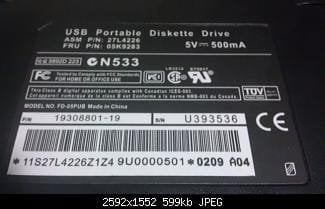
Pic of drive is attached. I have Windows Home x64.

My device manager sees the device under Floppy Drives. It shows under my computer. It tries to read the discs but said they need formatted. I can't format them since I will lose the information, pics that I purchased this for to burn them to a CDR and eventually an External HDD.
On some discs, that I knew information would be okay to lose, I chose to format, It stated it was not able to.
I'm at a loss. When I bought this, it said it would work with Win7, now I'm not so sure.

Any other information needed let me know. I put all my specs when registered.
 

Attachments

  • floppydrive.jpg
    floppydrive.jpg
    12.5 KB · Views: 90
Last edited:

My Computer My Computer

At a glance

windows 7 home premium 64intel premium 2.13mhzphysical 4gb virtual 7.35gbIntel HD graphics
Computer Manufacturer/Model Number
acer aspire 5733Z
OS
windows 7 home premium 64
CPU
intel premium 2.13mhz
Motherboard
ACPI X64based chipset ????
Memory
physical 4gb virtual 7.35gb
Graphics Card(s)
Intel HD graphics
Sound Card
realtek high definition
Monitor(s) Displays
generic laptop acer monitor
Hard Drives
Toshiba fixed 500 gig
Case
laptop
Is the information on the floppy NTSF?
Did you install the drivers?
 

My Computer My Computer

At a glance

Windows 10 Pro. 64/ version 1709 Windows 7 Pr...Intel i7-6800K @ 4.3Corsair Platinum 16 gig @2400EVGA GTX 1070 OC
Computer type
PC/Desktop
Computer Manufacturer/Model Number
Home made Desktop
OS
Windows 10 Pro. 64/ version 1709 Windows 7 Pro/64
CPU
Intel i7-6800K @ 4.3
Motherboard
ASUS X-99 Deluxe II
Memory
Corsair Platinum 16 gig @2400
Graphics Card(s)
EVGA GTX 1070 OC
Monitor(s) Displays
Asus 27" LED LCD/VE278Q
Screen Resolution
1920-1080 or 1280-720 HDMI
Hard Drives
INTEL SSD 730-240 Gb Sata 3.0/
PSU
EVGA Platium 1200W
Case
Phanteks Luxe Tempered Glass 8 fans/ one radiator
Cooling
XSPC/ Water Cooled CPU
Keyboard
Das 4 Professional
Mouse
Logitech M705/MX Anywhere 2-S
Internet Speed
100 mbits
Antivirus
Microsoft Security Essentials/ Malwarebytes Premium 3.0/ SAS
Browser
I.E. 11 default/Firefox/ ISP Time Warner Cable/Spectrum
Other Info
LG BluRay Burner/
Sound system-KLipsch-THX/
Icy Dock ssd Hot Swap bays.
+1 on that ^

You see, the way I view Sevenforums the post right before yours is "2560 x 1600 Monitors why are they so expensive."

Yes. It installed plug and play, but i used the CD that came with it to install correct drivers,
The pic is bottom of floppy drive.
I've tried HD 1.44 diskettes and the 720KB ones.
I saw on a post where the user had same problems, they were fixed when he used 1.44mb disks. That's basically all I have my saved data on.

Acer Aspire, Windows 7 Home x64
 

My Computer My Computer

At a glance

windows 7 home premium 64intel premium 2.13mhzphysical 4gb virtual 7.35gbIntel HD graphics
Computer Manufacturer/Model Number
acer aspire 5733Z
OS
windows 7 home premium 64
CPU
intel premium 2.13mhz
Motherboard
ACPI X64based chipset ????
Memory
physical 4gb virtual 7.35gb
Graphics Card(s)
Intel HD graphics
Sound Card
realtek high definition
Monitor(s) Displays
generic laptop acer monitor
Hard Drives
Toshiba fixed 500 gig
Case
laptop
TRy plugging the drive into a different USB port. If that doesn't work, if you know someone with a PC running Win 7 try the floppy drive in their PC. You shouldn't need to install any drivers in a Win 7 PC!
 

My Computer My Computer

At a glance

Microsoft Windows 7 Home Premium 64-bit 7601 ...Intel(R) Core(TM) i7-3770 CPU @ 3.40GHz8.00 GBIntel(R) HD Graphics 4000
Computer type
PC/Desktop
OS
Microsoft Windows 7 Home Premium 64-bit 7601 Multiprocessor Free Service Pack 1
CPU
Intel(R) Core(TM) i7-3770 CPU @ 3.40GHz
Motherboard
ASUSTeK COMPUTER INC. P8H77-M
Memory
8.00 GB
Graphics Card(s)
Intel(R) HD Graphics 4000
Sound Card
On Board
Monitor(s) Displays
Dell 24"
Screen Resolution
1920 x 1080
Hard Drives
(1) INTEL SSDSC2CT180A3 ATA Device (2) ST500DM002-1BD142 ATA Device (3) WDC WD3200AAKS-75L9A0 ATA Device (4) Generic- Compact Flash USB Device (5) Generic- MS/MS-Pro USB Device (6) Generic- SD/MMC USB Device (7) Generic- SM/xD-Picture USB
PSU
500w Corsair
Case
Cooler Master
Cooling
3 Fans
Keyboard
Logitech MK300
Mouse
Logitech WOM
Internet Speed
75Mb
Antivirus
Norton 360
Browser
Firefox, Opera, IE
I've just had the similar problems with the same USB floppy drive as you, 'britewng'. I read through the long 'bioNuke' thread, too.

My first problem was a lot of noise from the drive; the second, either hanging or an error message with 'the disc is not formatted', etc..

The answer to the first problem I found to be to plug the USB floppy directly into the motherboard USB slot. Previously I had used an extension or a hub. The answer to the second problem was suggested by the last post in the 'bioNuke' thread, i.e. go to BIOS and disable HPET. I had no idea what HPET was, but I went into my ASUS motherboard BIOS and had another look at the Floppy drive part. I found that the floppy controller was on the 'auto' setting. I decided to try the 'floppy' setting. Problem seems to have been solved and at least the files on the discs are showing up now and I expect everything else will be fine.
 

My Computer My Computer

At a glance

Windows 7 Pro 64-bit
Computer type
PC/Desktop
OS
Windows 7 Pro 64-bit
Back
Top