Solved USB 3.0 is faster than USB 2.0, but by how much really?

cytherian

New member
Power User
Local time
11:01 AM
Messages
218
I'm a bit uncertain by just how much faster USB 3.0 is over USB 2.0. I've read a few articles where it was stated that on paper 3.0 is 10x faster than 2.0, but would never be achieved in the the real world. The "real world" improvement would be more like 3x.

Now, I'm sure this is making several assumptions, such as native USB 3.0 and no hard drive involved in data transfer.

If you are doing a data transfer test with USB 2.0 and USB 3.0, they're both dealing with the exact same environment. If you've got a SATA II (3gb) 5400rpm drive, both speeds will be hampered if the hard drive is involved in a data transfer. Also, USB 3.0 is enabled on my laptop via a USB 3.0 port plugged into an Express Card slot. The device is rated for USB 3.0, 5Gbps, so I don't think it's a bottleneck.

I conducted a test with both and found only a 42% improvement. While still significantly better, it isn't quite as stellar as I'd have expected. In the test I copied the same files from my hard drive to a USB 3.0 enabled external hard drive (also supports USB 2.0).

What I'm trying to understand is if there's another bottleneck somewhere. Does the very fact that I have a SATA II 5400rpm hard drive end up capping USB 3.0 but not USB 2.0, so that the difference is less? Is there another kind of test I can do to bypass any data touching the hard drive? I wonder if I can download a file from the Internet, specifying the external USB 3.0 drive, and that there wouldn't be any caching on my slower internal hard drive to interfere.
 

My Computer My Computer

At a glance

Windows 7 Home Premium x64AMD Vision A8-3500M 4 Core8GbAMD Radeon HD 6620G
Computer type
Laptop
Computer Manufacturer/Model Number
HP Pavillion dv6 (dv6-6165dx)
OS
Windows 7 Home Premium x64
CPU
AMD Vision A8-3500M 4 Core
Motherboard
AMD
Memory
8Gb
Graphics Card(s)
AMD Radeon HD 6620G
Screen Resolution
1366x768
Hard Drives
Hitachi Travelstar 500Gb
Internet Speed
Realtek RTL8188CE 802.11b/g/n
You are limited by the write speed of the device you are transfering to. No matter how fast your connection is capable of, it can only transfer data at the speed of the receiving device. The 5 Gb/s speed that you refer to as USB 3.0 speed is a therotecial maximum. You will never see even close to that speed. Typically, transfering with USB 3.0 will be 2-3 times faster than USB 2.0, if the device you are transfering to is capable of accepting data that fast.
 

My Computers My Computers

  • At a glance

    Windows 11 ProRyzen 9 5900X32GB G Skill DDR4-3600EVGA RTX 3080 FTW 3 Ultra
    Computer type
    PC/Desktop
    Computer Manufacturer/Model Number
    ALWAYS UNDER CONSTRUCTION
    OS
    Windows 11 Pro
    CPU
    Ryzen 9 5900X
    Motherboard
    Asus X570 Crosshair Viii Hero
    Memory
    32GB G Skill DDR4-3600
    Graphics Card(s)
    EVGA RTX 3080 FTW 3 Ultra
    Sound Card
    On Board/Sennheiser PC37X Headset
    Monitor(s) Displays
    3 X Asus 27"
    Screen Resolution
    2560x1440
    Hard Drives
    2 X 1 TB NVME drives
    PSU
    EVGA 850
    Case
    Phanteks Eclipse P400A
    Cooling
    EVGA 280 AIO
    Keyboard
    Logitech G510s/ Logitech G13
    Mouse
    Logitech G502
    Internet Speed
    24/1
    Antivirus
    ESET/MBAM Pro/SAS Pro
    Browser
    Chrome/ Firefox/ Edge
  • At a glance

    Windows 11 ProIntel Ultra 9 288V32 GB LPDDR5X 8533
    Computer type
    Laptop
    System Manufacturer/Model Number
    Dell 16 Plus
    OS
    Windows 11 Pro
    CPU
    Intel Ultra 9 288V
    Memory
    32 GB LPDDR5X 8533
    Monitor(s) Displays
    16" Mini-LED HDR600 Touch 90 Hz
    Screen Resolution
    2560X1600
    Hard Drives
    1 TB NVME
Also, USB 3.0 is enabled on my laptop via a USB 3.0 port plugged into an Express Card slot. The device is rated for USB 3.0, 5Gbps, so I don't think it's a bottleneck.
I see you (bolded part). Expresscard speed (the speed of the communication between the expresscard USB 3 adapter and the laptop's mobo) is a bottleneck for USB 3.0.
Doesn't matter what they say. Expresscard speed is a fixed standard (just like USB 2.0 speed is).

If you had a Expresscard 2.0 slot then it's not a bottleneck (it's fast enough to allow you to link a frigging gaming external graphic card to it without lag), but afaik, Expresscard 2.0 is pretty damn rare (maybe because you can do so overkill things with it).

An article that goes more in depth.

I really doubt HDD read/write speed can seriously impact USB speed. HDDs are significantly faster.
 

My Computer My Computer

At a glance

Win 7 Pro 64-bit 7601AMD Phenom 9650 QuadCore, revision DR-B35 GB yes I run 2x 2GB and 1x 1GB, different b...NVIDIA GeForce 9800 GT 512 Mb, unknown manufa...
Computer type
PC/Desktop
Computer Manufacturer/Model Number
custom built
OS
Win 7 Pro 64-bit 7601
CPU
AMD Phenom 9650 QuadCore, revision DR-B3
Motherboard
ASUS M4A78
Memory
5 GB yes I run 2x 2GB and 1x 1GB, different brand, spank me.
Graphics Card(s)
NVIDIA GeForce 9800 GT 512 Mb, unknown manufacturer.
Sound Card
Crappy Realtek Integrated Audio
Monitor(s) Displays
Fujitsu Siemens P19-3P
Screen Resolution
1280 x 1024 x 32 bits @ 60 Hz Oh yeah, 4:3 rocks!
Hard Drives
(1) MAXTOR S TM3320613AS SATA Disk Device (2) STM35004 18AS SATA Disk Device (3) TOSHIBA USB 2.5"-HDD
PSU
whatever, around 450w
Case
Scavenged from old company PC, 10+ years old
Cooling
CPU fan, GPU fan, case fan, nothing fancy
Keyboard
Microsoft, PS/2, white.
Mouse
Optical, logitec.
Internet Speed
effective max speeds: 70-ish kB/s down 30-ish kB/s up
Antivirus
Avira, free edition.
Browser
Firefox with FXChrome to make it look like Google Chrome :P
Other Info
Was discarded by previous owner due to "horrible performance".
Was running Win Xp from a IDE drive. Yeah. Was a pain.
SATA II drive and Win7 and it zips away! Yay!
^ Thanks a lot for the link to that article, bobafett. It really sums it up rather nicely, and quite shocking to see just how much slower a USB 3.0 Express Card port is compared to native USB 3.0. Amazing. I will definitely wait for USB 3.0 before even considering a new computer system. :)
 

My Computer My Computer

At a glance

Windows 7 Home Premium x64AMD Vision A8-3500M 4 Core8GbAMD Radeon HD 6620G
Computer type
Laptop
Computer Manufacturer/Model Number
HP Pavillion dv6 (dv6-6165dx)
OS
Windows 7 Home Premium x64
CPU
AMD Vision A8-3500M 4 Core
Motherboard
AMD
Memory
8Gb
Graphics Card(s)
AMD Radeon HD 6620G
Screen Resolution
1366x768
Hard Drives
Hitachi Travelstar 500Gb
Internet Speed
Realtek RTL8188CE 802.11b/g/n

My Computer My Computer

At a glance

Windows 7 Home Premium 64bitIntel Core i3-32408GB DDR3 SDRAMEVGA GeForce GT 620
Computer type
PC/Desktop
Computer Manufacturer/Model Number
Dell Inspiron 660
OS
Windows 7 Home Premium 64bit
CPU
Intel Core i3-3240
Motherboard
Dell 084J0R
Memory
8GB DDR3 SDRAM
Graphics Card(s)
EVGA GeForce GT 620
Sound Card
Intel Panther Point PCH High Definition Audio
Monitor(s) Displays
Acer G205HV
Screen Resolution
1600 x 900
Hard Drives
Sandisk SSD 64GB SDSSDP064G
Seagate HDD 1TB ST1000DM003-1CH162
PSU
Dell 300W
Case
Dell Inspiron
Keyboard
Logitech Wireless K320/B350
Mouse
Microsoft
Internet Speed
25Mbps/4Mbps
Antivirus
Avast
Browser
Mozilla Firefox
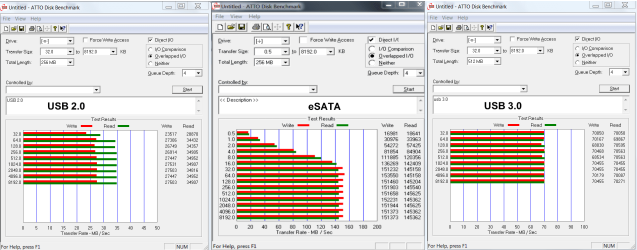
If you want speed, an eSata port is the best. Much faster than USB3 although the specs would not suggest that. There must be a lot of overhead with USB3.
 

My Computer My Computer

At a glance

Vista, Windows7, Mint Mate, Zorin, Windows 8from 1.6GHz Duo to i7
Computer Manufacturer/Model Number
HP, Dell, Gateway, Toshiba - 4 laptops and 2 desktops
OS
Vista, Windows7, Mint Mate, Zorin, Windows 8
CPU
from 1.6GHz Duo to i7
Monitor(s) Displays
2x HP w2207
Hard Drives
5x HDD, 7x SSD, 12x Externals
Keyboard
with trackball - no mices
Mouse
Trackball mice
Internet Speed
DSL 6000
Just to confirm what WHS said. Here is a test I ran a while back.

esata-usb 3-2.png
 

My Computers My Computers

  • At a glance

    Windows 11 ProRyzen 9 5900X32GB G Skill DDR4-3600EVGA RTX 3080 FTW 3 Ultra
    Computer type
    PC/Desktop
    Computer Manufacturer/Model Number
    ALWAYS UNDER CONSTRUCTION
    OS
    Windows 11 Pro
    CPU
    Ryzen 9 5900X
    Motherboard
    Asus X570 Crosshair Viii Hero
    Memory
    32GB G Skill DDR4-3600
    Graphics Card(s)
    EVGA RTX 3080 FTW 3 Ultra
    Sound Card
    On Board/Sennheiser PC37X Headset
    Monitor(s) Displays
    3 X Asus 27"
    Screen Resolution
    2560x1440
    Hard Drives
    2 X 1 TB NVME drives
    PSU
    EVGA 850
    Case
    Phanteks Eclipse P400A
    Cooling
    EVGA 280 AIO
    Keyboard
    Logitech G510s/ Logitech G13
    Mouse
    Logitech G502
    Internet Speed
    24/1
    Antivirus
    ESET/MBAM Pro/SAS Pro
    Browser
    Chrome/ Firefox/ Edge
  • At a glance

    Windows 11 ProIntel Ultra 9 288V32 GB LPDDR5X 8533
    Computer type
    Laptop
    System Manufacturer/Model Number
    Dell 16 Plus
    OS
    Windows 11 Pro
    CPU
    Intel Ultra 9 288V
    Memory
    32 GB LPDDR5X 8533
    Monitor(s) Displays
    16" Mini-LED HDR600 Touch 90 Hz
    Screen Resolution
    2560X1600
    Hard Drives
    1 TB NVME
If you want speed, an eSata port is the best. Much faster than USB3 although the specs would not suggest that. There must be a lot of overhead with USB3.
I don't know about that... Both the SATA and USB interfaces use the 8b/10g encoding that limits the throughput of the interface. Awhile ego, I've also tested the USB 2/3 and eSATA 3 throughput test:

http://www.sevenforums.com/hardware-devices/204424-usb-3-0-transfer-speed.html

The USB 3.0 with SSD drive is faster than the eSATA, although the 60 GBs SSD drive size limited the write speed. Certainly, having an SSD drive in the external enclosure with eSATA interface presumably would run circles around the USB 3.0.

Since the encoding is the same for both the SATA and USB, it seems that the external enclosure control board that converts between SATA and USB might be suspect for the limited throughput for the USB interfaces.
 

My Computer My Computer

At a glance

Windows 7 64-bit, Windows 8.1 64-bit, OSX El ...Intel i5-3350P 3.1 GHz16 GBs GSkill SniperRadeon HD 7850
Computer type
PC/Desktop
Computer Manufacturer/Model Number
Custom built at Home
OS
Windows 7 64-bit, Windows 8.1 64-bit, OSX El Capitan, Windows 10 (VMware)
CPU
Intel i5-3350P 3.1 GHz
Motherboard
Gigabyte GA-Z77X-UP5 TH
Memory
16 GBs GSkill Sniper
Graphics Card(s)
Radeon HD 7850
Sound Card
VIA HD Audio
Monitor(s) Displays
Dell U2410 24"
Screen Resolution
1920x1200
Hard Drives
1 x Intel 520 240 GBs
1 x Seagate 1TBs SATA 2.0,
1 x Seagate 1TBs eSATA 2.0
PSU
Thermaltake 850W
Case
Antec P183
Cooling
Noctua NH-D14 Heatsink 2 x 120mm fans, 4 x 120mm case fans
Keyboard
Dell Multimedia keyboard
Mouse
Logitech Trackball
Internet Speed
28.5 Mb/s
Transfer speeds from the same USB 3.0 drive are a lot lower when connected to a PCI-e x1 add-in card on a desktop computer
 

Attachments

  • USB3.0_PCI_e_x1_#2.jpg
    USB3.0_PCI_e_x1_#2.jpg
    33.6 KB · Views: 4

My Computer My Computer

At a glance

Windows 7 Home Premium 64bitIntel Core i3-32408GB DDR3 SDRAMEVGA GeForce GT 620
Computer type
PC/Desktop
Computer Manufacturer/Model Number
Dell Inspiron 660
OS
Windows 7 Home Premium 64bit
CPU
Intel Core i3-3240
Motherboard
Dell 084J0R
Memory
8GB DDR3 SDRAM
Graphics Card(s)
EVGA GeForce GT 620
Sound Card
Intel Panther Point PCH High Definition Audio
Monitor(s) Displays
Acer G205HV
Screen Resolution
1600 x 900
Hard Drives
Sandisk SSD 64GB SDSSDP064G
Seagate HDD 1TB ST1000DM003-1CH162
PSU
Dell 300W
Case
Dell Inspiron
Keyboard
Logitech Wireless K320/B350
Mouse
Microsoft
Internet Speed
25Mbps/4Mbps
Antivirus
Avast
Browser
Mozilla Firefox
Back
Top