
Solved Harddisk appears as local disk

stoleaway

New member
Member
Local time
2:00 PM
Messages
51
Location
singapore
Hi all, my harddisk is having this problem again. it used to be named Expansion (F:) but now it changed to Local Disk (F:) and it lagged my com when plugged in and it took my com more than half an hour to start when it is plugged in (ended up having to remove it and my com started normally)

tried to run cmd check, but it freezes all applications and when plugged in, it caused all my other applications (chrome etc) to be unresponsive. Is there anything I can do? It is still under warranty, but i have more than 1TB of data inside that I really need, so is there anything I can do to at least recover the data?

tried to run seatools, but it ended up not loading when my harddisk was plugged in so I couldn't checked anything at all :( It was working fine a few days back and I don't know the reason why it turned out like this.
 

My Computer

Computer Manufacturer/Model Number
HP Pavillion Slimline
OS
Microsoft Windows 7 Home Premium 64-bit 7600 Multiprocessor Free
CPU
Intel(R) Core(TM) i3 CPU 550 @ 3.20GHz
Motherboard
MSI 2A9C
Memory
4.00 GB
Graphics Card(s)
ATI Radeon HD 5450
Sound Card
(1) ATI High Definition Audio Device (2) Realtek High Defi
Screen Resolution
1600 x 900 x 32 bits (4294967296 colors) @ 60 Hz
Hard Drives
(1) ST3500418AS (2) Generic- Multi-Card USB Device (3) WD 10EAVS External USB Device
Hello stoleaway and welcome mate. Got any screen shots? of the drives in Computer to have a look at please? or is that drive singular?

Now one way of recovering the Data is to boot from a Ubuntu ISO disk (don't install) and via it you can see the data on the drive and possibly extract them that way.

Sounds like the drive is going south or has become corrupted or has a nasty on it.

Some system specs would be nice too as it is hard to know if you have a desktop laptop or whatever.

Personally I do not like large drives too much to lose when they head off into the sunset - as an afterthought got any backups made ? rescue disk etc I prefer 500GB max and back up to an external or if you have a desktop a second drive in the machine.
Download | Ubuntu < remember it will ask run or install just run.
 

My Computer

Computer type
PC/Desktop
Computer Manufacturer/Model Number
Own build (new) Desk1 / Asus ROG Win 7 / Desk2 1st build
OS
Desk1 7 Home Prem / Desk2 10 Pro / Main lap Asus ROG 10 Pro 2 laptop Toshiba 7 Pro Asus P2520 7 & 10
CPU
Desk1 i5 3750K / Laptop i7 GTX 860M / Desk2 i5 2500
Motherboard
Desk1 Asus P877-V / Desk2 Gigabyte H67 UD3H / Laptop ?
Memory
Desk1 8GB (1866) / Desk2 16GB (1333) / Laptop 8Gb DDR3
Graphics Card(s)
Desk 1& 2NVidia GTX 650 & Laptops on board Intel
Sound Card
Desk 1 & 2 -XONAR DG Realtek High Def audio Laptop
Monitor(s) Displays
Desk 1 Benq HD 2450 / Desk2 Philips 24" / Laptop 17.5"
Screen Resolution
1920x1080 D1 & D2 & Laptop 1
Hard Drives
Desk1 Samsung 120GB 830 SSD
Asus ROG 256GB 850 Pro SSD
Desk2 Samsung 840 256 SSD
Toshiba 120GB EVO
PSU
Desk 1 Corsair HX 1050/ Laptop ? / Desk 2 Corsair HX 650
Case
Desk 1 Cooler HAF XM ? Toshiba laptop / Desk2 Coolermaster
Cooling
Fans on all Desk1 -2 Desk2 - all Coolermasters 5 Laptop ?
Keyboard
Desk 1 MS Sidewinder X6 Desk 2 MS Sidewinder X 4
Mouse
Desk 1&2 - Gigabyte MS 900 gamer - laptop - Logitec wireless
Internet Speed
ADSL2+
Other Info
One other Desktop (tester) and spare Toshba laptop both with SSD's
Running Kaspersky 2016 ISS on all machines config'd identically
Logitec audio stereo systems on each machine (x3)
Canon MG5250MFC
Router/modem TP-Link running WPA2SK
Untitled-1.png

using a desktop, windows 7?

Tried the harddisk on my laptop too and the same thing happened :(
 

My Computer

Computer Manufacturer/Model Number
HP Pavillion Slimline
OS
Microsoft Windows 7 Home Premium 64-bit 7600 Multiprocessor Free
CPU
Intel(R) Core(TM) i3 CPU 550 @ 3.20GHz
Motherboard
MSI 2A9C
Memory
4.00 GB
Graphics Card(s)
ATI Radeon HD 5450
Sound Card
(1) ATI High Definition Audio Device (2) Realtek High Defi
Screen Resolution
1600 x 900 x 32 bits (4294967296 colors) @ 60 Hz
Hard Drives
(1) ST3500418AS (2) Generic- Multi-Card USB Device (3) WD 10EAVS External USB Device
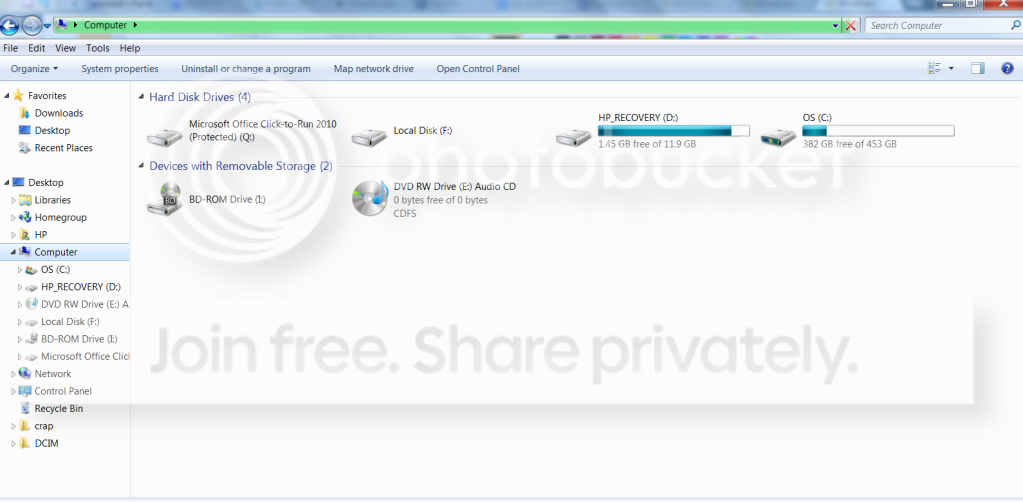
Ok mate so this F: drive is a second drive that is what I was wanting to know as it sort of sounded like you had the one drive and it was partitioned with an F: label.


You say it is still under warranty by that do you mean the machine in total or just this terabyte drive? I am not trying to circumvent the problem just that if you bought the machine and they installed the terabyte drive as part of the deal then they should do the work under warranty. On the other hand if you added the drive yourself into a new machine then they are not liable and if they wanted to be funny about it they could also void any warranty you have on the machine.

Now if you own the machine - it is out of warranty then try my suggestion of the Ubuntu boot disk. You will need to make that disk yourself and then power down add that F: drive power up and go into the BIOS and change the boot order to boot from the DVD optical drive. (You will have to find out what the BIOS key on power up is for your machine)

Insert the Ubuntu disk then exit the BIOS saving the changes -(you can always go back and put it back to boot form the HDD), it will then boot to the Ubuntu it will ask you if you want to install or run - run it don't install.

It takes a few minutes and you will end up with an OS that is "back to front" to Windows that is the close arrow is on the left the cursor arrow is black etc etc

You can now download the Seagate tools and run it on any of the disks you have in the machine. That is because you can acnes the net via the Firefox it comes with - a good tip if ever your Windows crashes and you cannot get onto the net or if you forget your login password.

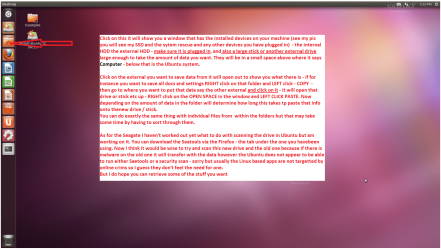
You can also get the data off of that drive onto another drive stick or whatever by accessing the files from the Computer square on the left of the screen I think if I remember it right (been a long time since I have needed to use it) you just need to click on the items on the left until you find the right one.

I reckon you could also run some security through that drive via this way SuperAntiSpyware is a good start as is Malwarebytes as this problem could also be a infection.

Just out of interest what security are you using? oh and some system specs my friend is very helpful too.

The approach above is or looks long and drawn out but if you can get the thing running properly or get the data back then it's worth it. If the Seagate comes up with a bad drive then data off then ditch it. Just finally another good checker for the drive is the Partition Wizard it will do a physical surface scaan ion the platters themselves.

If you haven't got any of those -

SUPERAntiSpyware | Remove Malware | Remove Spyware - AntiMalware, AntiSpyware, AntiAdware!

Download Malwarebytes Anti-Malware 1.65.1 - FileHippo.com

Partition Manager Server, server partition manager and partition magic server for Windows Server 2000/2003/2008. Server Partition software for Windows Server and None-Server partitions < freeware edition
 

My Computer

Computer type
PC/Desktop
Computer Manufacturer/Model Number
Own build (new) Desk1 / Asus ROG Win 7 / Desk2 1st build
OS
Desk1 7 Home Prem / Desk2 10 Pro / Main lap Asus ROG 10 Pro 2 laptop Toshiba 7 Pro Asus P2520 7 & 10
CPU
Desk1 i5 3750K / Laptop i7 GTX 860M / Desk2 i5 2500
Motherboard
Desk1 Asus P877-V / Desk2 Gigabyte H67 UD3H / Laptop ?
Memory
Desk1 8GB (1866) / Desk2 16GB (1333) / Laptop 8Gb DDR3
Graphics Card(s)
Desk 1& 2NVidia GTX 650 & Laptops on board Intel
Sound Card
Desk 1 & 2 -XONAR DG Realtek High Def audio Laptop
Monitor(s) Displays
Desk 1 Benq HD 2450 / Desk2 Philips 24" / Laptop 17.5"
Screen Resolution
1920x1080 D1 & D2 & Laptop 1
Hard Drives
Desk1 Samsung 120GB 830 SSD
Asus ROG 256GB 850 Pro SSD
Desk2 Samsung 840 256 SSD
Toshiba 120GB EVO
PSU
Desk 1 Corsair HX 1050/ Laptop ? / Desk 2 Corsair HX 650
Case
Desk 1 Cooler HAF XM ? Toshiba laptop / Desk2 Coolermaster
Cooling
Fans on all Desk1 -2 Desk2 - all Coolermasters 5 Laptop ?
Keyboard
Desk 1 MS Sidewinder X6 Desk 2 MS Sidewinder X 4
Mouse
Desk 1&2 - Gigabyte MS 900 gamer - laptop - Logitec wireless
Internet Speed
ADSL2+
Other Info
One other Desktop (tester) and spare Toshba laptop both with SSD's
Running Kaspersky 2016 ISS on all machines config'd identically
Logitec audio stereo systems on each machine (x3)
Canon MG5250MFC
Router/modem TP-Link running WPA2SK
hi, it is a seagate external harddisk and I don't really know much about these... but I will try your method later and see how it goes ^^
 

My Computer

Computer Manufacturer/Model Number
HP Pavillion Slimline
OS
Microsoft Windows 7 Home Premium 64-bit 7600 Multiprocessor Free
CPU
Intel(R) Core(TM) i3 CPU 550 @ 3.20GHz
Motherboard
MSI 2A9C
Memory
4.00 GB
Graphics Card(s)
ATI Radeon HD 5450
Sound Card
(1) ATI High Definition Audio Device (2) Realtek High Defi
Screen Resolution
1600 x 900 x 32 bits (4294967296 colors) @ 60 Hz
Hard Drives
(1) ST3500418AS (2) Generic- Multi-Card USB Device (3) WD 10EAVS External USB Device
hi, it is a seagate external harddisk and I don't really know much about these... but I will try your method later and see how it goes ^^
Hum stoleaway externals are real headaches mate especially those large capacity ones - that is why I said I like to use 500GB should it go belly up then less is lost.

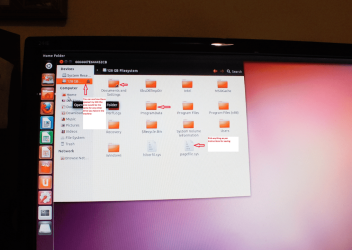
Now just to show you where to look when the Ubuntu is running I have attached a pic - head there I'll add some instruction s to the pic as well.

Well I have run Ubuntu on my tester and you can see the results try this anyway mate and see if the scanners will work on the new drive if that is what you are going to use. Bur if I were you I would stick to slightly smaller drives for reasons I have mentioned already.

Let me know how you go.

John
 

Attachments

  • UBUNTU.PNG
    UBUNTU.PNG
    296.6 KB · Views: 39
  • UBUNTU2.PNG
    UBUNTU2.PNG
    296.6 KB · Views: 39

My Computer

Computer type
PC/Desktop
Computer Manufacturer/Model Number
Own build (new) Desk1 / Asus ROG Win 7 / Desk2 1st build
OS
Desk1 7 Home Prem / Desk2 10 Pro / Main lap Asus ROG 10 Pro 2 laptop Toshiba 7 Pro Asus P2520 7 & 10
CPU
Desk1 i5 3750K / Laptop i7 GTX 860M / Desk2 i5 2500
Motherboard
Desk1 Asus P877-V / Desk2 Gigabyte H67 UD3H / Laptop ?
Memory
Desk1 8GB (1866) / Desk2 16GB (1333) / Laptop 8Gb DDR3
Graphics Card(s)
Desk 1& 2NVidia GTX 650 & Laptops on board Intel
Sound Card
Desk 1 & 2 -XONAR DG Realtek High Def audio Laptop
Monitor(s) Displays
Desk 1 Benq HD 2450 / Desk2 Philips 24" / Laptop 17.5"
Screen Resolution
1920x1080 D1 & D2 & Laptop 1
Hard Drives
Desk1 Samsung 120GB 830 SSD
Asus ROG 256GB 850 Pro SSD
Desk2 Samsung 840 256 SSD
Toshiba 120GB EVO
PSU
Desk 1 Corsair HX 1050/ Laptop ? / Desk 2 Corsair HX 650
Case
Desk 1 Cooler HAF XM ? Toshiba laptop / Desk2 Coolermaster
Cooling
Fans on all Desk1 -2 Desk2 - all Coolermasters 5 Laptop ?
Keyboard
Desk 1 MS Sidewinder X6 Desk 2 MS Sidewinder X 4
Mouse
Desk 1&2 - Gigabyte MS 900 gamer - laptop - Logitec wireless
Internet Speed
ADSL2+
Other Info
One other Desktop (tester) and spare Toshba laptop both with SSD's
Running Kaspersky 2016 ISS on all machines config'd identically
Logitec audio stereo systems on each machine (x3)
Canon MG5250MFC
Router/modem TP-Link running WPA2SK
I can't seem to get into BIOS :(
 

My Computer

Computer Manufacturer/Model Number
HP Pavillion Slimline
OS
Microsoft Windows 7 Home Premium 64-bit 7600 Multiprocessor Free
CPU
Intel(R) Core(TM) i3 CPU 550 @ 3.20GHz
Motherboard
MSI 2A9C
Memory
4.00 GB
Graphics Card(s)
ATI Radeon HD 5450
Sound Card
(1) ATI High Definition Audio Device (2) Realtek High Defi
Screen Resolution
1600 x 900 x 32 bits (4294967296 colors) @ 60 Hz
Hard Drives
(1) ST3500418AS (2) Generic- Multi-Card USB Device (3) WD 10EAVS External USB Device
stoleaway:

Could you post a screenshot of Disk Management?
Rt click Computer -> Manage -> Disk Management
What is the BD-rom drive? Can you eject/remove it?

Thanks
 

My Computer

Computer type
Laptop
Computer Manufacturer/Model Number
HP Pavilion dv6-6c10us
OS
x64 (6.3.9600) Win8.1 Pro & soon dual boot x64 (6.1.7601) Win7_SP1 HomePrem
CPU
AMD A6-3420M APU with Radeon(tm) HD Graphics
Motherboard
Hewlett-Packard 1805
Memory
6.00 GB
Graphics Card(s)
AMD Radeon(TM) HD 6520G
Sound Card
(1) AMD High Definition Audio Device (2) IDT High Definiti
Monitor(s) Displays
HP W2072a 20" LCD (1600 x 900) @ 60 Hz
Screen Resolution
1366 x 768 x 32 bits (4294967296 colors) @ 60 Hz
Hard Drives
ST640LM0 00 HM641JI SATA Disk Device
Keyboard
Logitech k520 wireless KB
Mouse
Logitech m320 wireless mouse (bundled with KB)
Internet Speed
15/5 | 54 MB Wireless 'n'
Antivirus
Realtime: Defender or Avast | On-demand: Malwarebytes, ESET
Browser
IE 11 on Win8, IE 10 on win 7
Other Info
Media: [Gimp, Audacity, VLC] || Comm: [WEmail 2012, Skype] || Productivity: [OpenOffice,| Textpad] || Utils: [Sysinternals, cCleaner, Speccy, Defraggler]
What message pops up on the screen that describes special keys you can press during boot to access things like BIOS?

If you fill out your system specs you might get better help on this. We need to know at least make/model.
 

My Computer

OS
Windows 7 Ultimate x64
F5ing: Good point on the specs - this could the problem :sarc:. stoleaway's system specs on sevenforums tell us that the OS is none!
If you fill out your system specs you might get better help on this. We need to know at least make/model.
stoleaway: The more information about your system and events that led up to the issue you're trying to solve will help find a solution quicker. You can use the EZ specs link in my signature so you don't have to type all of the information.
download the app, run it and if you're logged in to Sevenforums, the app will complete the System specs for you - if you tell it to do that.
 

My Computer

Computer type
Laptop
Computer Manufacturer/Model Number
HP Pavilion dv6-6c10us
OS
x64 (6.3.9600) Win8.1 Pro & soon dual boot x64 (6.1.7601) Win7_SP1 HomePrem
CPU
AMD A6-3420M APU with Radeon(tm) HD Graphics
Motherboard
Hewlett-Packard 1805
Memory
6.00 GB
Graphics Card(s)
AMD Radeon(TM) HD 6520G
Sound Card
(1) AMD High Definition Audio Device (2) IDT High Definiti
Monitor(s) Displays
HP W2072a 20" LCD (1600 x 900) @ 60 Hz
Screen Resolution
1366 x 768 x 32 bits (4294967296 colors) @ 60 Hz
Hard Drives
ST640LM0 00 HM641JI SATA Disk Device
Keyboard
Logitech k520 wireless KB
Mouse
Logitech m320 wireless mouse (bundled with KB)
Internet Speed
15/5 | 54 MB Wireless 'n'
Antivirus
Realtime: Defender or Avast | On-demand: Malwarebytes, ESET
Browser
IE 11 on Win8, IE 10 on win 7
Other Info
Media: [Gimp, Audacity, VLC] || Comm: [WEmail 2012, Skype] || Productivity: [OpenOffice,| Textpad] || Utils: [Sysinternals, cCleaner, Speccy, Defraggler]

My Computer

Computer Manufacturer/Model Number
HP Pavillion Slimline
OS
Microsoft Windows 7 Home Premium 64-bit 7600 Multiprocessor Free
CPU
Intel(R) Core(TM) i3 CPU 550 @ 3.20GHz
Motherboard
MSI 2A9C
Memory
4.00 GB
Graphics Card(s)
ATI Radeon HD 5450
Sound Card
(1) ATI High Definition Audio Device (2) Realtek High Defi
Screen Resolution
1600 x 900 x 32 bits (4294967296 colors) @ 60 Hz
Hard Drives
(1) ST3500418AS (2) Generic- Multi-Card USB Device (3) WD 10EAVS External USB Device
Your turn for point B I'm going away for a while.
 

My Computer

Computer type
PC/Desktop
Computer Manufacturer/Model Number
Own build (new) Desk1 / Asus ROG Win 7 / Desk2 1st build
OS
Desk1 7 Home Prem / Desk2 10 Pro / Main lap Asus ROG 10 Pro 2 laptop Toshiba 7 Pro Asus P2520 7 & 10
CPU
Desk1 i5 3750K / Laptop i7 GTX 860M / Desk2 i5 2500
Motherboard
Desk1 Asus P877-V / Desk2 Gigabyte H67 UD3H / Laptop ?
Memory
Desk1 8GB (1866) / Desk2 16GB (1333) / Laptop 8Gb DDR3
Graphics Card(s)
Desk 1& 2NVidia GTX 650 & Laptops on board Intel
Sound Card
Desk 1 & 2 -XONAR DG Realtek High Def audio Laptop
Monitor(s) Displays
Desk 1 Benq HD 2450 / Desk2 Philips 24" / Laptop 17.5"
Screen Resolution
1920x1080 D1 & D2 & Laptop 1
Hard Drives
Desk1 Samsung 120GB 830 SSD
Asus ROG 256GB 850 Pro SSD
Desk2 Samsung 840 256 SSD
Toshiba 120GB EVO
PSU
Desk 1 Corsair HX 1050/ Laptop ? / Desk 2 Corsair HX 650
Case
Desk 1 Cooler HAF XM ? Toshiba laptop / Desk2 Coolermaster
Cooling
Fans on all Desk1 -2 Desk2 - all Coolermasters 5 Laptop ?
Keyboard
Desk 1 MS Sidewinder X6 Desk 2 MS Sidewinder X 4
Mouse
Desk 1&2 - Gigabyte MS 900 gamer - laptop - Logitec wireless
Internet Speed
ADSL2+
Other Info
One other Desktop (tester) and spare Toshba laptop both with SSD's
Running Kaspersky 2016 ISS on all machines config'd identically
Logitec audio stereo systems on each machine (x3)
Canon MG5250MFC
Router/modem TP-Link running WPA2SK
stoleaway: Thanks for updating your specs.

how 'bout the questions I asked here

Since the external drive drags your system down - disconnect it until instructed to connect it. You want to make sure your base system is functioning well first. Anything that you added, like BD-rom, should be disconnected. This will isolate device issues.


What AV do you have on your system? Have you scanned your machine? What resulted?

Eset has a good online scanner that might catch more. Also do you have Malwarebytes? Run MWbytes too.

What happened a few days ago when the ext drive started acting oddly? Were you downloading large files? backing up your system?.... every little bit of information helps. That includes letting folks on this side know what you have and have not done yet. Hence, my asking again about the bd-rom....

Thanks,

Bill
.
 

My Computer

Computer type
Laptop
Computer Manufacturer/Model Number
HP Pavilion dv6-6c10us
OS
x64 (6.3.9600) Win8.1 Pro & soon dual boot x64 (6.1.7601) Win7_SP1 HomePrem
CPU
AMD A6-3420M APU with Radeon(tm) HD Graphics
Motherboard
Hewlett-Packard 1805
Memory
6.00 GB
Graphics Card(s)
AMD Radeon(TM) HD 6520G
Sound Card
(1) AMD High Definition Audio Device (2) IDT High Definiti
Monitor(s) Displays
HP W2072a 20" LCD (1600 x 900) @ 60 Hz
Screen Resolution
1366 x 768 x 32 bits (4294967296 colors) @ 60 Hz
Hard Drives
ST640LM0 00 HM641JI SATA Disk Device
Keyboard
Logitech k520 wireless KB
Mouse
Logitech m320 wireless mouse (bundled with KB)
Internet Speed
15/5 | 54 MB Wireless 'n'
Antivirus
Realtime: Defender or Avast | On-demand: Malwarebytes, ESET
Browser
IE 11 on Win8, IE 10 on win 7
Other Info
Media: [Gimp, Audacity, VLC] || Comm: [WEmail 2012, Skype] || Productivity: [OpenOffice,| Textpad] || Utils: [Sysinternals, cCleaner, Speccy, Defraggler]
Ok John,

I'll have to wait to see more from stoleaway. I jumped in on this one, we can both offer suggestions as long as we are moving in the same direction. Your focus was good, I thought I needed more / different information if I was going to be of any help. F5ing added something I tend to forget - update the specs.

Working together is always best. So I'll check back, but I might need some help - depending on what I'm able to figure out. jumanji might be a good resource if we can't provide a good solution.

See you in a bit then, mate.
Your turn for point B I'm going away for a while.
 

My Computer

Computer type
Laptop
Computer Manufacturer/Model Number
HP Pavilion dv6-6c10us
OS
x64 (6.3.9600) Win8.1 Pro & soon dual boot x64 (6.1.7601) Win7_SP1 HomePrem
CPU
AMD A6-3420M APU with Radeon(tm) HD Graphics
Motherboard
Hewlett-Packard 1805
Memory
6.00 GB
Graphics Card(s)
AMD Radeon(TM) HD 6520G
Sound Card
(1) AMD High Definition Audio Device (2) IDT High Definiti
Monitor(s) Displays
HP W2072a 20" LCD (1600 x 900) @ 60 Hz
Screen Resolution
1366 x 768 x 32 bits (4294967296 colors) @ 60 Hz
Hard Drives
ST640LM0 00 HM641JI SATA Disk Device
Keyboard
Logitech k520 wireless KB
Mouse
Logitech m320 wireless mouse (bundled with KB)
Internet Speed
15/5 | 54 MB Wireless 'n'
Antivirus
Realtime: Defender or Avast | On-demand: Malwarebytes, ESET
Browser
IE 11 on Win8, IE 10 on win 7
Other Info
Media: [Gimp, Audacity, VLC] || Comm: [WEmail 2012, Skype] || Productivity: [OpenOffice,| Textpad] || Utils: [Sysinternals, cCleaner, Speccy, Defraggler]

My Computer

Computer type
PC/Desktop
Computer Manufacturer/Model Number
Own build (new) Desk1 / Asus ROG Win 7 / Desk2 1st build
OS
Desk1 7 Home Prem / Desk2 10 Pro / Main lap Asus ROG 10 Pro 2 laptop Toshiba 7 Pro Asus P2520 7 & 10
CPU
Desk1 i5 3750K / Laptop i7 GTX 860M / Desk2 i5 2500
Motherboard
Desk1 Asus P877-V / Desk2 Gigabyte H67 UD3H / Laptop ?
Memory
Desk1 8GB (1866) / Desk2 16GB (1333) / Laptop 8Gb DDR3
Graphics Card(s)
Desk 1& 2NVidia GTX 650 & Laptops on board Intel
Sound Card
Desk 1 & 2 -XONAR DG Realtek High Def audio Laptop
Monitor(s) Displays
Desk 1 Benq HD 2450 / Desk2 Philips 24" / Laptop 17.5"
Screen Resolution
1920x1080 D1 & D2 & Laptop 1
Hard Drives
Desk1 Samsung 120GB 830 SSD
Asus ROG 256GB 850 Pro SSD
Desk2 Samsung 840 256 SSD
Toshiba 120GB EVO
PSU
Desk 1 Corsair HX 1050/ Laptop ? / Desk 2 Corsair HX 650
Case
Desk 1 Cooler HAF XM ? Toshiba laptop / Desk2 Coolermaster
Cooling
Fans on all Desk1 -2 Desk2 - all Coolermasters 5 Laptop ?
Keyboard
Desk 1 MS Sidewinder X6 Desk 2 MS Sidewinder X 4
Mouse
Desk 1&2 - Gigabyte MS 900 gamer - laptop - Logitec wireless
Internet Speed
ADSL2+
Other Info
One other Desktop (tester) and spare Toshba laptop both with SSD's
Running Kaspersky 2016 ISS on all machines config'd identically
Logitec audio stereo systems on each machine (x3)
Canon MG5250MFC
Router/modem TP-Link running WPA2SK
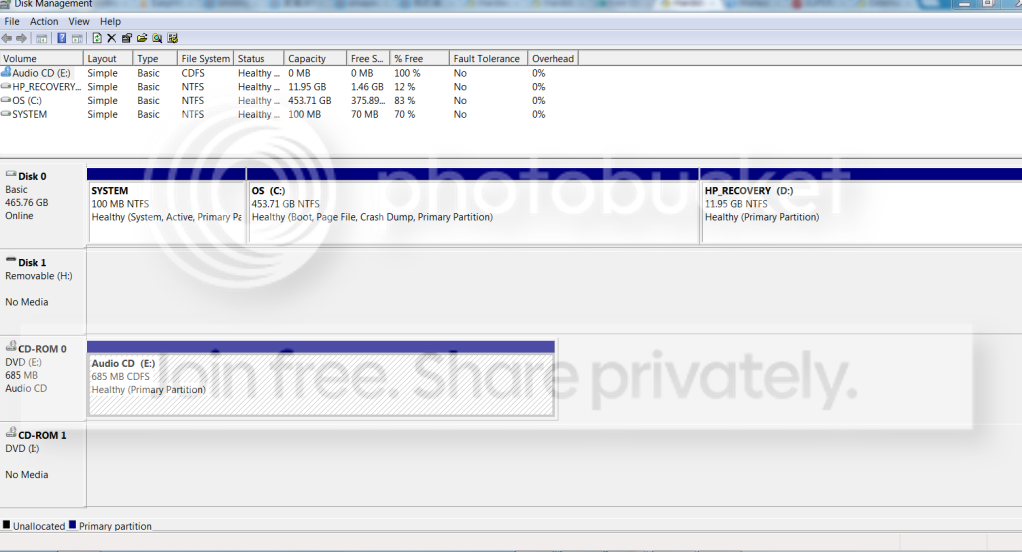
Hmm, I wasn't doing anything in particular when it happened, I am scanning my computer now and this is a picture of my disk management before i plug it in (couldn't take a pic of it when plugged in cos it lags everything)
a.png


I am doing the scan now without the harddisk plugged in.
 

My Computer

Computer Manufacturer/Model Number
HP Pavillion Slimline
OS
Microsoft Windows 7 Home Premium 64-bit 7600 Multiprocessor Free
CPU
Intel(R) Core(TM) i3 CPU 550 @ 3.20GHz
Motherboard
MSI 2A9C
Memory
4.00 GB
Graphics Card(s)
ATI Radeon HD 5450
Sound Card
(1) ATI High Definition Audio Device (2) Realtek High Defi
Screen Resolution
1600 x 900 x 32 bits (4294967296 colors) @ 60 Hz
Hard Drives
(1) ST3500418AS (2) Generic- Multi-Card USB Device (3) WD 10EAVS External USB Device
Ok John, I'll tuck that away in "Another tool to investigate and try" - I don't anything about it, so you'll have to guide stoleaway.

stoleaway: Found a few easy things to try. I don't want to overload you, so take it slow.
If you were able to get inot Disk Management, try changing the drive letter. I recommend remove drive letter, and assign a new one - as opposed to change drive letter'

Is the model of your ext drive Seagate Expansion Hard Drive site
STBV1000100 1TB USB 3.0
or
STAY1000102 1TB USB 3.0
or something different - those were my best guesses from info posted

Don't worry about trying to do everything at one time. better to do one thing and post the results, then the next thing. I'll catch up - someone else might pop in with another suggestion, read what folks are posting and provide feedback.

With your system denegrated by the ext drive, it might take you so time to provide feedback. Try this - it might be a quick fix, but other things should be checked.

Eject / Safely remove the ext drive and unplug the USB cable. Restart your computer.
Make sure your ext drive's power supply is securely attached to the ext drive (larger drives usually have higher power requirements and come with their own power supply)
Make sure that the ext drive end of the USB cable is securely attached.
Reconnect the ext drive to a different USB port
--> this should cause Windows to load the drivers for the device again.

What's the status? I don't expect this to make much difference since you already said the drive does NOT work on your laptop, but......

Can you get into Device Manager? Are there any warning or error indicators for any devices? (DevMgr will usually help you find them - the group containing a problem device will be expanded)

There was a post on another thread that asked the OP if they had reinstalled Windows with the ext drive attached. so I'll ask the same question here. did you install windows while the ext drive was attached?

Ok, that's plenty of stuff for you to do.

Thanks,

Bill
.
 

My Computer

Computer type
Laptop
Computer Manufacturer/Model Number
HP Pavilion dv6-6c10us
OS
x64 (6.3.9600) Win8.1 Pro & soon dual boot x64 (6.1.7601) Win7_SP1 HomePrem
CPU
AMD A6-3420M APU with Radeon(tm) HD Graphics
Motherboard
Hewlett-Packard 1805
Memory
6.00 GB
Graphics Card(s)
AMD Radeon(TM) HD 6520G
Sound Card
(1) AMD High Definition Audio Device (2) IDT High Definiti
Monitor(s) Displays
HP W2072a 20" LCD (1600 x 900) @ 60 Hz
Screen Resolution
1366 x 768 x 32 bits (4294967296 colors) @ 60 Hz
Hard Drives
ST640LM0 00 HM641JI SATA Disk Device
Keyboard
Logitech k520 wireless KB
Mouse
Logitech m320 wireless mouse (bundled with KB)
Internet Speed
15/5 | 54 MB Wireless 'n'
Antivirus
Realtime: Defender or Avast | On-demand: Malwarebytes, ESET
Browser
IE 11 on Win8, IE 10 on win 7
Other Info
Media: [Gimp, Audacity, VLC] || Comm: [WEmail 2012, Skype] || Productivity: [OpenOffice,| Textpad] || Utils: [Sysinternals, cCleaner, Speccy, Defraggler]
stoleaway: Ok - thought the system might too fubar with the drive attached.

In the DevMgmnt disk mgmnt shot - what is drive 1? currently assigned H: - is that the bd-rom psuedo drive? Please eject / dismount that if it is. Please stop any software that's running to mount ISO psuedo drives (DAEMON tools?).

And just to be absolutely clean - take out the audio CD.

Thanks,

Bill
.
 

My Computer

Computer type
Laptop
Computer Manufacturer/Model Number
HP Pavilion dv6-6c10us
OS
x64 (6.3.9600) Win8.1 Pro & soon dual boot x64 (6.1.7601) Win7_SP1 HomePrem
CPU
AMD A6-3420M APU with Radeon(tm) HD Graphics
Motherboard
Hewlett-Packard 1805
Memory
6.00 GB
Graphics Card(s)
AMD Radeon(TM) HD 6520G
Sound Card
(1) AMD High Definition Audio Device (2) IDT High Definiti
Monitor(s) Displays
HP W2072a 20" LCD (1600 x 900) @ 60 Hz
Screen Resolution
1366 x 768 x 32 bits (4294967296 colors) @ 60 Hz
Hard Drives
ST640LM0 00 HM641JI SATA Disk Device
Keyboard
Logitech k520 wireless KB
Mouse
Logitech m320 wireless mouse (bundled with KB)
Internet Speed
15/5 | 54 MB Wireless 'n'
Antivirus
Realtime: Defender or Avast | On-demand: Malwarebytes, ESET
Browser
IE 11 on Win8, IE 10 on win 7
Other Info
Media: [Gimp, Audacity, VLC] || Comm: [WEmail 2012, Skype] || Productivity: [OpenOffice,| Textpad] || Utils: [Sysinternals, cCleaner, Speccy, Defraggler]
I'll have to look at this a bit. Your shot of Computer shows
Q: MS Office click to run
F: Local disk
D: HP Recovery
C: OS

I: bd-rom
E: audio CD


your DskMgmnt shows
Disk 0
-- System
-- C: OS
-- D: HP Recovery

Disk 1
--H:

CD-rom 0
-- E: audio cd

CD-rom 1
-- I:

I think Disk 1 is the root of your problem, it's identified as removable - but let me think on it.
Are any other drives attached or might this be a phantom. I'm going to take a break and get some slepp. I'll check back in a few hours.

You might want to follow jumanji's advice in this post.

Thanks,
Bill
.
 

My Computer

Computer type
Laptop
Computer Manufacturer/Model Number
HP Pavilion dv6-6c10us
OS
x64 (6.3.9600) Win8.1 Pro & soon dual boot x64 (6.1.7601) Win7_SP1 HomePrem
CPU
AMD A6-3420M APU with Radeon(tm) HD Graphics
Motherboard
Hewlett-Packard 1805
Memory
6.00 GB
Graphics Card(s)
AMD Radeon(TM) HD 6520G
Sound Card
(1) AMD High Definition Audio Device (2) IDT High Definiti
Monitor(s) Displays
HP W2072a 20" LCD (1600 x 900) @ 60 Hz
Screen Resolution
1366 x 768 x 32 bits (4294967296 colors) @ 60 Hz
Hard Drives
ST640LM0 00 HM641JI SATA Disk Device
Keyboard
Logitech k520 wireless KB
Mouse
Logitech m320 wireless mouse (bundled with KB)
Internet Speed
15/5 | 54 MB Wireless 'n'
Antivirus
Realtime: Defender or Avast | On-demand: Malwarebytes, ESET
Browser
IE 11 on Win8, IE 10 on win 7
Other Info
Media: [Gimp, Audacity, VLC] || Comm: [WEmail 2012, Skype] || Productivity: [OpenOffice,| Textpad] || Utils: [Sysinternals, cCleaner, Speccy, Defraggler]
STBV3000100 it is a 3TB harddisk Expansion Desktop Hard Drive | Seagate here, I have already taken out the audio CD and ejected daemon tools but the BD-ROM is still there, do I need to do anything?

I am not sure what Disk 1 is as well, it wasn't there before but it turned out to be a generic multi card usb device (what is this?), and nope, I did not install windows with the ext harddisk in (do updates count?) My ext hdd is plugged in when the com installed updates when I shut down
 

My Computer

Computer Manufacturer/Model Number
HP Pavillion Slimline
OS
Microsoft Windows 7 Home Premium 64-bit 7600 Multiprocessor Free
CPU
Intel(R) Core(TM) i3 CPU 550 @ 3.20GHz
Motherboard
MSI 2A9C
Memory
4.00 GB
Graphics Card(s)
ATI Radeon HD 5450
Sound Card
(1) ATI High Definition Audio Device (2) Realtek High Defi
Screen Resolution
1600 x 900 x 32 bits (4294967296 colors) @ 60 Hz
Hard Drives
(1) ST3500418AS (2) Generic- Multi-Card USB Device (3) WD 10EAVS External USB Device
Back
Top