Solved Lost partitions!

msalton1

New member
Member
VIP
Local time
5:15 PM
Messages
325
Asus S200E notebook Hitachi HTS545050A7E380 500GB HD D: partition was empty except for 1 directory with some pictures and docs. As you can see, it was about 258 GB. I created 2 Acronis Disk images as I progressed (one of which was a preliminary image and included all partitions except for D:, where I placed the ATIH images.

All images were created from a boot USB key). I noticed some intermittent sluggishness, but it seemed to run better after I cleaned McAfee and other junk off. However, when making a final baseline image, Acronis refused to write to partition D. Rebooting into windows revealed that the partition showed as full.

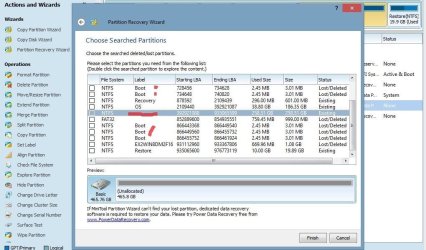
I ran Partition wizard from windows (no CD drive). I accidentally shut the window in the screenshot, so I guess I would need to run it again to try and repair it, but wanted to solicit advice on my next step. It looks as though the disk is about to go.

1. What is the deal with all of the lost/deleted Boot volumes?

2. Should I allow PW to try and repair it? Some other software?


3. I would like to remove the drive to create another whole disk image since the disk images I previously created seem to be lost. Any issue with that?


I think it likely this drive is beyond help (although it does boot and run).

Thanks for any suggestions!

The free space is wrong in these images.
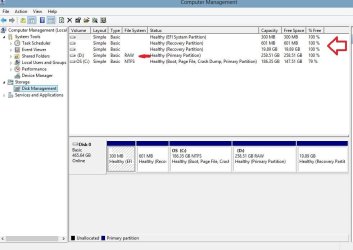
DiskMgmt.JPG

PWzd.JPG
 

My Computer

Computer type
PC/Desktop
Computer Manufacturer/Model Number
custom
OS
windows 7 Pro 64 Bit
CPU
i5 4670K
Motherboard
Asus Max Hero 1150 socket
Memory
16GB DDR3@933mhz
Graphics Card(s)
Radeon R9 390 8192mb
Monitor(s) Displays
Dell U2415 x3
Screen Resolution
1920 (5760) x 1200 x3
Hard Drives
System: Kingston 128GB SSD

Installing to Samsung 860 EVO 500GB
WD Black 2 TB & 1 TB
PSU
Corsair CX750M
Cooling
Hyper 312
Internet Speed
50mbps
You seem to have done substantial modifications to your ASUS S200E notebook. Can you please let us know what was the original specifications including the OS and what all you have done on that laptop without missing even a single action.This will definitely help others help you.
 

My Computer

OS
Windows 7 Home Premium 32 bit
Hi Jumanji. Yes, there does appear to be significant changes made, including additional partitions. Unfortunately, this notebook is refurbished and was recently bought by a friend of mine, so we have absolutely no history (or warranty). Fortunately, I was able to remove the drive and image the OS partition, which is the only partition that contained any kind of reconfiguration that my friend deems important, so not too big of a deal if the drive fails at this point.

I am trying to save it, though (and deal with a tight schedule of my own :shock: ). It doesn't look as though that will be possible. This morning, I have removed the drive and am re-running partition wizard on the disk via a drive dock and the boot CD of PW.

I'll likely allow the recovery wizard to attempt to recover the lost partitions (although I'm not hopeful), but am confused by the 3mb boot sectors and the 50+ MB FAT32 partitions.

I guess the question would be, should I try to recover those? I think I'll find out in the next hour or so when the scan completes and offers the opportunity to recover them. If not, a replacement drive will only be around $60, and my friend will not really lose any data (unless aproblem occurs restoring the win8 OS partition and system partition). We don't have a win8 disk or COA, but used magic jellybean to find the product#.

In the meantime, I'm considering this a learning experience. If anyone has any advice re; recovery of these small boot partitions, I'd be grateful.

Again, thank you for your response.

Salt
 

My Computer

Computer type
PC/Desktop
Computer Manufacturer/Model Number
custom
OS
windows 7 Pro 64 Bit
CPU
i5 4670K
Motherboard
Asus Max Hero 1150 socket
Memory
16GB DDR3@933mhz
Graphics Card(s)
Radeon R9 390 8192mb
Monitor(s) Displays
Dell U2415 x3
Screen Resolution
1920 (5760) x 1200 x3
Hard Drives
System: Kingston 128GB SSD

Installing to Samsung 860 EVO 500GB
WD Black 2 TB & 1 TB
PSU
Corsair CX750M
Cooling
Hyper 312
Internet Speed
50mbps
I have many thoughts running in my mind on your above post. I am already burning the midnight oil so I may not dwelve on it since it is giving a confused picture.

To be brief
1. The drive carries GPT partitioning. I do not think Partition Wizard is going to be of any help here.

2. I would advise you to try rewriting the GPT header and GPT table from the backup in the drive. ( Hopefully it is still there in tact)

Please refer to this thread and my posts therein especially the one dealing with how to save the backup that may remain in the last 33 or 34 sectors and restore them to the appropriate sectors in the beginning. http://www.sevenforums.com/hardware...ting-read-raw-instead-ntfs-6.html#post2577524 ( Please save the first 33 sectors first, numbering them as Sector 0, sector 1 and so on before you rewrite the backup there so that you can revert back should it become necessary)

Hopefully it should restore some originality to the drive and with the correct partition information available now, the RAW drive/partition may perhaps get restored automatically.. In any case you will not be writing any thing to the data sectors and so the data should remain safe. Once this restore GPT Header and GPT table is done ( Please do it carefully with due diligence), you may think of any data recovery if necessary.
 
Last edited:

My Computer

OS
Windows 7 Home Premium 32 bit
Thanks for your continued assistance, jumanji. I haven't done anything to the drive aside from diagnostics as of yet. It passed the SeaTools short and long test, and I did manage to image the entire disk with ATI 2014.

When I allowed windows 7 to start with the drive in the dock (not as boot), chkdsk popped up and declared that the MFT was corrupted. It couldn't repair it.

Your advice is a bit over my head. Does the corrupt MFT change your approach? Even though I have all partitions imaged and validated (and hopefully viable), I'm unsure of the best direction. When in the notebook, the drive does boot into windows. The 258 GB partition (D: in the 1st screen cap) shows, but is inaccessible and asks for formatting.

I would just delete the other partitions, enlarge C:\ and give him a data and storage partition, but I'm unsure if the MFT issue would be resolved. Also, I have no experience with GPT, adding further uncertainty.
 

My Computer

Computer type
PC/Desktop
Computer Manufacturer/Model Number
custom
OS
windows 7 Pro 64 Bit
CPU
i5 4670K
Motherboard
Asus Max Hero 1150 socket
Memory
16GB DDR3@933mhz
Graphics Card(s)
Radeon R9 390 8192mb
Monitor(s) Displays
Dell U2415 x3
Screen Resolution
1920 (5760) x 1200 x3
Hard Drives
System: Kingston 128GB SSD

Installing to Samsung 860 EVO 500GB
WD Black 2 TB & 1 TB
PSU
Corsair CX750M
Cooling
Hyper 312
Internet Speed
50mbps
It is very difficult to answer your questions because of the many unknowns. (For example we don't know the partition structure as it existed when your friend got the refurbished notebook. We also do not know what your friend did and what all changes he made to the partitions and how.)

Now the question is what is your real goal?

In which partition is the data you want to recover?

If you say D what exactly is the important data you or your friend want to recover? Or you just want to make D accessible? That is turn off the RAW indication.

As I understand it was fine before and turned RAW when you tried to write some image into it.

Now to turn it into a basic question why did your friend give it to you? What was the problem then?:)

You see these were the thoughts running in my mind yesterday night which I tried to bottle up and get going.

Referring to the PW screenshot you had put earlier I have many more questions on it but I am aware there is no point in putting them up to you for yourself is unaware of it.

We are literally in the woods without even a basic compass to give any bearing.

So the first attempt is to see whether at all it is possible to get some bearings?

Trying to rewrite the GPT header and GPT table as I indicated in my last post is that attempt.

Now it is possible to try MFT repair with Test Disk Advanced NTFS Boot and MFT Repair - CGSecurity but the question is should you try it now?

My answer is no. Not before we get some bearing. ( The drive is OK. And you may be able to clean install Windows 8 if you so desire. No need for a COA since the unique product ID is embedded in the BIOS. May be mate theog and other experts can help you doing that. So keep it as an option. You may raise a query on it in Windows 8 Forum)

While you can answer the many queries raised in this post, using Bootice is not all difficult. Please wait for my next post which will explain how to go about it.

I need sometime for the writeup.
 

My Computer

OS
Windows 7 Home Premium 32 bit
Download Booticex86.rar / Booticex64.rar ( version 1.2.0) http://bbs.ipauly.com/viewtopic.php?f=2&t=2 as per the system on which you will be running it and extract it to a folder say Bootice. Run the exe file.

EDIT: 09 Sep 2015 The link given above no longer works. Download your Windows Bit version of bootice from Bootice Download Softpedia

EDIT: 08 Feb 2016: You may download the current version of Bootice from the author's website 【BOOTICE v1.3.3.2: 功能强大的启动维护工具】-å*é€¸è½©

EDIT: 14 April 2022: Download bootice version 1.3.4.0 from Bootice Download (2022 Latest)

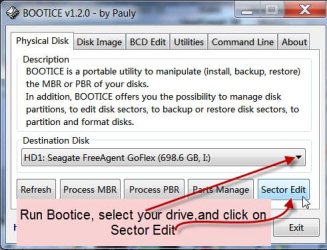
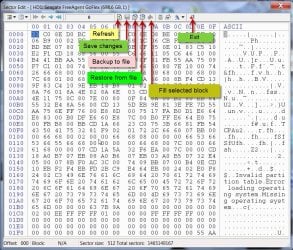
Select your drive and click on Sector edit.

A03-11-2013 11-33-20.jpg

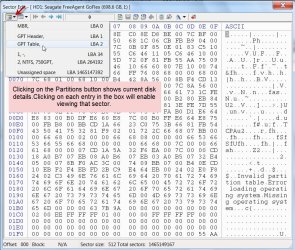
Clicking on the Partition button will show all details. Please note those diligently. Clicking on an entry on that drop box will show the contents of that LBA (sector).

B03-11-2013 11-53-07.jpg

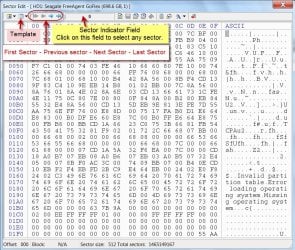
The following screenshots will help familiarising with the functions. Not a rocket science.

C03-11-2013 12-09-25.jpg

D03-11-2013 13-00-46.jpg


Saving any sector is an important task. You will start saving LBA0 (Sector 0), LBA1(Sector 1) and so on upto and including LBA33 and also all the Partition LBAs shown. You can use the arrow keys to navigate to the first LBA namely LBA0 and save it. Then you can increment it with Next arrow and keep saving each sector till LBA33.

For the Partition sectors, click on the Sector Indicator field, type the LBA number and that should take you to that LBA. You can also get that sector by clicking on the entry in the Partition Button drop box as aforesaid. Please save them with distinct naming such as LBA0, LBA1, LBA2 ………..LBA33 and so on with the LBA number.

Note:
1. This saving exercise is only a preliminary action. Should it become necessary anytime to bring the HDD to the condition we started with, these sectors can be restored.

2. There may be some sectors with no data – all zeros. No need to backup those.

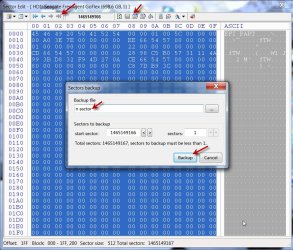
To save any sector, click on the back up to file button, give the distinct name and click on Backup. By default the file will be saved to the folder where you have bootice*.exe. Check it when you do the save first time. ( You can also save it to any other folder, by selecting the folder, giving the distinct name and save. You can experiment if you want to.)

G03-11-2013 18-39-03.jpg

Now starts the real work of saving the sector backups that already exists in the last 33 sectors.

Check the last sectors of your Disk from n to n-32 with Bootice. If you find that the GPT backup exists in those sectors, save each sector starting from n to n-32, giving a distinct name as nLBA, n-1LBA and so on. ( Do not replace n or n-1….. with actual LBA number.If you do so, you will be confused as to which LBA is to be restored to which LBA. Follow the instructions literally.) ( I have named the last sector as n sector but you follow it as nLBA, n-1LBA etc........... So read n sector as nLBA in the screenshots. :))

E03-11-2013 13-37-57.jpg

You will not do anything with LBA0 which is only a Protective MBR. Leave it alone now.

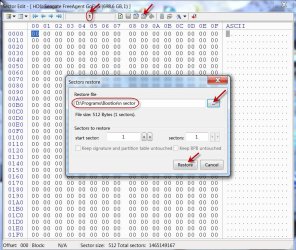
Now restore the nLBA to LBA1 (sector 1), n-32 to LBA 2, n-31to LBA3 and so on till you complete n-1to LBA 33.

Once this backup restoration is complete, check whether your HDD is accessible.

Now on how to restore using Bootice:

Select LBA1(Sector 1). Click on the button Restore from file, select the backed up nLBA file and click on restore. Now n-1 to LBA33, n-2 to LBA32 and so on till n-32 to LBA2

F03-11-2013 14-22-28.jpg

At the end of it, let us see whether there is any light at the end of the tunnel.

Even if not, I would think your HDD is now in a better condition for any data recovery – PhotoRec, Test Disk, Zero Assumption Recovery , Getdataback, icare data recovery or whatever.
 
Last edited:

My Computer

OS
Windows 7 Home Premium 32 bit
Good morning, and at the risk of sounding redundant, thank you again for your tenaciousness :).
I have to run out for an hour or so, but wanted to respond and answer the questions in your response from last night. Your latest post is very impressive and I will dive into reading that when I get back. On to the questions:

Now the question is what is your real goal?

I don't think it important to my friend if no other partition than C:\ survives. The only other partition that has (had) data was D:\ (depending on the environment, either 100% free or 100% full), but that seems to be lost. No worries, as it was just copied from another system, so all is intact elsewhere.

So the 1st priority is C:\. It actually seems fine, boots up, etc. I could delete all other partitions aside from C:\ and the required system partitions and be fine, as would my friend, but I'm not sure which partitions to keep.

I would like to keep the boot drive intact (or properly restored via ATIH) and repartition the space regained from the other partitions into useful partitions (no recovery partitions required, as I'll maintain a base image for him). I guess all new partitions would need to be GPT?


On an MBR drive, I would have no problem deciding that, but here, there seem to be multiple partitions that could be required, and they read as mixed FS (i.e., most NTFS, a few FAT32), EFI, etc.

As I understand it was fine before and turned RAW when you tried to write some image into it.
Well, the partition was readable and writeable, but in hindsight, the system was sluggish, the images took longer than expected to write and acronis returned an error or 2 (could not save file in existing format or filename), but did write, at least until it stopped. It wrote 2 full images to the drive and I even restored the OS image once. Then the partition was gone.

why did your friend give it to you? What was the problem then?
HE was having trouble getting online (this was a router issue) and wanted me to clean the system up, etc. He did note that it was sluggish.
-----------------------------------------

I also view this as a learning experience, but of course, the important thing is to get it back to him in one piece, streamlined and efficiently partitioned.

I very much appreciate the time and effort it took to participate in this thread and the time involved in the "tutorial" in your most recent post.

But now that there is a bit more clarity, I will await a reply from you before diving into the process you outline below, which seems very interesting. I'm hopeful that there is a simple solution to this, but even if so, I will retain and experiment with the information in your post.

I will be back in an hour or so. :geek:
 

My Computer

Computer type
PC/Desktop
Computer Manufacturer/Model Number
custom
OS
windows 7 Pro 64 Bit
CPU
i5 4670K
Motherboard
Asus Max Hero 1150 socket
Memory
16GB DDR3@933mhz
Graphics Card(s)
Radeon R9 390 8192mb
Monitor(s) Displays
Dell U2415 x3
Screen Resolution
1920 (5760) x 1200 x3
Hard Drives
System: Kingston 128GB SSD

Installing to Samsung 860 EVO 500GB
WD Black 2 TB & 1 TB
PSU
Corsair CX750M
Cooling
Hyper 312
Internet Speed
50mbps
I just found out that I will be tied up until later this evening. Also, I hope that you didn't feel pressed to give up your Sun. aftn for this. Of course, it is all as your time permits. And thank you again.

I'm thinking I may try restoring just C:\ and the system partition Acronis attached to it for imaging. :eek:
 

My Computer

Computer type
PC/Desktop
Computer Manufacturer/Model Number
custom
OS
windows 7 Pro 64 Bit
CPU
i5 4670K
Motherboard
Asus Max Hero 1150 socket
Memory
16GB DDR3@933mhz
Graphics Card(s)
Radeon R9 390 8192mb
Monitor(s) Displays
Dell U2415 x3
Screen Resolution
1920 (5760) x 1200 x3
Hard Drives
System: Kingston 128GB SSD

Installing to Samsung 860 EVO 500GB
WD Black 2 TB & 1 TB
PSU
Corsair CX750M
Cooling
Hyper 312
Internet Speed
50mbps
Hi Jumanji,
After taking a step back and reassessing the situation, I decided to delete and recreate the D:\ partition. This seems to have cleared up a lot of issue. Performance is back, I'm able to write to the partition, etc. Everything seems fine. However, running a PW recovery scan does still show some issues, as per the screenshot:

PWzd2.JPG
 

My Computer

Computer type
PC/Desktop
Computer Manufacturer/Model Number
custom
OS
windows 7 Pro 64 Bit
CPU
i5 4670K
Motherboard
Asus Max Hero 1150 socket
Memory
16GB DDR3@933mhz
Graphics Card(s)
Radeon R9 390 8192mb
Monitor(s) Displays
Dell U2415 x3
Screen Resolution
1920 (5760) x 1200 x3
Hard Drives
System: Kingston 128GB SSD

Installing to Samsung 860 EVO 500GB
WD Black 2 TB & 1 TB
PSU
Corsair CX750M
Cooling
Hyper 312
Internet Speed
50mbps
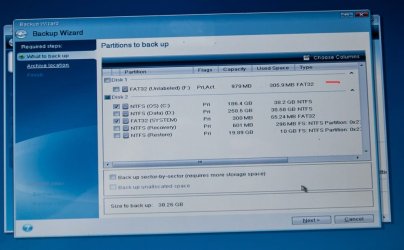
Also, I decided to image the C OS and system partitions again and noted that Acronis TI 2014 sees 2 drives (although there is only one...):

Acronis Cap.jpg
 

My Computer

Computer type
PC/Desktop
Computer Manufacturer/Model Number
custom
OS
windows 7 Pro 64 Bit
CPU
i5 4670K
Motherboard
Asus Max Hero 1150 socket
Memory
16GB DDR3@933mhz
Graphics Card(s)
Radeon R9 390 8192mb
Monitor(s) Displays
Dell U2415 x3
Screen Resolution
1920 (5760) x 1200 x3
Hard Drives
System: Kingston 128GB SSD

Installing to Samsung 860 EVO 500GB
WD Black 2 TB & 1 TB
PSU
Corsair CX750M
Cooling
Hyper 312
Internet Speed
50mbps
Good you have achieved some satisfactory results. In the other case also we found those mystery boot partitions and I really have no answers. In that case OP's whole drive was RAW. May be he has to take your help in making it UNRAW, seriously :).

It is because of that OP I did my experiments on GPT and learnt one thing positively. If I get a PC with UEFI and a GPT drive, the first thing I will do is backup sectors 0 to 33 and also the first sector of each partition with Bootice. In case of any partition related problem arising later on, I would simply restore those sectors.

( Recenty I made a trial backup of my system drive with AOMEI backupper. Today all of a sudden for some reason my Data Card would not work. ( I use it rarely and only when my ADSL fails.) It would work on other family members' laptops. I couldn't get into the root of the problem. After trying in vain for about half-an-hour, I simply restored my system from that back up and it was back in action.. Otherwise I would be asking for help here.:))

In your case, I would think you should now think of restoring that system to the factory condition ( of course after backing up all data) either from the recovery partition/restore disks or a clean install. Please take help from Windows 8 Forum and explore that suggestion.

EDIT: I stopped using Acronis TIH long back on reports that it meddles with MBR and so I may not be wrong perhaps if I suspect Acronis may be creating all those unknowns.!!!!!!!! ( I always view it with suspicion, from your first post on.:))
 

My Computer

OS
Windows 7 Home Premium 32 bit
I'm thinking the "mystery boot partitions" may be boot records for the recovery partitions. But the reality is that he will always bring his systems to me, and I keep the baseline backups I make for him. Given that, I'm tempted to give it back to him as is, as it will make no difference to him, and perhaps this will be something I sort out later, as time is at a real premium at the moment. And there is also the reality that I have a lot of learning to do when it comes to GPT partitions and UEFI. I also have to sort out some permission issues with moving the my docs folder to that 'new' D partition.

That said, I have copied and pasted your 'tut' above and saved it to disk. I will be downloading BootIce and perhaps doing some 'practice runs' with it. Learning about this and other aspects are of high interest to me and your posts seem valuable to that end. The last thing I want to do is screw up an HD and data that doesn't belong to me.

As to Acronis, I have vowed not to buy another version. I have been using it since 2004, but have found in recent years that poorly thought out "features" (as Acronis calls them) plague recent versions. I've had no MBR issues.

At any rate, thanks so much for your input and time. It is much appreciated!

Salt
 

My Computer

Computer type
PC/Desktop
Computer Manufacturer/Model Number
custom
OS
windows 7 Pro 64 Bit
CPU
i5 4670K
Motherboard
Asus Max Hero 1150 socket
Memory
16GB DDR3@933mhz
Graphics Card(s)
Radeon R9 390 8192mb
Monitor(s) Displays
Dell U2415 x3
Screen Resolution
1920 (5760) x 1200 x3
Hard Drives
System: Kingston 128GB SSD

Installing to Samsung 860 EVO 500GB
WD Black 2 TB & 1 TB
PSU
Corsair CX750M
Cooling
Hyper 312
Internet Speed
50mbps
Just popped back in with another thought. My concern over the lost/deleted boot partitions (records?) PW found might just be an issue with PW reading GPT/UEFI volumes. That's speculation on my part, but Disk Management doesn't show any issues and shows all partitions as healthy (incidentally, the latest build of Acronis Disk Director refused to even scan the drives...said it didn't support dynamic partitions even though the partitions were basic). screenshot here:
 

My Computer

Computer type
PC/Desktop
Computer Manufacturer/Model Number
custom
OS
windows 7 Pro 64 Bit
CPU
i5 4670K
Motherboard
Asus Max Hero 1150 socket
Memory
16GB DDR3@933mhz
Graphics Card(s)
Radeon R9 390 8192mb
Monitor(s) Displays
Dell U2415 x3
Screen Resolution
1920 (5760) x 1200 x3
Hard Drives
System: Kingston 128GB SSD

Installing to Samsung 860 EVO 500GB
WD Black 2 TB & 1 TB
PSU
Corsair CX750M
Cooling
Hyper 312
Internet Speed
50mbps
Your speculation may well be right. I also had a doubt that Partition Wizard is not well geared to take on GPT drives. So I do not recommend its use on GPT drives. Hence the Bootice way to backup the partition info and restore. But it presupposes that you have a baseline backup of all important sectors including the first sector of all partitions to begin with.

I would also speculate when you restore an image with ATI, is it restoring the first sector of any partition exactly to the same sector? May be not and that is why that partition turned RAW.( My experiment clearly demonstrated that destroy the the first sector of any partition, that partition will turn RAW) On close examination of the boot partitions in PW I find that they are all separated only by a few hundreds of sectors. So each time you attempt a restore you may be getting a different first sector of that partition. Especially with imaging software the user will need to check the particular tool documentation to ensure the software provides support for GPT. Otherwise we are sure to see problems galore of this sort.

In all there is more than what meets the eye. So I would think that in this change over to GPT from MBR period, till everyone of the Partition/Format/backup vendors get their act right and all the confusion clears it is safer to have that baseline sector-specific backup with Bootice.

For creation of GPT drive I used Windows Disk Management only. During the trials I also made an attempt to use AOMEI partition recovery with Partition Master. But even the quick scan seemed to take ages. So I did not pursue.

I have kept my 750GB drive ready for multiple GPT partitions and further trials. But hardly anytime to get on with. :)

I think you have the potential to carry on the experiments. I appreciate your spirit. Get going with it.:)
 
Last edited:

My Computer

OS
Windows 7 Home Premium 32 bit
...when you restore an image with ATI, is it restoring the first sector of any partition exactly to the same sector? May be not and that is why that partition turned RAW.


Maybe not, and I have lost confidence in ATI (prior to this experience), but I've been using it for a decade, and it takes time to find business crucial software, which I don't have at the moment. So I stayed with 'the satan I know'.

But I will say that the image restores I did to the System partition were no issue at all (twice). I did not restore any images to the D: partition (the one that turned RAW). I only saved the images there (in a folder, of course).

I think you are right when you imply an adjustment period is in play. We can only hope that it is short and fruitful.

I hope to have the time to educate myself in this and other of new technologies in the near future. Time is always at a premium these days, it seems, but I am nearing the end of what has been a time consuming project. I will likely be spending more time in the forums and it is nice to know that there are so many here that are helpful and knowledgeable. Again, thanks!
 

My Computer

Computer type
PC/Desktop
Computer Manufacturer/Model Number
custom
OS
windows 7 Pro 64 Bit
CPU
i5 4670K
Motherboard
Asus Max Hero 1150 socket
Memory
16GB DDR3@933mhz
Graphics Card(s)
Radeon R9 390 8192mb
Monitor(s) Displays
Dell U2415 x3
Screen Resolution
1920 (5760) x 1200 x3
Hard Drives
System: Kingston 128GB SSD

Installing to Samsung 860 EVO 500GB
WD Black 2 TB & 1 TB
PSU
Corsair CX750M
Cooling
Hyper 312
Internet Speed
50mbps
Back
Top