Solved How to Recover a Flash drive that turned into RAW

avinashrawat

New member
Member
Local time
5:49 AM
Messages
93
I Have a Toshiba 8GB USB that change into RAW file system, now windows don't recognize this. I have some important data on it. whenever i try to open this prompt a message "you require to format the drive."
I read some article on sevenforums.com, follow the instruction which shown in article but not Recover my USB.
Article link http://www.sevenforums.com/software...ive-turned-raw-partition-wizard-testdisk.html
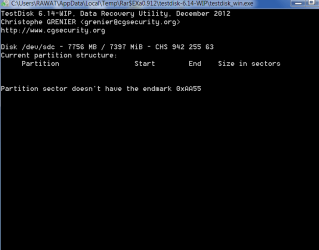
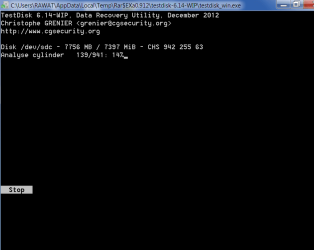
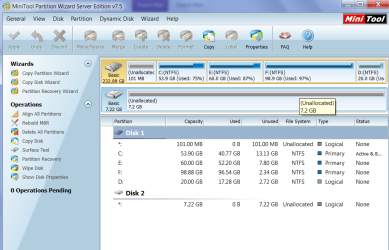
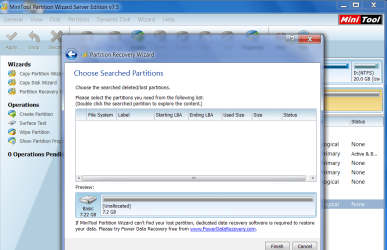
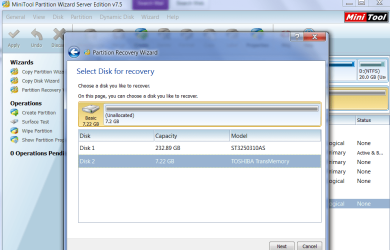
I try with TestDisk 6.14 and mini tool partition wizard server edition 7.5 to get back my partition but not get success.

I am attaching some snapshot of my USB.
 

Attachments
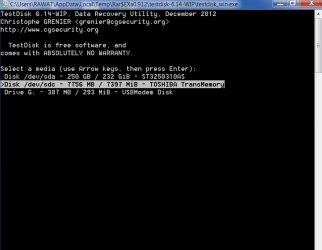
  • RAW_TD_1.png
    RAW_TD_1.png
    12.3 KB · Views: 1
  • RAW_TD_2.png
    RAW_TD_2.png
    10 KB · Views: 1
  • RAW_TD_3.png
    RAW_TD_3.png
    10.7 KB · Views: 1
  • RAW_TD_4.png
    RAW_TD_4.png
    9.6 KB · Views: 2
  • RAW_MINI_1.png
    RAW_MINI_1.png
    56.7 KB · Views: 1
  • RAW_MINI_3.png
    RAW_MINI_3.png
    73.4 KB · Views: 1
  • RAW_MINI_2.png
    RAW_MINI_2.png
    66.7 KB · Views: 2

My Computer My Computer

At a glance

windows 7 ultimate 32 bit
OS
windows 7 ultimate 32 bit
Hi there ... You could try Recuva file recovery ...
 

My Computer My Computer

At a glance

windows 7 home 64bitINTEL-CORE I716GB
Computer Manufacturer/Model Number
W530-3630QM1
OS
windows 7 home 64bit
CPU
INTEL-CORE I7
Memory
16GB
Hard Drives
750GB
Browser
Chrome
The subject thread clearly concludes that MiniTool Partition Wizard scores over Test Disk - atleast in that trial - and hence it should always be the first choice.

So let us give TestDisk a pass and start from scratch.

1. Let us know the exact model number of your 8 GB Toshiba pen drive. Also let us know for how long you have been using it successfully and also when this problem started.

2. Uninstall the MiniTools Server Edition, reboot and install MiniTools Partition Wizard Home Edition 8.1.1 http://www.partitionwizard.com/download.html

3. Safely remove all other external drives/Card Readers, plug in only your problem drive and then post a screenshot of Windows Disk Management, just to confirm that it still shows as RAW ( Go to the Tool bar in the window, click on the two buttons Show/Hide Console Tree and Show/Hide Action Pane to hide those so that we get a full view without those panes )

4. Post a screenshot of how your pen drive looks in the Partition Wizard.

5. Run Quick Scan in the Partition Recovery Wizard and check whether it successfully shows the partition.

6. If not then Run a Full Scan, which may take sometime, and check.

7. If after the Quick Scan or Full Scan the partition is shown, then explore to see whether all your files are seen.

8. If seen complete the procedure to rewrite the Partition Table.

9. If not seen cancel the process. We may have to try some other dedicated Data Recovery software.

Please do report.

Back to my bed and may be I will see it at dinner time when I am up or tom morning.

EDIT: In case Partition Recovery Wizard fails, I would recommend PhotoRec. http://www.sevenforums.com/software/193467-guide-using-photorec-recovery-software.html

Since it is only an 8GB pen drive, if you have enough space on your internal drive, you may copy the recovered files to it. If not hook up an external drive before you start PhotoRec and copy the recovered files into it.
 
Last edited:

My Computer My Computer

At a glance

Windows 7 Home Premium 32 bit
OS
Windows 7 Home Premium 32 bit
@Jumanji
However I decided to format my USB with default File System (FAT32 file system) but USB don't format .i try this many time with different file system but USB doesn't formatted. After some time i attached the USB this don't shown in Computer.Now the USB got damaged otherwise missing the USB driver. In which USB port i plug the USB another USB working properly.
 

My Computer My Computer

At a glance

windows 7 ultimate 32 bit
OS
windows 7 ultimate 32 bit
You see, in the first instance, you used Partition Wizard Server Edition most probably a Trial version which is feature limited. That is why I told you to uninstall the server Edition, install the full featured and free Home Edition and try. Instead, you have been doing things on your own and reporting. How do you want me to help you now?
 

My Computer My Computer

At a glance

Windows 7 Home Premium 32 bit
OS
Windows 7 Home Premium 32 bit
@jumanji
my problem is that after scanning of USB from mini tool partition wizard server edition 7.5 ,Test Disk 6.14 and Easeus Data recovery wizard i lost my USB mean Now my USB don't shown in computer. How i can recover my USB.

Sorry for those things that done by me.
 

My Computer My Computer

At a glance

windows 7 ultimate 32 bit
OS
windows 7 ultimate 32 bit
Who ever asked you to use Partition Wizard Server edition?

Anyway, Scanning with Partition Wizard either server edition or home edition cannot kill the pen drive, though the feature limited trial Server Edition would not have shown the files.

Now I really do not know the condition of your drive after all the manipulations..

Plug in your pen drive ( remove all other external drives) and post a screenshot of Windows Disk Management. Just do this.
 

My Computer My Computer

At a glance

Windows 7 Home Premium 32 bit
OS
Windows 7 Home Premium 32 bit
@Jumanji
First thing i want to say that you, you don't liable for any damaged that got in My USB,only i am liable for the Damage. If u hurt by above post i say to "sorry". And want to says thanks for your help.
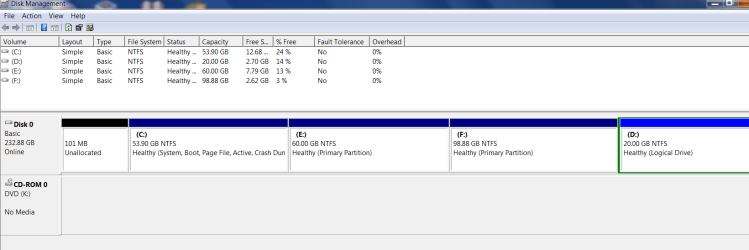
I am posting snapshot of windows disk management before and after inserting USB.
 

Attachments

  • Before_USB.png
    Before_USB.png
    24.8 KB · Views: 4
  • After_USB.png
    After_USB.png
    34.1 KB · Views: 32

My Computer My Computer

At a glance

windows 7 ultimate 32 bit
OS
windows 7 ultimate 32 bit
1. There is no need for the "before" screenshot.

2. After plugging in the pen drive, just take a full screenshot showing Disk 1 in it. That only carries the full information needed. I want to see whether it still reads RAW. ( Please do not click anywhere on Disk 1 to bring any other Window obscuring the DISK 1 drive map)

Your screenshot should look like the one below which shows my SanDisk pen drive Disk 1. Taken with Windows Snipping tool. Snipping Tool > New > Rectangular snip. Save as JPG in any folder you like and then upload.
wdm.JPG
 

My Computer My Computer

At a glance

Windows 7 Home Premium 32 bit
OS
Windows 7 Home Premium 32 bit
@jumanji
There is no sign of USB.
 

Attachments

  • After_USB_Snipping.JPG
    After_USB_Snipping.JPG
    92 KB · Views: 2

My Computer My Computer

At a glance

windows 7 ultimate 32 bit
OS
windows 7 ultimate 32 bit
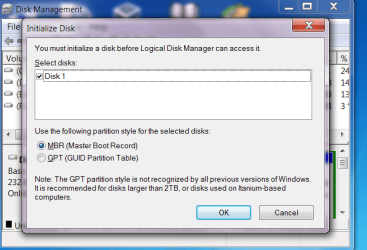
OK, Disk 1 is your pen drive. It is only showing as Unknown and not initialised with no capacity indication. It no longer shows as RAW. So recovery with Partition Recovery Wizard does not apply.

Do you still have Partition Wizard Server Edition on your PC? If so, plug in the pen drive, Run Partition Wizard and post a screenshot. Let us see how your pen-drive looks in it compared to the first PW screenshot in your post #1( the fifth Screenshot in that series). I am only hoping that it does not show as a BAD Disk.

( If you have already uninstalled the server edition, install PW Home Edition and do it.)

We shall decide on further course of action after that examination.

Note: I sit before my desktop only when my crippled back permits. So there may be many hours of absence in-between. Wait and don't panic. Heaven's will not crash in this case. :))
 

My Computer My Computer

At a glance

Windows 7 Home Premium 32 bit
OS
Windows 7 Home Premium 32 bit
@jumanji
When i attach my USB and start mini tool Server edition this will closing the application. Gives the following crash Problem Which as:-
Problem signature:
Problem Event Name: APPCRASH
Application Name: PartitionWizard.exe
Application Version: 7.5.0.1
Application Timestamp: 4fde8427
Fault Module Name: ntdll.dll
Fault Module Version: 6.1.7600.16385
Fault Module Timestamp: 4a5bdadb
Exception Code: c0000094
Exception Offset: 000337cb
OS Version: 6.1.7600.2.0.0.256.1
Locale ID: 1033
Additional Information 1: 0a9e
Additional Information 2: 0a9e372d3b4ad19135b953a78882e789
Additional Information 3: 0a9e
Additional Information 4: 0a9e372d3b4ad19135b953a78882e789

Read our privacy statement online:
Windows 7 Privacy Statement - Microsoft Windows

If the online privacy statement is not available, please read our privacy statement offline:
C:\Windows\system32\en-US\erofflps.txt

without attaching USB Mini tool PW working properly.
 

My Computer My Computer

At a glance

windows 7 ultimate 32 bit
OS
windows 7 ultimate 32 bit
OK, Remove your pen drive. Uninstall PW server edition. Reboot. Download and install PW Home edition 8.1.1. Plug in your pen drive and then run PW home edition. Now take a screenshot and upload.
 

My Computer My Computer

At a glance

Windows 7 Home Premium 32 bit
OS
Windows 7 Home Premium 32 bit
@Jumanji
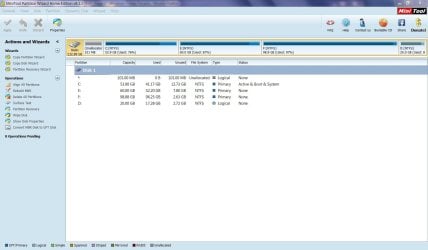
No USB listed In MiniTool PW home edition.Whenever i also attach snapshot.
 

Attachments

  • Capture_Mini_Home_edition.JPG
    Capture_Mini_Home_edition.JPG
    105.4 KB · Views: 1

My Computer My Computer

At a glance

windows 7 ultimate 32 bit
OS
windows 7 ultimate 32 bit
I am afraid Avinash, that the worst has happened to your flash drive. It is perhaps beyond redemption. When it turned RAW, it was perhaps the beginning of the end.

Anyway as a last ditch attempt, you can run PhotoRec and check whether it is successful in identifying the pen drive, and if it identifies, shows the files. Sometimes miracles do happen.

Don't worry about using PhotoRec. Whatever you do with it, it cannot kill even a perfectly working drive.
As a matter of fact, you can familiarise using it on a working pen drive. Make sure that you do not run TesDisk on a working drive.

Download TestDisk 6.14 Windows version from TestDisk Download - CGSecurity.

Extract the contents of the zip file into a directory. ( You have already done that)

Follow the procedure under the topic Recovery in http://www.sevenforums.com/software/193467-guide-using-photorec-recovery-software.html

1.Right click on photorec_win.exe and Run as Administrator.

2. First Window:

....................and so on


NOTE: You should always pull out the pen drive (safely remove if available) and plug it in before running Partition Wizard or PhotoRec.

If you plug it in after starting PW or PhotoRec, it will not be identified.

Please check on this before you run PW or PhotoRec.
 

My Computer My Computer

At a glance

Windows 7 Home Premium 32 bit
OS
Windows 7 Home Premium 32 bit
Back
Top