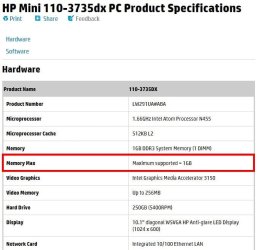
Is it possible for HP mini 110-3735dx to have 8GB ram?

RamUpgrade

New member
Local time
2:46 AM
Messages
2
First, a detail of my netbook. It is HP Mini 110-3735dx. As of right now, it has 1GB ram installed. The software used to be windows 7 starter but I upgraded to Windows 7 Ultimate a while ago. It is 32 bit.

I just happened to find out that my machine is capable of converting into 64 bit. So with that in mind, I want to do that. Make my machine from 32 bit to 64 bit. And of course I am going to use windows 7 ultimate in 64 bit version. For that I need to put new ram so that it be stable.

I did what I can and you guys can help me as well to confirm about this. I found out that my ram is PC3-10600 DDR3 204pin SDRAM SODIMM. With this information, when I go to buy ram and is most likely going to 8GB or 16GB, do I go specify:
8GB RAM PC3-10600 DDR3 204pin SDRAM SODIMM
16GB RAM PC3-10600 DDR3 204pin SDRAM SODIMM

Or is there alternative? And does it have to be 10600 or that could alternative? What about 204pin?

So my question was about the ram.

Thank you!!
 

My Computer My Computer

At a glance

Windows 7 UltimateIntel Atom N450DDR3
Computer type
Laptop
Computer Manufacturer/Model Number
HP 110-3735dx
OS
Windows 7 Ultimate
CPU
Intel Atom N450
Motherboard
Intel Atom Host Bridge
Memory
DDR3
While the CPU is 64 bit capable (as most modern CPUs are) it could theoretically ruin a 64 bit OS. But the maximum RAM on that computer is 1 GB which is only half the recommended minimum for a 64 bit OS. Considering that and the rather slow CPU it would run very poorly with a 64 bit OS.

This is not unusual for a netbook.
Stick with what you have.
 

My Computer My Computer

At a glance

Windows 7 Pro 64 bitXeon W35208 GBNvidia Geforce 210
Computer type
PC/Desktop
Computer Manufacturer/Model Number
HP
OS
Windows 7 Pro 64 bit
CPU
Xeon W3520
Memory
8 GB
Graphics Card(s)
Nvidia Geforce 210
I see. But as a general, suppose I want to upgrade my ram, how do I go about it? Let's just say my current ram is 2GB. I look into my computer and open the back cover and saw my actual ram. It turns out to be
2GB PC3-10600 DDR3 204pin SDRAM SODIMM.

When I go buying it, say 4GB, do I go for exactly 4GB PC3-10600 DDR3 204pin SDRAM SODIMM or could it 4GB DDR3 something else?

What about if I go buying 8GB? Go for 8GB PC3-10600 DDR3 204pin SDRAM SODIMM or is there alternative?

Also, when buying ram, do I need to buy anything else/do anything else?

Thank you
 

My Computer My Computer

At a glance

Windows 7 UltimateIntel Atom N450DDR3
Computer type
Laptop
Computer Manufacturer/Model Number
HP 110-3735dx
OS
Windows 7 Ultimate
CPU
Intel Atom N450
Motherboard
Intel Atom Host Bridge
Memory
DDR3
I see. But as a general, suppose I want to upgrade my ram, how do I go about it? Let's just say my current ram is 2GB. I look into my computer and open the back cover and saw my actual ram. It turns out to be
2GB PC3-10600 DDR3 204pin SDRAM SODIMM.

When I go buying it, say 4GB, do I go for exactly 4GB PC3-10600 DDR3 204pin SDRAM SODIMM or could it 4GB DDR3 something else?

What about if I go buying 8GB? Go for 8GB PC3-10600 DDR3 204pin SDRAM SODIMM or is there alternative?

Also, when buying ram, do I need to buy anything else/do anything else?

Thank you
When buying RAM, the first thing to do is to make sure that your system can support it. For example, PC3-10600 RAM runs at 1333 MHz (actually 666, but double data rate). If your system can only use that speed of RAM, there is no point in buying RAM that runs at 1600 MHz (PC3-12800) as the system won't use the extra speed of the new RAM, and you'd be wasting your money. It will still work at 1333, but you'd be paying more for a feature that you can't use.

That applies to 4 GB or 8GB sticks of RAM. Buy the same kind of RAM that the computer supports. Also make sure that the computer can support the size of RAM that you buy. It's all well and good to get 4 GB of RAM, but if your computer only supports 2 GB, you have 2 GB sitting around doing nothing. If it will work at all.
 

My Computer My Computer

At a glance

Win 7 Pro x64/Win 10 Pro x64 dual bootAMD FX 8350 Vishera @ 420016 GB Mushkin Blackline DDR3-2400 @ 1866 (9-1...XFX Radeon R9 280 Double D Black Edition
Computer type
PC/Desktop
Computer Manufacturer/Model Number
Mellon Labs (custom build)
OS
Win 7 Pro x64/Win 10 Pro x64 dual boot
CPU
AMD FX 8350 Vishera @ 4200
Motherboard
ASUS M5A97 R2.0
Memory
16 GB Mushkin Blackline DDR3-2400 @ 1866 (9-10-10-10-31)
Graphics Card(s)
XFX Radeon R9 280 Double D Black Edition
Sound Card
Realtek HD Audio on MB. Sounds great.
Monitor(s) Displays
Acer 24", Acer 22"
Screen Resolution
3840 x 1080
Hard Drives
1 x Mushkin Chronos 120 GB SSD (Win 10)
1 x Samsung 850 EVO 250 GB SSD (Win 7)
1 x WD 1TB SATA Blue
1 x WD 1TB SATA Green
PSU
Corsair TX-750
Case
CoolerMaster HAF 912+
Cooling
Coolermaster Seidon 240M Liquid AIO. 6 case fans
Keyboard
Logitech G710+
Mouse
Logitech G500s
Internet Speed
Much better since I got fiber, but still way overpriced.
Antivirus
MSE, Malware Bytes for scanning
Browser
Firefox
Other Info
Corsair VOID USB headphones.

A Mellon Labs X-1 - LCD Smartie driven system status display.

Brought to you by the letter E
As USerNam said, the netbook can only support a maximum of 1GB of RAM. You can get a 4GB or 16GB of DDR3 SODIMM but it will still only use 1GB. With the Atom processor 64 Bit will likely be very slow and sluggish since 2GB is the minimum to run w7 64-bit

Specs.JPG
 

My Computer My Computer

At a glance

Windows 7 Ultimate X64 SP1Intel i5-2550K, Differing ~4.4-4.8GHz No buil...16GB G.Skill Sniper 1866MHz @ 2133MHz 2x8GBASUS GTX650TIB-DC2OC-2GD5, (650TI Boost)
Computer type
PC/Desktop
Computer Manufacturer/Model Number
Home Built Desktop By DataTech
OS
Windows 7 Ultimate X64 SP1
CPU
Intel i5-2550K, Differing ~4.4-4.8GHz No built in GPU
Motherboard
ASUS P8Z68-V PRO/GEN3
Memory
16GB G.Skill Sniper 1866MHz @ 2133MHz 2x8GB
Graphics Card(s)
ASUS GTX650TIB-DC2OC-2GD5, (650TI Boost)
Sound Card
Onboard Realtek 5-1
Monitor(s) Displays
Samsung P2570HD
Screen Resolution
1920x1080
Hard Drives
Samsung 840 Pro 256GB SSD for OS, 500GB Seagate Constellation (Enterprise drive) for Data
PSU
Corsair HX650W
Case
Inwin Dragon Rider
Cooling
Hyper 212 EVO w/two Noctua fans, push-pull, @1300 RPM
Keyboard
E-Z Eyes, bright yellow keys with large characters
Mouse
steelseries SENSEI Laser Pro Gaming
Internet Speed
48-51Mbs Mbs down, 11 Mbs up Xfinity Cable
Antivirus
Norton Internet Security 2013
Browser
IE 10, Opera, Pale Moon if needed
Other Info
4 case fans, LG BluRay-RE, ASUS DVD-RW, Mr. Fusion power supply, 1.21 gigawatts.
Back
Top