
is it possible for windows seven to automatically replace files?

GeorgeFPrice

New member
Local time
1:10 PM
Messages
6
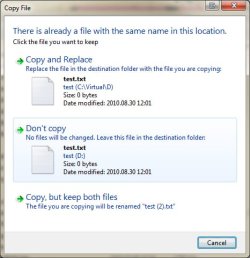
usually whenever im done with school, I like to backup my files and folders on a second hard drive. sometimes it could take hours to transfer. I tend to be away from the computer while it's transferring, and one thing that I see when I come back, is in the picture below. is it possible to auto replace files and folders?
 

Attachments
  • example.jpg
    example.jpg
    52 KB · Views: 37

My Computer My Computer

Computer type
PC/Desktop
Computer Manufacturer/Model Number
custom built from iBuypower
OS
windows 7 pro 64bit
CPU
Intel core i7-3770k processor 4x3.50Ghz/8mb L3
Motherboard
asus p8z77-v lx
Graphics Card(s)
nvidia geforce gtx570 - 1.2gb core: 822mhz single card
Sound Card
3d premium suround sound onboard
Monitor(s) Displays
22' ASUS VS228H
Screen Resolution
1920x1080
Hard Drives
2 -120 GB ADATA S510 SSD
Case
nzxt temptest evo mid tower case
Cooling
none
Keyboard
ibuypower usb
Mouse
ibuypower mouse
Antivirus
norton
Browser
safari, chrome and firefox
Hours :eek:

I`m sure there`s some software out there.

Robocopy or something, just google it. :D

If you don`t start naming your files individually, you`re gonna loose a lot of data.

It`s not in your picture, but there is a checkbox at the bottom, once you make a decision it will keep doing what you tell it to.

Replace the file, don`t replace etc.
 

My Computer My Computer

Computer type
PC/Desktop
Computer Manufacturer/Model Number
Skylake Special #666
OS
Windows 10 Pro x64
CPU
Intel Core i7 6700K
Motherboard
Asus Sabertooth Z170 Mark 1
Memory
GSkill TridentZ RGB 16GB 3600 16-16-16-36
Graphics Card(s)
EVGA GTX 980 Ti SC x2
Sound Card
Realtek High Definition
Monitor(s) Displays
AOC G2460PG
Screen Resolution
1920 x 1080 144Hz
Hard Drives
Samsung 860 Pro 256GB, Seagate Barracuda 4TB x2
PSU
EVGA 1000 P2, EVGA White Custom Braided Cables
Case
Corsair Vengeance C70 Gunmetal Black
Cooling
Corsair H100i v2, Corsair ML120 x2, Thermal Grizzly Kryonaut
Keyboard
Logitech G910 Orion Spectrum
Mouse
Logitech G700s
Internet Speed
Verizon Fios Quantum Gateway 75/75
Antivirus
Windows Defender, Malwarebytes Free 3.8.3
Browser
Chrome
Other Info
Corsair SP120 x4, LG Blu-ray Drive, Durabrand HT-395 100 Watt Dolby Digital Amp, Corsair H2100 Wireless 7.1 Headset
My own solution to this kind of thing. I use version control, SVN in my case. I just check in a revision when I'm done with whatever, it will just "backup" the files that have changed and keep a full history, don't have to waste time transferring everything. Then as a matter of cause, I backup the SVN repository to one of the many cloud storage solutions.
 

My Computer My Computer

Computer type
PC/Desktop
Computer Manufacturer/Model Number
Alienware Aurora ALX R4
OS
Windows 10 Pro (x64)
CPU
Intel Core i7-3930K (3.2GHz - 4.5GHz)
Motherboard
Alienware Aurora-R4 x79
Memory
4x Samsung 4GB PC3-12800 DDR3 (16GB 1600MHz)
Graphics Card(s)
Nvidia Geforce GTX 690
Sound Card
SteelSeries Siberia Elite
Monitor(s) Displays
Dell UltraSharp U3011
Screen Resolution
2560x1600
Hard Drives
Samsung 850 Pro 256 GB, Seagate 1TB Desktop Hybrid HDD, 2x Western Digital 4TB Green HDD
PSU
875W Some Dell PSU <.<
Case
Alienware Aurora ALX
Cooling
Custom Liquid Cooling (EK CPU & GPU blocks) dual EK 480RAD
Keyboard
Logitech G710+ Mechanical
Mouse
Logitech G700s
Internet Speed
Verizon Fios (50 mbps average)
Other Info
Server: Intel NUC D54250WYK: i5-4250U, 16GB, 256 GB mSATA, Windows Server 2012 R2
Back
Top