Black screen of death :( Help!

May I put in 2 cents worth?

For seeing what the volts are on the PSU use HW Info http://www.hwinfo.com/download.php < download the right bit version. close the right hand window > click on sensors > scroll down to where I have scrolled in my pic


If you are going to look at those caps PLEASE be VERY careful the large ones can hold a lethal charge

For another test try this

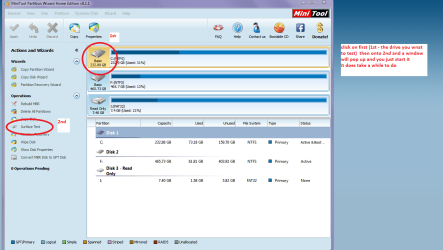
HARD DRIVE SURFACE TEST

Now as opposed to the usual drive testersthis specifically tests the surface of (usually) a spinner.

It will test the surface of the spinningdisk, and I suspect some idea of the performance of the read / write heads.

Download this http://www.partitionwizard.com/free-partition-manager.html my pic will give you the instruction on what to do. It doestake some time but it does cover most possibilities with a drive in conjunctionwith the other testers like Seatools http://www.seagate.com/au/en/support/downloads/item/seatools-win-master/
 

Attachments
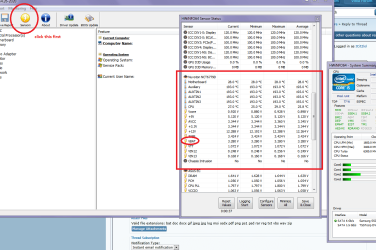
  • HW INFO VOLTS.PNG
    HW INFO VOLTS.PNG
    60 KB · Views: 5
  • SURFACE TEST.PNG
    SURFACE TEST.PNG
    47.5 KB · Views: 1

My Computer My Computer

At a glance

Desk1 7 Home Prem / Desk2 10 Pro / Main lap A...Desk1 i5 3750K / Laptop i7 GTX 860M / Desk2 i...Desk1 8GB (1866) / Desk2 16GB (1333) / Laptop...Desk 1& 2NVidia GTX 650 & Laptops on board Intel
Computer type
PC/Desktop
Computer Manufacturer/Model Number
Own build (new) Desk1 / Asus ROG Win 7 / Desk2 1st build
OS
Desk1 7 Home Prem / Desk2 10 Pro / Main lap Asus ROG 10 Pro 2 laptop Toshiba 7 Pro Asus P2520 7 & 10
CPU
Desk1 i5 3750K / Laptop i7 GTX 860M / Desk2 i5 2500
Motherboard
Desk1 Asus P877-V / Desk2 Gigabyte H67 UD3H / Laptop ?
Memory
Desk1 8GB (1866) / Desk2 16GB (1333) / Laptop 8Gb DDR3
Graphics Card(s)
Desk 1& 2NVidia GTX 650 & Laptops on board Intel
Sound Card
Desk 1 & 2 -XONAR DG Realtek High Def audio Laptop
Monitor(s) Displays
Desk 1 Benq HD 2450 / Desk2 Philips 24" / Laptop 17.5"
Screen Resolution
1920x1080 D1 & D2 & Laptop 1
Hard Drives
Desk1 Samsung 120GB 830 SSD
Asus ROG 256GB 850 Pro SSD
Desk2 Samsung 840 256 SSD
Toshiba 120GB EVO
PSU
Desk 1 Corsair HX 1050/ Laptop ? / Desk 2 Corsair HX 650
Case
Desk 1 Cooler HAF XM ? Toshiba laptop / Desk2 Coolermaster
Cooling
Fans on all Desk1 -2 Desk2 - all Coolermasters 5 Laptop ?
Keyboard
Desk 1 MS Sidewinder X6 Desk 2 MS Sidewinder X 4
Mouse
Desk 1&2 - Gigabyte MS 900 gamer - laptop - Logitec wireless
Internet Speed
ADSL2+
Other Info
One other Desktop (tester) and spare Toshba laptop both with SSD's
Running Kaspersky 2016 ISS on all machines config'd identically
Logitec audio stereo systems on each machine (x3)
Canon MG5250MFC
Router/modem TP-Link running WPA2SK
What do the Capacitors on the Motherboard look like? See any that are bulged or leaking?

Will the mobo will fail only if the capacitor is bulged or leaked?
 

My Computer My Computer

At a glance

Uttar PradeshAmd X6 Phenom II 1090BECorsair Venegance 8GBNVIDIA 9800GT
Computer type
PC/Desktop
Computer Manufacturer/Model Number
custom build
OS
Uttar Pradesh
CPU
Amd X6 Phenom II 1090BE
Motherboard
ASUS M4A88T-M
Memory
Corsair Venegance 8GB
Graphics Card(s)
NVIDIA 9800GT
Hard Drives
SAMSUNG Spin Point 500gb
WD Black 1tb
Antivirus
Avira
Browser
Chrome, Mozilla
No. There can be other points of failure, but bad capacitors is one of the more common ones.
 

My Computer My Computer

At a glance

Windows 7 64 Bit Home Premium SP1i7-3820GSkill F3-14900CL9Q - 16GBEVGA GeForce GTX660 - Driver 352.86
Computer type
PC/Desktop
Computer Manufacturer/Model Number
Home Built - Jan 2013
OS
Windows 7 64 Bit Home Premium SP1
CPU
i7-3820
Motherboard
Asus P9X79-PRO - Bios 4608
Memory
GSkill F3-14900CL9Q - 16GB
Graphics Card(s)
EVGA GeForce GTX660 - Driver 352.86
Sound Card
On board Realtek ALC898
Monitor(s) Displays
Acer S271HL
Screen Resolution
1920 x 1080
Hard Drives
#1- Samsung 840 Pro Series
#2- Western Digital WD1002FAEX Sata3 Black
#3- Western Digital WD1002FAEX Sata3 Black
PSU
Corsair CMPSU-850TX-V2 - 850 watt (by Seasonic)
Case
Corsair Obsidian 550D
Cooling
Standard 3 120mm case fans, Cooler Master Hyper 212 EVO
Keyboard
MS KC-0405
Mouse
Intellimouse 5-button
Internet Speed
56 Mbits/Sec (on a good day)
Antivirus
Avast & Malwarebytes
Browser
Firefox
Other Info
Asus DVD - DRW-24B1ST 24X
What comes in my mind is the mobo may be gone faulty as it is 3 years old.
We cannot tell about it finitely in a remote assistance.

But we can say that we have minimized all the other possibilities. Well, only one thing remains there .... the main source of power from the plug point.

You asked about WD data lifeguard ... you may run the quick test and the extended test.

And, the sudden power outage is called abnormal shutdown. :)

So, the conclusion is, there is a high probability that your guess with right. The troubleshooting process also indicates to it. But we cannot say it with certainty in a remote assistance, unfortunately.
 

My Computer My Computer

At a glance

Microsoft Windows 10 Pro Insider Preview 64-bitIntel(R) Core(TM) i3-4130 CPU @ 3.40GHzCorsair Vengence 4GB x2 (8.00GB Dual-Channel ...2047MB GeForce GTS 450 (ZOTAC International)
Computer type
PC/Desktop
Computer Manufacturer/Model Number
Self Assembled
OS
Microsoft Windows 10 Pro Insider Preview 64-bit
CPU
Intel(R) Core(TM) i3-4130 CPU @ 3.40GHz
Motherboard
Gigabyte Technology Co., Ltd. B85M-D3H
Memory
Corsair Vengence 4GB x2 (8.00GB Dual-Channel DDR3 @ 798MHz)
Graphics Card(s)
2047MB GeForce GTS 450 (ZOTAC International)
Sound Card
Onboard (Realtek High Definition Audio)
Monitor(s) Displays
LG Flatron E2040T
Screen Resolution
1600x900
Hard Drives
Western Digital 1 TB
Seagate 500 GB
PSU
Corsair VS550
Case
Cooler Master K380
Cooling
Cooler Master Seidon 120V Plus
Keyboard
Logitech MK260r
Mouse
Logitech MK260r
Internet Speed
PMPL Broadband
Antivirus
Windows Defender + MBAM
Browser
Firefox
Other Info
Dell Studio 15" Laptop
No. There can be other points of failure, but bad capacitors is one of the more common ones.

I checked my capacitor, i have just normal rounded capacitor which do not have any line in between, so when I see it looks pretty flat not bulged.
 

My Computer My Computer

At a glance

Uttar PradeshAmd X6 Phenom II 1090BECorsair Venegance 8GBNVIDIA 9800GT
Computer type
PC/Desktop
Computer Manufacturer/Model Number
custom build
OS
Uttar Pradesh
CPU
Amd X6 Phenom II 1090BE
Motherboard
ASUS M4A88T-M
Memory
Corsair Venegance 8GB
Graphics Card(s)
NVIDIA 9800GT
Hard Drives
SAMSUNG Spin Point 500gb
WD Black 1tb
Antivirus
Avira
Browser
Chrome, Mozilla
I will check this asap. Thanks.

May I put in 2 cents worth?

For seeing what the volts are on the PSU use HW Info http://www.hwinfo.com/download.php < download the right bit version. close the right hand window > click on sensors > scroll down to where I have scrolled in my pic


If you are going to look at those caps PLEASE be VERY careful the large ones can hold a lethal charge

For another test try this

HARD DRIVE SURFACE TEST

Now as opposed to the usual drive testersthis specifically tests the surface of (usually) a spinner.

It will test the surface of the spinningdisk, and I suspect some idea of the performance of the read / write heads.

Download this http://www.partitionwizard.com/free-partition-manager.html my pic will give you the instruction on what to do. It doestake some time but it does cover most possibilities with a drive in conjunctionwith the other testers like Seatools http://www.seagate.com/au/en/support/downloads/item/seatools-win-master/
 

My Computer My Computer

At a glance

Uttar PradeshAmd X6 Phenom II 1090BECorsair Venegance 8GBNVIDIA 9800GT
Computer type
PC/Desktop
Computer Manufacturer/Model Number
custom build
OS
Uttar Pradesh
CPU
Amd X6 Phenom II 1090BE
Motherboard
ASUS M4A88T-M
Memory
Corsair Venegance 8GB
Graphics Card(s)
NVIDIA 9800GT
Hard Drives
SAMSUNG Spin Point 500gb
WD Black 1tb
Antivirus
Avira
Browser
Chrome, Mozilla
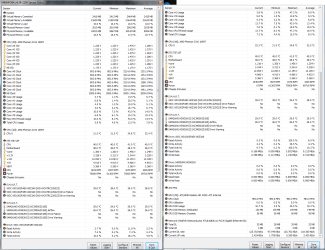
Please check my HWiNFO report.sensor.png


May I put in 2 cents worth?

For seeing what the volts are on the PSU use HW Info http://www.hwinfo.com/download.php < download the right bit version. close the right hand window > click on sensors > scroll down to where I have scrolled in my pic


If you are going to look at those caps PLEASE be VERY careful the large ones can hold a lethal charge

For another test try this

HARD DRIVE SURFACE TEST

Now as opposed to the usual drive testersthis specifically tests the surface of (usually) a spinner.

It will test the surface of the spinningdisk, and I suspect some idea of the performance of the read / write heads.

Download this http://www.partitionwizard.com/free-partition-manager.html my pic will give you the instruction on what to do. It doestake some time but it does cover most possibilities with a drive in conjunctionwith the other testers like Seatools http://www.seagate.com/au/en/support/downloads/item/seatools-win-master/
 

My Computer My Computer

At a glance

Uttar PradeshAmd X6 Phenom II 1090BECorsair Venegance 8GBNVIDIA 9800GT
Computer type
PC/Desktop
Computer Manufacturer/Model Number
custom build
OS
Uttar Pradesh
CPU
Amd X6 Phenom II 1090BE
Motherboard
ASUS M4A88T-M
Memory
Corsair Venegance 8GB
Graphics Card(s)
NVIDIA 9800GT
Hard Drives
SAMSUNG Spin Point 500gb
WD Black 1tb
Antivirus
Avira
Browser
Chrome, Mozilla
It's right where ICit2lol said it was. Your volts appear to be fine. :D

volts.JPG
 

My Computer My Computer

At a glance

Windows 7 Ultimate X64 SP1Intel i5-2550K, Differing ~4.4-4.8GHz No buil...16GB G.Skill Sniper 1866MHz @ 2133MHz 2x8GBASUS GTX650TIB-DC2OC-2GD5, (650TI Boost)
Computer type
PC/Desktop
Computer Manufacturer/Model Number
Home Built Desktop By DataTech
OS
Windows 7 Ultimate X64 SP1
CPU
Intel i5-2550K, Differing ~4.4-4.8GHz No built in GPU
Motherboard
ASUS P8Z68-V PRO/GEN3
Memory
16GB G.Skill Sniper 1866MHz @ 2133MHz 2x8GB
Graphics Card(s)
ASUS GTX650TIB-DC2OC-2GD5, (650TI Boost)
Sound Card
Onboard Realtek 5-1
Monitor(s) Displays
Samsung P2570HD
Screen Resolution
1920x1080
Hard Drives
Samsung 840 Pro 256GB SSD for OS, 500GB Seagate Constellation (Enterprise drive) for Data
PSU
Corsair HX650W
Case
Inwin Dragon Rider
Cooling
Hyper 212 EVO w/two Noctua fans, push-pull, @1300 RPM
Keyboard
E-Z Eyes, bright yellow keys with large characters
Mouse
steelseries SENSEI Laser Pro Gaming
Internet Speed
48-51Mbs Mbs down, 11 Mbs up Xfinity Cable
Antivirus
Norton Internet Security 2013
Browser
IE 10, Opera, Pale Moon if needed
Other Info
4 case fans, LG BluRay-RE, ASUS DVD-RW, Mr. Fusion power supply, 1.21 gigawatts.
Okay, so my PSU is good.
I tested that HDD Surface test but I am getting black screen in between, first I got after 4-5 lines.. And second time I got after 2 lines.
 

My Computer My Computer

At a glance

Uttar PradeshAmd X6 Phenom II 1090BECorsair Venegance 8GBNVIDIA 9800GT
Computer type
PC/Desktop
Computer Manufacturer/Model Number
custom build
OS
Uttar Pradesh
CPU
Amd X6 Phenom II 1090BE
Motherboard
ASUS M4A88T-M
Memory
Corsair Venegance 8GB
Graphics Card(s)
NVIDIA 9800GT
Hard Drives
SAMSUNG Spin Point 500gb
WD Black 1tb
Antivirus
Avira
Browser
Chrome, Mozilla
You will have 15 or more caps on the board, can you view all of them? Use a flashlight if needed. A bad board is about the only thing left unless it's a bad GPU card, monitor, or cable.
 

My Computer My Computer

At a glance

Windows 7 Ultimate X64 SP1Intel i5-2550K, Differing ~4.4-4.8GHz No buil...16GB G.Skill Sniper 1866MHz @ 2133MHz 2x8GBASUS GTX650TIB-DC2OC-2GD5, (650TI Boost)
Computer type
PC/Desktop
Computer Manufacturer/Model Number
Home Built Desktop By DataTech
OS
Windows 7 Ultimate X64 SP1
CPU
Intel i5-2550K, Differing ~4.4-4.8GHz No built in GPU
Motherboard
ASUS P8Z68-V PRO/GEN3
Memory
16GB G.Skill Sniper 1866MHz @ 2133MHz 2x8GB
Graphics Card(s)
ASUS GTX650TIB-DC2OC-2GD5, (650TI Boost)
Sound Card
Onboard Realtek 5-1
Monitor(s) Displays
Samsung P2570HD
Screen Resolution
1920x1080
Hard Drives
Samsung 840 Pro 256GB SSD for OS, 500GB Seagate Constellation (Enterprise drive) for Data
PSU
Corsair HX650W
Case
Inwin Dragon Rider
Cooling
Hyper 212 EVO w/two Noctua fans, push-pull, @1300 RPM
Keyboard
E-Z Eyes, bright yellow keys with large characters
Mouse
steelseries SENSEI Laser Pro Gaming
Internet Speed
48-51Mbs Mbs down, 11 Mbs up Xfinity Cable
Antivirus
Norton Internet Security 2013
Browser
IE 10, Opera, Pale Moon if needed
Other Info
4 case fans, LG BluRay-RE, ASUS DVD-RW, Mr. Fusion power supply, 1.21 gigawatts.
If we look at post #1 we can see that pushkar mentioned some corrosion/residue on the pins on the processor. He mentioned that this could be wiped clean (one pin at a time).
Normal chemical reaction corrosion will form a lumpy coating on metal parts. A sticky residue makes me wonder if it could be a case of excessive thermal compound that got into the socket?

The fact that the black screen occurs under any type of processor load points to a bad CPU (or motherboard-socket). My problem with that is that a CPU error will normally end with a shutdown or restart, not just the loss of video. There seems to be a missing piece to this puzzle.

Just thinking out loud.....
 

My Computer My Computer

At a glance

Windows 7 64 Bit Home Premium SP1i7-3820GSkill F3-14900CL9Q - 16GBEVGA GeForce GTX660 - Driver 352.86
Computer type
PC/Desktop
Computer Manufacturer/Model Number
Home Built - Jan 2013
OS
Windows 7 64 Bit Home Premium SP1
CPU
i7-3820
Motherboard
Asus P9X79-PRO - Bios 4608
Memory
GSkill F3-14900CL9Q - 16GB
Graphics Card(s)
EVGA GeForce GTX660 - Driver 352.86
Sound Card
On board Realtek ALC898
Monitor(s) Displays
Acer S271HL
Screen Resolution
1920 x 1080
Hard Drives
#1- Samsung 840 Pro Series
#2- Western Digital WD1002FAEX Sata3 Black
#3- Western Digital WD1002FAEX Sata3 Black
PSU
Corsair CMPSU-850TX-V2 - 850 watt (by Seasonic)
Case
Corsair Obsidian 550D
Cooling
Standard 3 120mm case fans, Cooler Master Hyper 212 EVO
Keyboard
MS KC-0405
Mouse
Intellimouse 5-button
Internet Speed
56 Mbits/Sec (on a good day)
Antivirus
Avast & Malwarebytes
Browser
Firefox
Other Info
Asus DVD - DRW-24B1ST 24X
If we look at post #1 we can see that pushkar mentioned some corrosion/residue on the pins on the processor. He mentioned that this could be wiped clean (one pin at a time).
Normal chemical reaction corrosion will form a lumpy coating on metal parts. A sticky residue makes me wonder if it could be a case of excessive thermal compound that got into the socket?

The fact that the black screen occurs under any type of processor load points to a bad CPU (or motherboard-socket). My problem with that is that a CPU error will normally end with a shutdown or restart, not just the loss of video. There seems to be a missing piece to this puzzle.

Just thinking out loud.....

I think I missed that in post #1 and I should have caught it. Excessive thermal compound on the processor would account for many issues for it would most likely be in the socket as well. If somehow the pins and socket being effected were related to video processing (think i-series intel) it could explain a lot. I will have to take a closer look at the Amd X6 Phenom II 1090BE architecture to know if that is even possible.
:shock:
 

My Computer My Computer

At a glance

Windows 7 Professional x64AMD Athlon II x4 3.00 GHz16GB Kingston DDR3Nvidia 8600 (dual DVI out for 2 monitors)
Computer type
PC/Desktop
Computer Manufacturer/Model Number
Custom Build MPCBS AMII
OS
Windows 7 Professional x64
CPU
AMD Athlon II x4 3.00 GHz
Motherboard
MSI GF615M-p33
Memory
16GB Kingston DDR3
Graphics Card(s)
Nvidia 8600 (dual DVI out for 2 monitors)
Sound Card
Onboard
Monitor(s) Displays
Acer H233H 23", ASUS 23"
Screen Resolution
1366 x 768
Hard Drives
(2) WD Blue 1 TB 3 partitions, (1) Seagate 7200 500GB with 2 partitions for useless and frequently deleted data Looking forward do an ssd for os soon.
PSU
Corsair 1100Watt
Case
Apevia HAF
Cooling
HAF AMD High Profile Heat sink and fan
Keyboard
wireless Logitech
Mouse
wireless Logitech
Internet Speed
16 mbps
Antivirus
eSet, AVG, Clam and Clamwin (depends on machine)
Browser
Firefox
Other Info
(9) Win 7 machines all x64 (POS Updated to Windows 7 pro YEA), (4) Linux machines x64 and x86 including a v3000 compaq lappy brought back to life with Mint 9 used to scan drives, (1) Linux Machine dual boot XP Pro (for testing and destroying), (1) Win 7 pro x64/Win 8.1 Lenovo Laptop Dual Boot.
If we look at post #1 we can see that pushkar mentioned some corrosion/residue on the pins on the processor. He mentioned that this could be wiped clean (one pin at a time).
Normal chemical reaction corrosion will form a lumpy coating on metal parts. A sticky residue makes me wonder if it could be a case of excessive thermal compound that got into the socket?

The fact that the black screen occurs under any type of processor load points to a bad CPU (or motherboard-socket). My problem with that is that a CPU error will normally end with a shutdown or restart, not just the loss of video. There seems to be a missing piece to this puzzle.

Just thinking out loud.....

I think I missed that in post #1 and I should have caught it. Excessive thermal compound on the processor would account for many issues for it would most likely be in the socket as well. If somehow the pins and socket being effected were related to video processing (think i-series intel) it could explain a lot. I will have to take a closer look at the Amd X6 Phenom II 1090BE architecture to know if that is even possible.
:shock:


Okay, pls check and let me know.
 

My Computer My Computer

At a glance

Uttar PradeshAmd X6 Phenom II 1090BECorsair Venegance 8GBNVIDIA 9800GT
Computer type
PC/Desktop
Computer Manufacturer/Model Number
custom build
OS
Uttar Pradesh
CPU
Amd X6 Phenom II 1090BE
Motherboard
ASUS M4A88T-M
Memory
Corsair Venegance 8GB
Graphics Card(s)
NVIDIA 9800GT
Hard Drives
SAMSUNG Spin Point 500gb
WD Black 1tb
Antivirus
Avira
Browser
Chrome, Mozilla

My Computer My Computer

At a glance

Windows 7 64 Bit Home Premium SP1i7-3820GSkill F3-14900CL9Q - 16GBEVGA GeForce GTX660 - Driver 352.86
Computer type
PC/Desktop
Computer Manufacturer/Model Number
Home Built - Jan 2013
OS
Windows 7 64 Bit Home Premium SP1
CPU
i7-3820
Motherboard
Asus P9X79-PRO - Bios 4608
Memory
GSkill F3-14900CL9Q - 16GB
Graphics Card(s)
EVGA GeForce GTX660 - Driver 352.86
Sound Card
On board Realtek ALC898
Monitor(s) Displays
Acer S271HL
Screen Resolution
1920 x 1080
Hard Drives
#1- Samsung 840 Pro Series
#2- Western Digital WD1002FAEX Sata3 Black
#3- Western Digital WD1002FAEX Sata3 Black
PSU
Corsair CMPSU-850TX-V2 - 850 watt (by Seasonic)
Case
Corsair Obsidian 550D
Cooling
Standard 3 120mm case fans, Cooler Master Hyper 212 EVO
Keyboard
MS KC-0405
Mouse
Intellimouse 5-button
Internet Speed
56 Mbits/Sec (on a good day)
Antivirus
Avast & Malwarebytes
Browser
Firefox
Other Info
Asus DVD - DRW-24B1ST 24X


Thank you Sir for that. I was out at the American Legion for Officer Installation and just got back.

I wonder if alcohol and a pipe cleaner would be gentle enough to pull all of the paste off the processor pins? I know the socket can be cleaned with alcohol and a extra soft toothbrush and a can of air.
 

My Computer My Computer

At a glance

Windows 7 Professional x64AMD Athlon II x4 3.00 GHz16GB Kingston DDR3Nvidia 8600 (dual DVI out for 2 monitors)
Computer type
PC/Desktop
Computer Manufacturer/Model Number
Custom Build MPCBS AMII
OS
Windows 7 Professional x64
CPU
AMD Athlon II x4 3.00 GHz
Motherboard
MSI GF615M-p33
Memory
16GB Kingston DDR3
Graphics Card(s)
Nvidia 8600 (dual DVI out for 2 monitors)
Sound Card
Onboard
Monitor(s) Displays
Acer H233H 23", ASUS 23"
Screen Resolution
1366 x 768
Hard Drives
(2) WD Blue 1 TB 3 partitions, (1) Seagate 7200 500GB with 2 partitions for useless and frequently deleted data Looking forward do an ssd for os soon.
PSU
Corsair 1100Watt
Case
Apevia HAF
Cooling
HAF AMD High Profile Heat sink and fan
Keyboard
wireless Logitech
Mouse
wireless Logitech
Internet Speed
16 mbps
Antivirus
eSet, AVG, Clam and Clamwin (depends on machine)
Browser
Firefox
Other Info
(9) Win 7 machines all x64 (POS Updated to Windows 7 pro YEA), (4) Linux machines x64 and x86 including a v3000 compaq lappy brought back to life with Mint 9 used to scan drives, (1) Linux Machine dual boot XP Pro (for testing and destroying), (1) Win 7 pro x64/Win 8.1 Lenovo Laptop Dual Boot.
Not a pipe cleaner, they have a metal core, a normal cotton swab is best.

The Phenom X6 has no embedded video but may be one on the board. AMD chips with video are APUs and use the FMx series sockets.
 

My Computer My Computer

At a glance

Windows 7 Ultimate X64 SP1Intel i5-2550K, Differing ~4.4-4.8GHz No buil...16GB G.Skill Sniper 1866MHz @ 2133MHz 2x8GBASUS GTX650TIB-DC2OC-2GD5, (650TI Boost)
Computer type
PC/Desktop
Computer Manufacturer/Model Number
Home Built Desktop By DataTech
OS
Windows 7 Ultimate X64 SP1
CPU
Intel i5-2550K, Differing ~4.4-4.8GHz No built in GPU
Motherboard
ASUS P8Z68-V PRO/GEN3
Memory
16GB G.Skill Sniper 1866MHz @ 2133MHz 2x8GB
Graphics Card(s)
ASUS GTX650TIB-DC2OC-2GD5, (650TI Boost)
Sound Card
Onboard Realtek 5-1
Monitor(s) Displays
Samsung P2570HD
Screen Resolution
1920x1080
Hard Drives
Samsung 840 Pro 256GB SSD for OS, 500GB Seagate Constellation (Enterprise drive) for Data
PSU
Corsair HX650W
Case
Inwin Dragon Rider
Cooling
Hyper 212 EVO w/two Noctua fans, push-pull, @1300 RPM
Keyboard
E-Z Eyes, bright yellow keys with large characters
Mouse
steelseries SENSEI Laser Pro Gaming
Internet Speed
48-51Mbs Mbs down, 11 Mbs up Xfinity Cable
Antivirus
Norton Internet Security 2013
Browser
IE 10, Opera, Pale Moon if needed
Other Info
4 case fans, LG BluRay-RE, ASUS DVD-RW, Mr. Fusion power supply, 1.21 gigawatts.
Not a pipe cleaner, they have a metal core, a normal cotton swab is best.

The Phenom X6 has no embedded video but may be one on the board. AMD chips with video are APUs and use the FMx series sockets.

Sorry bout that Britton. The Pipe Cleaners I get from my local smoke shop have plastic cores and long softer bristles so as not to scratch the seasoning out of a pipe and I forgot that many places are still selling and using the metal core ones. I don't like using cotton swabs as they tend to leave strands behind. Maybe soaking a toothpick in alcohol would work. Especially if the end is squashed/chewed (before dipping in alcohol of course).

I looked at the specs and I did not see vid onboard but it does state it support 3dnow so in might still be debris on the chip pins and socket. At this point I think everything else has been mentioned / tested.
 

My Computer My Computer

At a glance

Windows 7 Professional x64AMD Athlon II x4 3.00 GHz16GB Kingston DDR3Nvidia 8600 (dual DVI out for 2 monitors)
Computer type
PC/Desktop
Computer Manufacturer/Model Number
Custom Build MPCBS AMII
OS
Windows 7 Professional x64
CPU
AMD Athlon II x4 3.00 GHz
Motherboard
MSI GF615M-p33
Memory
16GB Kingston DDR3
Graphics Card(s)
Nvidia 8600 (dual DVI out for 2 monitors)
Sound Card
Onboard
Monitor(s) Displays
Acer H233H 23", ASUS 23"
Screen Resolution
1366 x 768
Hard Drives
(2) WD Blue 1 TB 3 partitions, (1) Seagate 7200 500GB with 2 partitions for useless and frequently deleted data Looking forward do an ssd for os soon.
PSU
Corsair 1100Watt
Case
Apevia HAF
Cooling
HAF AMD High Profile Heat sink and fan
Keyboard
wireless Logitech
Mouse
wireless Logitech
Internet Speed
16 mbps
Antivirus
eSet, AVG, Clam and Clamwin (depends on machine)
Browser
Firefox
Other Info
(9) Win 7 machines all x64 (POS Updated to Windows 7 pro YEA), (4) Linux machines x64 and x86 including a v3000 compaq lappy brought back to life with Mint 9 used to scan drives, (1) Linux Machine dual boot XP Pro (for testing and destroying), (1) Win 7 pro x64/Win 8.1 Lenovo Laptop Dual Boot.

My Computer My Computer

At a glance

Windows 7 Ultimate X64 SP1Intel i5-2550K, Differing ~4.4-4.8GHz No buil...16GB G.Skill Sniper 1866MHz @ 2133MHz 2x8GBASUS GTX650TIB-DC2OC-2GD5, (650TI Boost)
Computer type
PC/Desktop
Computer Manufacturer/Model Number
Home Built Desktop By DataTech
OS
Windows 7 Ultimate X64 SP1
CPU
Intel i5-2550K, Differing ~4.4-4.8GHz No built in GPU
Motherboard
ASUS P8Z68-V PRO/GEN3
Memory
16GB G.Skill Sniper 1866MHz @ 2133MHz 2x8GB
Graphics Card(s)
ASUS GTX650TIB-DC2OC-2GD5, (650TI Boost)
Sound Card
Onboard Realtek 5-1
Monitor(s) Displays
Samsung P2570HD
Screen Resolution
1920x1080
Hard Drives
Samsung 840 Pro 256GB SSD for OS, 500GB Seagate Constellation (Enterprise drive) for Data
PSU
Corsair HX650W
Case
Inwin Dragon Rider
Cooling
Hyper 212 EVO w/two Noctua fans, push-pull, @1300 RPM
Keyboard
E-Z Eyes, bright yellow keys with large characters
Mouse
steelseries SENSEI Laser Pro Gaming
Internet Speed
48-51Mbs Mbs down, 11 Mbs up Xfinity Cable
Antivirus
Norton Internet Security 2013
Browser
IE 10, Opera, Pale Moon if needed
Other Info
4 case fans, LG BluRay-RE, ASUS DVD-RW, Mr. Fusion power supply, 1.21 gigawatts.
The Phenom X6 has no embedded video but may be one on the board. AMD chips with video are APUs and use the FMx series sockets.

Thanks for the correction Gary. I looked again and can't see what I was looking at to reach that conclusion. My feet, obviously.
 

My Computer My Computer

At a glance

Windows 7 64 Bit Home Premium SP1i7-3820GSkill F3-14900CL9Q - 16GBEVGA GeForce GTX660 - Driver 352.86
Computer type
PC/Desktop
Computer Manufacturer/Model Number
Home Built - Jan 2013
OS
Windows 7 64 Bit Home Premium SP1
CPU
i7-3820
Motherboard
Asus P9X79-PRO - Bios 4608
Memory
GSkill F3-14900CL9Q - 16GB
Graphics Card(s)
EVGA GeForce GTX660 - Driver 352.86
Sound Card
On board Realtek ALC898
Monitor(s) Displays
Acer S271HL
Screen Resolution
1920 x 1080
Hard Drives
#1- Samsung 840 Pro Series
#2- Western Digital WD1002FAEX Sata3 Black
#3- Western Digital WD1002FAEX Sata3 Black
PSU
Corsair CMPSU-850TX-V2 - 850 watt (by Seasonic)
Case
Corsair Obsidian 550D
Cooling
Standard 3 120mm case fans, Cooler Master Hyper 212 EVO
Keyboard
MS KC-0405
Mouse
Intellimouse 5-button
Internet Speed
56 Mbits/Sec (on a good day)
Antivirus
Avast & Malwarebytes
Browser
Firefox
Other Info
Asus DVD - DRW-24B1ST 24X
My 2cents again I use a piece of old but straight credit card (about the length of the line of pins) to line up the pins and if possible like my slot cleaning have a piece of lint free cloth over the edge of it and VERY GENTLY move the piece of card along the direction of the pins to straighten them and clean at the same time.

Now as we know the pins are usually gold plated and as far as I am aware gold doesn't tarnish or get corroded the only substance I know that will attack gold is a solution of nitric and hydrochloric acid - Aqua Regia Aqua regia - Wikipedia, the free encyclopedia
I would suggest the "coating" on the pins is old compound that has baked on hard and my other thought is has some compound somehow got into the pin holes in the socket - now that would be a real nut breaker eh?

As Gary pointed outtoo there are a lot of caps all over the board and some are under the cooler of the CPU and can be very small - have they been checked.

I thought too the 5v rail was a tad low but not enough to trigger the Power_Good pin on the 24 pin socket but may be causing a problem somewhere else.
 

My Computer My Computer

At a glance

Desk1 7 Home Prem / Desk2 10 Pro / Main lap A...Desk1 i5 3750K / Laptop i7 GTX 860M / Desk2 i...Desk1 8GB (1866) / Desk2 16GB (1333) / Laptop...Desk 1& 2NVidia GTX 650 & Laptops on board Intel
Computer type
PC/Desktop
Computer Manufacturer/Model Number
Own build (new) Desk1 / Asus ROG Win 7 / Desk2 1st build
OS
Desk1 7 Home Prem / Desk2 10 Pro / Main lap Asus ROG 10 Pro 2 laptop Toshiba 7 Pro Asus P2520 7 & 10
CPU
Desk1 i5 3750K / Laptop i7 GTX 860M / Desk2 i5 2500
Motherboard
Desk1 Asus P877-V / Desk2 Gigabyte H67 UD3H / Laptop ?
Memory
Desk1 8GB (1866) / Desk2 16GB (1333) / Laptop 8Gb DDR3
Graphics Card(s)
Desk 1& 2NVidia GTX 650 & Laptops on board Intel
Sound Card
Desk 1 & 2 -XONAR DG Realtek High Def audio Laptop
Monitor(s) Displays
Desk 1 Benq HD 2450 / Desk2 Philips 24" / Laptop 17.5"
Screen Resolution
1920x1080 D1 & D2 & Laptop 1
Hard Drives
Desk1 Samsung 120GB 830 SSD
Asus ROG 256GB 850 Pro SSD
Desk2 Samsung 840 256 SSD
Toshiba 120GB EVO
PSU
Desk 1 Corsair HX 1050/ Laptop ? / Desk 2 Corsair HX 650
Case
Desk 1 Cooler HAF XM ? Toshiba laptop / Desk2 Coolermaster
Cooling
Fans on all Desk1 -2 Desk2 - all Coolermasters 5 Laptop ?
Keyboard
Desk 1 MS Sidewinder X6 Desk 2 MS Sidewinder X 4
Mouse
Desk 1&2 - Gigabyte MS 900 gamer - laptop - Logitec wireless
Internet Speed
ADSL2+
Other Info
One other Desktop (tester) and spare Toshba laptop both with SSD's
Running Kaspersky 2016 ISS on all machines config'd identically
Logitec audio stereo systems on each machine (x3)
Canon MG5250MFC
Router/modem TP-Link running WPA2SK
Back
Top