Partition USB Pen Drive

I played around a bit with a PNY 8 GB thumb drive.

No matter what I changed in PW, the extra partition is not usable in Windows.
Changed the following
partition typeID from FAT32 to FAT32 LBA
extended to primary
deleted / recreated partition (PW tells you here - Windows won't see the part!)

on one of the operations PW mounted the partition (sorry I didn't keep good notes on that)

Windows is just stubborn in this regard. There is no reason that a thumb drive cannot be partitioned and used in Windows given the devices have grown in capacity.

I compared my ext Seagate spinner HDD properties to the PNY thumb drive properties and did not see where Windows makes the distinction. I didn't look that close though. Windows might read the device firmware - I'm not sure on that.

Kudos to whs for posting the information he has.

Golden, do you have a method that makes the new partition on the thumb drive visible/useable in Windows. This limitation has always bugged me.

Thanks,

Bill
.
 

My Computer My Computer

At a glance

x64 (6.3.9600) Win8.1 Pro & soon dual boot x6...AMD A6-3420M APU with Radeon(tm) HD Graphics6.00 GBAMD Radeon(TM) HD 6520G
Computer type
Laptop
Computer Manufacturer/Model Number
HP Pavilion dv6-6c10us
OS
x64 (6.3.9600) Win8.1 Pro & soon dual boot x64 (6.1.7601) Win7_SP1 HomePrem
CPU
AMD A6-3420M APU with Radeon(tm) HD Graphics
Motherboard
Hewlett-Packard 1805
Memory
6.00 GB
Graphics Card(s)
AMD Radeon(TM) HD 6520G
Sound Card
(1) AMD High Definition Audio Device (2) IDT High Definiti
Monitor(s) Displays
HP W2072a 20" LCD (1600 x 900) @ 60 Hz
Screen Resolution
1366 x 768 x 32 bits (4294967296 colors) @ 60 Hz
Hard Drives
ST640LM0 00 HM641JI SATA Disk Device
Keyboard
Logitech k520 wireless KB
Mouse
Logitech m320 wireless mouse (bundled with KB)
Internet Speed
15/5 | 54 MB Wireless 'n'
Antivirus
Realtime: Defender or Avast | On-demand: Malwarebytes, ESET
Browser
IE 11 on Win8, IE 10 on win 7
Other Info
Media: [Gimp, Audacity, VLC] || Comm: [WEmail 2012, Skype] || Productivity: [OpenOffice,| Textpad] || Utils: [Sysinternals, cCleaner, Speccy, Defraggler]
I made another couple of experiments:

1. I had a 64GB stick with a single primary partition. But that stick was never used for anything. I tried to shrink the partition but Disk management did not let me - the option was greyed out.

2. I deleted that single partition to get unallocated space. There I first defined a 20GB partition and then I defined a second partition in the rest of the unallocated space. That was possible (all with Disk Management).


Attachments

  • 2014-07-29_1646.png
    2014-07-29_1646.png
    4.4 KB · Views: 0

My Computer My Computer

At a glance

Vista, Windows7, Mint Mate, Zorin, Windows 8from 1.6GHz Duo to i7
Computer Manufacturer/Model Number
HP, Dell, Gateway, Toshiba - 4 laptops and 2 desktops
OS
Vista, Windows7, Mint Mate, Zorin, Windows 8
CPU
from 1.6GHz Duo to i7
Monitor(s) Displays
2x HP w2207
Hard Drives
5x HDD, 7x SSD, 12x Externals
Keyboard
with trackball - no mices
Mouse
Trackball mice
Internet Speed
DSL 6000
Please unplug the pen drive , replug it and check whether you are able to access the second partition.

( I posted saying that Windows will never ever see a second partition but deleted it after seeing your post.:D. It is kept in reserve now. :))
 

My Computer My Computer

At a glance

Windows 7 Home Premium 32 bit
OS
Windows 7 Home Premium 32 bit
I have to add that SanDisk pen drives manufactured between June 2012 and Dec 2013 or about were configured as Fixed Disks. Is yours a SanDisk?
 

My Computer My Computer

At a glance

Windows 7 Home Premium 32 bit
OS
Windows 7 Home Premium 32 bit
Thanks for the guide Wolfgang, i will take a look through that soon.

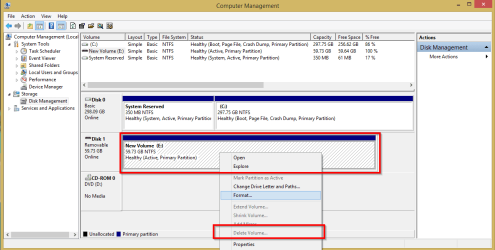
I tried doing what you mentioned about in post #22 but i don't get the delete option?
Please note, I'm at home using a different pen drive for this test.

Delete Volume is greyed out... do i need to do something prior to this?

2014-07-29 19_03_28-Untitled - Paint.png

Cheers,
Jamie
 

My Computer My Computer

At a glance

Windows 8.1 Pro x64Intel Core i5-2500K @ 3.30GHz - S11558GB Corsair DDR3 XMS3, PC3-12800NVIDIA GeForce GTX 650
Computer type
PC/Desktop
Computer Manufacturer/Model Number
Self Built
OS
Windows 8.1 Pro x64
CPU
Intel Core i5-2500K @ 3.30GHz - S1155
Motherboard
Asus P8P67 LE Rev3, Intel P67, S115
Memory
8GB Corsair DDR3 XMS3, PC3-12800
Graphics Card(s)
NVIDIA GeForce GTX 650
Sound Card
On-Board
Monitor(s) Displays
3 x 24" {Extended Display}
Screen Resolution
1920 x 1080
Hard Drives
300GB Seagate Barracuda 7200
PSU
550W Coolermaster GX550
Case
Silverstone Precision PS04B
Cooling
Stock
Keyboard
Logitech K120
Mouse
World of Warcraft Cataclysm MMO Gaming Mouse
Internet Speed
80 MB
Antivirus
MSE / Windows Defender
Browser
Chrome
I have to add that SanDisk pen drives manufactured between June 2012 and Dec 2013 or about were configured as Fixed Disks. Is yours a SanDisk?

The one i have been using is Kingston Data Traveller G4, my last post was with a 64gb SSK

Regards,
Jamie
 

My Computer My Computer

At a glance

Windows 8.1 Pro x64Intel Core i5-2500K @ 3.30GHz - S11558GB Corsair DDR3 XMS3, PC3-12800NVIDIA GeForce GTX 650
Computer type
PC/Desktop
Computer Manufacturer/Model Number
Self Built
OS
Windows 8.1 Pro x64
CPU
Intel Core i5-2500K @ 3.30GHz - S1155
Motherboard
Asus P8P67 LE Rev3, Intel P67, S115
Memory
8GB Corsair DDR3 XMS3, PC3-12800
Graphics Card(s)
NVIDIA GeForce GTX 650
Sound Card
On-Board
Monitor(s) Displays
3 x 24" {Extended Display}
Screen Resolution
1920 x 1080
Hard Drives
300GB Seagate Barracuda 7200
PSU
550W Coolermaster GX550
Case
Silverstone Precision PS04B
Cooling
Stock
Keyboard
Logitech K120
Mouse
World of Warcraft Cataclysm MMO Gaming Mouse
Internet Speed
80 MB
Antivirus
MSE / Windows Defender
Browser
Chrome
No, that question was addressed to whs on which brand pen drive he tried on.

Anyway, since you are here, if you can manage to get a Sandisk pen drive manufactured between June 2012 and Nov/De 2013, you may be able to partition those and access all the partitions since those were configured as Fixed disks. http://www.sevenforums.com/hardware...-recognized-local-disk-not-flash-drive-2.html So my question to whs whether what he used is a Sandisk pen drive.

As far as I know, it is not possible for Windows to see anything but the first partition on a pen drive. One has to flip the removable bit on the pen drive whereupon it will show as a HDD or Local Disk.
 

My Computer My Computer

At a glance

Windows 7 Home Premium 32 bit
OS
Windows 7 Home Premium 32 bit
It is a Sandisk but I have no idea when it was produced and the details in the device properties do not tell me. I bought it in April this year. Maybe I can find another empty stick in my big box and see what that yields.

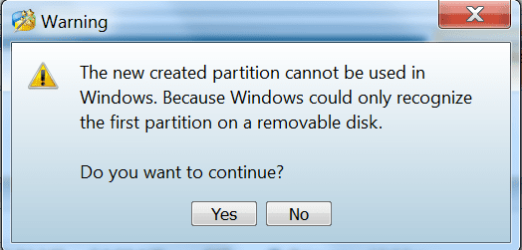
Update: I found an older Kingston stick and allocated 1 partition leaving some unallocated space. When I wanted to create the second partition (with Partition Wizard because nothing worked in Disk Management), I got the message below. And when I proceeded anyhow, PW got stuck at 84%.
 

Attachments

  • 2014-07-30_0006.png
    2014-07-30_0006.png
    15.1 KB · Views: 14

My Computer My Computer

At a glance

Vista, Windows7, Mint Mate, Zorin, Windows 8from 1.6GHz Duo to i7
Computer Manufacturer/Model Number
HP, Dell, Gateway, Toshiba - 4 laptops and 2 desktops
OS
Vista, Windows7, Mint Mate, Zorin, Windows 8
CPU
from 1.6GHz Duo to i7
Monitor(s) Displays
2x HP w2207
Hard Drives
5x HDD, 7x SSD, 12x Externals
Keyboard
with trackball - no mices
Mouse
Trackball mice
Internet Speed
DSL 6000
This task seems to be one of those easy in theory but harder in practice, i hope we can get to the bottom of it as this isn't my first attempt to do this :D

i have been looking round the web and seen a few things that mention this and the solution seems very complicated... Flipping the removable bit of your pen drive but can't see anything clear cut about this.

Linux doesn't seem to have this issue :)
 
Last edited:

My Computer My Computer

At a glance

Windows 8.1 Pro x64Intel Core i5-2500K @ 3.30GHz - S11558GB Corsair DDR3 XMS3, PC3-12800NVIDIA GeForce GTX 650
Computer type
PC/Desktop
Computer Manufacturer/Model Number
Self Built
OS
Windows 8.1 Pro x64
CPU
Intel Core i5-2500K @ 3.30GHz - S1155
Motherboard
Asus P8P67 LE Rev3, Intel P67, S115
Memory
8GB Corsair DDR3 XMS3, PC3-12800
Graphics Card(s)
NVIDIA GeForce GTX 650
Sound Card
On-Board
Monitor(s) Displays
3 x 24" {Extended Display}
Screen Resolution
1920 x 1080
Hard Drives
300GB Seagate Barracuda 7200
PSU
550W Coolermaster GX550
Case
Silverstone Precision PS04B
Cooling
Stock
Keyboard
Logitech K120
Mouse
World of Warcraft Cataclysm MMO Gaming Mouse
Internet Speed
80 MB
Antivirus
MSE / Windows Defender
Browser
Chrome
jumanji posted the answer, but there is a caution in trying to flip the bit on a pen drive - you can 'brick' it if something goes awry. I did some research and found that it's not worth the effort given that Microsoft allows Win8-to-Go.

For a list of certified flash drives for Win8-to-go, see:
Windows To Go

Scroll down to the Windows to go certified drives.

What does this have to do with the issue? These pen drives can be partitioned!

So.... I'll be getting a few new pen drives when they're on sale (back-to-school is coming soon!)
 

My Computer My Computer

At a glance

x64 (6.3.9600) Win8.1 Pro & soon dual boot x6...AMD A6-3420M APU with Radeon(tm) HD Graphics6.00 GBAMD Radeon(TM) HD 6520G
Computer type
Laptop
Computer Manufacturer/Model Number
HP Pavilion dv6-6c10us
OS
x64 (6.3.9600) Win8.1 Pro & soon dual boot x64 (6.1.7601) Win7_SP1 HomePrem
CPU
AMD A6-3420M APU with Radeon(tm) HD Graphics
Motherboard
Hewlett-Packard 1805
Memory
6.00 GB
Graphics Card(s)
AMD Radeon(TM) HD 6520G
Sound Card
(1) AMD High Definition Audio Device (2) IDT High Definiti
Monitor(s) Displays
HP W2072a 20" LCD (1600 x 900) @ 60 Hz
Screen Resolution
1366 x 768 x 32 bits (4294967296 colors) @ 60 Hz
Hard Drives
ST640LM0 00 HM641JI SATA Disk Device
Keyboard
Logitech k520 wireless KB
Mouse
Logitech m320 wireless mouse (bundled with KB)
Internet Speed
15/5 | 54 MB Wireless 'n'
Antivirus
Realtime: Defender or Avast | On-demand: Malwarebytes, ESET
Browser
IE 11 on Win8, IE 10 on win 7
Other Info
Media: [Gimp, Audacity, VLC] || Comm: [WEmail 2012, Skype] || Productivity: [OpenOffice,| Textpad] || Utils: [Sysinternals, cCleaner, Speccy, Defraggler]

It seems that Windows to go is the way forward with this then, other solutions seem to be very complicated to put into practice.

If anyone wishes to continue the challenge then i look forward to a simple solution but I'm going to consider the Windows to go as the best option.

Thank you all for the suggestions and help.

Regards,
Jamie
 

My Computer My Computer

At a glance

Windows 8.1 Pro x64Intel Core i5-2500K @ 3.30GHz - S11558GB Corsair DDR3 XMS3, PC3-12800NVIDIA GeForce GTX 650
Computer type
PC/Desktop
Computer Manufacturer/Model Number
Self Built
OS
Windows 8.1 Pro x64
CPU
Intel Core i5-2500K @ 3.30GHz - S1155
Motherboard
Asus P8P67 LE Rev3, Intel P67, S115
Memory
8GB Corsair DDR3 XMS3, PC3-12800
Graphics Card(s)
NVIDIA GeForce GTX 650
Sound Card
On-Board
Monitor(s) Displays
3 x 24" {Extended Display}
Screen Resolution
1920 x 1080
Hard Drives
300GB Seagate Barracuda 7200
PSU
550W Coolermaster GX550
Case
Silverstone Precision PS04B
Cooling
Stock
Keyboard
Logitech K120
Mouse
World of Warcraft Cataclysm MMO Gaming Mouse
Internet Speed
80 MB
Antivirus
MSE / Windows Defender
Browser
Chrome
It seems that Windows to go is the way forward with this then, other solutions seem to be very complicated to put into practice.

If anyone wishes to continue the challenge then i look forward to a simple solution but I'm going to consider the Windows to go as the best option.

Thank you all for the suggestions and help.

Regards,
Jamie

It's not really Windows to go as the answer, but the flash drives that are certified.

If you read their data sheets, you should find that they are manufactured as fixed disks. That's the key, not Win To Go.

I only posted that because it was an easy reference to some drives, there might be others that are manufactured as fixed disks, but are not MS certified Win To go.

I've wanted to partition flash drives for a long time too - but getting new drives is easier than mucking around with my existing drives.

I really enjoyed this thread Jamie. It was a good topic, one that I was interested in and had some nagging desire to resolve in my own head once and or all.


Thanks,

Bill
.
 

My Computer My Computer

At a glance

x64 (6.3.9600) Win8.1 Pro & soon dual boot x6...AMD A6-3420M APU with Radeon(tm) HD Graphics6.00 GBAMD Radeon(TM) HD 6520G
Computer type
Laptop
Computer Manufacturer/Model Number
HP Pavilion dv6-6c10us
OS
x64 (6.3.9600) Win8.1 Pro & soon dual boot x64 (6.1.7601) Win7_SP1 HomePrem
CPU
AMD A6-3420M APU with Radeon(tm) HD Graphics
Motherboard
Hewlett-Packard 1805
Memory
6.00 GB
Graphics Card(s)
AMD Radeon(TM) HD 6520G
Sound Card
(1) AMD High Definition Audio Device (2) IDT High Definiti
Monitor(s) Displays
HP W2072a 20" LCD (1600 x 900) @ 60 Hz
Screen Resolution
1366 x 768 x 32 bits (4294967296 colors) @ 60 Hz
Hard Drives
ST640LM0 00 HM641JI SATA Disk Device
Keyboard
Logitech k520 wireless KB
Mouse
Logitech m320 wireless mouse (bundled with KB)
Internet Speed
15/5 | 54 MB Wireless 'n'
Antivirus
Realtime: Defender or Avast | On-demand: Malwarebytes, ESET
Browser
IE 11 on Win8, IE 10 on win 7
Other Info
Media: [Gimp, Audacity, VLC] || Comm: [WEmail 2012, Skype] || Productivity: [OpenOffice,| Textpad] || Utils: [Sysinternals, cCleaner, Speccy, Defraggler]
It seems that Windows to go is the way forward with this then, other solutions seem to be very complicated to put into practice.

If anyone wishes to continue the challenge then i look forward to a simple solution but I'm going to consider the Windows to go as the best option.

Thank you all for the suggestions and help.

Regards,
Jamie

It's not really Windows to go as the answer, but the flash drives that are certified.

If you read their data sheets, you should find that they are manufactured as fixed disks. That's the key, not Win To Go.

I only posted that because it was an easy reference to some drives, there might be others that are manufactured as fixed disks, but are not MS certified Win To go.

I've wanted to partition flash drives for a long time too - but getting new drives is easier than mucking around with my existing drives.

I really enjoyed this thread Jamie. It was a good topic, one that I was interested in and had some nagging desire to resolve in my own head once and or all.


Thanks,

Bill
.

I see, thank you for clearing that up :thumbsup:
 

My Computer My Computer

At a glance

Windows 8.1 Pro x64Intel Core i5-2500K @ 3.30GHz - S11558GB Corsair DDR3 XMS3, PC3-12800NVIDIA GeForce GTX 650
Computer type
PC/Desktop
Computer Manufacturer/Model Number
Self Built
OS
Windows 8.1 Pro x64
CPU
Intel Core i5-2500K @ 3.30GHz - S1155
Motherboard
Asus P8P67 LE Rev3, Intel P67, S115
Memory
8GB Corsair DDR3 XMS3, PC3-12800
Graphics Card(s)
NVIDIA GeForce GTX 650
Sound Card
On-Board
Monitor(s) Displays
3 x 24" {Extended Display}
Screen Resolution
1920 x 1080
Hard Drives
300GB Seagate Barracuda 7200
PSU
550W Coolermaster GX550
Case
Silverstone Precision PS04B
Cooling
Stock
Keyboard
Logitech K120
Mouse
World of Warcraft Cataclysm MMO Gaming Mouse
Internet Speed
80 MB
Antivirus
MSE / Windows Defender
Browser
Chrome
Golden, do you have a method that makes the new partition on the thumb drive visible/useable in Windows. This limitation has always bugged me
Nope...I spoke too soon. I see the same thing you all do : only the first partition is visible in Windows 7+8 :confused:

I could of sworn I did this before some time ago, but now I'm not so sure...
 

My Computer My Computer

At a glance

Windows 10 Pro x64 ; Xubuntu x64Intel i7 860 @ 2.80 GHz O/C'ed to 4.0GHz16GB Corsair Vengance DDR3 @ 661 MHz Dual Cha...EVGA NVidia GTX 560 1024MB
Computer type
PC/Desktop
Computer Manufacturer/Model Number
Golden Mk. I.4
OS
Windows 10 Pro x64 ; Xubuntu x64
CPU
Intel i7 860 @ 2.80 GHz O/C'ed to 4.0GHz
Motherboard
Gigabyte P55A-UD3R Rev.1. Award BIOS F13
Memory
16GB Corsair Vengance DDR3 @ 661 MHz Dual Channel (9-9-9-24)
Graphics Card(s)
EVGA NVidia GTX 560 1024MB
Sound Card
Realtek Integrated
Monitor(s) Displays
Dual Samsung SyncMaster 2494HS
Screen Resolution
1920*1080 and 1920*1080
Hard Drives
1*Samsung 840 EVO 120GB SSD;
1*OCZ Vertex 2 60GB SSD;
2*Samsung F3 SpinPoint 1TB in RAID0;
1*Samsung F1 SpinPoint 1TB;
2*Western Digital 1TB External USB 3.0
1*Western Digital 500GB External USB 3.0
1*Seagate 500GB External USB 2.0
PSU
Thermaltake ToughPower QFan 750W
Case
Thermaltake Element S VK60001W2Z
Cooling
Corsair H60 Water Cooling, 2*230mm and 2*80mm case fans
Keyboard
Logitech G110
Mouse
Logitech MX518
And so here I go with the post that went in as #23 in this thread but which I deleted and threw a question instead after seeing that whs was successful in partitioning and accessing a pen drive. As I guessed rightly, he used a Sandisk pen drive that was configured as a fixed disk to carry the Win8 logo.

Now that deleted post - that was kept in reserve - reinstated here.

"No matter what one does, Windows will never ever see a second partition in the pen drive.( unless certain changes are made in the registry. In such a case only Windows in that PC will see the second partition and in no other PC)

If one has to see all partitions and in all Windows PCs, one should make the pen drive look like an HDD to Windows.

And that can be done only by flipping the removable bit in the pen drive.

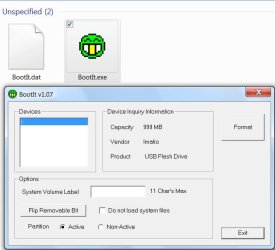
And the only utility that was doing it is the Lexar Bootit. I think Lexar no longer supports it and it is no longer available in their website. One can still download it from other sites.

29-07-2014 22-33-46.jpg

Lexar USB Formatting Tool Download 2013 | Computrogeek

It is said that at present it may not work on all brands of pen drives - including some Lexar, and that it may kill some pen drives.

So one has to use it at his own risk. ( Though I have this on my PC for so many years, I could never muster courage to try it. :D )

I suppose one has to click on the Flip Removable Bit, check Do not load system files and Non-Active - unless one wants it to be a bootable pen drive - and then Format. If the process goes through successfully the pen drive will appear as an HDD on any PC and can be partitioned and formatted as one likes. But it is a big IF."

Slartybart anyway has now provided the answer. Look for Win8 certified pen drives. Those are factory configured as Fixed Disks. (It is to meet Windows 8 certification Sandisk was the first to come out with pen drives configured as Fixed Disks but later retracted)
 
Last edited:

My Computer My Computer

At a glance

Windows 7 Home Premium 32 bit
OS
Windows 7 Home Premium 32 bit
Just for fun, i may try the lexar tool and see what happens... i have many pen drives so if i loose one i will cope :D
I will have a go later today if i get chance and report back.

Regards,
Jamie
 

My Computer My Computer

At a glance

Windows 8.1 Pro x64Intel Core i5-2500K @ 3.30GHz - S11558GB Corsair DDR3 XMS3, PC3-12800NVIDIA GeForce GTX 650
Computer type
PC/Desktop
Computer Manufacturer/Model Number
Self Built
OS
Windows 8.1 Pro x64
CPU
Intel Core i5-2500K @ 3.30GHz - S1155
Motherboard
Asus P8P67 LE Rev3, Intel P67, S115
Memory
8GB Corsair DDR3 XMS3, PC3-12800
Graphics Card(s)
NVIDIA GeForce GTX 650
Sound Card
On-Board
Monitor(s) Displays
3 x 24" {Extended Display}
Screen Resolution
1920 x 1080
Hard Drives
300GB Seagate Barracuda 7200
PSU
550W Coolermaster GX550
Case
Silverstone Precision PS04B
Cooling
Stock
Keyboard
Logitech K120
Mouse
World of Warcraft Cataclysm MMO Gaming Mouse
Internet Speed
80 MB
Antivirus
MSE / Windows Defender
Browser
Chrome
Back
Top