
How to fix "Current Pending Sector Count" on WD External Drive

duanvcd

New member
Local time
1:50 AM
Messages
7
How to fix "Current Pending Sector Count" on WD External Drive

Hi,
I bought a WD Passport 1 year ago, and I've tried to test it by HD Tune Pro and Hard Disk Sentinel.
And result are listed below:
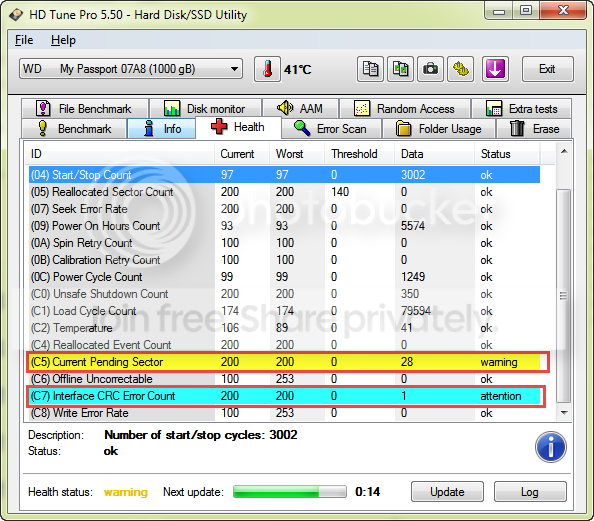
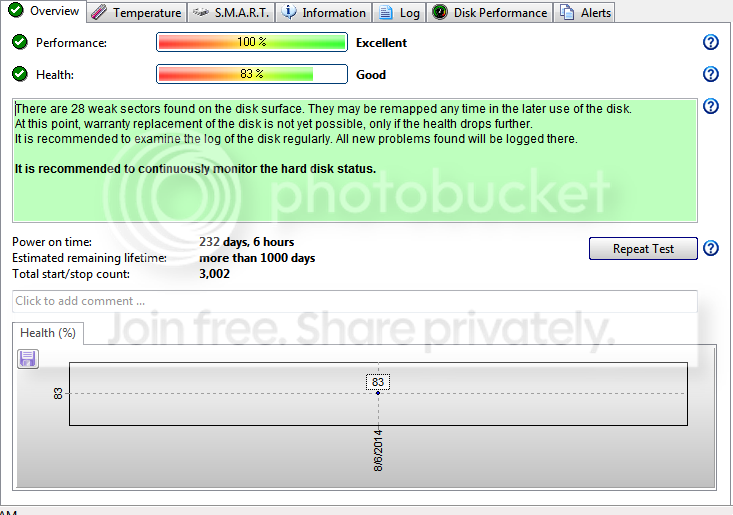


How could I fix this error? I feel my drive doesn't work softly anymore :(
Thank you so much!
 

My Computer My Computer

At a glance

Windows 7 Ultimate 64bitAMD Phenom 8450 Triple-Core 2.10GHz2GB DDR2
OS
Windows 7 Ultimate 64bit
CPU
AMD Phenom 8450 Triple-Core 2.10GHz
Motherboard
Gigabyte
Memory
2GB DDR2
What does "work softly" mean?

https://kb.acronis.com/content/9133

which says:

"Current Pending Sector Count S.M.A.R.T. parameter is a critical parameter and indicates the current count of unstable sectors (waiting for remapping). The raw value of this attribute indicates the total number of sectors waiting for remapping. Later, when some of these sectors are read successfully, the value is decreased. If errors still occur when reading some sector, the hard drive will try to restore the data, transfer it to the reserved disk area (spare area) and mark this sector as remapped.

Recommendations

This is a critical parameter. Degradation of this parameter may indicate imminent drive failure. Urgent data backup and hardware replacement is recommended."

You could run checkdisk and see if the number changes.

Or you could reformat, which is a drastic step and may not help.

Or you could adopt a policy of "watchful waiting" and hope. Hope that it doesn't get worse, while keeping your personal data backed up elsewhere.

Or you could throw in the towel and buy a new drive now, if this is causing you to lose sleep.
 

My Computer My Computer

At a glance

Windows 7 Home Premium SP1, 64-bitIntel Skylake i5-6600K, not overclocked8 GB HyperX DDR4-2666 (2 x 4 GB)none; graphics are integrated on CPU
Computer type
PC/Desktop
Computer Manufacturer/Model Number
Ignatz Special; 4 speed manual gearbox; factory air conditioning; one of one
OS
Windows 7 Home Premium SP1, 64-bit
CPU
Intel Skylake i5-6600K, not overclocked
Motherboard
AsRock Z170M Extreme 4, micro ATX
Memory
8 GB HyperX DDR4-2666 (2 x 4 GB)
Graphics Card(s)
none; graphics are integrated on CPU
Sound Card
onboard: Realtek ALC1150; external: USB Behringer UF0-202
Monitor(s) Displays
Dell S2340M 23 inch IPS
Screen Resolution
1600 x 900
Hard Drives
System: Crucial MX100 series SSD, 128 GB;
Data: Samsung Spinpoint 103SJ, 1 TB;
Backup: WD Caviar Green WD30EZRX-00D8PB0, 3 TB
PSU
Rosewill SilentNight 500 watt fanless, semi-modular
Case
Antec Solo II
Cooling
Noctua NH-U12S; Noctua F12 intake, Noctua S12A exhaust
Keyboard
Microsoft 200 6JH-00001 USB
Mouse
Dell or Microsoft optical wired; USB
Antivirus
Microsoft Security Essentials and Malwarebytes Premium
Browser
Pale Moon
Other Info
All fans PWM; speeds at idle: CPU circa 500 rpm; intake circa 600 rpm; exhaust circa 600 rpm; CPU temps 27 idle and 47 C load in a warm room (27 C/81 F) when running Intel Extreme Tuning Utility stress test.
"Current Pending Sector" is a direct indication of the number of bad sectors waiting to be remapped ( remapping is the process of marking defective sectors are bad and allocating spare sectors from the reserved pool as replacement "Logical Blocks" ). Even one "Current Pending Sector" is a clear indication of failing media. Yours is 28 which is pretty bad and storing any important data on this drive is a risk. If this disk is only using as a media storage ( songs, Videos etc - not business critical documents ) , you can try to run an "Extended Test" using "WD Data Lifeguard Diagnostics" and it may force remapping of the pending sectors.

WD Support / Downloads / SATA & SAS / WD VelociRaptor


If the WD tool failed to fix the disk, i won't recommend using the disk at all. But you may choose to store unimportant data if you wish.
 

My Computer My Computer

At a glance

Windows 7 Ultimate x64
Computer type
PC/Desktop
OS
Windows 7 Ultimate x64
Hello there duanvcd,

I am really sorry to hear about the frustration your WD My Passport is causing you. Even though you have already tested it, I would suggest you try the WD Data Lifeguard Diagnostic tool(as Anshad Edavana already mentioned) as it is a specifically designed software for your device.
If you get similar to the previous results, I would suggest you to back your data up as soon as possible. One thing you can do after that is to run chkdsk /r.
If the problem persists, and all your important data is safe, you can try to format the drive or eventually write zeros on it.

If nothing helps and the device is still in warranty, you can just RMA it WD Support / Warranty & RMA Services

Hope this helps,
D_Know_WD
 

My Computer My Computer

At a glance

Windows 7 Professional x64
Computer type
PC/Desktop
OS
Windows 7 Professional x64
Thank all of you guys,
My drive even didn't recognized in normal way when I plugged in into the PC :(
Damn!!! I hate this coz I don't know the reasons of failure.
I'm going to replace my drive now :(
 

My Computer My Computer

At a glance

Windows 7 Ultimate 64bitAMD Phenom 8450 Triple-Core 2.10GHz2GB DDR2
OS
Windows 7 Ultimate 64bit
CPU
AMD Phenom 8450 Triple-Core 2.10GHz
Motherboard
Gigabyte
Memory
2GB DDR2
Hello there duanvcd,

I am really sorry to hear about the frustration your WD My Passport is causing you. Even though you have already tested it, I would suggest you try the WD Data Lifeguard Diagnostic tool(as Anshad Edavana already mentioned) as it is a specifically designed software for your device.
If you get similar to the previous results, I would suggest you to back your data up as soon as possible. One thing you can do after that is to run chkdsk /r.
If the problem persists, and all your important data is safe, you can try to format the drive or eventually write zeros on it.

If nothing helps and the device is still in warranty, you can just RMA it WD Support / Warranty & RMA Services

Hope this helps,
D_Know_WD

Dear DKnowWD,
Is this product warranted global via WD website?
 

My Computer My Computer

At a glance

Windows 7 Ultimate 64bitAMD Phenom 8450 Triple-Core 2.10GHz2GB DDR2
OS
Windows 7 Ultimate 64bit
CPU
AMD Phenom 8450 Triple-Core 2.10GHz
Motherboard
Gigabyte
Memory
2GB DDR2
Back
Top