drive fallen and clicking sound want to recover data

krupa236

New member
Local time
9:35 PM
Messages
9
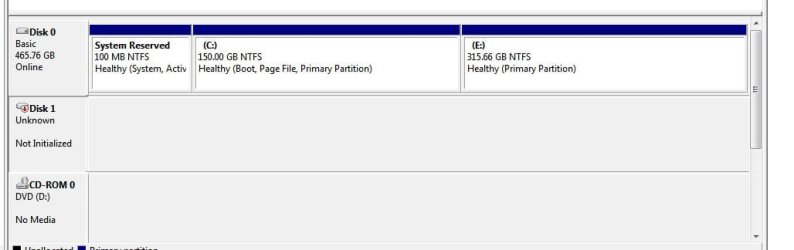
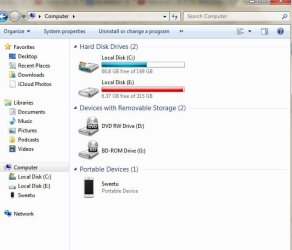
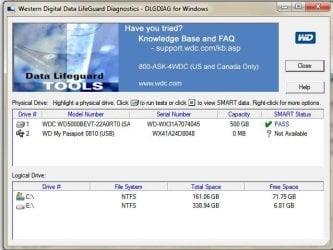
I have WD hard drive.it fell down and now there is clicking sound from the drive when i connect it.i want to recover my data.i have attached the disk management photo with it.i have tried ease us data recovery software but my drive is not showing up in it. Also it doesn't show up in my computer folder. So i would like to know how can i recover the data from my drive. after seeing the threads i also tried the wd digital data lifeguard and here this popped up.my drive is the one with serial numbe 8048. attaching the photo with it. Thanks in advance.
 

Attachments

  • data 1.JPG
    data 1.JPG
    30.9 KB · Views: 4
  • my computer.JPG
    my computer.JPG
    42.9 KB · Views: 53
  • drive.JPG
    drive.JPG
    53.1 KB · Views: 52
Last edited by a moderator:

My Computer My Computer

At a glance

windows 7 Home Premium 32-bit
Computer type
Laptop
Computer Manufacturer/Model Number
Acer
OS
windows 7 Home Premium 32-bit
Antivirus
Microsoft Essentials
You didn't say whether you ran the Quick Test and then the long/extended test with DataLifeguard Diagnostic for Windows and what the result was.

To me it appears that the drive has suffered mechanical damage due the fall and is now beyond redemption.

You had also tagged on to another old thread with the same problem and therein greg has suggested trying a "Copy and paste" method and also running the Datalifeguard Diagnostic for DOS ( if I had understood correctly). For your own satisfaction that you had done everything possible you can go through those motions.

If the DOS test also fails, contact Western Digital for a replacement if under warranty and also data recovery. Also ask them if the drive is hardware encrypted. ( To my knowledge except WD Elements drive, most other models of portable drives employ hardware encryption and data recovery is impossible even if you extract the drive from the enclosure and connect it as a secondary drive. Even if the drive is working one won't be able to get the data because it is encrypted. And that encrypt/decrypt hardware is in the USB to SATA bridge interface inside the enclosure. Once you take the HDD out of the enclosure you lose the decryptability.)

To run Datalifeguard Diagnostic for DOS:

1. Download Rufus https://rufus.akeo.ie/ and create a MSDOS/FreeDOS bootable pen drive. You may follow this http://support.wdc.com/download/notes/DLGDiagUSBInstructionsv3.pdf ( All data on the pendrive will be lost. So beforehand copy all data on the pen drive elsewhere.In other words use an empty pen drive to create a bootable pen drive.)

2. Extract dlgdiag_5_22.zip and copy the dlgdiag5.exe to the bootable pen drive.

3. Boot from the pen drive, against the command prompt type dlgdiag5.exe and press enter to run it.
 

My Computer My Computer

At a glance

Windows 7 Home Premium 32 bit
OS
Windows 7 Home Premium 32 bit
If it fell, it has probably a mechanical failure. You can try with a live Linux CD, but I think there is not much hope.
 

My Computer My Computer

At a glance

Vista, Windows7, Mint Mate, Zorin, Windows 8from 1.6GHz Duo to i7
Computer Manufacturer/Model Number
HP, Dell, Gateway, Toshiba - 4 laptops and 2 desktops
OS
Vista, Windows7, Mint Mate, Zorin, Windows 8
CPU
from 1.6GHz Duo to i7
Monitor(s) Displays
2x HP w2207
Hard Drives
5x HDD, 7x SSD, 12x Externals
Keyboard
with trackball - no mices
Mouse
Trackball mice
Internet Speed
DSL 6000
Hello krupa236 ,

The drive has suffered mechanical failure when it fell down and it's very unlikely that you'll be able to extract any information from it. I'm sorry for your data.

You might consider using professional data recovery services. WD do not provide data recovery services but you can have a look at the list of our data recovery partners here: Support Answers. Good luck.
 

My Computer My Computer

At a glance

Windows
Computer type
PC/Desktop
OS
Windows
What I didn't want to say in my previous post but now compelled to state:

This is a cut and paste from another website:

"Western Digital is manufacturing a significant number of their external hard drives with an encrypted hard drive controller. The main chip on the external hard drive SATA to USB 2.0 & 3.0 PCB adapter boards, performs a block level encryption on the data as it is written to and read from the hard drive itself. This encryption process is not configurable and is not typically advertised on their feature list, most users are completely unaware that this process is happening."

The significant part is what I have put in bold. Yes, most users are totally unaware of it and then come to know of it only when a data recovery becomes essential.

"This encryption typically becomes an issue for the end user when they suffer some type of electronics failure with the enclosure electronics board. Often times the hard drive itself is removed to access the data, but no data can be found or extracted. None of the standard data recovery utilities are able to detect or decrypt the data and often find a significant amount of fragmented and bogus data."

I made a polite and non-critical statement "contact Western Digital for a replacement if under warranty and also data recovery. Also ask them if the drive is hardware encrypted." If you would have done it the tech support would have directed you to a specific data recovery agency/agencies. Why?
"Western Digital and other drive companies usually only give their encryption secrets to one single data recovery company, who can then charge whatever they want, knowing they are the only ones that can recover it." :)

In your case @ krupa236, the data recovery agency has to repair the mechanicals of the drive to make it readable and then use decryption key/s so benevolently revealed to those agencies only and so they are going to extract as much as they can from you.:)

In another thread Western Digital in defence had replied to a user that the hardware encryption is configurable and can be disabled by the user. Most probably the user has to install the Drive Utilities that comes with the drive and disable it from within that software.

But I do not know whether all of this is made known in the documentation that is supplied to the users. Most probably not. Most users come to know of it only when they hit the wall by which time they are helpless. ( unless money is of no concern to them.)
 

My Computer My Computer

At a glance

Windows 7 Home Premium 32 bit
OS
Windows 7 Home Premium 32 bit
But I do not know whether all of this is made known in the documentation that is supplied to the users. Most probably not. Most users come to know of it only when they hit the wall by which time they are helpless. ( unless money is of no concern to them.)

I (and a lot of other folks too) only buy OEM "barebones" hard drives. And of course you get NO documentation or software with these - just the drive!

Great info. Thanks.
 

My Computer My Computer

At a glance

Windows 7 64 Bit Home Premium SP1i7-3820GSkill F3-14900CL9Q - 16GBEVGA GeForce GTX660 - Driver 352.86
Computer type
PC/Desktop
Computer Manufacturer/Model Number
Home Built - Jan 2013
OS
Windows 7 64 Bit Home Premium SP1
CPU
i7-3820
Motherboard
Asus P9X79-PRO - Bios 4608
Memory
GSkill F3-14900CL9Q - 16GB
Graphics Card(s)
EVGA GeForce GTX660 - Driver 352.86
Sound Card
On board Realtek ALC898
Monitor(s) Displays
Acer S271HL
Screen Resolution
1920 x 1080
Hard Drives
#1- Samsung 840 Pro Series
#2- Western Digital WD1002FAEX Sata3 Black
#3- Western Digital WD1002FAEX Sata3 Black
PSU
Corsair CMPSU-850TX-V2 - 850 watt (by Seasonic)
Case
Corsair Obsidian 550D
Cooling
Standard 3 120mm case fans, Cooler Master Hyper 212 EVO
Keyboard
MS KC-0405
Mouse
Intellimouse 5-button
Internet Speed
56 Mbits/Sec (on a good day)
Antivirus
Avast & Malwarebytes
Browser
Firefox
Other Info
Asus DVD - DRW-24B1ST 24X
@jumanji
i did run the lifeguard diagnostics. but the drive doesnt show as physical drive.it shows as usb.and smart status shows not available.And as soon as i start the test it shows the below attachment.
And about calling the western digital.they told me that they don't provide data recovery option.they only provide warranty replacement.
 

Attachments

  • logistic.JPG
    logistic.JPG
    65.4 KB · Views: 5

My Computer My Computer

At a glance

windows 7 Home Premium 32-bit
Computer type
Laptop
Computer Manufacturer/Model Number
Acer
OS
windows 7 Home Premium 32-bit
Antivirus
Microsoft Essentials
how do i use rufus? i dint understand the details about it. can you please explain me in detail.?
 

My Computer My Computer

At a glance

windows 7 Home Premium 32-bit
Computer type
Laptop
Computer Manufacturer/Model Number
Acer
OS
windows 7 Home Premium 32-bit
Antivirus
Microsoft Essentials
Your post #7: You have run the Quick Test. In a similar fashion you can run the long test also. And both will be superfast and give you a pass result which is false positive. Your drive is not reading even one sector. :)

Do you still want to run Datalifeguard diagnostics for DOS?

I had already outlined the process of creating a bootable pen drive in my post #2. You may also see my post http://www.sevenforums.com/hardware-devices/285354-windows-format-partition-disk-6.html#post2355231

The process is also explained in detail here http://support.wdc.com/download/notes/DLGDiagUSBInstructionsv3.pdf

Please read it and create the bootable pen drive on an empty pen drive. The whole process is simple.

If you encounter any problem in any specific step let us know.

EDIT: In India of course there is no Western Digital Supported Data Recovery Agency with whom they have shared the secrets - the decrypting keys. In other Asia Paciific countries Australia, Hong Kong, Japan, Singapore, Malaysia, Thailand, Indonesia, Philippines they do have their authorised agents as per the link given by TechpumpkinWD WD Support / Data Recovery Partners
 

My Computer My Computer

At a glance

Windows 7 Home Premium 32 bit
OS
Windows 7 Home Premium 32 bit

Attachments

  • 2015-02-18_1209.png
    2015-02-18_1209.png
    53.3 KB · Views: 2

My Computer My Computer

At a glance

Vista, Windows7, Mint Mate, Zorin, Windows 8from 1.6GHz Duo to i7
Computer Manufacturer/Model Number
HP, Dell, Gateway, Toshiba - 4 laptops and 2 desktops
OS
Vista, Windows7, Mint Mate, Zorin, Windows 8
CPU
from 1.6GHz Duo to i7
Monitor(s) Displays
2x HP w2207
Hard Drives
5x HDD, 7x SSD, 12x Externals
Keyboard
with trackball - no mices
Mouse
Trackball mice
Internet Speed
DSL 6000
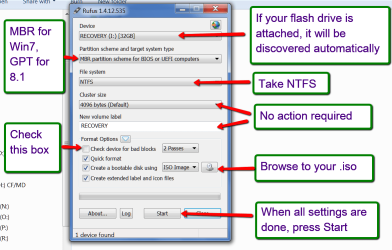
:) What whs has shown is for writing a bootable ISO to a pen drive and boot it.

For running the DOS version of Datalifeguard diagnostic for DOS, one has to create a bootable DOS pen drive. It can be FreeDOS or MSDOS.

Anyway, whs, you gave a good picture base on which I can buildup. ( I was too lazy to do a pictorial version. And that also explains why I do not write tutorials. I can only be a freelancer by temperament, writing as and when required. :))

1. If your pen drive is attached when you run Rufus, the first field ( Device) would show the attached pen drive. ( It is recommended that you unplug all other pen drives and USB HDDs and keep plugged in only that pen drive you want to be the MSDOS/FreeDOS bootable pen drive.)

2. In the second field leave it at MBR ( You have to think of GPT only if you are running Windows 8 and if you are on UEFI system. I have Windows 8 on an MBR disk. :))

3. In the next field - File System - select FAT32 if it is something else.( You cannot create a bootable DOS pen drive on NTFS).

4. Leave the cluster size at default - 4096 bytes.

4. In the fifth field, give a new volume label, if one is not already there or you want to give a different label.

5 In the Format Options,

a) If you know that your pen drive is good and exhibited no problems before, you need not check for bad blocks. That will save some time.

b) Leave Quick format checked. Full format will take time and normally not required.

c) In the Create bootable disk using, you will select MSDOS or FreeDOS from the drop down arrow for a bootable DOS pen drive.

d) Next item leave it checked.

Click on Start and let it complete. You can now boot into DOS with the pen drive. But what will you run with it?

Now download Datalifeguard diagnostic for DOS from
WD Support / Downloads / SATA & SAS / WD Blue / SE / SE16 (SATA II)

Extract the downloaded dlgdiag_5_22.zip in its download location and you will have the DOSDLG_5_22 folder. Open that folder. You will have two text files and the program file DOSDLG.exe This is your bread and butter. Copy this file only to the bootable DOS pen drive you had created.

Now boot your PC from this pendrive using the onetime boot menu. You will be booting into DOS and the c:> prompt will appear. Against the prompt type DOSDLG.exe and press enter . You will be running Datalifeguard for Diagnostics.

Hmmm... what actually whs has so painstakingly and mistakenly ;) posted, and what I had so painstakingly written here burning the midnight oil is all redundant, redundant redundant ...... for all this is nicely written in the reference I had given twice ( in my post #2 and post #9) and that is http://support.wdc.com/download/notes/DLGDiagUSBInstructionsv3.pdf

Why didn't you read it?

 

My Computer My Computer

At a glance

Windows 7 Home Premium 32 bit
OS
Windows 7 Home Premium 32 bit
This is what one of those servces says:

We support a wide range of Media’s such as Desktop hard Disks (5.25”), Laptop Hard Disks (3.5”, 2.5” & 1.8”),

I don't know whether I would trust a service that supports 3.5" laptop disks. That must be the Mongolian kind. LOL
 

My Computer My Computer

At a glance

Vista, Windows7, Mint Mate, Zorin, Windows 8from 1.6GHz Duo to i7
Computer Manufacturer/Model Number
HP, Dell, Gateway, Toshiba - 4 laptops and 2 desktops
OS
Vista, Windows7, Mint Mate, Zorin, Windows 8
CPU
from 1.6GHz Duo to i7
Monitor(s) Displays
2x HP w2207
Hard Drives
5x HDD, 7x SSD, 12x Externals
Keyboard
with trackball - no mices
Mouse
Trackball mice
Internet Speed
DSL 6000
What I didn't want to say in my previous post but now compelled to state:

This encryption process is not configurable and is not typically advertised on their feature list, most users are completely unaware that this process is happening."[/I]


Yes, WD external drives have hardware encryption. But this is no secret. It is an advertised feature put in place to protect the data of any unauthorised access and is included in the specifications list along with all other drive characteristics. You can see for yourself:

Support Answers

Support Answers
 

My Computer My Computer

At a glance

Windows
Computer type
PC/Desktop
OS
Windows
Hi TechpumpkinWD,

In this thread Data recovery on an external encrypted HDD [Solved] - Western Digital - Storage John VanKirk on May 16, 2013 had written

"Also for others following along, WD emailed me saying using the Firmware Security Encryption is an option, so if you have a newer Passport or Ultra removable USB drive, you can use it for backup safety, without encrypting the data if you configure if that way."

Can you please tell us how exactly to configure these drives to disable hardware encryption? If the user can configure it so, where exactly is it documented?

I do not have any WD external drive and I have been looking for an answer for quite sometime and I think I have the right WD person now.:)
 
Last edited:

My Computer My Computer

At a glance

Windows 7 Home Premium 32 bit
OS
Windows 7 Home Premium 32 bit
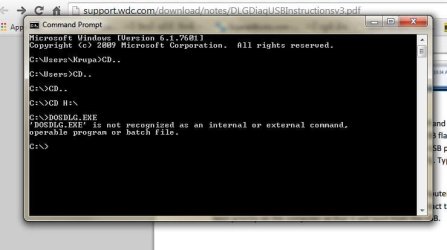
When i tired in command prompt i got this error.
 

Attachments

  • CMD.JPG
    CMD.JPG
    35.4 KB · Views: 1

My Computer My Computer

At a glance

windows 7 Home Premium 32-bit
Computer type
Laptop
Computer Manufacturer/Model Number
Acer
OS
windows 7 Home Premium 32-bit
Antivirus
Microsoft Essentials
Hi Krupa,

you can't run DOSDLG.exe in Windows.

You have to create a bootable DOS pen drive as indicated in post #11 using Rufus.Then you have to copy the DOSDLG.exe to that bootable DOS pen drive..

You have to boot your computer from your DOS pen drive using the onetime boot menu.. It will load DOS into your system and you will only get a C:> prompt when DOS is loaded.. At that prompt you will type DOSDLG.exe and press enter to run it.
 

My Computer My Computer

At a glance

Windows 7 Home Premium 32 bit
OS
Windows 7 Home Premium 32 bit
So i got my drive and the case open today. The inside problem is the disc inside spins for 30 seconds or so and then stops spinning. so now what can be done..?
 

My Computer My Computer

At a glance

windows 7 Home Premium 32-bit
Computer type
Laptop
Computer Manufacturer/Model Number
Acer
OS
windows 7 Home Premium 32-bit
Antivirus
Microsoft Essentials
Nothing - really nothing can be done. By the way you were only advised to run Datalifeguard diagnostics for DOS on it.

You may now giveup and buy a new drive and buy one without hardware encryption.In Western Digital portables only Elements comes without hardware encryption.
 

My Computer My Computer

At a glance

Windows 7 Home Premium 32 bit
OS
Windows 7 Home Premium 32 bit
no other procedure can be done.?
i had tried that dos using prompt but i guess i hadnt understood it well.
 

My Computer My Computer

At a glance

windows 7 Home Premium 32-bit
Computer type
Laptop
Computer Manufacturer/Model Number
Acer
OS
windows 7 Home Premium 32-bit
Antivirus
Microsoft Essentials
You can contact Western Digital Data Recovery Partners in APAC Region WD Support / Data Recovery Partners They also have free consultation numbers. You can ring them up.

Singapore
Kroll Ontrack Singapore Pte. Ltd.

Nordic European Centre
3, International Business Park
#02-27
Singapore 609927
Free Consultation:+65 6296 5131
Malaysia
Provided by Kroll Ontrack Singapore

Nordic European Centre
3, International Business Park
#02-27
Singapore 609927
Free Consultation: 1800806761
Phone number: +65 6296 5131

Even here you would have been well-off had you not opened up the drive.
 

My Computer My Computer

At a glance

Windows 7 Home Premium 32 bit
OS
Windows 7 Home Premium 32 bit
Back
Top