StevePhoto58
New member
- Local time
- 8:14 AM
- Messages
- 3
Okay, i'm guessing that this will be an easy one. I have four drives from a dead NAS that I want to recover data from. The drives are all okay from what I can see. I have one mounted here in an enclosure and I can see it in the Control Panel. All four discs appear the same way when I connect them. The NAS was set up as JBOD.
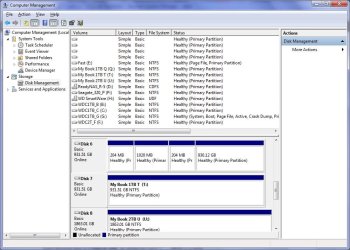
Now, as I said I can see the first drive (I know which is which from the NAS), and it looks like this
(see attachment)
You'll see the partitions all show, but I can't attach the drive an assign a drive letter. Can anyone help me with that? I do have Disk Internals recovery software, but if I can simply attach the drive and access the file system without running a recovery session, then that will save me lots of time.
Is there a way to do that?
I'm on Windows 7 Home Premium 64-bit. The drive is sitting in a USB3 SATA docking Station. I have 16Gb RAM and enough space to transfer the data from each of the four discs.
Cheers,
Steve
Now, as I said I can see the first drive (I know which is which from the NAS), and it looks like this
(see attachment)
You'll see the partitions all show, but I can't attach the drive an assign a drive letter. Can anyone help me with that? I do have Disk Internals recovery software, but if I can simply attach the drive and access the file system without running a recovery session, then that will save me lots of time.
Is there a way to do that?
I'm on Windows 7 Home Premium 64-bit. The drive is sitting in a USB3 SATA docking Station. I have 16Gb RAM and enough space to transfer the data from each of the four discs.
Cheers,
Steve
Attachments
My Computer
At a glance
Windows 7 Hime Premium 64Core i7
- Computer Manufacturer/Model Number
- home built
- OS
- Windows 7 Hime Premium 64
- CPU
- Core i7
 )
)