How to recover WD 1TB RAW HD

jk22

New member
Member
VIP
Local time
6:54 PM
Messages
115
Hey guys,

Yesterday, my laptop went to checkdisk on boot and after it finished I cant access my laptop 2 partition which is located on WesternDigital 1TB harddrive and its showing RAW like 0 bytes. I have very important data on it and I want to get back all data.

Can anyone tell me how to fix it ?

Regards.
 

My Computer My Computer

At a glance

Windows 10 Pro 64-bitIntel Core i7 5600U @ 2.60GHz Broadwell-U 14n...8.00GB Dual-Channel DDR3 @ 798MHz (11-11-11-28)Intel HD Graphics 5500
Computer type
Laptop
Computer Manufacturer/Model Number
Lenovo ThinkPad X1 Carbon
OS
Windows 10 Pro 64-bit
CPU
Intel Core i7 5600U @ 2.60GHz Broadwell-U 14nm Technology
Motherboard
LENOVO 20BTS0Y500 (U3E1)
Memory
8.00GB Dual-Channel DDR3 @ 798MHz (11-11-11-28)
Graphics Card(s)
Intel HD Graphics 5500
Sound Card
Speaker/HP (Realtek High Definition Audio)
Monitor(s) Displays
Generic PnP Monitor on Intel HD Graphics 5500
Screen Resolution
1920 x 1080 x 32 bits per pixel
Hard Drives
SAMSUNG MZHPV256HDGL-000L1 (256 GB SSD)
Keyboard
Standard PS/2 Keyboard
Mouse
Logitech G102 Prodigy Gaming Mouse
Internet Speed
10 Mbps
Antivirus
Comodo Firewall 11.0.0.6606
Browser
Google Chrome and Firefox
Hello jk22!

I'm sorry for the problem with the WD drive! :/

What happened that it decided to run a chkdsk? Also, what model is the WD drive and how old is it?

The RAW format means that the initial file system that that partition had, has been broken or damaged or infected, so it went corrupted and the system can't recognize it anymore. The data is most likely still there, but it's very difficult to extract it from a raw drive. :/

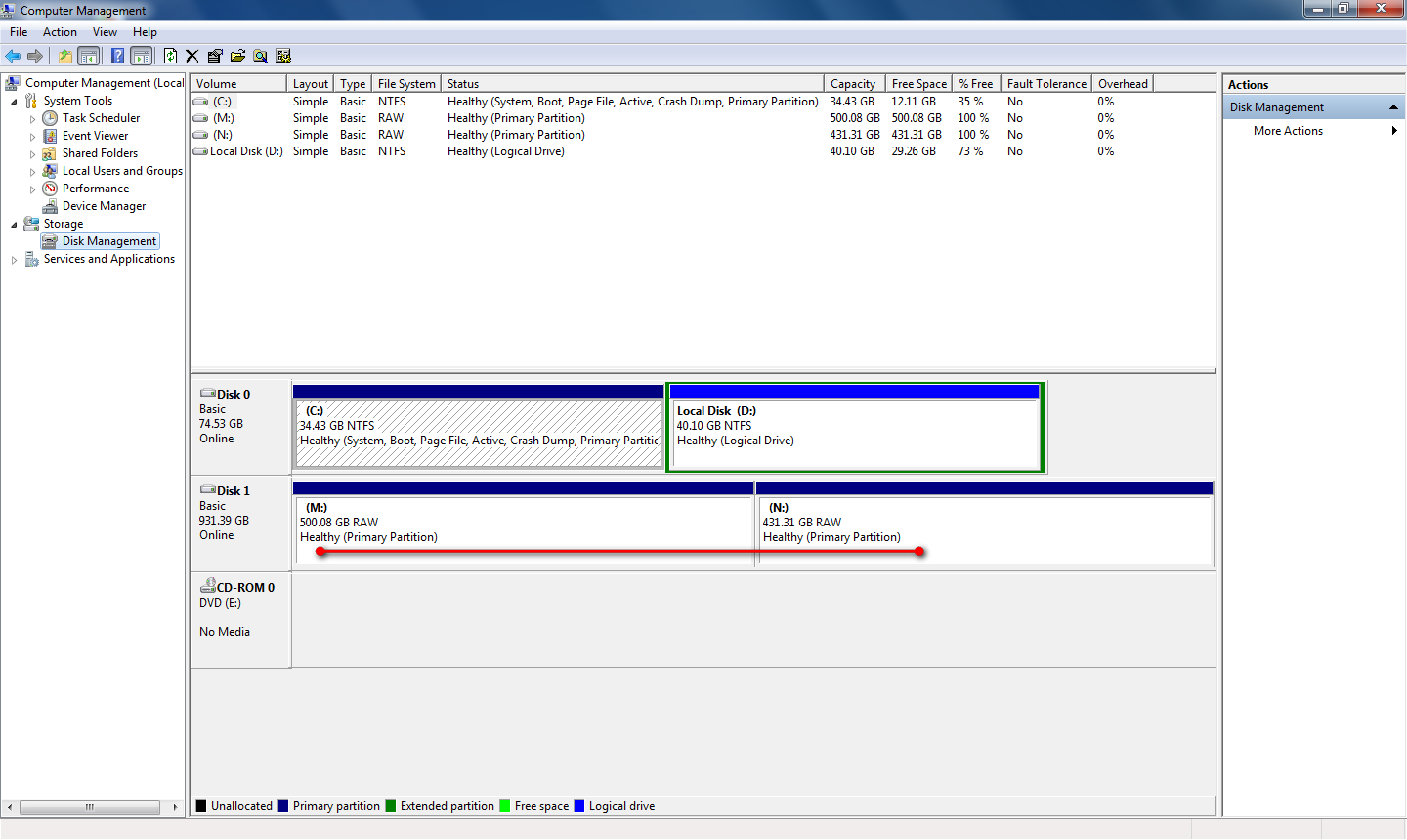
Could you just in case post a screenshot of Disk Management?

You could try booting to a USB/Linux Live CD, the drive may be accessible from there. If it doesn't work you could try a data recovery software on your own, but bare in mind it could damage the drive/data more than help. :/

Otherwise, the next step would be professional data recovery service, WD has partners in the field.

Best of luck and post back! :)

CK_WD
 

My Computer My Computer

At a glance

Windows 7 Home Premium x64
Computer type
PC/Desktop
OS
Windows 7 Home Premium x64
Mode: WD Blue WD10JPVX
I have purchased it like 7 months ago and its still in warranty.

Disk Management:
U0vlGz9.png


What do you mean by this ?
You could try booting to a USB/Linux Live CD ?
 
Last edited:

My Computer My Computer

At a glance

Windows 10 Pro 64-bitIntel Core i7 5600U @ 2.60GHz Broadwell-U 14n...8.00GB Dual-Channel DDR3 @ 798MHz (11-11-11-28)Intel HD Graphics 5500
Computer type
Laptop
Computer Manufacturer/Model Number
Lenovo ThinkPad X1 Carbon
OS
Windows 10 Pro 64-bit
CPU
Intel Core i7 5600U @ 2.60GHz Broadwell-U 14nm Technology
Motherboard
LENOVO 20BTS0Y500 (U3E1)
Memory
8.00GB Dual-Channel DDR3 @ 798MHz (11-11-11-28)
Graphics Card(s)
Intel HD Graphics 5500
Sound Card
Speaker/HP (Realtek High Definition Audio)
Monitor(s) Displays
Generic PnP Monitor on Intel HD Graphics 5500
Screen Resolution
1920 x 1080 x 32 bits per pixel
Hard Drives
SAMSUNG MZHPV256HDGL-000L1 (256 GB SSD)
Keyboard
Standard PS/2 Keyboard
Mouse
Logitech G102 Prodigy Gaming Mouse
Internet Speed
10 Mbps
Antivirus
Comodo Firewall 11.0.0.6606
Browser
Google Chrome and Firefox
I can see that both of your WD Blue partitions are listed as RAW< which means you're not supposed to be able to access either of them at this point. :/ I can see the capacities and the drive letters, but it says the drive/partitions is/are 100% free.. :/

Yes, you can try booting to a Linux-based Live CD. Here's a sevenforums tutorial by Golden on a Live CD with Peppermint:
http://www.sevenforums.com/tutorials/256518-peppermint-live-cd-dvd-usb-create-emergency-backup.html

Good luck! :)

CK_WD
 

My Computer My Computer

At a glance

Windows 7 Home Premium x64
Computer type
PC/Desktop
OS
Windows 7 Home Premium x64

My Computer My Computer

At a glance

Vista, Windows7, Mint Mate, Zorin, Windows 8from 1.6GHz Duo to i7
Computer Manufacturer/Model Number
HP, Dell, Gateway, Toshiba - 4 laptops and 2 desktops
OS
Vista, Windows7, Mint Mate, Zorin, Windows 8
CPU
from 1.6GHz Duo to i7
Monitor(s) Displays
2x HP w2207
Hard Drives
5x HDD, 7x SSD, 12x Externals
Keyboard
with trackball - no mices
Mouse
Trackball mice
Internet Speed
DSL 6000
Hi jk22,

You have got various suggestions to deal with the problem.

First thing I would like to know is the Model No: of your Lenovo laptop. Does it have two internal drives?

Your laptop is booting. Fine.

At boot time Windows ran check disk on the second drive, not without reason. Did it say check disk completed successfully after going through all verification stages? If not do you remember any other message that came through?

Before embarking on more rigorous procedures, try running check disk again from command prompt.

Open Command prompt.

Start > All programs > Accessories > Command Prompt

Type
CHKDSK I: /f /v /r /x Press enter. Note: Replace I: with the actual drive letter of the RAW volume. Also note there is a space before every /

Allow check disk to complete. Reboot your PC.

Does it resolve the problem? There is - according to my thinking and previous precedent - a 50% chance.

If it doesn't work then you can think of other procedures.
 

My Computer My Computer

At a glance

Windows 7 Home Premium 32 bit
OS
Windows 7 Home Premium 32 bit
I can see that both of your WD Blue partitions are listed as RAW< which means you're not supposed to be able to access either of them at this point. :/ I can see the capacities and the drive letters, but it says the drive/partitions is/are 100% free.. :/

Yes, you can try booting to a Linux-based Live CD. Here's a sevenforums tutorial by Golden on a Live CD with Peppermint:
http://www.sevenforums.com/tutorials/256518-peppermint-live-cd-dvd-usb-create-emergency-backup.html

Good luck! :)

CK_WD

I will try it out.


I have used that but it didnt showed anything.

Hi jk22,

You have got various suggestions to deal with the problem.

First thing I would like to know is the Model No: of your Lenovo laptop. Does it have two internal drives?

Your laptop is booting. Fine.

At boot time Windows ran check disk on the second drive, not without reason. Did it say check disk completed successfully after going through all verification stages? If not do you remember any other message that came through?

Before embarking on more rigorous procedures, try running check disk again from command prompt.

Open Command prompt.

Start > All programs > Accessories > Command Prompt

Type
CHKDSK I: /f /v /r /x Press enter. Note: Replace I: with the actual drive letter of the RAW volume. Also note there is a space before every /

Allow check disk to complete. Reboot your PC.

Does it resolve the problem? There is - according to my thinking and previous precedent - a 50% chance.

If it doesn't work then you can think of other procedures.

I was using this WD Harddisk as a Caddy drive on my Laptop Lenovo G510. I do have Lenovo T400 where I am using it with external enclosure.

I just clean installed Windows 10 Home x64 and it showed me check disk so I thought to dont worry and keep going the check disk. But after that I cant open drives from explorer than I take out the harddrive and made an external drive.

About checkdisk its saying.

CHKDSK is not available for RAW drives.
 
Last edited:

My Computer My Computer

At a glance

Windows 10 Pro 64-bitIntel Core i7 5600U @ 2.60GHz Broadwell-U 14n...8.00GB Dual-Channel DDR3 @ 798MHz (11-11-11-28)Intel HD Graphics 5500
Computer type
Laptop
Computer Manufacturer/Model Number
Lenovo ThinkPad X1 Carbon
OS
Windows 10 Pro 64-bit
CPU
Intel Core i7 5600U @ 2.60GHz Broadwell-U 14nm Technology
Motherboard
LENOVO 20BTS0Y500 (U3E1)
Memory
8.00GB Dual-Channel DDR3 @ 798MHz (11-11-11-28)
Graphics Card(s)
Intel HD Graphics 5500
Sound Card
Speaker/HP (Realtek High Definition Audio)
Monitor(s) Displays
Generic PnP Monitor on Intel HD Graphics 5500
Screen Resolution
1920 x 1080 x 32 bits per pixel
Hard Drives
SAMSUNG MZHPV256HDGL-000L1 (256 GB SSD)
Keyboard
Standard PS/2 Keyboard
Mouse
Logitech G102 Prodigy Gaming Mouse
Internet Speed
10 Mbps
Antivirus
Comodo Firewall 11.0.0.6606
Browser
Google Chrome and Firefox

My Computer My Computer

At a glance

Windows 10 Pro 64-bitIntel Core i7 5600U @ 2.60GHz Broadwell-U 14n...8.00GB Dual-Channel DDR3 @ 798MHz (11-11-11-28)Intel HD Graphics 5500
Computer type
Laptop
Computer Manufacturer/Model Number
Lenovo ThinkPad X1 Carbon
OS
Windows 10 Pro 64-bit
CPU
Intel Core i7 5600U @ 2.60GHz Broadwell-U 14nm Technology
Motherboard
LENOVO 20BTS0Y500 (U3E1)
Memory
8.00GB Dual-Channel DDR3 @ 798MHz (11-11-11-28)
Graphics Card(s)
Intel HD Graphics 5500
Sound Card
Speaker/HP (Realtek High Definition Audio)
Monitor(s) Displays
Generic PnP Monitor on Intel HD Graphics 5500
Screen Resolution
1920 x 1080 x 32 bits per pixel
Hard Drives
SAMSUNG MZHPV256HDGL-000L1 (256 GB SSD)
Keyboard
Standard PS/2 Keyboard
Mouse
Logitech G102 Prodigy Gaming Mouse
Internet Speed
10 Mbps
Antivirus
Comodo Firewall 11.0.0.6606
Browser
Google Chrome and Firefox
You can use any Linux distro.
 

My Computer My Computer

At a glance

Vista, Windows7, Mint Mate, Zorin, Windows 8from 1.6GHz Duo to i7
Computer Manufacturer/Model Number
HP, Dell, Gateway, Toshiba - 4 laptops and 2 desktops
OS
Vista, Windows7, Mint Mate, Zorin, Windows 8
CPU
from 1.6GHz Duo to i7
Monitor(s) Displays
2x HP w2207
Hard Drives
5x HDD, 7x SSD, 12x Externals
Keyboard
with trackball - no mices
Mouse
Trackball mice
Internet Speed
DSL 6000
I think its just partition table is not readable or only MBR is not readable?

Check the post what he said:
cgsecurity.org ? View topic - TestDisk appears Partition : Read error

Edit: Can I use Ubuntu instead of PepperMint6 ?

From whichever machine and configuration you posted the screenshot, the two partitions appear. So it is not the loss of partition Table.

Is it MBR - We have to check on it.

Live Linux - Keep it in the backburner for now..

Two laptops, two different OS, two different connect mechanism - that is not going to lead us anywhere.

Please stick to one configuration as follows and don't keep changing till the problem is resolved.

Laptop - whichever laptop has Windows 7 on it. ( Which one is it -G 510 or T 600?) Windows 10 precipitated the problem as per your recent disclosure. So keep away from it for now.

1TB WD drive inside an enclosure.

Boot into Windows 7, plug in your 1TB external drive to the USB port and post the screenshot of Windows Disk Management. Upload to SevenForum Servers.

http://www.sevenforums.com/tutorials/274797-disk-management-post-screen-capture-image.html

http://www.sevenforums.com/tutorials/9733-screenshots-files-upload-post-seven-forums.html
 

My Computer My Computer

At a glance

Windows 7 Home Premium 32 bit
OS
Windows 7 Home Premium 32 bit
I am using Ubuntu from USB Flash Drive and its showing me all data and it makes me happy but when I try to copy its say

there was an error copying the file into /media/ubuntu/Local Disk

Moreover, every data which I copied to other drive showing 0 bytes instead of notepad files which are showing actual size and working good.
 
Last edited:

My Computer My Computer

At a glance

Windows 10 Pro 64-bitIntel Core i7 5600U @ 2.60GHz Broadwell-U 14n...8.00GB Dual-Channel DDR3 @ 798MHz (11-11-11-28)Intel HD Graphics 5500
Computer type
Laptop
Computer Manufacturer/Model Number
Lenovo ThinkPad X1 Carbon
OS
Windows 10 Pro 64-bit
CPU
Intel Core i7 5600U @ 2.60GHz Broadwell-U 14nm Technology
Motherboard
LENOVO 20BTS0Y500 (U3E1)
Memory
8.00GB Dual-Channel DDR3 @ 798MHz (11-11-11-28)
Graphics Card(s)
Intel HD Graphics 5500
Sound Card
Speaker/HP (Realtek High Definition Audio)
Monitor(s) Displays
Generic PnP Monitor on Intel HD Graphics 5500
Screen Resolution
1920 x 1080 x 32 bits per pixel
Hard Drives
SAMSUNG MZHPV256HDGL-000L1 (256 GB SSD)
Keyboard
Standard PS/2 Keyboard
Mouse
Logitech G102 Prodigy Gaming Mouse
Internet Speed
10 Mbps
Antivirus
Comodo Firewall 11.0.0.6606
Browser
Google Chrome and Firefox
I think its just partition table is not readable or only MBR is not readable?

Check the post what he said:
cgsecurity.org ? View topic - TestDisk appears Partition : Read error

Edit: Can I use Ubuntu instead of PepperMint6 ?

From whichever machine and configuration you posted the screenshot, the two partitions appear. So it is not the loss of partition Table.

Is it MBR - We have to check on it.

Live Linux - Keep it in the backburner for now..

Two laptops, two different OS, two different connect mechanism - that is not going to lead us anywhere.

Please stick to one configuration as follows and don't keep changing till the problem is resolved.

Laptop - whichever laptop has Windows 7 on it. ( Which one is it -G 510 or T 600?) Windows 10 precipitated the problem as per your recent disclosure. So keep away from it for now.

1TB WD drive inside an enclosure.

Boot into Windows 7, plug in your 1TB external drive to the USB port and post the screenshot of Windows Disk Management. Upload to SevenForum Servers.

http://www.sevenforums.com/tutorials/274797-disk-management-post-screen-capture-image.html

http://www.sevenforums.com/tutorials/9733-screenshots-files-upload-post-seven-forums.html

I have posted the screenshot from Lenovo T400 Windows 7 SP1 Ultimate x64.

Yes, its MBR.

Its Lenovo T400 not T600.

Here is the Disk Management Screenshot:


U0vlGz9.png
 

My Computer My Computer

At a glance

Windows 10 Pro 64-bitIntel Core i7 5600U @ 2.60GHz Broadwell-U 14n...8.00GB Dual-Channel DDR3 @ 798MHz (11-11-11-28)Intel HD Graphics 5500
Computer type
Laptop
Computer Manufacturer/Model Number
Lenovo ThinkPad X1 Carbon
OS
Windows 10 Pro 64-bit
CPU
Intel Core i7 5600U @ 2.60GHz Broadwell-U 14nm Technology
Motherboard
LENOVO 20BTS0Y500 (U3E1)
Memory
8.00GB Dual-Channel DDR3 @ 798MHz (11-11-11-28)
Graphics Card(s)
Intel HD Graphics 5500
Sound Card
Speaker/HP (Realtek High Definition Audio)
Monitor(s) Displays
Generic PnP Monitor on Intel HD Graphics 5500
Screen Resolution
1920 x 1080 x 32 bits per pixel
Hard Drives
SAMSUNG MZHPV256HDGL-000L1 (256 GB SSD)
Keyboard
Standard PS/2 Keyboard
Mouse
Logitech G102 Prodigy Gaming Mouse
Internet Speed
10 Mbps
Antivirus
Comodo Firewall 11.0.0.6606
Browser
Google Chrome and Firefox
OK, good.

Keep the same setup in all what you do - Windows 7, your 1TB WD Blue inside the enclosure and plugged into the USB port.

You said using Live Ubuntu you were able to see all your data but unable to copy. Unfortunately I am not familiar with Ubuntu and so I shall go my own way -the Lucid Puppy way,

Go to this post http://www.sevenforums.com/hardware...ly-unrecognisable-hard-drive.html#post2936753 and create the Lucid Puppy pen drive.( Use an empty pendrive since any and all data in it will be lost when you create the Lucid Puppy pendrive)

Boot with Lucid puppy and see whether you can see any folders and files to recover.

[Go to the topic Recovering files from the non-bootable Internal Drive: in this thread Lucid Puppy way to recover files from a non-bootable computer on how-to. In your case it will be your external drive.You will be copying from your faulty external to another external. Please omit whatever is stated above this topic which only states how I made my drive RAW to try Lucid Puppy. You already have a RAW drive..]

That thread also details how to copy files/folders seen by Lucid Puppy and you should have no difficulty in doing that.
 
Last edited:

My Computer My Computer

At a glance

Windows 7 Home Premium 32 bit
OS
Windows 7 Home Premium 32 bit
OK, good.

Keep the same setup in all what you do - Windows 7, your 1TB WD Blue inside the enclosure and plugged into the USB port.

You said using Live Ubuntu you were able to see all your data but unable to copy. Unfortunately I am not familiar with Ubuntu and so I shall go my own way -the Lucid Puppy way,

Go to this post http://www.sevenforums.com/hardware...ly-unrecognisable-hard-drive.html#post2936753 and create the Lucid Puppy pen drive.( Use an empty pendrive since any and all data in it will be lost when you create the Lucid Puppy pendrive)

Boot with Lucid puppy and see whether you can see any folders and files to recover.

[Go to the topic Recovering files from the non-bootable Internal Drive: in this thread Lucid Puppy way to recover files from a non-bootable computer on how-to. In your case it will be your external drive.You will be copying from your faulty external to another external. Please omit whatever is stated above this topic which only states how I made my drive RAW to try Lucid Puppy. You already have a RAW drive..]

That thread also details how to copy files/folders seen by Lucid Puppy and you should have no difficulty in doing that.

I am using Peppermint and its showing me all data and I can read it and copy aswell.

What do u you suggest Peppermint or Lucid Puppy ?
 

My Computer My Computer

At a glance

Windows 10 Pro 64-bitIntel Core i7 5600U @ 2.60GHz Broadwell-U 14n...8.00GB Dual-Channel DDR3 @ 798MHz (11-11-11-28)Intel HD Graphics 5500
Computer type
Laptop
Computer Manufacturer/Model Number
Lenovo ThinkPad X1 Carbon
OS
Windows 10 Pro 64-bit
CPU
Intel Core i7 5600U @ 2.60GHz Broadwell-U 14nm Technology
Motherboard
LENOVO 20BTS0Y500 (U3E1)
Memory
8.00GB Dual-Channel DDR3 @ 798MHz (11-11-11-28)
Graphics Card(s)
Intel HD Graphics 5500
Sound Card
Speaker/HP (Realtek High Definition Audio)
Monitor(s) Displays
Generic PnP Monitor on Intel HD Graphics 5500
Screen Resolution
1920 x 1080 x 32 bits per pixel
Hard Drives
SAMSUNG MZHPV256HDGL-000L1 (256 GB SSD)
Keyboard
Standard PS/2 Keyboard
Mouse
Logitech G102 Prodigy Gaming Mouse
Internet Speed
10 Mbps
Antivirus
Comodo Firewall 11.0.0.6606
Browser
Google Chrome and Firefox
Ok, if you are already using Peppermint ( Tutorial by Golden) and can copy all data, there is no need to redo it with Lucid Puppy. Go ahead with Peppermint. The end is what matters and not the means. There are many routes to reach the same destination.
 

My Computer My Computer

At a glance

Windows 7 Home Premium 32 bit
OS
Windows 7 Home Premium 32 bit
Ok, if you are already using Peppermint ( Tutorial by Golden) and can copy all data, there is no need to redo it with Lucid Puppy. Go ahead with Peppermint. The end is what matters and not the means. There are many routes to reach the same destination.

Yes you are right but Peppermint is very lazy on copying files.
 

My Computer My Computer

At a glance

Windows 10 Pro 64-bitIntel Core i7 5600U @ 2.60GHz Broadwell-U 14n...8.00GB Dual-Channel DDR3 @ 798MHz (11-11-11-28)Intel HD Graphics 5500
Computer type
Laptop
Computer Manufacturer/Model Number
Lenovo ThinkPad X1 Carbon
OS
Windows 10 Pro 64-bit
CPU
Intel Core i7 5600U @ 2.60GHz Broadwell-U 14nm Technology
Motherboard
LENOVO 20BTS0Y500 (U3E1)
Memory
8.00GB Dual-Channel DDR3 @ 798MHz (11-11-11-28)
Graphics Card(s)
Intel HD Graphics 5500
Sound Card
Speaker/HP (Realtek High Definition Audio)
Monitor(s) Displays
Generic PnP Monitor on Intel HD Graphics 5500
Screen Resolution
1920 x 1080 x 32 bits per pixel
Hard Drives
SAMSUNG MZHPV256HDGL-000L1 (256 GB SSD)
Keyboard
Standard PS/2 Keyboard
Mouse
Logitech G102 Prodigy Gaming Mouse
Internet Speed
10 Mbps
Antivirus
Comodo Firewall 11.0.0.6606
Browser
Google Chrome and Firefox
Do you know any notepad application where I can check what is changed on same notepad file name but with different sizes.
 

My Computer My Computer

At a glance

Windows 10 Pro 64-bitIntel Core i7 5600U @ 2.60GHz Broadwell-U 14n...8.00GB Dual-Channel DDR3 @ 798MHz (11-11-11-28)Intel HD Graphics 5500
Computer type
Laptop
Computer Manufacturer/Model Number
Lenovo ThinkPad X1 Carbon
OS
Windows 10 Pro 64-bit
CPU
Intel Core i7 5600U @ 2.60GHz Broadwell-U 14nm Technology
Motherboard
LENOVO 20BTS0Y500 (U3E1)
Memory
8.00GB Dual-Channel DDR3 @ 798MHz (11-11-11-28)
Graphics Card(s)
Intel HD Graphics 5500
Sound Card
Speaker/HP (Realtek High Definition Audio)
Monitor(s) Displays
Generic PnP Monitor on Intel HD Graphics 5500
Screen Resolution
1920 x 1080 x 32 bits per pixel
Hard Drives
SAMSUNG MZHPV256HDGL-000L1 (256 GB SSD)
Keyboard
Standard PS/2 Keyboard
Mouse
Logitech G102 Prodigy Gaming Mouse
Internet Speed
10 Mbps
Antivirus
Comodo Firewall 11.0.0.6606
Browser
Google Chrome and Firefox
Nope. You may put any such query on the Software subforum where there will be others in the know and can advise you better.
 

My Computer My Computer

At a glance

Windows 7 Home Premium 32 bit
OS
Windows 7 Home Premium 32 bit
Nope. You may put any such query on the Software subforum where there will be others in the know.

Okay and I will update you about harddrive shortly.
 

My Computer My Computer

At a glance

Windows 10 Pro 64-bitIntel Core i7 5600U @ 2.60GHz Broadwell-U 14n...8.00GB Dual-Channel DDR3 @ 798MHz (11-11-11-28)Intel HD Graphics 5500
Computer type
Laptop
Computer Manufacturer/Model Number
Lenovo ThinkPad X1 Carbon
OS
Windows 10 Pro 64-bit
CPU
Intel Core i7 5600U @ 2.60GHz Broadwell-U 14nm Technology
Motherboard
LENOVO 20BTS0Y500 (U3E1)
Memory
8.00GB Dual-Channel DDR3 @ 798MHz (11-11-11-28)
Graphics Card(s)
Intel HD Graphics 5500
Sound Card
Speaker/HP (Realtek High Definition Audio)
Monitor(s) Displays
Generic PnP Monitor on Intel HD Graphics 5500
Screen Resolution
1920 x 1080 x 32 bits per pixel
Hard Drives
SAMSUNG MZHPV256HDGL-000L1 (256 GB SSD)
Keyboard
Standard PS/2 Keyboard
Mouse
Logitech G102 Prodigy Gaming Mouse
Internet Speed
10 Mbps
Antivirus
Comodo Firewall 11.0.0.6606
Browser
Google Chrome and Firefox
Problem is solved. Thanks for helping me!
 

My Computer My Computer

At a glance

Windows 10 Pro 64-bitIntel Core i7 5600U @ 2.60GHz Broadwell-U 14n...8.00GB Dual-Channel DDR3 @ 798MHz (11-11-11-28)Intel HD Graphics 5500
Computer type
Laptop
Computer Manufacturer/Model Number
Lenovo ThinkPad X1 Carbon
OS
Windows 10 Pro 64-bit
CPU
Intel Core i7 5600U @ 2.60GHz Broadwell-U 14nm Technology
Motherboard
LENOVO 20BTS0Y500 (U3E1)
Memory
8.00GB Dual-Channel DDR3 @ 798MHz (11-11-11-28)
Graphics Card(s)
Intel HD Graphics 5500
Sound Card
Speaker/HP (Realtek High Definition Audio)
Monitor(s) Displays
Generic PnP Monitor on Intel HD Graphics 5500
Screen Resolution
1920 x 1080 x 32 bits per pixel
Hard Drives
SAMSUNG MZHPV256HDGL-000L1 (256 GB SSD)
Keyboard
Standard PS/2 Keyboard
Mouse
Logitech G102 Prodigy Gaming Mouse
Internet Speed
10 Mbps
Antivirus
Comodo Firewall 11.0.0.6606
Browser
Google Chrome and Firefox
Back
Top