WD external HD changes from NTFS to RAW - how to retrieve data?

Odelot

New member
Local time
5:28 PM
Messages
12
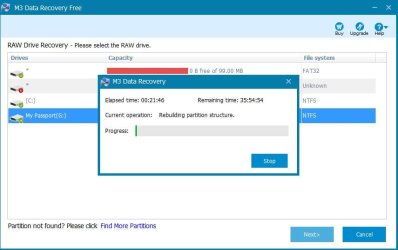
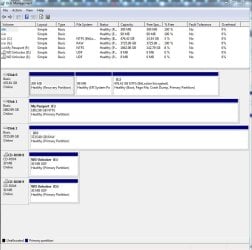
I have a Passport 4TB external HD. I have used this drive and several other WD external drives without incident for several years. Upon connecting it today, it asked me for my password - as it ordinarily does - but instead of showing up under My Computer as 'My Passport G:', it shows up as 'Local Disk G:' and asks if I want to reformat it. So I went to diskmgmt.msc (see screen capture) and it says this sector is now RAW (note the sector on my other WD HD is NTFS). I contacted Western Digital about this and they said to attempt to retrieve the data using a third party tool M3 Data Recovery.

If M3 Data Recovery doesn't work, what other options might there be?

M3 Data Recovery looks like it will take a long time (22-23 hrs). Is there possibly a quicker way? Would XCopy work?

What might have been the cause of this?

Does anyone else here have any experience with issues like this? And what was the resolution?
 

Attachments

  • WD3_2018-05-20.JPG
    WD3_2018-05-20.JPG
    14 KB · Views: 35
  • WD M3 data recovery 2018-05-20.JPG
    WD M3 data recovery 2018-05-20.JPG
    43.9 KB · Views: 1
  • diskmgmt_dot_msc_2018-05-20.JPG
    diskmgmt_dot_msc_2018-05-20.JPG
    94.7 KB · Views: 1

My Computer My Computer

Computer type
PC/Desktop
OS
Windows7
You don't want data recovery it will take hours and may make things worse. Raw means it's lost partition table you need specific partition recovery software there are lots of free ones on Google once partition is recovered files will be there it shouldn't take very long to find it. If the data is vital do nothing and send to a data recovery firm
 

My Computer My Computer

Computer type
PC/Desktop
OS
win 8 32 bit
sorry for my bad english...

use any free cloning-tool (dd_rescue e.g.) to transfer data to a new drive

if disk doesn't respond or lags (copy time more than 24 hours) this is common wd firmware problem caused by bad sectors on the surface - only option for recovery is a pro ! i have 5-10 such cases per month.

regards
 

My Computer My Computer

Computer type
PC/Desktop
OS
Linux Mint 64
You don't want data recovery it will take hours and may make things worse. Raw means it's lost partition table you need specific partition recovery software there are lots of free ones on Google once partition is recovered files will be there it shouldn't take very long to find it. If the data is vital do nothing and send to a data recovery firm
Thanks for your post.
I'm a newbie to things like this, but it seems that partition recovery software such as Download EaseUS Partition Recovery and Free EaseUS Data Recovery does the same thing as using this Free data recovery software for Mac/Windows: M3 Data Recovery
Or am I wrong? If so, what's the difference between the two.
 

My Computer My Computer

Computer type
PC/Desktop
OS
Windows7

My Computer My Computer

Computer type
Laptop
Computer Manufacturer/Model Number
Dell Precision 15 7550 Workstation
OS
Windows 10 22H2 Pro
CPU
Intel(R) Xeon W-10885M
Motherboard
Dell
Memory
2x 32 GB DDR4 ECC memory (128 GB max)
Graphics Card(s)
Intel onboard GPU 1080p - Quadro RTX 5000 Max-Q GPU 4K
Hard Drives
1TB Samsung 9100 Pro main M2 SSD
2x 2TB Samsung 9100 Pro temp storage M2 SSD (6 TB max)
Mouse
Logitech MX-25 Bluetooth
Internet Speed
slow
Antivirus
MS
Browser
Pale Moon 34.x.x - x64 AVX2 build
There is slight difference you can scan specifically just for the partition table which shouldn't take long as it's at the front of the disk. Another way is to find files and trace back to partition table which can take forever. Both have benefits and if you search for partition recovery one software may not work but next works in mins
 

My Computer My Computer

Computer type
PC/Desktop
OS
win 8 32 bit
Back
Top