Two LPT-1 ports showing in Win7Pro pc: neither works!

JohnDohe

Banned
Local time
2:37 AM
Messages
60
Hi!


I have two LPT-1 ports showing under Device Manager of my Win7Pro pc.


screen-shot-2019-05-10-at-6-56-06-pm-friday-5-10-19-jpg.7108


Any printer I plug into the (physically only) LPT-1 port does not work.

Whats going on?

What to do?

Thanks!
 

My Computer My Computer

At a glance

Windows 7 Pro 64 bit
Computer type
PC/Desktop
Computer Manufacturer/Model Number
Acer
OS
Windows 7 Pro 64 bit
You have two LPT ports. The fist one I suppose is on the MB and the second from a add on PCIe card.
If it shows under device manager it should be working. The only strange thing is that there are two LPT1.
Did you install the printer software?
 

My Computers My Computers

  • At a glance

    Windows 7 HP 64i5 6600K - 800MHz to 4200MHz4+4G GSkill DDR4 3000IG - Intel 530
    Computer type
    PC/Desktop
    Computer Manufacturer/Model Number
    custom build
    OS
    Windows 7 HP 64
    CPU
    i5 6600K - 800MHz to 4200MHz
    Motherboard
    GA-Z170-HD3P
    Memory
    4+4G GSkill DDR4 3000
    Graphics Card(s)
    IG - Intel 530
    Monitor(s) Displays
    Samsung 226BW
    Screen Resolution
    1680x1050
    Hard Drives
    (1) -1 SM951 – 128GB M.2 AHCI PCIe SSD drive for Windows 7 and Lubuntu
    (2) -1 WD SATA 3 - 1T for Data
    (3) -1 WD SATA 3 - 1T for backup
    PSU
    Thermaltake 450W TR2 gold
    Keyboard
    Old and good Chicony mechanical keyboard
    Mouse
    Logitech mX performance - 9 buttons (had to disable some)
    Internet Speed
    500Mb/s
    Browser
    Firefox 64
    Other Info
    TinyWall firewall
  • At a glance

    Windows 7 Proi7-4500U 800MHz to 3.0GHz(4+4)G DDR3 1600IG intel 4400 + NVIDIA GeForce GT 745M
    Computer type
    Laptop
    System Manufacturer/Model Number
    Asus Q550LF
    OS
    Windows 7 Pro
    CPU
    i7-4500U 800MHz to 3.0GHz
    Motherboard
    Asus Q550LF
    Memory
    (4+4)G DDR3 1600
    Graphics Card(s)
    IG intel 4400 + NVIDIA GeForce GT 745M
    Sound Card
    Realtek
    Monitor(s) Displays
    LG Display LP156WF4-SPH1
    Screen Resolution
    1920 x 1080
    Hard Drives
    BX500 120G SSD for Windows and programs +
    1T HDD for data
    Internet Speed
    500 Mb/s
    Browser
    Firefox
    Other Info
    TinyWall firewall
You have two LPT ports. The fist one I suppose is on the MB and the second from a add on PCIe card.
If it shows under device manager it should be working. The only strange thing is that there are two LPT1.
Did you install the printer software?

Hi!

(BTW: I'm doing all this in an ACER Veriton VM4630G-i7477X with 32GB RAM and Windows 7 Pro.)

Very perceptive of you!

The MB does have its factory LPT port.

And I did install an LPT PCIe card.

I have two (2) old Okidata 810's and one Okidata 800 that only run from LPT's. This card expanded my LPT's to three, just what I needed.

For the longest time, the Oki-800 on LPT-1 was working perfectly. For years.

Some years ago, it stopped.

The printer would work if attached to LPT-2 or -3.

LPT-1 seemed dead.

I had moved into more modern equipment, with a networked printer (Lexmark OptraImage T616n with four 500-sheet and one 2,000 sheet drawer, networked and with a twinax adapter card to communicate with my AS/400) so when LPT-1 went down, it wasn't a pressing issue.

As time went on I could not print various jobs to the Oki's more and more. Just don't have enough memory or whatever (even with their memory expansion cards).

Then the Oki-800, my first ever laser printer from 1986, finally said "enough" and . . . died.

After a period of mourning and recovery, I pressed on.

I decided to get another Lexmark as a spare. So now I had two of them. One in production and the other just there "in case".

Then I decided that instead of having the spare Lexmark sitting in its box, to put it to good use and replace the dead Oki-800 that was on LPT-1.

The Oki-810's are attached to LPT-2 and LPT-3 and they work albeit for very simple print jobs. Don't ask them to deal with a pdf!

I set up the (spare) Lexmark onto LPT-1: won't print.

Put it onto LPT-2 or -3 and it works.

So I decided to dig into why LPT-1 isn't working.

Digging around the 'net I got a tip to try uninstalling both LPT-1's, rebooting and seeing what happens:

Here's what happened:

https://i.imgur.com/L671e47.jpg

Ok, now I've got just one LPT-1 but there's an LPT-4 that was never there before!

Until I get back to the office (I remoted in and did the uninstall's) I won't know if the Lexmark works or not.

But what to do about LPT-4?

If I point the Lexmark to LPT-1, and it doesn't work, but it does work if pointed to LPT-4, can I uninstall LPT-1, reboot, rename LPT-4 to LPT-1 and re-point the Lexmark to LPT-1?

Or have I made an even bigger mess than before?

Thanks!

 

My Computer My Computer

At a glance

Windows 7 Pro 64 bit
Computer type
PC/Desktop
Computer Manufacturer/Model Number
Acer
OS
Windows 7 Pro 64 bit
Please don't use external links. Use the paper clip, browse to your file and upload.

Now it seems a little more correct as you don't have two LPT1.
As the LPT1 is on your MB, you should go into BIOS and have a look at the peripherals - parallel port and look how is it set.

Selects an operating mode for the onboard parallel (LPT) port. Options may are: SPP (Standard Parallel Port)
(default), EPP (Enhanced Parallel Port), ECP (Extended Capabilities Port), ECP+EPP.

You may also have to set its base I/O address and corresponding interrupt. Options may are: 378/IRQ7 (default), 278/IRQ5, 3BC/IRQ7

Run System information (%windir%\system32\msinfo32.exe) and see if there is a same IRQ being used by two LPT ports.
 

My Computers My Computers

  • At a glance

    Windows 7 HP 64i5 6600K - 800MHz to 4200MHz4+4G GSkill DDR4 3000IG - Intel 530
    Computer type
    PC/Desktop
    Computer Manufacturer/Model Number
    custom build
    OS
    Windows 7 HP 64
    CPU
    i5 6600K - 800MHz to 4200MHz
    Motherboard
    GA-Z170-HD3P
    Memory
    4+4G GSkill DDR4 3000
    Graphics Card(s)
    IG - Intel 530
    Monitor(s) Displays
    Samsung 226BW
    Screen Resolution
    1680x1050
    Hard Drives
    (1) -1 SM951 – 128GB M.2 AHCI PCIe SSD drive for Windows 7 and Lubuntu
    (2) -1 WD SATA 3 - 1T for Data
    (3) -1 WD SATA 3 - 1T for backup
    PSU
    Thermaltake 450W TR2 gold
    Keyboard
    Old and good Chicony mechanical keyboard
    Mouse
    Logitech mX performance - 9 buttons (had to disable some)
    Internet Speed
    500Mb/s
    Browser
    Firefox 64
    Other Info
    TinyWall firewall
  • At a glance

    Windows 7 Proi7-4500U 800MHz to 3.0GHz(4+4)G DDR3 1600IG intel 4400 + NVIDIA GeForce GT 745M
    Computer type
    Laptop
    System Manufacturer/Model Number
    Asus Q550LF
    OS
    Windows 7 Pro
    CPU
    i7-4500U 800MHz to 3.0GHz
    Motherboard
    Asus Q550LF
    Memory
    (4+4)G DDR3 1600
    Graphics Card(s)
    IG intel 4400 + NVIDIA GeForce GT 745M
    Sound Card
    Realtek
    Monitor(s) Displays
    LG Display LP156WF4-SPH1
    Screen Resolution
    1920 x 1080
    Hard Drives
    BX500 120G SSD for Windows and programs +
    1T HDD for data
    Internet Speed
    500 Mb/s
    Browser
    Firefox
    Other Info
    TinyWall firewall
Please don't use external links. Use the paper clip, browse to your file and upload.

Now it seems a little more correct as you don't have two LPT1.
As the LPT1 is on your MB, you should go into BIOS and have a look at the peripherals - parallel port and look how is it set.

Selects an operating mode for the onboard parallel (LPT) port. Options may are: SPP (Standard Parallel Port)
(default), EPP (Enhanced Parallel Port), ECP (Extended Capabilities Port), ECP+EPP.

You may also have to set its base I/O address and corresponding interrupt. Options may are: 378/IRQ7 (default), 278/IRQ5, 3BC/IRQ7

Run System information (%windir%\system32\msinfo32.exe) and see if there is a same IRQ being used by two LPT ports.

Apologies for the link. I will browse, insert, etc. from now on :D

I ran %windir%\system32\msinfo32.exe and man! There's SO much there!

What screenshots would you like to see?
 

My Computer My Computer

At a glance

Windows 7 Pro 64 bit
Computer type
PC/Desktop
Computer Manufacturer/Model Number
Acer
OS
Windows 7 Pro 64 bit
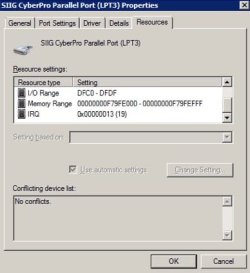
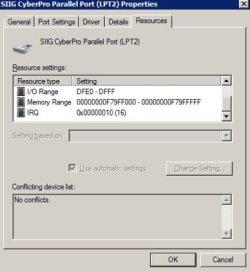
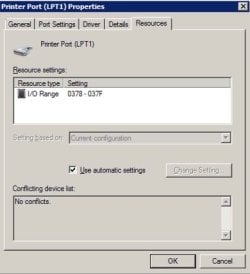
In system information, see if there is any conflict on same IRQ or address.
You can also open device manager, printer port LPT1 - Properties - resources and see address and IRQ.
 

My Computers My Computers

  • At a glance

    Windows 7 HP 64i5 6600K - 800MHz to 4200MHz4+4G GSkill DDR4 3000IG - Intel 530
    Computer type
    PC/Desktop
    Computer Manufacturer/Model Number
    custom build
    OS
    Windows 7 HP 64
    CPU
    i5 6600K - 800MHz to 4200MHz
    Motherboard
    GA-Z170-HD3P
    Memory
    4+4G GSkill DDR4 3000
    Graphics Card(s)
    IG - Intel 530
    Monitor(s) Displays
    Samsung 226BW
    Screen Resolution
    1680x1050
    Hard Drives
    (1) -1 SM951 – 128GB M.2 AHCI PCIe SSD drive for Windows 7 and Lubuntu
    (2) -1 WD SATA 3 - 1T for Data
    (3) -1 WD SATA 3 - 1T for backup
    PSU
    Thermaltake 450W TR2 gold
    Keyboard
    Old and good Chicony mechanical keyboard
    Mouse
    Logitech mX performance - 9 buttons (had to disable some)
    Internet Speed
    500Mb/s
    Browser
    Firefox 64
    Other Info
    TinyWall firewall
  • At a glance

    Windows 7 Proi7-4500U 800MHz to 3.0GHz(4+4)G DDR3 1600IG intel 4400 + NVIDIA GeForce GT 745M
    Computer type
    Laptop
    System Manufacturer/Model Number
    Asus Q550LF
    OS
    Windows 7 Pro
    CPU
    i7-4500U 800MHz to 3.0GHz
    Motherboard
    Asus Q550LF
    Memory
    (4+4)G DDR3 1600
    Graphics Card(s)
    IG intel 4400 + NVIDIA GeForce GT 745M
    Sound Card
    Realtek
    Monitor(s) Displays
    LG Display LP156WF4-SPH1
    Screen Resolution
    1920 x 1080
    Hard Drives
    BX500 120G SSD for Windows and programs +
    1T HDD for data
    Internet Speed
    500 Mb/s
    Browser
    Firefox
    Other Info
    TinyWall firewall
In system information, see if there is any conflict on same IRQ or address.
You can also open device manager, printer port LPT1 - Properties - resources and see address and IRQ.

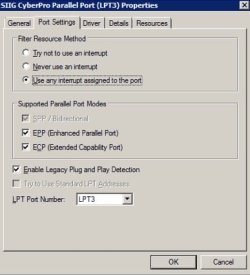
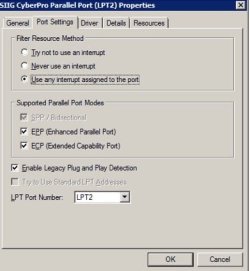
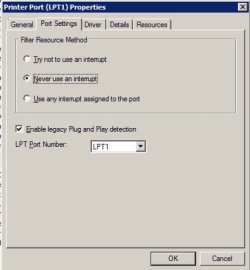
Please have a look at these attached screenshots.

Tell you anything?

Thanks!
 

Attachments

  • Screen Shot 2019-05-11 at 4.56.31 PM   Saturday  5-11-19.jpg
    Screen Shot 2019-05-11 at 4.56.31 PM Saturday 5-11-19.jpg
    15.9 KB · Views: 33
  • Screen Shot 2019-05-11 at 4.56.15 PM   Saturday  5-11-19.jpg
    Screen Shot 2019-05-11 at 4.56.15 PM Saturday 5-11-19.jpg
    21 KB · Views: 34
  • Screen Shot 2019-05-11 at 4.56.02 PM   Saturday  5-11-19.jpg
    Screen Shot 2019-05-11 at 4.56.02 PM Saturday 5-11-19.jpg
    21.2 KB · Views: 32
  • Screen Shot 2019-05-11 at 4.55.47 PM   Saturday  5-11-19.jpg
    Screen Shot 2019-05-11 at 4.55.47 PM Saturday 5-11-19.jpg
    16.9 KB · Views: 34

My Computer My Computer

At a glance

Windows 7 Pro 64 bit
Computer type
PC/Desktop
Computer Manufacturer/Model Number
Acer
OS
Windows 7 Pro 64 bit
You can also open device manager, printer port LPT1 - Properties - Resources tab and see address and IRQ.
 

My Computers My Computers

  • At a glance

    Windows 7 HP 64i5 6600K - 800MHz to 4200MHz4+4G GSkill DDR4 3000IG - Intel 530
    Computer type
    PC/Desktop
    Computer Manufacturer/Model Number
    custom build
    OS
    Windows 7 HP 64
    CPU
    i5 6600K - 800MHz to 4200MHz
    Motherboard
    GA-Z170-HD3P
    Memory
    4+4G GSkill DDR4 3000
    Graphics Card(s)
    IG - Intel 530
    Monitor(s) Displays
    Samsung 226BW
    Screen Resolution
    1680x1050
    Hard Drives
    (1) -1 SM951 – 128GB M.2 AHCI PCIe SSD drive for Windows 7 and Lubuntu
    (2) -1 WD SATA 3 - 1T for Data
    (3) -1 WD SATA 3 - 1T for backup
    PSU
    Thermaltake 450W TR2 gold
    Keyboard
    Old and good Chicony mechanical keyboard
    Mouse
    Logitech mX performance - 9 buttons (had to disable some)
    Internet Speed
    500Mb/s
    Browser
    Firefox 64
    Other Info
    TinyWall firewall
  • At a glance

    Windows 7 Proi7-4500U 800MHz to 3.0GHz(4+4)G DDR3 1600IG intel 4400 + NVIDIA GeForce GT 745M
    Computer type
    Laptop
    System Manufacturer/Model Number
    Asus Q550LF
    OS
    Windows 7 Pro
    CPU
    i7-4500U 800MHz to 3.0GHz
    Motherboard
    Asus Q550LF
    Memory
    (4+4)G DDR3 1600
    Graphics Card(s)
    IG intel 4400 + NVIDIA GeForce GT 745M
    Sound Card
    Realtek
    Monitor(s) Displays
    LG Display LP156WF4-SPH1
    Screen Resolution
    1920 x 1080
    Hard Drives
    BX500 120G SSD for Windows and programs +
    1T HDD for data
    Internet Speed
    500 Mb/s
    Browser
    Firefox
    Other Info
    TinyWall firewall
You can also open device manager, printer port LPT1 - Properties - Resources tab and see address and IRQ.

Ok, here they are:

Thoughts?
 

Attachments

  • Screen Shot 2019-05-11 at 5.31.25 PM   Saturday  5-11-19.jpg
    Screen Shot 2019-05-11 at 5.31.25 PM Saturday 5-11-19.jpg
    18.2 KB · Views: 30
  • Screen Shot 2019-05-11 at 5.31.11 PM   Saturday  5-11-19.jpg
    Screen Shot 2019-05-11 at 5.31.11 PM Saturday 5-11-19.jpg
    21.1 KB · Views: 31
  • Screen Shot 2019-05-11 at 5.30.57 PM   Saturday  5-11-19.jpg
    Screen Shot 2019-05-11 at 5.30.57 PM Saturday 5-11-19.jpg
    20.6 KB · Views: 30
  • Screen Shot 2019-05-11 at 5.30.24 PM   Saturday  5-11-19.jpg
    Screen Shot 2019-05-11 at 5.30.24 PM Saturday 5-11-19.jpg
    18.4 KB · Views: 29

My Computer My Computer

At a glance

Windows 7 Pro 64 bit
Computer type
PC/Desktop
Computer Manufacturer/Model Number
Acer
OS
Windows 7 Pro 64 bit
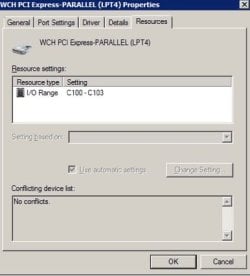
No conflicts. Should be working.
Did you check the BIOS settings?
 

My Computers My Computers

  • At a glance

    Windows 7 HP 64i5 6600K - 800MHz to 4200MHz4+4G GSkill DDR4 3000IG - Intel 530
    Computer type
    PC/Desktop
    Computer Manufacturer/Model Number
    custom build
    OS
    Windows 7 HP 64
    CPU
    i5 6600K - 800MHz to 4200MHz
    Motherboard
    GA-Z170-HD3P
    Memory
    4+4G GSkill DDR4 3000
    Graphics Card(s)
    IG - Intel 530
    Monitor(s) Displays
    Samsung 226BW
    Screen Resolution
    1680x1050
    Hard Drives
    (1) -1 SM951 – 128GB M.2 AHCI PCIe SSD drive for Windows 7 and Lubuntu
    (2) -1 WD SATA 3 - 1T for Data
    (3) -1 WD SATA 3 - 1T for backup
    PSU
    Thermaltake 450W TR2 gold
    Keyboard
    Old and good Chicony mechanical keyboard
    Mouse
    Logitech mX performance - 9 buttons (had to disable some)
    Internet Speed
    500Mb/s
    Browser
    Firefox 64
    Other Info
    TinyWall firewall
  • At a glance

    Windows 7 Proi7-4500U 800MHz to 3.0GHz(4+4)G DDR3 1600IG intel 4400 + NVIDIA GeForce GT 745M
    Computer type
    Laptop
    System Manufacturer/Model Number
    Asus Q550LF
    OS
    Windows 7 Pro
    CPU
    i7-4500U 800MHz to 3.0GHz
    Motherboard
    Asus Q550LF
    Memory
    (4+4)G DDR3 1600
    Graphics Card(s)
    IG intel 4400 + NVIDIA GeForce GT 745M
    Sound Card
    Realtek
    Monitor(s) Displays
    LG Display LP156WF4-SPH1
    Screen Resolution
    1920 x 1080
    Hard Drives
    BX500 120G SSD for Windows and programs +
    1T HDD for data
    Internet Speed
    500 Mb/s
    Browser
    Firefox
    Other Info
    TinyWall firewall
No conflicts. Should be working.
Did you check the BIOS settings?

Ok, I know how to get into the BIOS, but, what to look for?

What do you need to know from the BIOS?

Thanks!
 

My Computer My Computer

At a glance

Windows 7 Pro 64 bit
Computer type
PC/Desktop
Computer Manufacturer/Model Number
Acer
OS
Windows 7 Pro 64 bit
In post #7 the top screenshot (the one for WCH pci express parallel lpt-4 doesn't have a port assigned. Try changing it to lpt 4.
 

My Computers My Computers

  • At a glance

    Windows 7 pro/Windows 10 ProIntel i7 860 Quad core 2.8 ghz8 gbATI Radeon HD 5770 1 gb ram
    Computer type
    PC/Desktop
    Computer Manufacturer/Model Number
    HP Pavillion Elite HPE-250f
    OS
    Windows 7 pro/Windows 10 Pro
    CPU
    Intel i7 860 Quad core 2.8 ghz
    Memory
    8 gb
    Graphics Card(s)
    ATI Radeon HD 5770 1 gb ram
    Monitor(s) Displays
    Alienware 25 AW2521HF & Viewsonic
    Screen Resolution
    1920 x1080 & 1680x1050
    Hard Drives
    WD blue 1 tb & 500 gb.
    Browser
    FF of course.
    Other Info
    https://www.bestbuy.com/site/hp-pavilion-elite-desktop-intel-core-i7-processor-8gb-memory-1tb-hard-drive/9921493.p?skuId=9921493
  • At a glance

    Windows 2012 R2 Data center/Linux Minti3 9100 3.6GHz, 8M cache, 4C/4T8GB 2666MT/s DDR4 ECC UDIMM
    Computer type
    PC/Desktop
    System Manufacturer/Model Number
    Dell Poweredge T140
    OS
    Windows 2012 R2 Data center/Linux Mint
    CPU
    i3 9100 3.6GHz, 8M cache, 4C/4T
    Memory
    8GB 2666MT/s DDR4 ECC UDIMM
    Monitor(s) Displays
    Viewsonic
    Screen Resolution
    1680x1050
    Hard Drives
    1 TB & 750 GB
    Other Info
    https://www.dell.com/en-us/work/shop/productdetailstxn/poweredge-t140?~ck=bt
Ok, I know how to get into the BIOS, but, what to look for?

What do you need to know from the BIOS?

Thanks!

Read my post #4
 

My Computers My Computers

  • At a glance

    Windows 7 HP 64i5 6600K - 800MHz to 4200MHz4+4G GSkill DDR4 3000IG - Intel 530
    Computer type
    PC/Desktop
    Computer Manufacturer/Model Number
    custom build
    OS
    Windows 7 HP 64
    CPU
    i5 6600K - 800MHz to 4200MHz
    Motherboard
    GA-Z170-HD3P
    Memory
    4+4G GSkill DDR4 3000
    Graphics Card(s)
    IG - Intel 530
    Monitor(s) Displays
    Samsung 226BW
    Screen Resolution
    1680x1050
    Hard Drives
    (1) -1 SM951 – 128GB M.2 AHCI PCIe SSD drive for Windows 7 and Lubuntu
    (2) -1 WD SATA 3 - 1T for Data
    (3) -1 WD SATA 3 - 1T for backup
    PSU
    Thermaltake 450W TR2 gold
    Keyboard
    Old and good Chicony mechanical keyboard
    Mouse
    Logitech mX performance - 9 buttons (had to disable some)
    Internet Speed
    500Mb/s
    Browser
    Firefox 64
    Other Info
    TinyWall firewall
  • At a glance

    Windows 7 Proi7-4500U 800MHz to 3.0GHz(4+4)G DDR3 1600IG intel 4400 + NVIDIA GeForce GT 745M
    Computer type
    Laptop
    System Manufacturer/Model Number
    Asus Q550LF
    OS
    Windows 7 Pro
    CPU
    i7-4500U 800MHz to 3.0GHz
    Motherboard
    Asus Q550LF
    Memory
    (4+4)G DDR3 1600
    Graphics Card(s)
    IG intel 4400 + NVIDIA GeForce GT 745M
    Sound Card
    Realtek
    Monitor(s) Displays
    LG Display LP156WF4-SPH1
    Screen Resolution
    1920 x 1080
    Hard Drives
    BX500 120G SSD for Windows and programs +
    1T HDD for data
    Internet Speed
    500 Mb/s
    Browser
    Firefox
    Other Info
    TinyWall firewall
Read my post #4

Ok, here it is:

"You can also open device manager, printer port LPT1 - Properties - Resources tab and see address and IRQ"

What will the BIOS tell us that we don't already know?

Thanks!
 

My Computer My Computer

At a glance

Windows 7 Pro 64 bit
Computer type
PC/Desktop
Computer Manufacturer/Model Number
Acer
OS
Windows 7 Pro 64 bit
Did you try my suggestion?
 

My Computers My Computers

  • At a glance

    Windows 7 pro/Windows 10 ProIntel i7 860 Quad core 2.8 ghz8 gbATI Radeon HD 5770 1 gb ram
    Computer type
    PC/Desktop
    Computer Manufacturer/Model Number
    HP Pavillion Elite HPE-250f
    OS
    Windows 7 pro/Windows 10 Pro
    CPU
    Intel i7 860 Quad core 2.8 ghz
    Memory
    8 gb
    Graphics Card(s)
    ATI Radeon HD 5770 1 gb ram
    Monitor(s) Displays
    Alienware 25 AW2521HF & Viewsonic
    Screen Resolution
    1920 x1080 & 1680x1050
    Hard Drives
    WD blue 1 tb & 500 gb.
    Browser
    FF of course.
    Other Info
    https://www.bestbuy.com/site/hp-pavilion-elite-desktop-intel-core-i7-processor-8gb-memory-1tb-hard-drive/9921493.p?skuId=9921493
  • At a glance

    Windows 2012 R2 Data center/Linux Minti3 9100 3.6GHz, 8M cache, 4C/4T8GB 2666MT/s DDR4 ECC UDIMM
    Computer type
    PC/Desktop
    System Manufacturer/Model Number
    Dell Poweredge T140
    OS
    Windows 2012 R2 Data center/Linux Mint
    CPU
    i3 9100 3.6GHz, 8M cache, 4C/4T
    Memory
    8GB 2666MT/s DDR4 ECC UDIMM
    Monitor(s) Displays
    Viewsonic
    Screen Resolution
    1680x1050
    Hard Drives
    1 TB & 750 GB
    Other Info
    https://www.dell.com/en-us/work/shop/productdetailstxn/poweredge-t140?~ck=bt
Did you try my suggestion?

Once I get into the location tomorrow, I will.

In the meantime, what are you hoping to see in the BIOS that we don't already know?

Please tell me what to look for and report back on (2nd request).
 

My Computer My Computer

At a glance

Windows 7 Pro 64 bit
Computer type
PC/Desktop
Computer Manufacturer/Model Number
Acer
OS
Windows 7 Pro 64 bit
It is next to impossible to tell you what to look since different manufacturers have programed the BIOS menu to look differently, especially without knowing anything about your computer. You might look in your manufacturer's instructions, which you should be able to find it online, or you might try a reset. There should be an option for resetting the settings or returning to the manufacturer's defaults.

As an FYI Samuria is very helpful. You might send him a private message, apologize, say that you where confused as to his advise, and ask that he help.
 

My Computers My Computers

  • At a glance

    Windows 7 pro/Windows 10 ProIntel i7 860 Quad core 2.8 ghz8 gbATI Radeon HD 5770 1 gb ram
    Computer type
    PC/Desktop
    Computer Manufacturer/Model Number
    HP Pavillion Elite HPE-250f
    OS
    Windows 7 pro/Windows 10 Pro
    CPU
    Intel i7 860 Quad core 2.8 ghz
    Memory
    8 gb
    Graphics Card(s)
    ATI Radeon HD 5770 1 gb ram
    Monitor(s) Displays
    Alienware 25 AW2521HF & Viewsonic
    Screen Resolution
    1920 x1080 & 1680x1050
    Hard Drives
    WD blue 1 tb & 500 gb.
    Browser
    FF of course.
    Other Info
    https://www.bestbuy.com/site/hp-pavilion-elite-desktop-intel-core-i7-processor-8gb-memory-1tb-hard-drive/9921493.p?skuId=9921493
  • At a glance

    Windows 2012 R2 Data center/Linux Minti3 9100 3.6GHz, 8M cache, 4C/4T8GB 2666MT/s DDR4 ECC UDIMM
    Computer type
    PC/Desktop
    System Manufacturer/Model Number
    Dell Poweredge T140
    OS
    Windows 2012 R2 Data center/Linux Mint
    CPU
    i3 9100 3.6GHz, 8M cache, 4C/4T
    Memory
    8GB 2666MT/s DDR4 ECC UDIMM
    Monitor(s) Displays
    Viewsonic
    Screen Resolution
    1680x1050
    Hard Drives
    1 TB & 750 GB
    Other Info
    https://www.dell.com/en-us/work/shop/productdetailstxn/poweredge-t140?~ck=bt
It is next to impossible to tell you what to look since different manufacturers have programed the BIOS menu to look differently, especially without knowing anything about your computer. You might look in your manufacturer's instructions, which you should be able to find it online, or you might try a reset. There should be an option for resetting the settings or returning to the manufacturer's defaults.

As an FYI Samuria is very helpful. You might send him a private message, apologize, say that you where confused as to his advise, and ask that he help.

Dear Sir,

I respectfully understand your point.

But I am not asking you to be an expert on every variation of BIOS there could be.

Rather, I am asking that you detail what you would be looking for in my BIOS
if you had access to it.

Please explain, in general terms, what you would be looking for in the BIOS.

I'm not asking for you to detail exactly what I might see in my BIOS.

Could you include screenshots of your BIOS and what (in your BIOS) you are
looking at that gives you the information you wold want me to report back with
from my BIOS?

Because until I know what to look for I cannot even begin to search my BIOS.

Show me what you're looking at in YOUR BIOS and I will find it in MY BIOS.

(FYI: no, I will not communicate with Samuria nor will I "apologize". I did nothing incorrectly.
He was vague and when I asked for clarification, he continued to be evasive.
But in true troll fashion, he continues to engage more and more persons in this forum with
regard to his being "victimized" by me . . . and sits back grinning, silently, while we continue
to acknowledge and second-guess him.
You cannot read his mind and therefore cannot know what he is about.
I ask that you look at the other answers in this post.
None are as vague as Samuria's.
His is the only post that provides no help whatsoever.
Samuria is a big boy. He can write back to me and apologize for being so vague and evasive :-))

Thanks!
 

My Computer My Computer

At a glance

Windows 7 Pro 64 bit
Computer type
PC/Desktop
Computer Manufacturer/Model Number
Acer
OS
Windows 7 Pro 64 bit
It is next to impossible to tell you what to look since different manufacturers have programed the BIOS menu to look differently, especially without knowing anything about your computer. You might look in your manufacturer's instructions, which you should be able to find it online, or you might try a reset. There should be an option for resetting the settings or returning to the manufacturer's defaults.

As an FYI Samuria is very helpful. You might send him a private message, apologize, say that you where confused as to his advise, and ask that he help.

Please see screenshot of my BIOS:

yub3j9ds.jpg


What does it tell you?

Thanks!
 

My Computer My Computer

At a glance

Windows 7 Pro 64 bit
Computer type
PC/Desktop
Computer Manufacturer/Model Number
Acer
OS
Windows 7 Pro 64 bit
I don't see any issues but I've never really used parallel ports and the only computer I have old enough to have any only has 1. I don't even have any devices to use on it. Have you tried a BIOS reset as I suggested? Have you tried what I suggested in post 12?
 

My Computers My Computers

  • At a glance

    Windows 7 pro/Windows 10 ProIntel i7 860 Quad core 2.8 ghz8 gbATI Radeon HD 5770 1 gb ram
    Computer type
    PC/Desktop
    Computer Manufacturer/Model Number
    HP Pavillion Elite HPE-250f
    OS
    Windows 7 pro/Windows 10 Pro
    CPU
    Intel i7 860 Quad core 2.8 ghz
    Memory
    8 gb
    Graphics Card(s)
    ATI Radeon HD 5770 1 gb ram
    Monitor(s) Displays
    Alienware 25 AW2521HF & Viewsonic
    Screen Resolution
    1920 x1080 & 1680x1050
    Hard Drives
    WD blue 1 tb & 500 gb.
    Browser
    FF of course.
    Other Info
    https://www.bestbuy.com/site/hp-pavilion-elite-desktop-intel-core-i7-processor-8gb-memory-1tb-hard-drive/9921493.p?skuId=9921493
  • At a glance

    Windows 2012 R2 Data center/Linux Minti3 9100 3.6GHz, 8M cache, 4C/4T8GB 2666MT/s DDR4 ECC UDIMM
    Computer type
    PC/Desktop
    System Manufacturer/Model Number
    Dell Poweredge T140
    OS
    Windows 2012 R2 Data center/Linux Mint
    CPU
    i3 9100 3.6GHz, 8M cache, 4C/4T
    Memory
    8GB 2666MT/s DDR4 ECC UDIMM
    Monitor(s) Displays
    Viewsonic
    Screen Resolution
    1680x1050
    Hard Drives
    1 TB & 750 GB
    Other Info
    https://www.dell.com/en-us/work/shop/productdetailstxn/poweredge-t140?~ck=bt
Back
Top