Disable touchpad win 7

PersuasiveMedia

New member
Local time
6:22 PM
Messages
20
I looked everywhere in devmgmt and it's not there, I am using synaptics
 

My Computers

System One System Two

  • Computer type
    PC/Desktop
    OS
    Windows 7 Professional x64 With Windows 10 x64 Dual booted
    CPU
    AMD A4 6210
    Memory
    16GB
    Graphics Card(s)
    AMD RADEON R3
  • Computer type
    PC/Desktop
You didn't say what the model number is for your laptop.

Many laptops like mine have a hotkey to enable/disable the touchpad. For example in the user manual it shows how to do that;

tp1.jpg

I can also enable/disable the touchpad in the Control Panel:
Select Mouse Properties
Select Device Settings
Select Disable

tp2.jpg

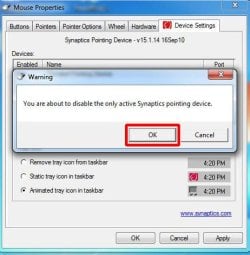
Select OK

tp3.jpg
 

My Computers

System One System Two

  • Computer type
    PC/Desktop
    Computer Manufacturer/Model Number
    Custom build
    OS
    Windows 7 Home Premium 64-bits
    CPU
    AMD FX-8350
    Motherboard
    Gigabyte GA-990FXA-UD3 (AM3+)
    Memory
    GSKILL Ripjaw-X PC3 12800 8GB (2x4GB)
    Graphics Card(s)
    ASUS ROG STRIX GTX 1060 6GB
    Sound Card
    Integrated
    Monitor(s) Displays
    Asus VE228H (21.5-in)
    Screen Resolution
    1920x1080 60Hz
    Hard Drives
    SAMSUNG 870 EVO 2.5 Inch SATA SSD (1TB)
    SAMSUNG 870 EVO 2.5 Inch SATA SSD (1TB)
    SAMSUNG 870 EVO 2.5 Inch SATA SSD (1TB)
    PSU
    Corsair RM750x (750 watts)
    Case
    Corsair Carbide Series 200R
    Cooling
    Corsair Hydro Series H60 (CWCH60)
    Keyboard
    Logitech Elite
    Mouse
    Logitech M510 Wireless Mouse
    Internet Speed
    Comcast Gigabit Extra (1200Mbps down / 35Mbps up)
    Antivirus
    Malwarebytes
    Browser
    Firefox, Edge, Chrome
    Other Info
    ASUS DRW-24B1ST DVD-RW (24X) optical drive
    Seagate Expansion Desk (5TB) external SATA/USB HDD
    Comcast XB8 Internet Gateway
  • Computer type
    PC/Desktop
    System Manufacturer/Model Number
    Custom
    OS
    Windows 7 Pro (64-bit)
    CPU
    AMD Phenom II 960T X4
    Motherboard
    ASUS M4N82 Deluxe
    Memory
    Corsair XMS2 DDR2-800 8GB (4x2GB)
    Graphics Card(s)
    ASUS ENGTX560 DCII OC/2DI/1GD5 1GB
    Monitor(s) Displays
    Samsung 930B 19-inch LCD
    Screen Resolution
    1280x1024
    Hard Drives
    Samsung SSD 870 EVO 1000 GB (Windows 10)
    Seagate ST1000DM003 1000 GB (Windows 7)
    PSU
    Antec TruePower (new) TP-650
    Case
    Antec Three Hundred
    Cooling
    AMD stock cooler from FX8350
    Mouse
    Logitech M100
    Internet Speed
    Xfinity Gigabit Extra 1200/35 Mbps
Where can i get the drivers from synaptics? I tried google and it redirects to lenovo but i am HP. The synaptics tab won't show in my mouse settings


You didn't say what the model number is for your laptop.
Many laptops like mine have a hotkey to enable/disable the touchpad. For example in the user manual it shows how to do that;

View attachment 424688

I can also enable/disable the touchpad in the Control Panel:
Select Mouse Properties
Select Device Settings
Select Disable

View attachment 424689

Select OK

View attachment 424690
 

My Computers

System One System Two

  • Computer type
    PC/Desktop
    OS
    Windows 7 Professional x64 With Windows 10 x64 Dual booted
    CPU
    AMD A4 6210
    Memory
    16GB
    Graphics Card(s)
    AMD RADEON R3
  • Computer type
    PC/Desktop
Back
Top