Windows 7 failing to pick up External Hard Drive

mcintyre94

New member
Local time
11:38 AM
Messages
24
Simple problem really, but no idea where to start with fixing it.

On my old Vista laptop I used an External Hard Drive, with 80GB advertised memory. It is a sumvision enclosure. It uses a Mini-USB to 2 USB connection wire, with one called "Assistant Power" This cable is the one it came with. On Vista, this picked up and worked perfectly.

Now, Windows 7 and my Christmas present PC, and it's not picking up. It's all plugged in, it's been plugged into two back ports, two front ports, two extension ports plugged into a front port and two extension ports plugged into a back port.

The first time I plugged it in a bubble came up at the bottom taskbar saying it had installed device driver software and was good to go. It never picked up.

I have re-started, and re-started with and without it plugged in. No luck either way.

Can anybody help me please, because we need to get these files off that laptop as soon as we can, but I'm not going to do that until they're on this PC, for obvious reasons.

Thanks,
Callum.
 

My Computer My Computer

At a glance

7 Home Premium 64-bitAMD AthlonII Quad Core X4 620 @ 2.6GHZ per core.4GB DDR2 RAMNvidia 8200 Integrated, full intention to upg...
Computer Manufacturer/Model Number
Custom Build
OS
7 Home Premium 64-bit
CPU
AMD AthlonII Quad Core X4 620 @ 2.6GHZ per core.
Motherboard
ASRock K10N78
Memory
4GB DDR2 RAM
Graphics Card(s)
Nvidia 8200 Integrated, full intention to upgrade.
Sound Card
HD 7.1 ALC888 8 Channel Surround Sound
Monitor(s) Displays
Acer X193HQb 18.5in Widescreen TFT Monitor
Screen Resolution
1366x768 16:9
Hard Drives
1 1000GB HDD
PSU
ATX 12V 450Watts
Case
GalaxyIII Modded Series
Keyboard
Microsoft Wireless Optical Desktop 1000
Mouse
Microsoft Wireless Optical Desktop 1000
Internet Speed
8MB max Talktalk
Control Panel>Admin Tools>Computer Management>Disc Management>Right click External HD>Change Drive letters and Paths>assign a letter.

This should work if your device manager can pick up your HD.

Dan
 

My Computer My Computer

At a glance

Windows 7 Ultimate 64bitAMD Phenom II 555 Black Edition Quad Core OC'...G Skill RipJaw 1333MHz 4GBATI raideon 4250 HD/XFX ATI Radeon 1GB HD4650
Computer Manufacturer/Model Number
Blue Shards 1.0
OS
Windows 7 Ultimate 64bit
CPU
AMD Phenom II 555 Black Edition Quad Core OC'd to 4.0GHz
Motherboard
ASUS M4A88T-M
Memory
G Skill RipJaw 1333MHz 4GB
Graphics Card(s)
ATI raideon 4250 HD/XFX ATI Radeon 1GB HD4650
Sound Card
Realteck HD Audio
Monitor(s) Displays
2x 22" Widescreen HD Monitors
Hard Drives
500GB Sata 7500RPM
80GB IDE
PSU
850W OCUK Modular
Case
Antec Dark Fleet DF-30
Cooling
Titan Fenrir Pro (CPU)
Keyboard
Logitech Wireless
Mouse
Logitech Wireless
Internet Speed
24Meg
Other Info
Getting soon-
2TB 7200RPM HDD
+8GB RAM
30GB SSD
HD6950/70
Thankyou very much for your quick reply, but unfortunately it's not showing up in Disk Management.
 

My Computer My Computer

At a glance

7 Home Premium 64-bitAMD AthlonII Quad Core X4 620 @ 2.6GHZ per core.4GB DDR2 RAMNvidia 8200 Integrated, full intention to upg...
Computer Manufacturer/Model Number
Custom Build
OS
7 Home Premium 64-bit
CPU
AMD AthlonII Quad Core X4 620 @ 2.6GHZ per core.
Motherboard
ASRock K10N78
Memory
4GB DDR2 RAM
Graphics Card(s)
Nvidia 8200 Integrated, full intention to upgrade.
Sound Card
HD 7.1 ALC888 8 Channel Surround Sound
Monitor(s) Displays
Acer X193HQb 18.5in Widescreen TFT Monitor
Screen Resolution
1366x768 16:9
Hard Drives
1 1000GB HDD
PSU
ATX 12V 450Watts
Case
GalaxyIII Modded Series
Keyboard
Microsoft Wireless Optical Desktop 1000
Mouse
Microsoft Wireless Optical Desktop 1000
Internet Speed
8MB max Talktalk

My Computer My Computer

At a glance

Windows 7 Ultimate 64bitAMD Phenom II 555 Black Edition Quad Core OC'...G Skill RipJaw 1333MHz 4GBATI raideon 4250 HD/XFX ATI Radeon 1GB HD4650
Computer Manufacturer/Model Number
Blue Shards 1.0
OS
Windows 7 Ultimate 64bit
CPU
AMD Phenom II 555 Black Edition Quad Core OC'd to 4.0GHz
Motherboard
ASUS M4A88T-M
Memory
G Skill RipJaw 1333MHz 4GB
Graphics Card(s)
ATI raideon 4250 HD/XFX ATI Radeon 1GB HD4650
Sound Card
Realteck HD Audio
Monitor(s) Displays
2x 22" Widescreen HD Monitors
Hard Drives
500GB Sata 7500RPM
80GB IDE
PSU
850W OCUK Modular
Case
Antec Dark Fleet DF-30
Cooling
Titan Fenrir Pro (CPU)
Keyboard
Logitech Wireless
Mouse
Logitech Wireless
Internet Speed
24Meg
Other Info
Getting soon-
2TB 7200RPM HDD
+8GB RAM
30GB SSD
HD6950/70
Thanks again, but Partition Wizard doesn't detect it at all. Device Manager is somewhat confusing, but I've not seen it in there.
 

My Computer My Computer

At a glance

7 Home Premium 64-bitAMD AthlonII Quad Core X4 620 @ 2.6GHZ per core.4GB DDR2 RAMNvidia 8200 Integrated, full intention to upg...
Computer Manufacturer/Model Number
Custom Build
OS
7 Home Premium 64-bit
CPU
AMD AthlonII Quad Core X4 620 @ 2.6GHZ per core.
Motherboard
ASRock K10N78
Memory
4GB DDR2 RAM
Graphics Card(s)
Nvidia 8200 Integrated, full intention to upgrade.
Sound Card
HD 7.1 ALC888 8 Channel Surround Sound
Monitor(s) Displays
Acer X193HQb 18.5in Widescreen TFT Monitor
Screen Resolution
1366x768 16:9
Hard Drives
1 1000GB HDD
PSU
ATX 12V 450Watts
Case
GalaxyIII Modded Series
Keyboard
Microsoft Wireless Optical Desktop 1000
Mouse
Microsoft Wireless Optical Desktop 1000
Internet Speed
8MB max Talktalk
Thanks again, but Partition Wizard doesn't detect it at all. Device Manager is somewhat confusing, but I've not seen it in there.
Hmmm,do other devices work via your USB ports?
 

My Computer My Computer

At a glance

Windows 7 Ultimate 64bitAMD Phenom II 555 Black Edition Quad Core OC'...G Skill RipJaw 1333MHz 4GBATI raideon 4250 HD/XFX ATI Radeon 1GB HD4650
Computer Manufacturer/Model Number
Blue Shards 1.0
OS
Windows 7 Ultimate 64bit
CPU
AMD Phenom II 555 Black Edition Quad Core OC'd to 4.0GHz
Motherboard
ASUS M4A88T-M
Memory
G Skill RipJaw 1333MHz 4GB
Graphics Card(s)
ATI raideon 4250 HD/XFX ATI Radeon 1GB HD4650
Sound Card
Realteck HD Audio
Monitor(s) Displays
2x 22" Widescreen HD Monitors
Hard Drives
500GB Sata 7500RPM
80GB IDE
PSU
850W OCUK Modular
Case
Antec Dark Fleet DF-30
Cooling
Titan Fenrir Pro (CPU)
Keyboard
Logitech Wireless
Mouse
Logitech Wireless
Internet Speed
24Meg
Other Info
Getting soon-
2TB 7200RPM HDD
+8GB RAM
30GB SSD
HD6950/70
Thanks again, but Partition Wizard doesn't detect it at all. Device Manager is somewhat confusing, but I've not seen it in there.
Welcome MC to Windows 7 Support Forums,
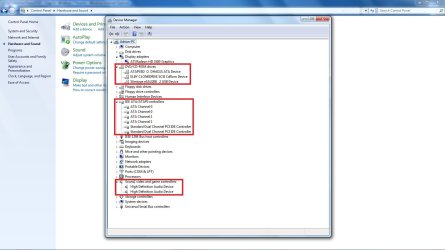
Since this is an external HD there is a possibility that a driver needs updating or you need to enable USB within the bios, as my esteemed colleague has suggested is to use disk manager to see if the drive has been allocated or assigned a drive letter. I'm attaching a screenshot from device manager to see how the hard drive may appear.

Regards,
Adrian
 

Attachments

  • devices.jpg
    devices.jpg
    100.5 KB · Views: 778

My Computer My Computer

At a glance

Windows 7 7600 1 X64AMD PHENOM II X 550 PROCESSOR 3.1 ghzCorsair 4 gig ddr 3ati radeon 3300
Computer Manufacturer/Model Number
Custom Build
OS
Windows 7 7600 1 X64
CPU
AMD PHENOM II X 550 PROCESSOR 3.1 ghz
Motherboard
ASUS M4A78-TE
Memory
Corsair 4 gig ddr 3
Graphics Card(s)
ati radeon 3300
Sound Card
ati hd
Monitor(s) Displays
syncmaster 2033sw
Screen Resolution
1600X900 60 hz refresh
Hard Drives
twin_seagates SATA's 1 TB & 500 Gig, hitachi_slimline 160 gig
PSU
antec_550 watt
Case
cooler master GLite
Cooling
stock_heat sink
Internet Speed
20mbs up/ 1.5mbs down
Other Info
favorite child "stewie"
favorite dog "brian"
They do. Currently, one back port is connected to a 7 USB Port hub. This has been used time and time again in the past, and I have just checked that a USB pen works in each drive. All successful. I have just tested both front ports with the same pen, perfectly. The receiver for my wireless mouse and keyboard is also plugged into the 7 Port hub, and works flawlessly.

Thanks again. :)
 

My Computer My Computer

At a glance

7 Home Premium 64-bitAMD AthlonII Quad Core X4 620 @ 2.6GHZ per core.4GB DDR2 RAMNvidia 8200 Integrated, full intention to upg...
Computer Manufacturer/Model Number
Custom Build
OS
7 Home Premium 64-bit
CPU
AMD AthlonII Quad Core X4 620 @ 2.6GHZ per core.
Motherboard
ASRock K10N78
Memory
4GB DDR2 RAM
Graphics Card(s)
Nvidia 8200 Integrated, full intention to upgrade.
Sound Card
HD 7.1 ALC888 8 Channel Surround Sound
Monitor(s) Displays
Acer X193HQb 18.5in Widescreen TFT Monitor
Screen Resolution
1366x768 16:9
Hard Drives
1 1000GB HDD
PSU
ATX 12V 450Watts
Case
GalaxyIII Modded Series
Keyboard
Microsoft Wireless Optical Desktop 1000
Mouse
Microsoft Wireless Optical Desktop 1000
Internet Speed
8MB max Talktalk
Thanks again, but Partition Wizard doesn't detect it at all. Device Manager is somewhat confusing, but I've not seen it in there.
Welcome MC to Windows 7 Support Forums,
Since this is an external HD there is a possibility that a driver needs updating or you need to enable USB within the bios, as my esteemed colleague has suggested is to use disk manager to see if the drive has been allocated or assigned a drive letter. I'm attaching a screenshot from device manager to see how the hard drive may appear.

Regards,
Adrian

Thankyou very much for your help. I have gone through all the high-lighted parts of Device Manager, and right click-update drivers. No luck, and everything was updated.
 

My Computer My Computer

At a glance

7 Home Premium 64-bitAMD AthlonII Quad Core X4 620 @ 2.6GHZ per core.4GB DDR2 RAMNvidia 8200 Integrated, full intention to upg...
Computer Manufacturer/Model Number
Custom Build
OS
7 Home Premium 64-bit
CPU
AMD AthlonII Quad Core X4 620 @ 2.6GHZ per core.
Motherboard
ASRock K10N78
Memory
4GB DDR2 RAM
Graphics Card(s)
Nvidia 8200 Integrated, full intention to upgrade.
Sound Card
HD 7.1 ALC888 8 Channel Surround Sound
Monitor(s) Displays
Acer X193HQb 18.5in Widescreen TFT Monitor
Screen Resolution
1366x768 16:9
Hard Drives
1 1000GB HDD
PSU
ATX 12V 450Watts
Case
GalaxyIII Modded Series
Keyboard
Microsoft Wireless Optical Desktop 1000
Mouse
Microsoft Wireless Optical Desktop 1000
Internet Speed
8MB max Talktalk
Image

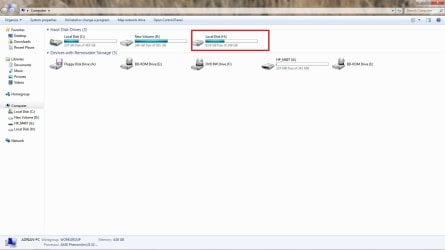
Mc, attached are some images for you to view.
The imafes are of an external Hard Drive using a USB connection attached to a Window 7 PC, they show the drivers, in device manager, the My Computer image shows the drive assigned letter and so on.
I suggest the following,
use your device manager and view and see where the external drive installed the drivers and see if it even shows up and un-install it and re-boot then power off, connect the drive and see if Windows 7 detects the drive as new hardware and attempts to install it again.

Regards,
Adrian
 

Attachments

  • Mass_Storage.jpg
    Mass_Storage.jpg
    81.7 KB · Views: 413
  • My_PC.jpg
    My_PC.jpg
    64 KB · Views: 292

My Computer My Computer

At a glance

Windows 7 7600 1 X64AMD PHENOM II X 550 PROCESSOR 3.1 ghzCorsair 4 gig ddr 3ati radeon 3300
Computer Manufacturer/Model Number
Custom Build
OS
Windows 7 7600 1 X64
CPU
AMD PHENOM II X 550 PROCESSOR 3.1 ghz
Motherboard
ASUS M4A78-TE
Memory
Corsair 4 gig ddr 3
Graphics Card(s)
ati radeon 3300
Sound Card
ati hd
Monitor(s) Displays
syncmaster 2033sw
Screen Resolution
1600X900 60 hz refresh
Hard Drives
twin_seagates SATA's 1 TB & 500 Gig, hitachi_slimline 160 gig
PSU
antec_550 watt
Case
cooler master GLite
Cooling
stock_heat sink
Internet Speed
20mbs up/ 1.5mbs down
Other Info
favorite child "stewie"
favorite dog "brian"
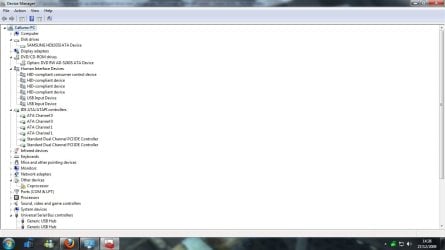
Mine is not picking up any "USB Mass Storage" or a second disc in Device Manager.

Attached is my Device Manager window. Currently the External Hard Drive is plugged into the two front USBs, if that means anything.

Thanks again to all who have helped so far. :)
 

Attachments

  • DeviceManager1.jpg
    DeviceManager1.jpg
    65.4 KB · Views: 105
  • DeviceManager2.jpg
    DeviceManager2.jpg
    66.8 KB · Views: 79

My Computer My Computer

At a glance

7 Home Premium 64-bitAMD AthlonII Quad Core X4 620 @ 2.6GHZ per core.4GB DDR2 RAMNvidia 8200 Integrated, full intention to upg...
Computer Manufacturer/Model Number
Custom Build
OS
7 Home Premium 64-bit
CPU
AMD AthlonII Quad Core X4 620 @ 2.6GHZ per core.
Motherboard
ASRock K10N78
Memory
4GB DDR2 RAM
Graphics Card(s)
Nvidia 8200 Integrated, full intention to upgrade.
Sound Card
HD 7.1 ALC888 8 Channel Surround Sound
Monitor(s) Displays
Acer X193HQb 18.5in Widescreen TFT Monitor
Screen Resolution
1366x768 16:9
Hard Drives
1 1000GB HDD
PSU
ATX 12V 450Watts
Case
GalaxyIII Modded Series
Keyboard
Microsoft Wireless Optical Desktop 1000
Mouse
Microsoft Wireless Optical Desktop 1000
Internet Speed
8MB max Talktalk
Whats the device with the yellow triangle?
Does it go away if you plug the HD out?
Have you tried another Port?
 

My Computer My Computer

At a glance

Windows 7 Ultimate 64bitAMD Phenom II 555 Black Edition Quad Core OC'...G Skill RipJaw 1333MHz 4GBATI raideon 4250 HD/XFX ATI Radeon 1GB HD4650
Computer Manufacturer/Model Number
Blue Shards 1.0
OS
Windows 7 Ultimate 64bit
CPU
AMD Phenom II 555 Black Edition Quad Core OC'd to 4.0GHz
Motherboard
ASUS M4A88T-M
Memory
G Skill RipJaw 1333MHz 4GB
Graphics Card(s)
ATI raideon 4250 HD/XFX ATI Radeon 1GB HD4650
Sound Card
Realteck HD Audio
Monitor(s) Displays
2x 22" Widescreen HD Monitors
Hard Drives
500GB Sata 7500RPM
80GB IDE
PSU
850W OCUK Modular
Case
Antec Dark Fleet DF-30
Cooling
Titan Fenrir Pro (CPU)
Keyboard
Logitech Wireless
Mouse
Logitech Wireless
Internet Speed
24Meg
Other Info
Getting soon-
2TB 7200RPM HDD
+8GB RAM
30GB SSD
HD6950/70
There is no visible difference to either Disk or Device Management if I plug in and out the Hard Drive. Now tested in a few combinations of extension ports, the two front and two at the back. No luck under any configuration.

I assume the yellow triangle is "Co-processor" under Other Devices, and sorry but I honestly don't have a clue what that is.
 

My Computer My Computer

At a glance

7 Home Premium 64-bitAMD AthlonII Quad Core X4 620 @ 2.6GHZ per core.4GB DDR2 RAMNvidia 8200 Integrated, full intention to upg...
Computer Manufacturer/Model Number
Custom Build
OS
7 Home Premium 64-bit
CPU
AMD AthlonII Quad Core X4 620 @ 2.6GHZ per core.
Motherboard
ASRock K10N78
Memory
4GB DDR2 RAM
Graphics Card(s)
Nvidia 8200 Integrated, full intention to upgrade.
Sound Card
HD 7.1 ALC888 8 Channel Surround Sound
Monitor(s) Displays
Acer X193HQb 18.5in Widescreen TFT Monitor
Screen Resolution
1366x768 16:9
Hard Drives
1 1000GB HDD
PSU
ATX 12V 450Watts
Case
GalaxyIII Modded Series
Keyboard
Microsoft Wireless Optical Desktop 1000
Mouse
Microsoft Wireless Optical Desktop 1000
Internet Speed
8MB max Talktalk
There is no visible difference to either Disk or Device Management if I plug in and out the Hard Drive. Now tested in a few combinations of extension ports, the two front and two at the back. No luck under any configuration.

I assume the yellow triangle is "Co-processor" under Other Devices, and sorry but I honestly don't have a clue what that is.
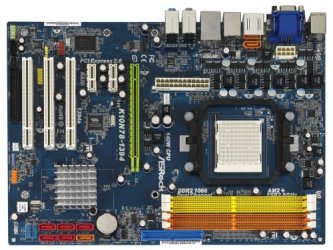
Mc, Minotaur is pointing out that you have a dual core or quad core which is not recognised by your motherboard, this also could be the reason that your USB ports may not be able to recognise the external drive, I would suggest you go to your MOBO source and investigate if you have newer bios updates and newer chipset drivers. I'll also google and see if I can point you in the right direction .

Adrian
 

My Computer My Computer

At a glance

Windows 7 7600 1 X64AMD PHENOM II X 550 PROCESSOR 3.1 ghzCorsair 4 gig ddr 3ati radeon 3300
Computer Manufacturer/Model Number
Custom Build
OS
Windows 7 7600 1 X64
CPU
AMD PHENOM II X 550 PROCESSOR 3.1 ghz
Motherboard
ASUS M4A78-TE
Memory
Corsair 4 gig ddr 3
Graphics Card(s)
ati radeon 3300
Sound Card
ati hd
Monitor(s) Displays
syncmaster 2033sw
Screen Resolution
1600X900 60 hz refresh
Hard Drives
twin_seagates SATA's 1 TB & 500 Gig, hitachi_slimline 160 gig
PSU
antec_550 watt
Case
cooler master GLite
Cooling
stock_heat sink
Internet Speed
20mbs up/ 1.5mbs down
Other Info
favorite child "stewie"
favorite dog "brian"

Attachments

  • K10N78-1394(Enlarge).jpg
    K10N78-1394(Enlarge).jpg
    47.9 KB · Views: 13

My Computer My Computer

At a glance

Windows 7 7600 1 X64AMD PHENOM II X 550 PROCESSOR 3.1 ghzCorsair 4 gig ddr 3ati radeon 3300
Computer Manufacturer/Model Number
Custom Build
OS
Windows 7 7600 1 X64
CPU
AMD PHENOM II X 550 PROCESSOR 3.1 ghz
Motherboard
ASUS M4A78-TE
Memory
Corsair 4 gig ddr 3
Graphics Card(s)
ati radeon 3300
Sound Card
ati hd
Monitor(s) Displays
syncmaster 2033sw
Screen Resolution
1600X900 60 hz refresh
Hard Drives
twin_seagates SATA's 1 TB & 500 Gig, hitachi_slimline 160 gig
PSU
antec_550 watt
Case
cooler master GLite
Cooling
stock_heat sink
Internet Speed
20mbs up/ 1.5mbs down
Other Info
favorite child "stewie"
favorite dog "brian"
Updates

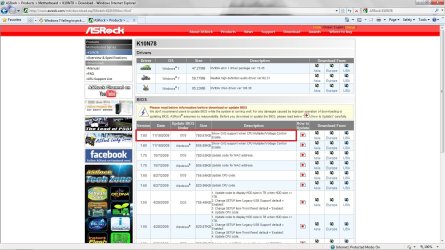
Mc, attached is an image from the Asrock support site for your MOBO, the latest bios version is less than a month old. I suggest that you reflash your bios with the latest version. Make sure you backup your existing bios in case you have issues. You can either use a floppy to reflash or a pendrive.
Here is the link: ASRock > Products > Motherboard > K10N78 > Download
The link is directly for windows 7 OS.

Regards,
Adrian
 

Attachments

  • ASROCK_SUPPORT.jpg
    ASROCK_SUPPORT.jpg
    175.1 KB · Views: 60

My Computer My Computer

At a glance

Windows 7 7600 1 X64AMD PHENOM II X 550 PROCESSOR 3.1 ghzCorsair 4 gig ddr 3ati radeon 3300
Computer Manufacturer/Model Number
Custom Build
OS
Windows 7 7600 1 X64
CPU
AMD PHENOM II X 550 PROCESSOR 3.1 ghz
Motherboard
ASUS M4A78-TE
Memory
Corsair 4 gig ddr 3
Graphics Card(s)
ati radeon 3300
Sound Card
ati hd
Monitor(s) Displays
syncmaster 2033sw
Screen Resolution
1600X900 60 hz refresh
Hard Drives
twin_seagates SATA's 1 TB & 500 Gig, hitachi_slimline 160 gig
PSU
antec_550 watt
Case
cooler master GLite
Cooling
stock_heat sink
Internet Speed
20mbs up/ 1.5mbs down
Other Info
favorite child "stewie"
favorite dog "brian"
Aah thankyou very much guys! I'll install update highlighted in a moment. Is a system restore an adequate backup, or should I be doing something else? I've never really done this stuff before.

Create a bootable system USB pen drive.
Download an updated ASRock BIOS file (WinZip format with .zip file extension) from the web site, unzip the BIOS file and save all files to the drive you created in step 1.
Boot from the disk you created in step 2.
At the "A:\" prompt, type BIOSfile.exe, then press <Enter>. For example: A:\P55DX_1.60.exe <Enter> then you will see a message "Please wait for BIOS loading ROM".
After 30 seconds, you will see the message "Program ended normally", then you have finished upgrading the BIOS.
After finishing upgrading the BIOS, restart your system and press <F2> to enter the BIOS setup utility during boot up.
In Exit menu, please select "Load Default Settings" and press <Enter> to continue.
Select "Exit Saving Changes" and press <Enter> to exit the BIOS setup utility.
Now, system is booting up with new BIOS.

Is this correct? :)
 

My Computer My Computer

At a glance

7 Home Premium 64-bitAMD AthlonII Quad Core X4 620 @ 2.6GHZ per core.4GB DDR2 RAMNvidia 8200 Integrated, full intention to upg...
Computer Manufacturer/Model Number
Custom Build
OS
7 Home Premium 64-bit
CPU
AMD AthlonII Quad Core X4 620 @ 2.6GHZ per core.
Motherboard
ASRock K10N78
Memory
4GB DDR2 RAM
Graphics Card(s)
Nvidia 8200 Integrated, full intention to upgrade.
Sound Card
HD 7.1 ALC888 8 Channel Surround Sound
Monitor(s) Displays
Acer X193HQb 18.5in Widescreen TFT Monitor
Screen Resolution
1366x768 16:9
Hard Drives
1 1000GB HDD
PSU
ATX 12V 450Watts
Case
GalaxyIII Modded Series
Keyboard
Microsoft Wireless Optical Desktop 1000
Mouse
Microsoft Wireless Optical Desktop 1000
Internet Speed
8MB max Talktalk
Aah thankyou very much guys! I'll install update highlighted in a moment. Is a system restore an adequate backup, or should I be doing something else? I've never really done this stuff before.

Create a bootable system USB pen drive.
Download an updated ASRock BIOS file (WinZip format with .zip file extension) from the web site, unzip the BIOS file and save all files to the drive you created in step 1.
Boot from the disk you created in step 2.
At the "A:\" prompt, type BIOSfile.exe, then press <Enter>. For example: A:\P55DX_1.60.exe <Enter> then you will see a message "Please wait for BIOS loading ROM".
After 30 seconds, you will see the message "Program ended normally", then you have finished upgrading the BIOS.
After finishing upgrading the BIOS, restart your system and press <F2> to enter the BIOS setup utility during boot up.
In Exit menu, please select "Load Default Settings" and press <Enter> to continue.
Select "Exit Saving Changes" and press <Enter> to exit the BIOS setup utility.
Now, system is booting up with new BIOS.

Is this correct? :)
What you have there is correct, You should have in your bios a way to save the existing version.
 

My Computer My Computer

At a glance

Windows 7 7600 1 X64AMD PHENOM II X 550 PROCESSOR 3.1 ghzCorsair 4 gig ddr 3ati radeon 3300
Computer Manufacturer/Model Number
Custom Build
OS
Windows 7 7600 1 X64
CPU
AMD PHENOM II X 550 PROCESSOR 3.1 ghz
Motherboard
ASUS M4A78-TE
Memory
Corsair 4 gig ddr 3
Graphics Card(s)
ati radeon 3300
Sound Card
ati hd
Monitor(s) Displays
syncmaster 2033sw
Screen Resolution
1600X900 60 hz refresh
Hard Drives
twin_seagates SATA's 1 TB & 500 Gig, hitachi_slimline 160 gig
PSU
antec_550 watt
Case
cooler master GLite
Cooling
stock_heat sink
Internet Speed
20mbs up/ 1.5mbs down
Other Info
favorite child "stewie"
favorite dog "brian"
Thanks to everyone for your help, my dad's trying one more thing before we adjust the BIOS. I've sorted the problem temporarily with another hard drive I got my hands on (which worked perfectly), but my dad wants to try something quickly first.

Thanks again, and I'll rep everyone who helped now. :) Minotar and Adrian, thanks so much! :D
 

My Computer My Computer

At a glance

7 Home Premium 64-bitAMD AthlonII Quad Core X4 620 @ 2.6GHZ per core.4GB DDR2 RAMNvidia 8200 Integrated, full intention to upg...
Computer Manufacturer/Model Number
Custom Build
OS
7 Home Premium 64-bit
CPU
AMD AthlonII Quad Core X4 620 @ 2.6GHZ per core.
Motherboard
ASRock K10N78
Memory
4GB DDR2 RAM
Graphics Card(s)
Nvidia 8200 Integrated, full intention to upgrade.
Sound Card
HD 7.1 ALC888 8 Channel Surround Sound
Monitor(s) Displays
Acer X193HQb 18.5in Widescreen TFT Monitor
Screen Resolution
1366x768 16:9
Hard Drives
1 1000GB HDD
PSU
ATX 12V 450Watts
Case
GalaxyIII Modded Series
Keyboard
Microsoft Wireless Optical Desktop 1000
Mouse
Microsoft Wireless Optical Desktop 1000
Internet Speed
8MB max Talktalk
Thanks to everyone for your help, my dad's trying one more thing before we adjust the BIOS. I've sorted the problem temporarily with another hard drive I got my hands on (which worked perfectly), but my dad wants to try something quickly first.

Thanks again, and I'll rep everyone who helped now. :) Minotar and Adrian, thanks so much! :D
Cheers Matey!
 

My Computer My Computer

At a glance

Windows 7 7600 1 X64AMD PHENOM II X 550 PROCESSOR 3.1 ghzCorsair 4 gig ddr 3ati radeon 3300
Computer Manufacturer/Model Number
Custom Build
OS
Windows 7 7600 1 X64
CPU
AMD PHENOM II X 550 PROCESSOR 3.1 ghz
Motherboard
ASUS M4A78-TE
Memory
Corsair 4 gig ddr 3
Graphics Card(s)
ati radeon 3300
Sound Card
ati hd
Monitor(s) Displays
syncmaster 2033sw
Screen Resolution
1600X900 60 hz refresh
Hard Drives
twin_seagates SATA's 1 TB & 500 Gig, hitachi_slimline 160 gig
PSU
antec_550 watt
Case
cooler master GLite
Cooling
stock_heat sink
Internet Speed
20mbs up/ 1.5mbs down
Other Info
favorite child "stewie"
favorite dog "brian"
Back
Top