Experience with Gigabyte motherboards?

Nice rig, great wiring job. It doesn't take much longer and looks so good :D

Built this rig with a Gigabyte board, BIOS is good once you get use to it.
No problems at all.
Really like it.
 

My Computer My Computer

At a glance

Windows 7 Ult x64 - SP1/ Windows 8 Pro x64Intel Core i5-3570K 4.6GHz8GB (2X4GB) DDR3 1600 Corsair Vengeance CL8 1.5vSapphire HD 7770 Vapor-X OC 1GB DDR5
Computer type
PC/Desktop
Computer Manufacturer/Model Number
76~2.0
OS
Windows 7 Ult x64 - SP1/ Windows 8 Pro x64
CPU
Intel Core i5-3570K 4.6GHz
Motherboard
Gigabyte GA-Z77X UD3H, f18
Memory
8GB (2X4GB) DDR3 1600 Corsair Vengeance CL8 1.5v
Graphics Card(s)
Sapphire HD 7770 Vapor-X OC 1GB DDR5
Sound Card
Onboard VIA VT2021
Monitor(s) Displays
22" LCD Dell
Screen Resolution
1680x1050
Hard Drives
Samsung 840Pro 128GB SSD,
Seagate Barracuda 500GB SATA2 7200rpm 32MB cache, Seagate Barracuda 1TB SATA2 7200rpm 32MB cache,
PSU
Corsair HX650W
Case
Cooler Master Storm Scout
Cooling
Corsair H80 2x12cm Noctua NF P12 , 2x14cm case fans
Keyboard
Logitech Wave
Mouse
CM Sentinel
Internet Speed
Dismal
Antivirus
Avast
Browser
Opera Next
Other Info
Haswell laptop: HP Envy 17t-j, i7-4700MQ, GeForce 740M 2GB DDR3, 17.3" Full HD 1920x1080, 16GB RAM, Samsung 840 Pro 128GB, 1TB Hitachi 7200 HDD,
Desktop: eSATA ports,
External eSATA Seagate 500GB SATA2 7200rpm,
External WD USB 500GB
Thanks.

Well I finally got to playing around in the BIOS and did a slight overclock (from stock 2.80 to 3.54GHz). Things ran stable though I did find that my ZALMAN CNPS9500 AT CPU cooler isn't up to the task :o Temps ran around 59-60c idle :eek:

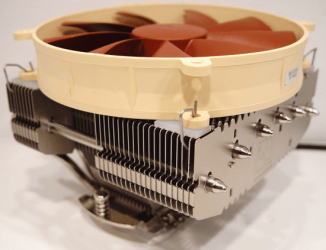
However I'm still on my break-in period with the Artic Silver 5 thermo compound so temps may get lower once the compound settles. Doesn't matter though cause I'm still going to replace the Zalman with this NH-C12P SE14 cooler. It’s a little pricey but has great reviews; and I love the styling and concept.


NH-C12P SE14.png

Outside of that, even at stock speeds, this thing os pretty fast. I'm loving it :D
 

My Computer My Computer

At a glance

Windows 10 ProIntel Core i7-4770K (3.5Ghz)32 gig Corsair Dominator Platinum (4x8Gig)Sapphire Tri-X R9 Fury
Computer type
PC/Desktop
Computer Manufacturer/Model Number
Custom built by me.
OS
Windows 10 Pro
CPU
Intel Core i7-4770K (3.5Ghz)
Motherboard
Gigabyte G1 Sniper 5 (F10 Bios)
Memory
32 gig Corsair Dominator Platinum (4x8Gig)
Graphics Card(s)
Sapphire Tri-X R9 Fury
Sound Card
Soundblaster ZXR
Monitor(s) Displays
NEC PA242W 24" LCD Monitor
Screen Resolution
1920 x 1200
Hard Drives
Primary - Samsung 850 Pro (512gig), Samsung 840 Pro (256gig), 2TB WD Caviar Black.
PSU
EVGA Supernova 1000 G2
Case
Cooler Master HAF X
Cooling
Corsair H100i with Corsair Air Series SP120 Quiet Fans
Keyboard
Logitech Wireless Wave
Mouse
Logitech Performance MX
Internet Speed
High Speed Cable
Antivirus
Norton Security
Browser
IE11
Other Info
Memory Timings - 1866MHz @ 9-9-9-27-1T @ 1.5 volts
Those temps are high!

Something amiss there.
I would re-apply the AS-5, just to check everything.

OC'ed mine from 2.66 to 3.6 GHz, ran Prime95 and Memtest the max temps average was 61c.
Brought it back to 3.36 GHz ran Prime95 and Memtest, max temps 59c. At idle 29c, and cooled down fast.

That CPU cooler is pricey.
A lot of others around with excellent reviews for half the price, anyway, get the one you like ;)
I would stay away from coolers with an added conversion bracket, find one made to fit your CPU.

Hope you can get those temps down, I wouldn't want to run mine at 60c idle :shock:
 
Last edited:

My Computer My Computer

At a glance

Windows 7 Ult x64 - SP1/ Windows 8 Pro x64Intel Core i5-3570K 4.6GHz8GB (2X4GB) DDR3 1600 Corsair Vengeance CL8 1.5vSapphire HD 7770 Vapor-X OC 1GB DDR5
Computer type
PC/Desktop
Computer Manufacturer/Model Number
76~2.0
OS
Windows 7 Ult x64 - SP1/ Windows 8 Pro x64
CPU
Intel Core i5-3570K 4.6GHz
Motherboard
Gigabyte GA-Z77X UD3H, f18
Memory
8GB (2X4GB) DDR3 1600 Corsair Vengeance CL8 1.5v
Graphics Card(s)
Sapphire HD 7770 Vapor-X OC 1GB DDR5
Sound Card
Onboard VIA VT2021
Monitor(s) Displays
22" LCD Dell
Screen Resolution
1680x1050
Hard Drives
Samsung 840Pro 128GB SSD,
Seagate Barracuda 500GB SATA2 7200rpm 32MB cache, Seagate Barracuda 1TB SATA2 7200rpm 32MB cache,
PSU
Corsair HX650W
Case
Cooler Master Storm Scout
Cooling
Corsair H80 2x12cm Noctua NF P12 , 2x14cm case fans
Keyboard
Logitech Wave
Mouse
CM Sentinel
Internet Speed
Dismal
Antivirus
Avast
Browser
Opera Next
Other Info
Haswell laptop: HP Envy 17t-j, i7-4700MQ, GeForce 740M 2GB DDR3, 17.3" Full HD 1920x1080, 16GB RAM, Samsung 840 Pro 128GB, 1TB Hitachi 7200 HDD,
Desktop: eSATA ports,
External eSATA Seagate 500GB SATA2 7200rpm,
External WD USB 500GB
Temps ran around 59-60c idle :eek:
Yeah, that would concern me quite a bit. I've got a small overclock on my Q9550 from 2.83ghz to 3.2ghz and I'm running with the stock cooler and I idle 32-34 and max around 60.
 

My Computer My Computer

At a glance

Windows 7 Ultimate x64Intel Q9550 2.83Ghz OC'd to 3.40Ghz8GB G.Skill PI DDR2-800, 4-4-4-12 timingsEVGA 1280MB Nvidia GeForce GTX570
Computer Manufacturer/Model Number
Self-Built in July 2009
OS
Windows 7 Ultimate x64
CPU
Intel Q9550 2.83Ghz OC'd to 3.40Ghz
Motherboard
Gigabyte GA-EP45-UD3R rev. 1.1, F12 BIOS
Memory
8GB G.Skill PI DDR2-800, 4-4-4-12 timings
Graphics Card(s)
EVGA 1280MB Nvidia GeForce GTX570
Sound Card
Realtek ALC899A 8 channel onboard audio
Monitor(s) Displays
23" Acer x233H
Screen Resolution
1920x1080
Hard Drives
Intel X25-M 80GB Gen 2 SSD
Western Digital 1TB Caviar Black, 32MB cache. WD1001FALS
PSU
Corsair 620HX modular
Case
Antec P182
Cooling
stock
Keyboard
ABS M1 Mechanical
Mouse
Logitech G9 Laser Mouse
Internet Speed
15/2 cable modem
Other Info
Windows and Linux enthusiast. Logitech G35 Headset.
Dave I've already re-applied the compound per the instructions on page 4 & 5 of Artic silver’s PDF instructions for my processor. I did this before attempting an overclock because I thought the idle temps were high then. And those temps quoted were at overclocked speeds. At stock I'm running around 45c idle.

current idle temps_1.JPG

I'm going to re-orient the cooler and see if that helps lower the temp further.

As for the Noctura, yeah, that’s the one I’m going for. However I’ll have to put up with the Zalman for another month. At that time I’ll be able to get it along with a new power supply :)

I’ll keep you guys posted on the temps once I re-orient the CPU cooler.

Thanks.
 

My Computer My Computer

At a glance

Windows 10 ProIntel Core i7-4770K (3.5Ghz)32 gig Corsair Dominator Platinum (4x8Gig)Sapphire Tri-X R9 Fury
Computer type
PC/Desktop
Computer Manufacturer/Model Number
Custom built by me.
OS
Windows 10 Pro
CPU
Intel Core i7-4770K (3.5Ghz)
Motherboard
Gigabyte G1 Sniper 5 (F10 Bios)
Memory
32 gig Corsair Dominator Platinum (4x8Gig)
Graphics Card(s)
Sapphire Tri-X R9 Fury
Sound Card
Soundblaster ZXR
Monitor(s) Displays
NEC PA242W 24" LCD Monitor
Screen Resolution
1920 x 1200
Hard Drives
Primary - Samsung 850 Pro (512gig), Samsung 840 Pro (256gig), 2TB WD Caviar Black.
PSU
EVGA Supernova 1000 G2
Case
Cooler Master HAF X
Cooling
Corsair H100i with Corsair Air Series SP120 Quiet Fans
Keyboard
Logitech Wireless Wave
Mouse
Logitech Performance MX
Internet Speed
High Speed Cable
Antivirus
Norton Security
Browser
IE11
Other Info
Memory Timings - 1866MHz @ 9-9-9-27-1T @ 1.5 volts

My Computer My Computer

At a glance

Windows 7 ultimate 64 bit / XP Home sp3intel Core 2 Duo E8400 3.0ghz8 gigs 1066 OCZ Fata1tyEVGA GTX 580 Call of Duty Black Ops Edition
Computer Manufacturer/Model Number
Self Built
OS
Windows 7 ultimate 64 bit / XP Home sp3
CPU
intel Core 2 Duo E8400 3.0ghz
Motherboard
Asus P5ND bios 1401
Memory
8 gigs 1066 OCZ Fata1ty
Graphics Card(s)
EVGA GTX 580 Call of Duty Black Ops Edition
Sound Card
Creative Soundblaster Audigy 2zs
Monitor(s) Displays
Asus 24in LCD's 2MS X2
Screen Resolution
1920x1080p @60Hz
Hard Drives
WD Caviar 500 Black/ WD Caviar 200 Blue
PSU
OCZ 700W GameXtreme
Case
NZXT Apollo
Cooling
Corsair H50 CPU/120mm x3 /60mm x2 /Corsair Dominator Ram
Keyboard
Logitech Bluetooth Wireless MX5000
Mouse
Logitech Bluetooth Wireless MX1000
Internet Speed
Download 19.83 Upload 0.97
Other Info
Logitech Z2300 Speakers/ Bose Noise Cancelling Headphones/Avermedia PCI-e Hybrid TV Bravo/Epson NX415 all in one/ 4 Port Powered USB Hub/ LG 10x Bluray Burner /TSST Corp DVDRW External
You know, I've seen this at Microcenter where I bought my parts but never really gave it a look. I’ll do some research and see if it's something I might try.

Though to be honest, I'm pretty much set on that Noctura. I'm really not planning on going super overclock with my system; I doubt that I'll try to push 4gig. With that said, I'm not looking for any kind of water cooling system. Plus I really like the styling of the Noctura, and from the reviews I’ve read, it works. So that's what I'm planning on getting. However it doesn't hurt to look at other solutions, so thanks

BTW re-orienting the cooler lowed the temps across the board by 2c but it's early. We'll see what happens during the next few days.

I'm out for now. Later.
 

My Computer My Computer

At a glance

Windows 10 ProIntel Core i7-4770K (3.5Ghz)32 gig Corsair Dominator Platinum (4x8Gig)Sapphire Tri-X R9 Fury
Computer type
PC/Desktop
Computer Manufacturer/Model Number
Custom built by me.
OS
Windows 10 Pro
CPU
Intel Core i7-4770K (3.5Ghz)
Motherboard
Gigabyte G1 Sniper 5 (F10 Bios)
Memory
32 gig Corsair Dominator Platinum (4x8Gig)
Graphics Card(s)
Sapphire Tri-X R9 Fury
Sound Card
Soundblaster ZXR
Monitor(s) Displays
NEC PA242W 24" LCD Monitor
Screen Resolution
1920 x 1200
Hard Drives
Primary - Samsung 850 Pro (512gig), Samsung 840 Pro (256gig), 2TB WD Caviar Black.
PSU
EVGA Supernova 1000 G2
Case
Cooler Master HAF X
Cooling
Corsair H100i with Corsair Air Series SP120 Quiet Fans
Keyboard
Logitech Wireless Wave
Mouse
Logitech Performance MX
Internet Speed
High Speed Cable
Antivirus
Norton Security
Browser
IE11
Other Info
Memory Timings - 1866MHz @ 9-9-9-27-1T @ 1.5 volts
You should be able to get at least mid 30's at an idle.

What's the fan speed?

Hate to ask a bunch of silly questions but, is it blowing on the cooler, setup for variable speeds, enabled in BIOS?

Somethings not right there...
 

My Computer My Computer

At a glance

Windows 7 Ult x64 - SP1/ Windows 8 Pro x64Intel Core i5-3570K 4.6GHz8GB (2X4GB) DDR3 1600 Corsair Vengeance CL8 1.5vSapphire HD 7770 Vapor-X OC 1GB DDR5
Computer type
PC/Desktop
Computer Manufacturer/Model Number
76~2.0
OS
Windows 7 Ult x64 - SP1/ Windows 8 Pro x64
CPU
Intel Core i5-3570K 4.6GHz
Motherboard
Gigabyte GA-Z77X UD3H, f18
Memory
8GB (2X4GB) DDR3 1600 Corsair Vengeance CL8 1.5v
Graphics Card(s)
Sapphire HD 7770 Vapor-X OC 1GB DDR5
Sound Card
Onboard VIA VT2021
Monitor(s) Displays
22" LCD Dell
Screen Resolution
1680x1050
Hard Drives
Samsung 840Pro 128GB SSD,
Seagate Barracuda 500GB SATA2 7200rpm 32MB cache, Seagate Barracuda 1TB SATA2 7200rpm 32MB cache,
PSU
Corsair HX650W
Case
Cooler Master Storm Scout
Cooling
Corsair H80 2x12cm Noctua NF P12 , 2x14cm case fans
Keyboard
Logitech Wave
Mouse
CM Sentinel
Internet Speed
Dismal
Antivirus
Avast
Browser
Opera Next
Other Info
Haswell laptop: HP Envy 17t-j, i7-4700MQ, GeForce 740M 2GB DDR3, 17.3" Full HD 1920x1080, 16GB RAM, Samsung 840 Pro 128GB, 1TB Hitachi 7200 HDD,
Desktop: eSATA ports,
External eSATA Seagate 500GB SATA2 7200rpm,
External WD USB 500GB
Hi dave sorry for getting back to you so late. The fan speeds are correctly set in the BIOS. As to the CPU fan itself, it's a PVM fan, meaning the speeds are controlled by the motherboard in relation to heat. It's just like the fan that comes with the stock CPU cooler.

One other thing that I didn't mention is that I like to keep my case fans running at medium settings because I don't like fan noise; which is also the reason I like PVM fans on my coolers. Point being is that I don't run my fans at max settings. I suppose I could lower my temps a little further if I did, but....

Right now I'm currently running around 42c idle at stock. For comparisons I ran my Q6600 (stock 2.4 to 2.9 OC) at around 53c idle for 2.5 years without issue; and from my understanding, the i7’s run hotter so….

At any rate I'm not going to obsess if I can't get mid to low 30's at this point in time because I know there's a lot of variables associated with CPU cooling. Once the Artic Silver cures then we'll see what the temps are like afterwards.

Suggestions and help always welcome :)

Thanks.
 

My Computer My Computer

At a glance

Windows 10 ProIntel Core i7-4770K (3.5Ghz)32 gig Corsair Dominator Platinum (4x8Gig)Sapphire Tri-X R9 Fury
Computer type
PC/Desktop
Computer Manufacturer/Model Number
Custom built by me.
OS
Windows 10 Pro
CPU
Intel Core i7-4770K (3.5Ghz)
Motherboard
Gigabyte G1 Sniper 5 (F10 Bios)
Memory
32 gig Corsair Dominator Platinum (4x8Gig)
Graphics Card(s)
Sapphire Tri-X R9 Fury
Sound Card
Soundblaster ZXR
Monitor(s) Displays
NEC PA242W 24" LCD Monitor
Screen Resolution
1920 x 1200
Hard Drives
Primary - Samsung 850 Pro (512gig), Samsung 840 Pro (256gig), 2TB WD Caviar Black.
PSU
EVGA Supernova 1000 G2
Case
Cooler Master HAF X
Cooling
Corsair H100i with Corsair Air Series SP120 Quiet Fans
Keyboard
Logitech Wireless Wave
Mouse
Logitech Performance MX
Internet Speed
High Speed Cable
Antivirus
Norton Security
Browser
IE11
Other Info
Memory Timings - 1866MHz @ 9-9-9-27-1T @ 1.5 volts
Noctua NH-C12P SE14

Update on CPU Cooler

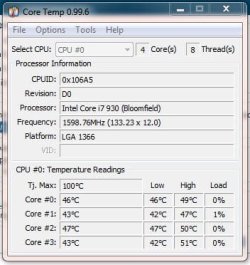
OK, so I got the Noctua NH-C12P SE14 in. Got it installed and thus far…. Results are mixed. Overall it’s about 3c degrees cooler than my old ZALMAN CNPS9500 AT. With the Zalman I was averaging 75c load, 45c idle on my overclocked 930, the SE14 is averaging 72c load, 42c idle. Hmmm.

Where it excels is in noise. This thing is quiet, even with the processor running at full load. This of course is due to its large 140mm 1200 RPM constant speed fan. Even at its full 1200 RPM speed, this thing is quiet. If I want "quieter", at the cost of higher temps, I can use one of the two voltage adapters to lower the RPMs but I don’t need them as this thing is quiet enough.

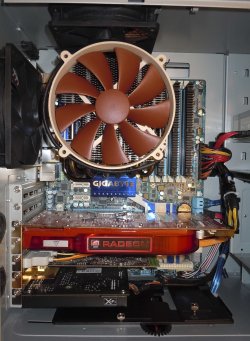
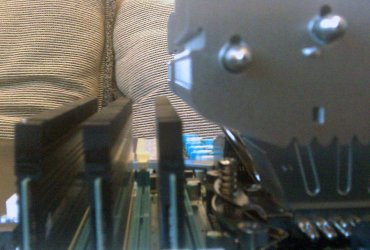
As to fit/clearance…. There’s no issues using it on a GA-X58A-UD5 MB. There was however a clearance issue with my Corsair Dominator RAM. Depending on orientation the cooler will hang over the first stick. Reorienting the cooler took care of that issue. To be honest this was a concern going in as posted here - Noctua NH-C12P SE14 CPU Cooler, GA-X58A-UD5, and Corsair Dominator RAM fit

At any rate, reorienting the cooler leaves clearance for the sticks without having to remove the heatsink from the first stick. Here's the Suggested orientation of the NH-C12P

SE14-Installed-1.jpgSE14-RAM-Clearance.jpg

Although this thing is big, it’s surprisingly light, even with the fan attached.

BTW the cooler comes with Noctua’s NT-H1-1 thermo compound which actually outperforms Arctic Silver 5, though not by any wide margins. My own unscientific tests show both giving about the same results. However it’s been noted that Noctua’s paste settles quickly whereas Arctic’s paste takes a few days to settle. Hmmm….

So….did I get what I expected with this cooler? To be honest, the book is still open. I’ll give it a few more days as the NT-H1 thermo paste settles in. Yeah, I know I just said it settles quickly, but I also said "Hmmm..."

What I DO like about it is the low profile and low noise. With the fan running at full speed, this baby is quiet. I’m running four 120mm fans in my Antec P182 case. Two S-FLEX SFF21E’s, top and rear (20dBA), one Enermax Magma (18 dBA) front, and a stock Antec Fan in the lower mid chamber (had to replace a faulty Enermax Magma). With the combination the fan noise is more like a low running whoosh sound… like an AC in the background.

Also with the SE14’s fan blowing down it provides cooling to the board’s components. Cool.

With that said… if you’re going anywhere near a 4gig overclock, this cooler isn’t for you (or me). This is more for the light to medium (3.5ish gig) overclockers where noise is a factor. That’s me.

To be honest I kind of expected more (Review), but.... :confused:

Next up...Power Supply
 

My Computer My Computer

At a glance

Windows 10 ProIntel Core i7-4770K (3.5Ghz)32 gig Corsair Dominator Platinum (4x8Gig)Sapphire Tri-X R9 Fury
Computer type
PC/Desktop
Computer Manufacturer/Model Number
Custom built by me.
OS
Windows 10 Pro
CPU
Intel Core i7-4770K (3.5Ghz)
Motherboard
Gigabyte G1 Sniper 5 (F10 Bios)
Memory
32 gig Corsair Dominator Platinum (4x8Gig)
Graphics Card(s)
Sapphire Tri-X R9 Fury
Sound Card
Soundblaster ZXR
Monitor(s) Displays
NEC PA242W 24" LCD Monitor
Screen Resolution
1920 x 1200
Hard Drives
Primary - Samsung 850 Pro (512gig), Samsung 840 Pro (256gig), 2TB WD Caviar Black.
PSU
EVGA Supernova 1000 G2
Case
Cooler Master HAF X
Cooling
Corsair H100i with Corsair Air Series SP120 Quiet Fans
Keyboard
Logitech Wireless Wave
Mouse
Logitech Performance MX
Internet Speed
High Speed Cable
Antivirus
Norton Security
Browser
IE11
Other Info
Memory Timings - 1866MHz @ 9-9-9-27-1T @ 1.5 volts
Back
Top