Very strange error on Outlook 2003

No expert

New member
Member
Local time
1:30 PM
Messages
29
I have the weirdest situation here and I'm struggling to understand why:

1. My hotmail POP3 account works fine on my old Windows XP (32bit) machine, using Outlook 2003.

2. The exact same account, with identical credentials on my Windows 7 (64bit) machine, using Outlook 2003, fails to send emails (receiving is fine) with the following error message:

Task 'pop3.live.com - Sending' reported error (0x800CCC7D) : 'Your outgoing (SMTP) server does not support SSL-secured connections. If SSL-secured connections have worked in the past, contact your server administrator or Internet service provider (ISP).'

3. Disabling the firewall on the Windows 7 machine did not make a difference. I did not have to disable the firewall on the Windows XP machine. Both are running Zonealarm.

4. Both machines are physically in the same room, using the same ISP. The only difference is that the Windows XP is a (wireless) laptop but I don't think that makes any difference.

I'm really stuck, so any ideas welcome...
 

My Computer My Computer

OS
Windows 7 Home Premium (64-bit)
I had that happen to me.

Open Outlook. Click Tools> E-mail accounts.

Picture 1 top left
Check View or change existing email account> Next

Click Change in second picture. Top right.

Picture 3 Bottom left
Uncheck Log on using Secure password Authentication.
Click more settings.

Picture 4 Bottom right.
Advanced Tab Uncheck both SSL boxes. Empty boxes as in picture.
Click okay close any open windows.

Mike
 
Last edited:

My Computer My Computer

Computer Manufacturer/Model Number
Hopalong/ Godzilla
OS
Windows7 Pro 64bit SP-1; Windows XP Pro 32bit
CPU
Intel Core i7-870 Lynnfield 2.93GHz LGA 1156 95W Quad-Core
Motherboard
ASUS P7P55D-E PRO
Memory
8GB@1400MHz Crucial Ballistix DDR3-1600 4x2GB
Graphics Card(s)
ASUS ENGTX460 DirectCU/2DI/1GD5 1GB 256-bit GDDR5
Sound Card
VIA Onboard
Monitor(s) Displays
Asus VS248H-P 24"; Samsung SyncMaster 941BW 19"ws
Screen Resolution
1920x1080; 1440x900
Hard Drives
Samsung 830 120GB SSD
Intel 320 120GB SSD
Western Digital Caviar Black WD7501AALS 750GB 7200 RPM SATA 3.0Gb/s
Western Digital Caviar Black WD6401AALS 640GB 7200 RPM SATA 3.0Gb/s
PSU
COOLER MASTER Silent Pro RS850-AMBAJ3-US 850W Modular
Case
COOLER MASTER HAF 932 RC-932-KKN5-GP Black
Cooling
Scythe "Mugen-2 Rev.B" (2 ScytheKaze-Jyuni PWM fans)
Keyboard
Logitech K-320
Mouse
Kensington
Antivirus
Avast Inernet Suite
Browser
IE 9 ; Chrome
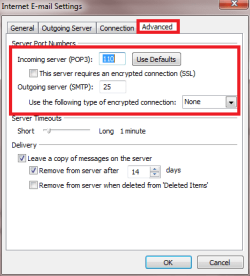
Open the account settings on both XP and Seven, compare that these settings are the same on both machines:

- Incomimg server port number
- Outgoing server port number

Outlook_ports.png

Notice please: the port numbers 110 & 25 in my screenshot are from an account of mine. Yours can be something different. Important is that you put those working port numbers from your XP mail settings to Seven.

Selection This server requires an encrypted connection should be disabled, not checked on both machines.

Kari
 

My Computer My Computer

Computer type
Laptop
Computer Manufacturer/Model Number
HP ENVY 17-1150eg
OS
Windows 10 Pro x64 EN-GB
CPU
1.6 GHz Intel Core i7-720QM Processor
Memory
6 GB
Graphics Card(s)
ATI Mobility Radeon HD 5850 Graphics
Sound Card
Beats sound system with integrated subwoofer
Monitor(s) Displays
17" laptop display, 22" LED and 32" Full HD TV through HDMI
Screen Resolution
1600*900 (1), 1920*1080 (2&3)
Hard Drives
Internal: 2 x 500 GB SATA Hard Disk Drive 7200 rpm
External: 2TB for backups, 3TB USB3 network drive for media
Cooling
As Envy runs a bit warm, I have it on a Cooler Master pad
Keyboard
Logitech diNovo Media Desktop Laser (bluetooth)
Mouse
Logitech Performance Mouse MX
Internet Speed
50/10 Mbps VDSL
Antivirus
Windows Defender 4.3.9431.0
Browser
Maxthon 3.5.2., IE11
Thank you both for responding so quickly.

Apologies for omitting this from my earlier post. I already have other POP3 accounts which work fine with the "default" 110/25 settings. The problem is that Hotmail requires some specific settings as seen here:

Hotmail POP3 Configuration

So at the moment I am using:

  • POP3 port 995, with encryption selected; and
  • SMTP port 587 with encryption selected.
For the record SPA Authentication is not selected.

These are the settings that work fine on my XP machine but fail on my Windows 7 one.

The strangest past is this: when I click on "Test Account Settings", it completes with no errors on my W7 machine, but then... when I try to actually send an email then I get the 0x800CCC7D error.


So, this is the error message if I keep 587 but disable SSL:

Task 'pop3.live.com - Sending' reported error (0x800CCC78) : 'Unable to send the message. Please verify the e-mail address in your account properties. The server responded: 530 5.7.0 Must issue a STARTTLS command first'

Task 'pop3.live.com - Sending' reported error (0x800CCC7C) : 'Your outgoing (SMTP) server requires an SSL-secured connection. On the Tools menu, click E-mail Accounts, select View or change exisiting e-mail accounts, click Next, select the account, and then click Change. Click More Settings and then on the Advanced tab select This server requires an encrypted (SSL) connection. The server responded: 530 5.7.0 Must issue a STARTTLS command first'


and this is the error message when I try 25 again with no SSL:

Task 'pop3.live.com - Sending' reported error (0x80042109) : 'Outlook is unable to connect to your outgoing (SMTP) e-mail server. If you continue to receive this message, contact your server administrator or Internet service provider (ISP).'

Task 'pop3.live.com - Sending' reported error (0x80042109) : 'Outlook is unable to connect to your outgoing (SMTP) e-mail server. If you continue to receive this message, contact your server administrator or Internet service provider (ISP).'


Appreciate your help.

Thanks
 

My Computer My Computer

OS
Windows 7 Home Premium (64-bit)
Hi there,

have you had time to look at this?

Thanks for your help.
 

My Computer My Computer

OS
Windows 7 Home Premium (64-bit)
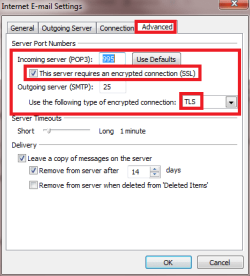
I tested this, changing three different Hotmail accounts from IMAP to POP3. I used three accounts to test because I wanted to see if there's a difference when using a @live.com, @msn.com or @hotmail.com account.

No difference, all accounts sending and receiving well from XP / Outlook 2003, Vista / Outlook 2007 and Seven / Outlook 2010, using these settings:

Hotmail_pop_settings_1.png Hotmail_pop_settings_2.png

Notice that using SSL encryption gave always a sending error, on all platforms. Using TLS, no problems whatsoever.

Kari
 
Last edited:

My Computer My Computer

Computer type
Laptop
Computer Manufacturer/Model Number
HP ENVY 17-1150eg
OS
Windows 10 Pro x64 EN-GB
CPU
1.6 GHz Intel Core i7-720QM Processor
Memory
6 GB
Graphics Card(s)
ATI Mobility Radeon HD 5850 Graphics
Sound Card
Beats sound system with integrated subwoofer
Monitor(s) Displays
17" laptop display, 22" LED and 32" Full HD TV through HDMI
Screen Resolution
1600*900 (1), 1920*1080 (2&3)
Hard Drives
Internal: 2 x 500 GB SATA Hard Disk Drive 7200 rpm
External: 2TB for backups, 3TB USB3 network drive for media
Cooling
As Envy runs a bit warm, I have it on a Cooler Master pad
Keyboard
Logitech diNovo Media Desktop Laser (bluetooth)
Mouse
Logitech Performance Mouse MX
Internet Speed
50/10 Mbps VDSL
Antivirus
Windows Defender 4.3.9431.0
Browser
Maxthon 3.5.2., IE11
Thanks for your reply Kari.

What I'm struggling to understand is why the same settings work on my Windows XP machine and not on Windows 7. So I don't think it has anything to do with Outlook itself, there must be some other issue that is related to the PC itself or to Windows 7?

Many thanks
 

My Computer My Computer

OS
Windows 7 Home Premium (64-bit)
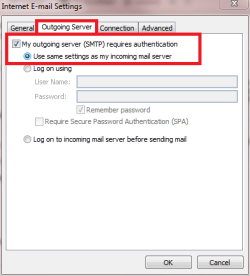
Sorry if you feel this is a stupid question, but did you check that Outgoing Server tab (first image in my previous post)? The option My outgoing server requires authentication must be enabled. Setting the ports and encryption alone is not enough.
 

My Computer My Computer

Computer type
Laptop
Computer Manufacturer/Model Number
HP ENVY 17-1150eg
OS
Windows 10 Pro x64 EN-GB
CPU
1.6 GHz Intel Core i7-720QM Processor
Memory
6 GB
Graphics Card(s)
ATI Mobility Radeon HD 5850 Graphics
Sound Card
Beats sound system with integrated subwoofer
Monitor(s) Displays
17" laptop display, 22" LED and 32" Full HD TV through HDMI
Screen Resolution
1600*900 (1), 1920*1080 (2&3)
Hard Drives
Internal: 2 x 500 GB SATA Hard Disk Drive 7200 rpm
External: 2TB for backups, 3TB USB3 network drive for media
Cooling
As Envy runs a bit warm, I have it on a Cooler Master pad
Keyboard
Logitech diNovo Media Desktop Laser (bluetooth)
Mouse
Logitech Performance Mouse MX
Internet Speed
50/10 Mbps VDSL
Antivirus
Windows Defender 4.3.9431.0
Browser
Maxthon 3.5.2., IE11
Kari, no worries - not a stupid question. I can confirm that it is enabled and even more strangely the "Test Account Settings" process completes with no errors. I have no idea what's going on...
 

My Computer My Computer

OS
Windows 7 Home Premium (64-bit)
Hi Kari, any luck with this? Many thanks
 

My Computer My Computer

OS
Windows 7 Home Premium (64-bit)
As I mentioned before, I had luck. I have three latest versions of Outlook (2003, 2007, 2010), installed on three latest versions of Windows (XP, Vista, Seven), and I have absolutely no problems in using three different types of Hotmail accounts (@live, @msn, @hotmail) on all of them using POP3 instead of IMAP.

The settings on every system, every Outlook version as shown on those screenshots above.

I can not reproduce your problem. I have absolutely not a faintest clue why it is not working for you.

Kari
 

My Computer My Computer

Computer type
Laptop
Computer Manufacturer/Model Number
HP ENVY 17-1150eg
OS
Windows 10 Pro x64 EN-GB
CPU
1.6 GHz Intel Core i7-720QM Processor
Memory
6 GB
Graphics Card(s)
ATI Mobility Radeon HD 5850 Graphics
Sound Card
Beats sound system with integrated subwoofer
Monitor(s) Displays
17" laptop display, 22" LED and 32" Full HD TV through HDMI
Screen Resolution
1600*900 (1), 1920*1080 (2&3)
Hard Drives
Internal: 2 x 500 GB SATA Hard Disk Drive 7200 rpm
External: 2TB for backups, 3TB USB3 network drive for media
Cooling
As Envy runs a bit warm, I have it on a Cooler Master pad
Keyboard
Logitech diNovo Media Desktop Laser (bluetooth)
Mouse
Logitech Performance Mouse MX
Internet Speed
50/10 Mbps VDSL
Antivirus
Windows Defender 4.3.9431.0
Browser
Maxthon 3.5.2., IE11
There appears to be a resolution to an identical problem in the following link...

Task 'Hotmail - Sending' reported error (0x800CCC7D) : 'Your outgoing (SMTP) server does not support SSL-secured connections. If SSL-secured connections have worked in the past, contact your server administrator or Internet service provider (ISP).'
.
.

Outlook connector configures the account as MAPI and doesn’t require POP settings.
Remove the Hotmail account configured as POP and then download the latest version of Outlook connector from the download link below:
Download details: Outlook Hotmail Connector 32-bit

For more information on how to configure Outlook connector click Use a Windows Live Hotmail account in Outlook - Outlook - Microsoft Office

.
.
 

My Computer My Computer

Computer type
PC/Desktop
Computer Manufacturer/Model Number
Packard Bell
OS
Windows 7 Home Premium 64bit
CPU
Intel(R) Core(TM) i3-2120 CPU @ 3.30GHz
Motherboard
Packard Bell IPISB-AG
Memory
3.00 GB
Graphics Card(s)
(1) Intel(R) HD Graphics (2) VNC Mirror Driver
Sound Card
Realtek High Definition Audio
Monitor(s) Displays
AIO LCD
Screen Resolution
1920 x 1080
Hard Drives
WDC WD10EADX-22TDHB0 ATA Device
Fixed hard disk media
4 partitions
931.51 GB
Keyboard
Wireless
Mouse
Wireless
Antivirus
Microsoft Security Essentials
Browser
IE; Firefox
Other Info
Also:
Samsung N220 Plus Netbook - Windows 7 Home
HP laptop
iPad 5
Please correct me if I'm wrong, but doesn't Hotmail connector only allow you to configure Hotmail as IMAP account?
 

My Computer My Computer

Computer type
Laptop
Computer Manufacturer/Model Number
HP ENVY 17-1150eg
OS
Windows 10 Pro x64 EN-GB
CPU
1.6 GHz Intel Core i7-720QM Processor
Memory
6 GB
Graphics Card(s)
ATI Mobility Radeon HD 5850 Graphics
Sound Card
Beats sound system with integrated subwoofer
Monitor(s) Displays
17" laptop display, 22" LED and 32" Full HD TV through HDMI
Screen Resolution
1600*900 (1), 1920*1080 (2&3)
Hard Drives
Internal: 2 x 500 GB SATA Hard Disk Drive 7200 rpm
External: 2TB for backups, 3TB USB3 network drive for media
Cooling
As Envy runs a bit warm, I have it on a Cooler Master pad
Keyboard
Logitech diNovo Media Desktop Laser (bluetooth)
Mouse
Logitech Performance Mouse MX
Internet Speed
50/10 Mbps VDSL
Antivirus
Windows Defender 4.3.9431.0
Browser
Maxthon 3.5.2., IE11
Please correct me if I'm wrong, but doesn't Hotmail connector only allow you to configure Hotmail as IMAP account?

It would seem so from the quote in my previous post. The problem in the link is identical to that which No Expert is experiencing.
I do not personally have a Hotmail account, so if you have hands-on knowledge then your experience would be more beneficial. :)
 

My Computer My Computer

Computer type
PC/Desktop
Computer Manufacturer/Model Number
Packard Bell
OS
Windows 7 Home Premium 64bit
CPU
Intel(R) Core(TM) i3-2120 CPU @ 3.30GHz
Motherboard
Packard Bell IPISB-AG
Memory
3.00 GB
Graphics Card(s)
(1) Intel(R) HD Graphics (2) VNC Mirror Driver
Sound Card
Realtek High Definition Audio
Monitor(s) Displays
AIO LCD
Screen Resolution
1920 x 1080
Hard Drives
WDC WD10EADX-22TDHB0 ATA Device
Fixed hard disk media
4 partitions
931.51 GB
Keyboard
Wireless
Mouse
Wireless
Antivirus
Microsoft Security Essentials
Browser
IE; Firefox
Other Info
Also:
Samsung N220 Plus Netbook - Windows 7 Home
HP laptop
iPad 5
That's the problem, Irene ;) I have experience as a user who has no problems. Other than telling how my settings are, it seems I'm unable to help the OP.
 

My Computer My Computer

Computer type
Laptop
Computer Manufacturer/Model Number
HP ENVY 17-1150eg
OS
Windows 10 Pro x64 EN-GB
CPU
1.6 GHz Intel Core i7-720QM Processor
Memory
6 GB
Graphics Card(s)
ATI Mobility Radeon HD 5850 Graphics
Sound Card
Beats sound system with integrated subwoofer
Monitor(s) Displays
17" laptop display, 22" LED and 32" Full HD TV through HDMI
Screen Resolution
1600*900 (1), 1920*1080 (2&3)
Hard Drives
Internal: 2 x 500 GB SATA Hard Disk Drive 7200 rpm
External: 2TB for backups, 3TB USB3 network drive for media
Cooling
As Envy runs a bit warm, I have it on a Cooler Master pad
Keyboard
Logitech diNovo Media Desktop Laser (bluetooth)
Mouse
Logitech Performance Mouse MX
Internet Speed
50/10 Mbps VDSL
Antivirus
Windows Defender 4.3.9431.0
Browser
Maxthon 3.5.2., IE11
OK, some additional information. I installed Outlook Connector and then added the email address as IMAP which works fine but... only if you make the hotmail address as the default address in Outlook (apparently this is a "feature" of Connector). But because I have another address as my main address then this arrangement will simply not work. Therefore, Outlook Connector has been unistalled, my hotmail address closed and switched to another provider. So that's the "solution"...
 

My Computer My Computer

OS
Windows 7 Home Premium (64-bit)
Sorry to hear that. Main thing is you have something that works for you.
 

My Computer My Computer

Computer type
Laptop
Computer Manufacturer/Model Number
HP ENVY 17-1150eg
OS
Windows 10 Pro x64 EN-GB
CPU
1.6 GHz Intel Core i7-720QM Processor
Memory
6 GB
Graphics Card(s)
ATI Mobility Radeon HD 5850 Graphics
Sound Card
Beats sound system with integrated subwoofer
Monitor(s) Displays
17" laptop display, 22" LED and 32" Full HD TV through HDMI
Screen Resolution
1600*900 (1), 1920*1080 (2&3)
Hard Drives
Internal: 2 x 500 GB SATA Hard Disk Drive 7200 rpm
External: 2TB for backups, 3TB USB3 network drive for media
Cooling
As Envy runs a bit warm, I have it on a Cooler Master pad
Keyboard
Logitech diNovo Media Desktop Laser (bluetooth)
Mouse
Logitech Performance Mouse MX
Internet Speed
50/10 Mbps VDSL
Antivirus
Windows Defender 4.3.9431.0
Browser
Maxthon 3.5.2., IE11
hi!

I am having the exact same problem with SSL email on ports 587/995. Double checked config. Everything exactly as supposed to be. I am an IT guy, used Outlook for 15+ years, and can't see any problem with this. Removed antivirus, no filtering in place. It works fine on an XP with Outlook 2003 and an XP with Outlook 2000 on the same network, but NOT on Outlook 2003 (latest SP3) on Windows 7 Pro 64bit.

Did you figure this out?

Once, I got warned by Outlook that there was a security issue with the server, and to say ok. Unfortunately, as I was typing stuff, I don't know if it ever took Y or N. Where would I go to clean up any certificate associated with the email domain names ?

Also, at the same time, I get SCHANNEL errors in Event Viewer/System: The following fatal alert was generated: 10. The internal error state is 10.

Thanks!
 
Last edited:

My Computer My Computer

OS
Windws 7 Pro 64bit
I'm "glad" I'm not the old one with this issue. The "solution" is to install Outlook Connector BUT then you have to use your Hotmail / Live address as the default one. However, you may be able to configure it as POP3 possibly (i.e. outside Connector).
 

My Computer My Computer

OS
Windows 7 Home Premium (64-bit)
Have you found an answer for this issue? I am experiencing similar problems with Outlook 2003 running on XP SP3. For me, this has been an intermittent issue going on for a long while.

It began last year, sometimes it would send mail through my Hotmail account, other times I would get the error message. After doing some research, I concluded it may be Norton AV and I disables the email scanning. It seemed to work for a few days, but then it would stop sending. I recently upgraded to the newest version of Norton, and then I thought the problem was fixed because it worked for at least a week, but the issue has returned.

Sometimes on a reboot it works for a little while and then it fails again. It is frustrating. I have my settings as described above and still nothing.

Bear in mind, I can always receive mail, and I have no problems sending mail through this account through my WIN7 machine running Thunderbird, and through my Android phone running GMAIL and K9.

Any help would be appreciated!
 

My Computer My Computer

OS
windows 7
Back
Top