Solved 2 instances of outlook 2010 at the same time

quad

New member
Local time
7:50 PM
Messages
6
I'm trying to run two instances of outlook at the same time on the same computer using two different outlook profiles.

example - Profile 1 - Outlook (the default profile)
Profile 2 - Gmail

I just want to keep both of my email accounts separate.

I tried this Running two or more email profiles concurrently in Outlook 2010

and using the /profile "Outlook" switch.

It works for the first profile that I open but it doesn't matter which profile I try to open next, it will always continue to re-open the profile I opened first.

Anyone know how to get this to work?

Thanks,
quad
 

My Computer My Computer

OS
Windows 7 RC

My Computer My Computer

Computer type
PC/Desktop
Computer Manufacturer/Model Number
Packard Bell
OS
Windows 7 Home Premium 64bit
CPU
Intel(R) Core(TM) i3-2120 CPU @ 3.30GHz
Motherboard
Packard Bell IPISB-AG
Memory
3.00 GB
Graphics Card(s)
(1) Intel(R) HD Graphics (2) VNC Mirror Driver
Sound Card
Realtek High Definition Audio
Monitor(s) Displays
AIO LCD
Screen Resolution
1920 x 1080
Hard Drives
WDC WD10EADX-22TDHB0 ATA Device
Fixed hard disk media
4 partitions
931.51 GB
Keyboard
Wireless
Mouse
Wireless
Antivirus
Microsoft Security Essentials
Browser
IE; Firefox
Other Info
Also:
Samsung N220 Plus Netbook - Windows 7 Home
HP laptop
iPad 5
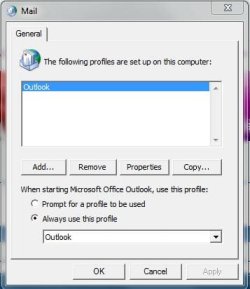
In your Control Panel, Mail, select Profiles, and see what option is selected at the bottom. I have two people who monitor two e-mail accounts, and for both I have it set to prompt them...and it works fine.
 

Attachments

  • Mail.jpg
    Mail.jpg
    26.6 KB · Views: 60

My Computer My Computer

OS
Windows 7 Ultimate x64 SP1
CPU
Intel Core i7-2600
Motherboard
Gigabyte GA-P67A-UD3P-B3
Memory
12 GB Patriot Extreme DDR3-1333
Graphics Card(s)
Nvidia GTX 470
Monitor(s) Displays
Dell UltraSharp 2209WA
Hard Drives
OCZ Agility3 240 GB, WD5001AALS, WD7501AALS
PSU
OCZ ModStream 700W
Case
CoolerMaster HAF 912 Advanced
Cooling
CoolerMaster Hyper 212 Plus
In your Control Panel, Mail, select Profiles, and see what option is selected at the bottom. I have two people who monitor two e-mail accounts, and for both I have it set to prompt them...and it works fine.

I do have my outlook profiles setup to Prompt me and I have a Gmail profile and the default Outlook profile.

The first time I open Outlook it prompts me but when I open outlook the second time it opens the same profile that is already opened without prompting me.

thanks,
quad
 

My Computer My Computer

OS
Windows 7 RC
The following link, I believe, includes reference to the requirement in your post: Hammer of God
... unfortunately I think it is only suitable for 2007/2003 :(
Also, it refers to Exchange Servers not POP3 accounts. (It seems that Outlook 2010 now has these capabilities).

Here is an excerpt from the link:

..:.:.:: ExtraOutlook! Vista/XP OL 2003/2007 v1.3 (~ 6k - author: Jason Geffner) ::.::.:..​
What people are saying about "ExtraOutlook":
Slava - "This tool is just AWESOME!!!! Thanks again..."
Erin - "That. Is. Pimp."
Greg - "Life just got alot better. Thanks heaps!"
Greg's Mom - "Do me Thor! Do me!"


As long as Outlook has been around, people have been trying to get two instances running at the same time. Not multiple profiles that you can load when starting Outlook, but two separate instances running concurrently, each with their own associated profile. After all, Outlook (even 2007) only lets you connect to a single Exchange server per profile... And that sucks.
What would be great is to have one instance connected up to your "business" Exchange Server, and another connected up to your "personal" Exchange Server (and of course, to other people's Exchange servers who don't you know have an account on their box ;).
If you've tried to do this, you've found that no matter what you do, you can't run two (or more) Outlooks at the same time, even if you try renaming .exe's, using command-line profile specifications, or any other tricks.
However, while futzing around one day trying to get two Outlooks running, I had what I thought was a great idea -- I'd configure a separate profile for Outlook under a different user account, and then use "RunAs" to launch Outlook as that user, and all of my dreams would come true. Boy, was I excited.
Well, it didn't work. In fact, it didn't work so well that it scared me.
When Outlook was launched via "RunAs" (no matter whether I executed Outlook.exe in a secondary "RunAs" command prompt or directly from the the interactive session), what happened was that a separate instance of Outlook did indeed launch, but it displayed the "concurrent" user's folders and NOT those of the user used to RunAs - no matter how you launched it! If during this time you viewed Task Manager, you would find that even though you saw two differnt windows running, and though you could interact with them individually (meaning, you could open different sets of folders in each separately, but they were for the same user) you only saw one instance of the .exe running. The first thing I thought was "Voodoo!!" I then said to myself, "Self, even though you launched it in a completely different user context, it hopped out of that user's space and hijacked your concurrent logon's files! WTF?"
During last year's Microsoft Ninjitsu training at Black Hat Vegas, I brought it up to my class and we all concurred that voodoo was afoot - even some Microsoft guys (who shall remain nameless) thought so and told me to STFU and to contact MSRC before talking about it anymore since it looked like Outlook was actually crossing user context borders.
True to "responsible disclosure," I called upon the skillz of Jason Geffner, a "reverse engineer" I work with at NGSSoftware. Jason is one of those irritatingly smart people that can do anything, so I knew he'd help me out (Actually, we've got lots of people like that at NGS ;). As it turns out, Outlook is doing nothing close to what I feared. Basically, the second instance sees that another Outlook window is running in the same interactive logon space, and when it starts, it just calls another popup in the previous Outlook space and then terminates itself (that's close enough, anyway). The good news is that there is no "user hopping" or "boundary crossing" here. A more detailed explanation of the actual technical process is available on Jason's site. The really good news is that Jason was able to intercept the exit process and patch the FindWindowA call to a NULL value, which started a completely separate Outlook instance and allowed a different profile to be selected on load! W00t! So, without further adieu, we are proud to present you with our "ExtraOutlook" tool that allows you to launch as many Outlook instances as you want. All you have to do is configure the profiles you want, and then type: ExtraOutlook.exe "C:\Program Files\Microsoft Office\Office12\OUTLOOK.EXE" (after you download it, of course).
Attendees of past Microsoft Ninjitsu classes have been using it for some time now (as all attendees get special access to the Hammer of God Member's Site) and we've not heard of any catastrophic failures (you know, like having all mailbox data destroyed without any hope of recovery).
Of course, use it at your own risk, and all standard warnings and disclaimers apply. Go nuts.
Ver 1.0 - Rel 1/11/08 - Public Release
Ver 1.1 - Rel 1/12/08 - Fixed error on XP
ver 1.2 - Rel 2/09/08 - Added support for Outlook 2003
ver 1.3 - Rel 1/15/09 - Added support for command line options

... all very complicated! :confused:
 

My Computer My Computer

Computer type
PC/Desktop
Computer Manufacturer/Model Number
Packard Bell
OS
Windows 7 Home Premium 64bit
CPU
Intel(R) Core(TM) i3-2120 CPU @ 3.30GHz
Motherboard
Packard Bell IPISB-AG
Memory
3.00 GB
Graphics Card(s)
(1) Intel(R) HD Graphics (2) VNC Mirror Driver
Sound Card
Realtek High Definition Audio
Monitor(s) Displays
AIO LCD
Screen Resolution
1920 x 1080
Hard Drives
WDC WD10EADX-22TDHB0 ATA Device
Fixed hard disk media
4 partitions
931.51 GB
Keyboard
Wireless
Mouse
Wireless
Antivirus
Microsoft Security Essentials
Browser
IE; Firefox
Other Info
Also:
Samsung N220 Plus Netbook - Windows 7 Home
HP laptop
iPad 5
THANK YOU! Thank You! Thank You!!!

I ran across the extraoutlook.exe before but I guess I didn't fully understand it or didn't set it up right the first time.

VERY VERY Simple!

Download extraoutlook.exe and here's what I did:
I created a folder (extraoutlook at the root of C and put the extraoutlook.exe in the folder)

Next I went to a command prompt and navigated to my C:\extraoutlook folder then typed in the following line -
extraoutlook.exe "C:\Program Files (x86)\Microsoft Office\Office14\outlook.exe" /profile "Gmail"

So it would look like this on the screen in your command window -
C:\extraoutlook\extraoutlook.exe "C:\Program Files (x86)\Microsoft Office\Office14\outlook.exe" /profile "Gmail"

This is working for Windows 7 using Outlook 2010

Once Again - Thank You!!!

PS - To make it even easier once it's setup I did this:

Created a bat file in the C:\extraoutlook folder and created a shortcut of the bat file on my desktop.

Now just a double-click and I have my Gmail account open :D
***************************************************
If you don't know how to create a bat file here we go:
Open a new text document and
If you are using Windows 7 just copy and paste the following: extraoutlook.exe "C:\Program Files (x86)\Microsoft Office\Office14\Outlook.exe" /profile "Gmail"
(My profile name is Gmail - replace it with whatever your outlook profile name is)
Save your new text document - rename it to whatever you want

Now you will have to change the extension of your new .txt file to .bat - now just double click the file and it will work.
 

My Computer My Computer

OS
Windows 7 RC
Excellent!! So pleased it worked for you. :D

Great method explanation for anyone else wishing to do the same...
 

My Computer My Computer

Computer type
PC/Desktop
Computer Manufacturer/Model Number
Packard Bell
OS
Windows 7 Home Premium 64bit
CPU
Intel(R) Core(TM) i3-2120 CPU @ 3.30GHz
Motherboard
Packard Bell IPISB-AG
Memory
3.00 GB
Graphics Card(s)
(1) Intel(R) HD Graphics (2) VNC Mirror Driver
Sound Card
Realtek High Definition Audio
Monitor(s) Displays
AIO LCD
Screen Resolution
1920 x 1080
Hard Drives
WDC WD10EADX-22TDHB0 ATA Device
Fixed hard disk media
4 partitions
931.51 GB
Keyboard
Wireless
Mouse
Wireless
Antivirus
Microsoft Security Essentials
Browser
IE; Firefox
Other Info
Also:
Samsung N220 Plus Netbook - Windows 7 Home
HP laptop
iPad 5
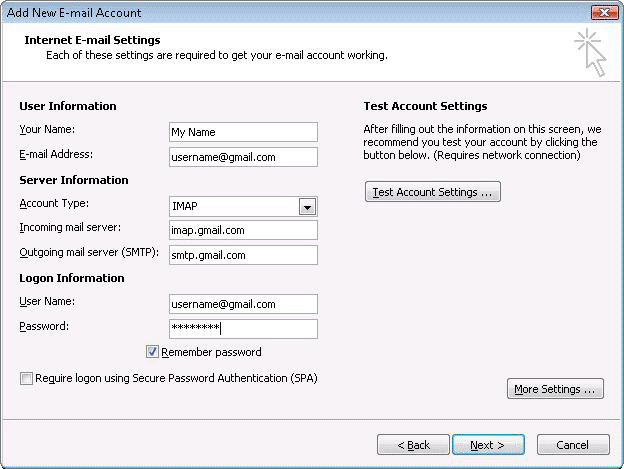
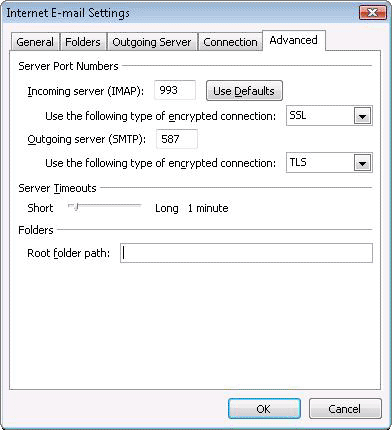
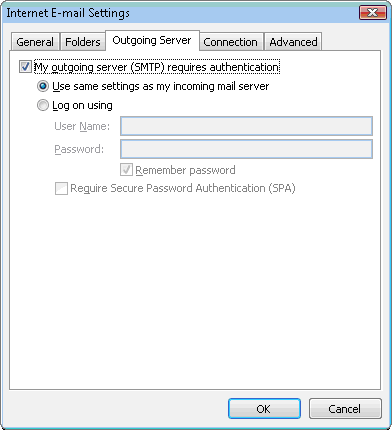
My next problem was checking my gmail accounts using outlook on two different computers.

It was easy after a quick Google search. I had to use IMAP instead of POP3. :D

Enter all of the proper info for your account the make these few changes and there you go!!!


gmail_77689c_en.gif


gmail_77689d_en.gif


gmail_77689e_en.gif


It's all listed here: Outlook 2007 or 2010 - Gmail Help just in case you are having trouble.

quad ;)
 

My Computer My Computer

OS
Windows 7 RC
Thanks for the extra info, quad. I am sure that others will be most grateful.
 

My Computer My Computer

Computer type
PC/Desktop
Computer Manufacturer/Model Number
Packard Bell
OS
Windows 7 Home Premium 64bit
CPU
Intel(R) Core(TM) i3-2120 CPU @ 3.30GHz
Motherboard
Packard Bell IPISB-AG
Memory
3.00 GB
Graphics Card(s)
(1) Intel(R) HD Graphics (2) VNC Mirror Driver
Sound Card
Realtek High Definition Audio
Monitor(s) Displays
AIO LCD
Screen Resolution
1920 x 1080
Hard Drives
WDC WD10EADX-22TDHB0 ATA Device
Fixed hard disk media
4 partitions
931.51 GB
Keyboard
Wireless
Mouse
Wireless
Antivirus
Microsoft Security Essentials
Browser
IE; Firefox
Other Info
Also:
Samsung N220 Plus Netbook - Windows 7 Home
HP laptop
iPad 5
OPening an old thread to add more complications to the mix... I have an SSD for my C drive and have very littel on it. My program files are on the D drive. How do I get it to run on that drive with the .bat? I upgraded to Office 2010 a couple days ago and now the .bat will not open my 2nd session. Worked fine until then...

Ragman!!!

Here is my original .bat that worked with WIN 7 ULT 64bit and Office 2007.

cd\
cd D:\ExtraOutlook
extraoutlook.exe "D:\Program Files (x86)\Microsoft Office\Office12\Outlook.exe" /profile "USMV"

Now using the same OS and Office 2010.
 

My Computer My Computer

OS
Windows 7 Ultimate x64
Thanks again for this very useful info.

I had one profile with a couple pop mail accounts and a busted exchange account (which was a pain to remove) and another profile with two exchange accounts.

EXTRAOUTLOOK ROCKS!!! I can now open up two outlook instances at the same time, one with pop mails and another with the exchanges.

THANK YOU!!!
 

My Computer My Computer

Computer Manufacturer/Model Number
EVGA 780i (132-CK-NF78-A2)
OS
Win7 x64
CPU
E6750 [email protected] OC
Motherboard
EVGA 780i (132-CK-NF78-A2)
Memory
6GB Crucial Balistix 800
Graphics Card(s)
2 X GTX460 SLI OC@849,2000
Sound Card
Audigy 2 (Creative is evil)
Monitor(s) Displays
65" Sony TV
Screen Resolution
1920X1080
Hard Drives
3X150 raptors @ Raid0
PSU
Corsair 850
Getting error message

I am trying to use ExtraOutlook with windows 7 and outlook 2010. I am getting the following error.

ExtraOutlook v1.3 Error
Function not found in Import Table

Anyone else seen this?
 
Last edited:

My Computer My Computer

OS
Windows 7 64xbit Professional
You are doing something wrong

I have saved extraoutlook.exe in c:\windows and I have created two shortcuts on the desktop. I have two profiles in control panel-->Mail (32bit) named "Outlook" and "Outlook 2". The first is the default.

First Shortcut - Outlook pop.
Target: C:\Windows\ExtraOutlook.exe "C:\Program Files (x86)\Microsoft Office\Office14\outlook.exe" /profile "Outlook 2"

Start in: c:\Windows

Second shortcut - Outlook Exchange
Target: C:\Windows\ExtraOutlook.exe "C:\Program Files (x86)\Microsoft Office\Office14\outlook.exe" /profile "Outlook 2"

Start in: c:\Windows
 

My Computer My Computer

Computer Manufacturer/Model Number
EVGA 780i (132-CK-NF78-A2)
OS
Win7 x64
CPU
E6750 [email protected] OC
Motherboard
EVGA 780i (132-CK-NF78-A2)
Memory
6GB Crucial Balistix 800
Graphics Card(s)
2 X GTX460 SLI OC@849,2000
Sound Card
Audigy 2 (Creative is evil)
Monitor(s) Displays
65" Sony TV
Screen Resolution
1920X1080
Hard Drives
3X150 raptors @ Raid0
PSU
Corsair 850
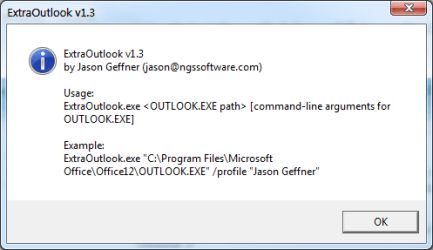
Having issue with this process

I keep on getting extraoutlook v1.3
Usage:
extraoutlook.exe<OUTLOOK.EXEpath>[command-line arguments for OUTLOOK.EXE]

Any ideas on what this is??


THANK YOU! Thank You! Thank You!!!

I ran across the extraoutlook.exe before but I guess I didn't fully understand it or didn't set it up right the first time.

VERY VERY Simple!

Download extraoutlook.exe and here's what I did:
I created a folder (extraoutlook at the root of C and put the extraoutlook.exe in the folder)

Next I went to a command prompt and navigated to my C:\extraoutlook folder then typed in the following line -
extraoutlook.exe "C:\Program Files (x86)\Microsoft Office\Office14\outlook.exe" /profile "Gmail"

So it would look like this on the screen in your command window -
C:\extraoutlook\extraoutlook.exe "C:\Program Files (x86)\Microsoft Office\Office14\outlook.exe" /profile "Gmail"

This is working for Windows 7 using Outlook 2010

Once Again - Thank You!!!

PS - To make it even easier once it's setup I did this:

Created a bat file in the C:\extraoutlook folder and created a shortcut of the bat file on my desktop.

Now just a double-click and I have my Gmail account open :D
***************************************************
If you don't know how to create a bat file here we go:
Open a new text document and
If you are using Windows 7 just copy and paste the following: extraoutlook.exe "C:\Program Files (x86)\Microsoft Office\Office14\Outlook.exe" /profile "Gmail"
(My profile name is Gmail - replace it with whatever your outlook profile name is)
Save your new text document - rename it to whatever you want

Now you will have to change the extension of your new .txt file to .bat - now just double click the file and it will work.
 

Attachments

  • extraoutlook.png
    extraoutlook.png
    8.5 KB · Views: 17

My Computer My Computer

OS
Windows 7 ultimate x32
BRILLIANT! :party:
Been looking for a solution for this issue for far too long so thank you very much indeed.
All the best
Mac
 

My Computer My Computer

OS
Windows 8 (trial version)
Is this still working for everyone? Perhaps it won't work with the X64 version of office? I'm getting the import table message on Office 2010 and Windows 7 Pro both X64
 

My Computer My Computer

Computer Manufacturer/Model Number
Asus G53SX-DH71
OS
Windows 7 Ultimate Retail
CPU
i7-2670QM
Memory
12GB
Graphics Card(s)
Geforce 560M
I can confirm that it works with Win7 x64 and 32BIT office 2010, not sure about 64 bit office...
 

My Computer My Computer

Computer Manufacturer/Model Number
EVGA 780i (132-CK-NF78-A2)
OS
Win7 x64
CPU
E6750 [email protected] OC
Motherboard
EVGA 780i (132-CK-NF78-A2)
Memory
6GB Crucial Balistix 800
Graphics Card(s)
2 X GTX460 SLI OC@849,2000
Sound Card
Audigy 2 (Creative is evil)
Monitor(s) Displays
65" Sony TV
Screen Resolution
1920X1080
Hard Drives
3X150 raptors @ Raid0
PSU
Corsair 850
I can now confirm it does not work with office 2010 x64. No big deal I'd rather run office x86 and have this ability.

Thanks everyone.
 

My Computer My Computer

Computer Manufacturer/Model Number
Asus G53SX-DH71
OS
Windows 7 Ultimate Retail
CPU
i7-2670QM
Memory
12GB
Graphics Card(s)
Geforce 560M
Back
Top