ALFA AWUS036H usb Adapter REFUSES completely to connect

gin99

New member
Local time
7:49 PM
Messages
9
SOLVED! By me, please see page 2!

OK,

This is my first post, so go easy on me..!

I have a Sony VPCEC2S0E laptop which is less than a year old.

I have spent DAYS trying to get the ALFA adapter to work, I have searched the net, and in particular the forums, including this one, and I have found lots of issues with it, a couple of solutions, but no joy for me.

I have tried lots of different drivers, tried it with and without the Realtek Utility (VERY conflicty - if that is a word), installed XP on separate partition - my laptop is now dual boot, even had the adapter changed in case it was faulty. No joy at all.

With Windows XP I have various drivers missing so I gave up, got the ethernet working though.

I have an internal Atheros AR9285 Wireless Network Adapter, (got the usb ALFA to improve the range) I have disabled it while installing, and after, but could this be stopping ALFA connecting?

Or maybe some Sony bloatware in the background?

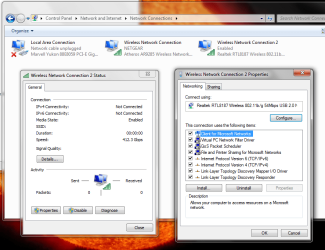
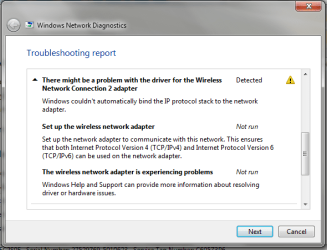
The Adapter (Realtek RTL8187 Wireless 802.11b/g 54Mbps USB 2.0 Network Adapter) is listed in device manager as working. It is Enabled in Network Connections, the troubleshooter just tells me what I already know - that there is a problem with it!

There are 2 drivers in Driver File Details - RTL8187.sys (Realtek) and vwifibus.sys (Microsoft)

I am sure that either I am doing something simple wrong, or it just does not work on my system, but I have followed the instructions to the letter, and the thing just sits there. Getting slightly warm.

Please help if you can, it is so frustrating, don't know whether to cry or smash the thing up!!
Asking you guys is surely the best option!

Windows 7 Home Premium 64bit - and as of yesterday, SP1
Intel i5 2.27GHz
6GB RAM
 
Last edited:

My Computer My Computer

At a glance

Windows 7 Home Premium 64bit
OS
Windows 7 Home Premium 64bit
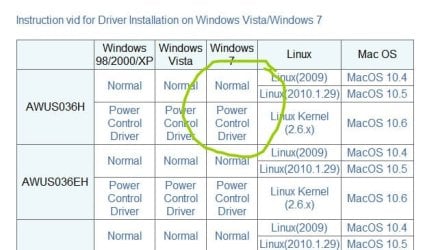
Hi gin99, welcome to seven forums, did you install the driver that came with the device? if so could you system restore prior to the installation of alfa if you could go back as far as the first installation. my experienced with alfa is that the driver that came with the device is not compatible with windows 7. you can download the driver here

ALFA Network – WLAN, WiFi phone, ADSL, KVM, Bluetooth, PoE Products -- Driver

choose the correct model and version of windows.
 

Attachments

  • alfa.jpg
    alfa.jpg
    62.4 KB · Views: 279
Last edited:

My Computer My Computer

At a glance

MS Windows 8Intel Core i5 @ 2.27GHz Arrandale 32nm Techno...8.0GB Dual-Channel DDR3 @ 532MHz (7-7-7-20)ATI Mobility Radeon HD 4300 Series (Dell)
Computer type
PC/Desktop
Computer Manufacturer/Model Number
Dell inspiron 1564
OS
MS Windows 8
CPU
Intel Core i5 @ 2.27GHz Arrandale 32nm Technology
Motherboard
Dell Inc. 0M9XW4 (U2E1)
Memory
8.0GB Dual-Channel DDR3 @ 532MHz (7-7-7-20)
Graphics Card(s)
ATI Mobility Radeon HD 4300 Series (Dell)
Sound Card
Realtek High Definition Audio
Monitor(s) Displays
Generic PnP Monitor on ATI Mobility Radeon HD 4330
Screen Resolution
1366x768 pixels
Hard Drives
1 tb TOSHIBA (SATA)
PSU
built-in
Case
Dell Laptop
Cooling
built-in
Keyboard
built-in
Mouse
Dell Touchpad/Microsoft Arc Mouse
Other Info
Snake Laptop Skin, Detachable Alfa USB wifi with custom 15dbi antenna (for better signal range)
Hi rbeldua, thanks for the quick response.

Yes, I have tried the included drivers, and the one from the Alfa site.
I have not done a system restore though, will that possibly remove more stuff than just uninstalling the drivers manually?
Also, would it be best to only install the driver from that download, or run the exe file (so including the realtek utility)

Many thanks in advance
 

My Computer My Computer

At a glance

Windows 7 Home Premium 64bit
OS
Windows 7 Home Premium 64bit
if you have not done a system restore, you can wipe the previous driver with this

Guru3D - Driver Sweeper (Setup) download from Guru3D.com

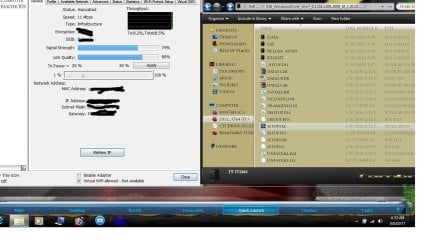
then download the appropriate driver from alfa site, extract it and click the setup.exe as shown on the right. that will install the utility also, which is on the left. but if you the want the driver only, let windows search for it automatically on your harddrive.

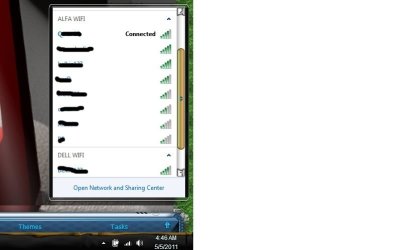
if successfully installed, eventually you will have two network wireless adapters displayed like so.

i hope this helps.
 

Attachments

  • ALFA.jpg
    ALFA.jpg
    114.5 KB · Views: 366
  • alfa1.jpg
    alfa1.jpg
    25.1 KB · Views: 211
Last edited:

My Computer My Computer

At a glance

MS Windows 8Intel Core i5 @ 2.27GHz Arrandale 32nm Techno...8.0GB Dual-Channel DDR3 @ 532MHz (7-7-7-20)ATI Mobility Radeon HD 4300 Series (Dell)
Computer type
PC/Desktop
Computer Manufacturer/Model Number
Dell inspiron 1564
OS
MS Windows 8
CPU
Intel Core i5 @ 2.27GHz Arrandale 32nm Technology
Motherboard
Dell Inc. 0M9XW4 (U2E1)
Memory
8.0GB Dual-Channel DDR3 @ 532MHz (7-7-7-20)
Graphics Card(s)
ATI Mobility Radeon HD 4300 Series (Dell)
Sound Card
Realtek High Definition Audio
Monitor(s) Displays
Generic PnP Monitor on ATI Mobility Radeon HD 4330
Screen Resolution
1366x768 pixels
Hard Drives
1 tb TOSHIBA (SATA)
PSU
built-in
Case
Dell Laptop
Cooling
built-in
Keyboard
built-in
Mouse
Dell Touchpad/Microsoft Arc Mouse
Other Info
Snake Laptop Skin, Detachable Alfa USB wifi with custom 15dbi antenna (for better signal range)
Thanks for the advice, but

:( my system restore doesn't go back far enough
:(:( Driver Sweeper is no longer available from their site
:(:(:( The win7 drivers are no longer available from the alfa site!

Could it be Alfa are fiddling with the win7 driver??

I shall struggle on...
 

My Computer My Computer

At a glance

Windows 7 Home Premium 64bit
OS
Windows 7 Home Premium 64bit
hi gin99, the links are working perfectly and they are available on their sites just downloaded myself. the alfa driver is 17 mb with the filename 036_WindowsDriver_Win7_6.1316.1209.2009_UI_1.00.0145.L and driver sweeper is 4.5 mb with the filename DriverSweeper_2.1.0-[Guru3D.com].

edit: currently i am using alfa awuso36h device for wifi connection. i had the same problem before, what i did was...(i reformatted my hardrive with fresh installation) just to have this device working. make sure your device is not defective and check also your usb cable.
 

My Computer My Computer

At a glance

MS Windows 8Intel Core i5 @ 2.27GHz Arrandale 32nm Techno...8.0GB Dual-Channel DDR3 @ 532MHz (7-7-7-20)ATI Mobility Radeon HD 4300 Series (Dell)
Computer type
PC/Desktop
Computer Manufacturer/Model Number
Dell inspiron 1564
OS
MS Windows 8
CPU
Intel Core i5 @ 2.27GHz Arrandale 32nm Technology
Motherboard
Dell Inc. 0M9XW4 (U2E1)
Memory
8.0GB Dual-Channel DDR3 @ 532MHz (7-7-7-20)
Graphics Card(s)
ATI Mobility Radeon HD 4300 Series (Dell)
Sound Card
Realtek High Definition Audio
Monitor(s) Displays
Generic PnP Monitor on ATI Mobility Radeon HD 4330
Screen Resolution
1366x768 pixels
Hard Drives
1 tb TOSHIBA (SATA)
PSU
built-in
Case
Dell Laptop
Cooling
built-in
Keyboard
built-in
Mouse
Dell Touchpad/Microsoft Arc Mouse
Other Info
Snake Laptop Skin, Detachable Alfa USB wifi with custom 15dbi antenna (for better signal range)
hmmm,

The link on the alfa site goes to 4shared.com and says "The file link that you requested is not valid."

And the Guru3D site says this on it- "Attention - Guru3D Driver Sweeper has been discontinued as such you will not find any download links here any longer."

Sorry, rbeldua, am I being stooopid?
 

My Computer My Computer

At a glance

Windows 7 Home Premium 64bit
OS
Windows 7 Home Premium 64bit
Hope this may help...
I can post other screen shots, please let me know any in particular
 

Attachments

  • Capture.PNG
    Capture.PNG
    54.4 KB · Views: 475

My Computer My Computer

At a glance

Windows 7 Home Premium 64bit
OS
Windows 7 Home Premium 64bit
Thanks for the links, Mkam, I have the correct driver, I am sure of that now.

The adapter should just work, I think now that it must be a problem with my Vaio. Sony have been utterly useless in helping. Just doing the usual passing the buck.

Screen cap attached.
 

Attachments

  • Capture.PNG
    Capture.PNG
    21.8 KB · Views: 145

My Computer My Computer

At a glance

Windows 7 Home Premium 64bit
OS
Windows 7 Home Premium 64bit
Just thought I would update, as I have now fixed the problem.

Unfortunately, the only way was to restore to factory settings. Takes a while, as anyone who (especially if you dont constantly backup all your files) has done it knows.

After taking things as far as I could, I emailled the Managing Director of Sony. I was promptly replied to, and after a couple of telephone calls from a very helpful chap at head office, I was contacted by an engineer from Egypt. Lots of calls and emails and going through the usual check this, check that, I gave up and sorted it myself by doing the above. He probably would have eventually worked out what was going on, some sort of software conflict I am certain, but sod that, just wipe the HD and start again is my advice.

Anyway, I done that, downloaded the utility, plugged in the adapter, and it works!

Thanks for your help!
 

My Computer My Computer

At a glance

Windows 7 Home Premium 64bit
OS
Windows 7 Home Premium 64bit

My Computer My Computer

At a glance

windows 72.8 Core 2 DUO2GBNVIDIA 8500GT
Computer Manufacturer/Model Number
Intel DG31PR
OS
windows 7
CPU
2.8 Core 2 DUO
Motherboard
Intel DG31PR
Memory
2GB
Graphics Card(s)
NVIDIA 8500GT
Sound Card
Onboard
Monitor(s) Displays
HP 2009f widescreen
Hard Drives
200 GB sata 2, 16MB Cache
PSU
400 watts
Case
Pro Media Gaming PC
Cooling
Cooler master
My Alfa adaptor wouldn't work either and i had tried a lots of times with installing drivers and so on. that was a couple of years ago..A friend of mine has discovered that the problem i had was the windows signature. The driver wasnt signed by windows..or smth like that. So he just installed a script on my pc which everytime i turn it on is going to disable signature, after that windows gets in, and my Alfa adaptor works smoothly!
 

My Computer My Computer

At a glance

Windows 7 Professional x64
OS
Windows 7 Professional x64

My Computer My Computer

At a glance

MS Windows 8Intel Core i5 @ 2.27GHz Arrandale 32nm Techno...8.0GB Dual-Channel DDR3 @ 532MHz (7-7-7-20)ATI Mobility Radeon HD 4300 Series (Dell)
Computer type
PC/Desktop
Computer Manufacturer/Model Number
Dell inspiron 1564
OS
MS Windows 8
CPU
Intel Core i5 @ 2.27GHz Arrandale 32nm Technology
Motherboard
Dell Inc. 0M9XW4 (U2E1)
Memory
8.0GB Dual-Channel DDR3 @ 532MHz (7-7-7-20)
Graphics Card(s)
ATI Mobility Radeon HD 4300 Series (Dell)
Sound Card
Realtek High Definition Audio
Monitor(s) Displays
Generic PnP Monitor on ATI Mobility Radeon HD 4330
Screen Resolution
1366x768 pixels
Hard Drives
1 tb TOSHIBA (SATA)
PSU
built-in
Case
Dell Laptop
Cooling
built-in
Keyboard
built-in
Mouse
Dell Touchpad/Microsoft Arc Mouse
Other Info
Snake Laptop Skin, Detachable Alfa USB wifi with custom 15dbi antenna (for better signal range)
View attachment Doc1sc.docx
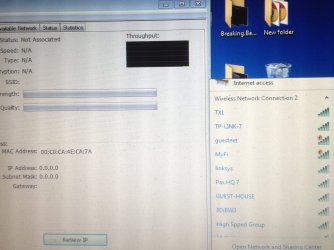
this is what it looks like u see i have the antenna pulling in the the full bars and my actual internet is week...i know the adapter is working i just can connect you see the realtek window under general no activity
 

My Computer My Computer

At a glance

Win 7 starter 32
OS
Win 7 starter 32
2 network adapters is showing that's because 1 is your built in wireless network (I presume you're using a laptop, you have to disable or turn it off) and the other wireless network would be the Alfa.
 

My Computer My Computer

At a glance

MS Windows 8Intel Core i5 @ 2.27GHz Arrandale 32nm Techno...8.0GB Dual-Channel DDR3 @ 532MHz (7-7-7-20)ATI Mobility Radeon HD 4300 Series (Dell)
Computer type
PC/Desktop
Computer Manufacturer/Model Number
Dell inspiron 1564
OS
MS Windows 8
CPU
Intel Core i5 @ 2.27GHz Arrandale 32nm Technology
Motherboard
Dell Inc. 0M9XW4 (U2E1)
Memory
8.0GB Dual-Channel DDR3 @ 532MHz (7-7-7-20)
Graphics Card(s)
ATI Mobility Radeon HD 4300 Series (Dell)
Sound Card
Realtek High Definition Audio
Monitor(s) Displays
Generic PnP Monitor on ATI Mobility Radeon HD 4330
Screen Resolution
1366x768 pixels
Hard Drives
1 tb TOSHIBA (SATA)
PSU
built-in
Case
Dell Laptop
Cooling
built-in
Keyboard
built-in
Mouse
Dell Touchpad/Microsoft Arc Mouse
Other Info
Snake Laptop Skin, Detachable Alfa USB wifi with custom 15dbi antenna (for better signal range)
Back
Top