Windows 7 random wifi connection issues

smithster

New member
Local time
10:38 PM
Messages
3
New to Forum!

windows 7 installed - setup is:

Dell Inspiron 1521 laptop
AMD 64bit CPU
4gb Ram
500Gb drive
GIGABYTE Aircruiser N300 GN-WS30N-RH 802.11N b/g/n draft 2.0
Draytek Vigor 2820N router

Everything is setup OK - the problem is WIFI connectivity. Seems to be random connection, it will work OK for about 2-3 days, after reboots and sleep on and off. Then suddenly the W7 will claim not to be able to connect - it can see the router and connection, but everytime you hit "connect" it just returns with " unable to connect". Tried rebooting, running troubleshooter, removing connection and adding again, rebooting router(!) - but none work. I have Ubuntu installed on laptop as well - which connects everytime, even when W7 is claiming not to be able to, so I summise that the "network end of things" is OK, but W7 has decided to stop connecting. Very frustrating.:mad:
This also happened with a previous WIFI module installed, exactly the same problem, so it must be W7 issue. I have 2 Win XP, 1 Vista Ultimate laptop WIFI and 1 linux box all using the same router - no problems, even when my Dell is unable to connect.

Any help would be greatly appreciated, as I'm very close to going back to Vista, and giving up on W7.:( Which is a shame as W7 is very good otherwise.
 

My Computer

Computer Manufacturer/Model Number
dell inspiron 1521
OS
windows 7 64
CPU
AMD dual core 64 bit
Motherboard
-
Memory
4gb
Graphics Card(s)
-
Sound Card
-
Monitor(s) Displays
-
Hard Drives
500gb WD
PSU
-
Case
-
Cooling
-
New to Forum!

windows 7 installed - setup is:

Dell Inspiron 1521 laptop
AMD 64bit CPU
4gb Ram
500Gb drive
GIGABYTE Aircruiser N300 GN-WS30N-RH 802.11N b/g/n draft 2.0
Draytek Vigor 2820N router

Everything is setup OK - the problem is WIFI connectivity. Seems to be random connection, it will work OK for about 2-3 days, after reboots and sleep on and off. Then suddenly the W7 will claim not to be able to connect - it can see the router and connection, but everytime you hit "connect" it just returns with " unable to connect". Tried rebooting, running troubleshooter, removing connection and adding again, rebooting router(!) - but none work. I have Ubuntu installed on laptop as well - which connects everytime, even when W7 is claiming not to be able to, so I summise that the "network end of things" is OK, but W7 has decided to stop connecting. Very frustrating.:mad:
This also happened with a previous WIFI module installed, exactly the same problem, so it must be W7 issue. I have 2 Win XP, 1 Vista Ultimate laptop WIFI and 1 linux box all using the same router - no problems, even when my Dell is unable to connect.

Any help would be greatly appreciated, as I'm very close to going back to Vista, and giving up on W7.:( Which is a shame as W7 is very good otherwise.

Hi and welcome to sevenforums

I have a dell inspirion myself and the same problem happens to me. In my case it was a corrupt dell 1390 driver and the router I used (linksys). First thing I had to do was to kill IP-6 support. that gave me alot more stability. replacing the driver also helped. ifuond that the router was losing dns support because the firmware needed to be updated.

Hope this helps

Ken
 

My Computer

Computer Manufacturer/Model Number
HP Pavillion dv-7 1005 Tx
OS
Win 8 Release candidate 8400
CPU
[email protected]
Memory
4 gigs
Graphics Card(s)
Nvidia 9600M
Sound Card
HD built-in
Monitor(s) Displays
17" Wxga
Screen Resolution
1440x900
Cooling
none
Internet Speed
45Mb down 5Mb up
Thanks zigzag, I will try this. I was previously using vista Ultimate - does that have IP6 support turned on by default? I don't recall having to turn it off, so if it was on once installed and updated, I guess it is on - but never had any issues with conections there!
I'll keep you updated.
 

My Computer

Computer Manufacturer/Model Number
dell inspiron 1521
OS
windows 7 64
CPU
AMD dual core 64 bit
Motherboard
-
Memory
4gb
Graphics Card(s)
-
Sound Card
-
Monitor(s) Displays
-
Hard Drives
500gb WD
PSU
-
Case
-
Cooling
-
since having stopped IP6 in windows 7, haven't had any issues with connection. I hope this is fixed in the retail release of W7, when IP6 becomes more important in the future...
 

My Computer

Computer Manufacturer/Model Number
dell inspiron 1521
OS
windows 7 64
CPU
AMD dual core 64 bit
Motherboard
-
Memory
4gb
Graphics Card(s)
-
Sound Card
-
Monitor(s) Displays
-
Hard Drives
500gb WD
PSU
-
Case
-
Cooling
-
hi.. im having a problem with the wifi connection. i used to have a not genuine windows 7 before,i tried connecting to the free public wifi in our school and i was not able to get a signal. my roomate had also a netbook and she was able to get a signal and connect to the internet. i thought it was because of the fake that was installed in my netbook os so i replaced it with the genuine one. i was now able to detect signals but the problem was "windows was not able to connect to *****". what will i do ? im really having trouble with it. . can u help me?? looking forward to your answer :)
 

My Computer

OS
windows 7 ultimate
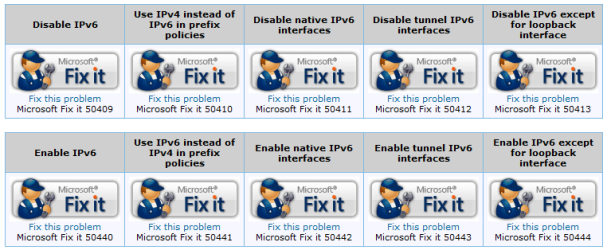
I've had the same intermittent connectivity problems with my Inspiron 1521 running Windows 7 64bit. I disabled IP6 using the utilities found here: How to disable certain Internet Protocol version 6 (IPv6) components in Windows Vista, Windows 7, and Windows Server 2008

Working so far!

This is a known IPv6 issue, but thanks for putting that MS link with all the Fix-It Solutions integrated and registry settings that goes with it. Very helpfull for those needed it!:)
 

Attachments

  • Capture.PNG
    Capture.PNG
    47.8 KB · Views: 68

My Computer

Computer type
PC/Desktop
Computer Manufacturer/Model Number
Custom Build
OS
Windows 7 Professional SP1 - x64 [Non-UEFI Boot]
CPU
Ivy Bridge Core i5 3570K (Delidded)
Motherboard
Asus P8Z77-V LE PLUS
Memory
G.Skill "Ares" DDR3 PC3-12800 - 1600MHz (16Gb)
Graphics Card(s)
Asus Dual-RX480-O4G
Sound Card
Creative Sound Blaster Z w/5.1 sound system
Monitor(s) Displays
Asus IPS 23"
Screen Resolution
16/9
Hard Drives
Internal:
500Go Sata 6Gb/s (x2)
500Go Sata 3Gb/s (x2)
SSD 60Go Sata 6Gb/s
PSU
In Win C 900W Series 80+ Platinum
Case
Thermaltake Chaser A71
Cooling
Custom Water Cooling Loop
Keyboard
Cooler Master QuickFire XTi
Mouse
Razer Imperator 2012 (4G)
Antivirus
MSE
Browser
IE 11.0.xxx Rtm
Other Info
"Raid0" with Intel Smart Response Technology (HDD/SSD)
Wifi problem in Window 7

I have observes from last two months that Window 7 have problem in Wifi connectivty where wifi adapter automatically Disabled and you need to run the diagnostic to get it repaired and then it connects with the Wifi access point.
i am using the lenenevo T510 Laptop
 

My Computer

Computer Manufacturer/Model Number
Lenavo
OS
Windows 7 Professional 64 bit
CPU
Core i 7
Motherboard
Intel
Memory
4 GB
Graphics Card(s)
1 GB
Hard Drives
300GB
what i did was i went to the manufacturer of my wireless device which in my case was realtek typed the specific wireless device id and downloaded the driver rebooted my system and it worked i hope it works for you
 

My Computer

Computer Manufacturer/Model Number
asus eee pc900hd
OS
windows 7 ultimate
Memory
2g
Back
Top