Solved No network shown in managed networks

SEVEN X7

New member
Local time
5:39 PM
Messages
30
I have to re-enter the network security key everytime windows reboots. When I enter Manage wireless networks there are none displayed. When I try to manually add it I get an access denied message. I am able to connect to my network in the available networks list I just can't configure to connect automatically.
 

My Computer

Computer Manufacturer/Model Number
Home Built
OS
Windows 7 Ultimate x64
CPU
AMD Phenom II x6
Motherboard
Asus M4N98TD EVO
Memory
2x4GB
Graphics Card(s)
Nvidia GTS250
Sound Card
on board VIA VT1708S
Monitor(s) Displays
Acer AL2223W
Hard Drives
Hitachi HDS5C3015ALA632 Sata2 1.5 TB
2XSeagate ST3500630AS Sata 2 500GB
Seagate ST380013A
Seagate ST31000111A
PSU
Rocketfish 700 watt
Cooling
air
Hello,

Verify that the WLAN AutoConfig Service is set to Automatic.

Click on Start button and type services.msc and press enter.
Locate WLAN AutoConfig service, right click on it and select Properties
On General Tab, select Automatic for startup type.
On Dependences tab and make sure that all the Dependences Services are set to Automatic.

Click ok to save the new setting.

Please give us an update if this works or not.
 

My Computer

Computer Manufacturer/Model Number
Lenovo Desktop/Samsung Laptop
OS
Win7 & Win8 64bit
CPU
Intel i5
Internet Speed
Charter-20 Mbps
Antivirus
Avast
Browser
FF, IE9 and Chrome
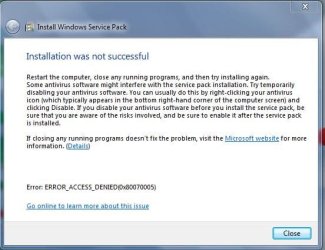
I had to change one of the dependencies to automatic but it made no difference. All of the problems I have been having are access related. This one and SP1 fails on install. The error says access denied.
 

My Computer

Computer Manufacturer/Model Number
Home Built
OS
Windows 7 Ultimate x64
CPU
AMD Phenom II x6
Motherboard
Asus M4N98TD EVO
Memory
2x4GB
Graphics Card(s)
Nvidia GTS250
Sound Card
on board VIA VT1708S
Monitor(s) Displays
Acer AL2223W
Hard Drives
Hitachi HDS5C3015ALA632 Sata2 1.5 TB
2XSeagate ST3500630AS Sata 2 500GB
Seagate ST380013A
Seagate ST31000111A
PSU
Rocketfish 700 watt
Cooling
air
You're talking about the same problematic computer correct? If it is, there are more things that need to look at.
This one and SP1 fails on install. The error says access denied.
 

My Computer

Computer Manufacturer/Model Number
Lenovo Desktop/Samsung Laptop
OS
Win7 & Win8 64bit
CPU
Intel i5
Internet Speed
Charter-20 Mbps
Antivirus
Avast
Browser
FF, IE9 and Chrome
Same win7X64 computer. I have gone through the security settings dozens of times. I've run the microsoft reddiness and hotfix's for the SP1 install isues. Run Avast and Malwarebytes scans in pre-boot and safe mode. Everything comes up clean. The SP1 install has failed 5 times. Gets to 99% then fails and reverts. These seem to both be access isues. I don't want to do a clean install. Takes two 2 weeks of every spare minute to reinstall all programs settings and updates. Already did a repair install with all updates except SP1.
 

My Computer

Computer Manufacturer/Model Number
Home Built
OS
Windows 7 Ultimate x64
CPU
AMD Phenom II x6
Motherboard
Asus M4N98TD EVO
Memory
2x4GB
Graphics Card(s)
Nvidia GTS250
Sound Card
on board VIA VT1708S
Monitor(s) Displays
Acer AL2223W
Hard Drives
Hitachi HDS5C3015ALA632 Sata2 1.5 TB
2XSeagate ST3500630AS Sata 2 500GB
Seagate ST380013A
Seagate ST31000111A
PSU
Rocketfish 700 watt
Cooling
air
Failure number 6. Error
 

Attachments

  • Failure SP1.JPG
    Failure SP1.JPG
    54.1 KB · Views: 8

My Computer

Computer Manufacturer/Model Number
Home Built
OS
Windows 7 Ultimate x64
CPU
AMD Phenom II x6
Motherboard
Asus M4N98TD EVO
Memory
2x4GB
Graphics Card(s)
Nvidia GTS250
Sound Card
on board VIA VT1708S
Monitor(s) Displays
Acer AL2223W
Hard Drives
Hitachi HDS5C3015ALA632 Sata2 1.5 TB
2XSeagate ST3500630AS Sata 2 500GB
Seagate ST380013A
Seagate ST31000111A
PSU
Rocketfish 700 watt
Cooling
air
@SEVEN X7, I read your post just now.

IMO, you should reconsider a clean install. You can straight away download your Windows 7 version with SP1 from Digital River server and get rid of all the problems that are plaguing your computer. I am afraid you will be taking more time sorting out the issues than doing a clean install. Anyway it is upto you and you are the best judge.

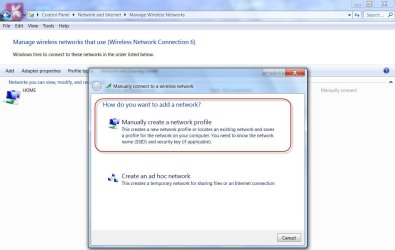
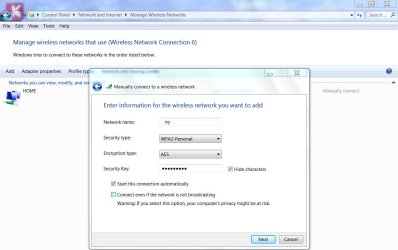
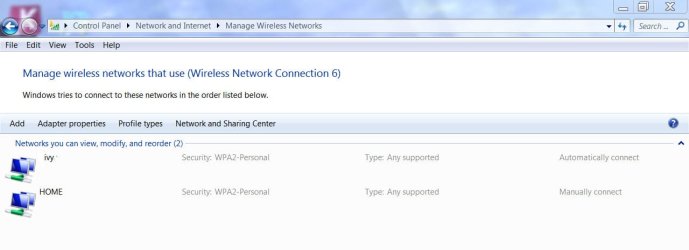
Before readiing this post, in response to your post in another thread I had prepared some screenshots on creating the network. That is now redundant since it appears to be intimately connected with your other OS problems. Still I shall put them out here just to demonstrate how easy it will be if only you have a clean system.

Adding a visible Wireless station:
Network and Sharing Center > Manage Wireless Network > Add

1addSSID.jpg

Fill in the details and click next.

2next.jpg

Added.

3added.jpg

Your problem and the problem of the OP in the other thread are not similar anyway. :)
 

My Computer

OS
Windows 7 Home Premium 32 bit
  • Like
Reactions: 2xg
From this Post I would highly agree with jumanji by doing a Clean Install of Windows 7.
Same win7X64 computer. I have gone through the security settings dozens of times. I've run the microsoft reddiness and hotfix's for the SP1 install isues. Run Avast and Malwarebytes scans in pre-boot and safe mode. Everything comes up clean. The SP1 install has failed 5 times. Gets to 99% then fails and reverts. These seem to both be access isues. I don't want to do a clean install. Takes two 2 weeks of every spare minute to reinstall all programs settings and updates. Already did a repair install with all updates except SP1.
 

My Computer

Computer Manufacturer/Model Number
Lenovo Desktop/Samsung Laptop
OS
Win7 & Win8 64bit
CPU
Intel i5
Internet Speed
Charter-20 Mbps
Antivirus
Avast
Browser
FF, IE9 and Chrome
@ Jumanji, Your snapshots of adding a visible Wireless station are fine but when I do that the last snapshot says ACCESS DENIED
 

My Computer

Computer Manufacturer/Model Number
Home Built
OS
Windows 7 Ultimate x64
CPU
AMD Phenom II x6
Motherboard
Asus M4N98TD EVO
Memory
2x4GB
Graphics Card(s)
Nvidia GTS250
Sound Card
on board VIA VT1708S
Monitor(s) Displays
Acer AL2223W
Hard Drives
Hitachi HDS5C3015ALA632 Sata2 1.5 TB
2XSeagate ST3500630AS Sata 2 500GB
Seagate ST380013A
Seagate ST31000111A
PSU
Rocketfish 700 watt
Cooling
air
The other OP also has come out saying that he gets the access denied when trying to add a wireless station.

On further search I got hold of this thread in this very forum. http://www.sevenforums.com/network-sharing/20298-access-denied-when-trying-add-wireless-network.html

Take a look at it and try the fixes mentioned therein in the last few posts.

If a wireless station is visible on your laptop, you can add it to "Manage wireless networks".

Check the screenshots in this post. http://www.sevenforums.com/network-sharing/202785-no-network-shown-managed-networks.html#post1702980

.
 
Last edited:

My Computer

OS
Windows 7 Home Premium 32 bit
Back
Top