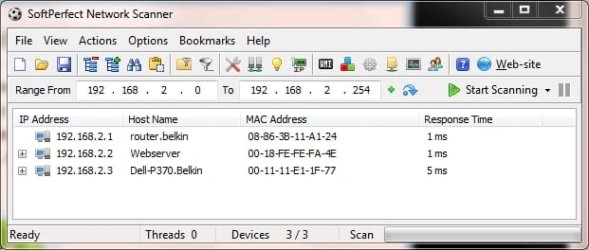
Need utility to find where IP address conflict is.

abuttino

New member
Power User
VIP
Local time
1:45 AM
Messages
201
What would be the best? I built my network myself and there are no known IP conflicts.

So, some type of network scanner to see what mac is using what IP..
 

My Computer My Computer

At a glance

Windows 7 RTM x86/x64Yonah/e6600 O.C. to 3.4GHz2GB/4GBATI/EVGA NVIDIA 8800
Computer Manufacturer/Model Number
Dell 6400/My own build
OS
Windows 7 RTM x86/x64
CPU
Yonah/e6600 O.C. to 3.4GHz
Motherboard
Dell/EVGA
Memory
2GB/4GB
Graphics Card(s)
ATI/EVGA NVIDIA 8800
Sound Card
RealTek/Auzentech X-Meridian
Monitor(s) Displays
Built-in/65" Mitsubishi HDTV
Screen Resolution
1280x1800/1920x1280
Hard Drives
80GB Toshiba/Several
PSU
Dell Laptop/CoolerMaster
Case
Laptop/CoolerMaster Cosmos
Cooling
Air/Water
Keyboard
Standard/Media Center Kbd
Mouse
Touchpad/Bluetooth
Internet Speed
20MBPS
Is this not available in the "attached devices" in your router ? - the table below shows mine with fixed IPs but even with DHCP anything connected to the router should show the IPs and MAC addresses.


Attached Devices


IP Address Device Name MAC Address
1 192.168.0.40 SHAW3 00:17:C4:AB:E8:49
2 192.168.0.50 SHAW2 20:7C:8F:2D1:3C
3 192.168.0.60 UNKNOWN 00:24:8D:F2:EE:53
 

My Computer My Computer

At a glance

Windows 7 Home Premium 64-bitAthlon3GBIntegrated
Computer Manufacturer/Model Number
HP Desktop Slimline
OS
Windows 7 Home Premium 64-bit
CPU
Athlon
Memory
3GB
Graphics Card(s)
Integrated
Monitor(s) Displays
HP 20" LCD
Hard Drives
500GB
Internet Speed
Slow

My Computer My Computer

At a glance

Windows 10 Pro X64Intel Quad Core i7-4770 @ 3.4Ghz16.0GB PC3-12800 DDR3 SDRAM 1600 MHzIntel Integrated HD Graphics
Computer type
PC/Desktop
Computer Manufacturer/Model Number
Lenovo IdeaCenter 450
OS
Windows 10 Pro X64
CPU
Intel Quad Core i7-4770 @ 3.4Ghz
Memory
16.0GB PC3-12800 DDR3 SDRAM 1600 MHz
Graphics Card(s)
Intel Integrated HD Graphics
Sound Card
Realtek HD Audio
Monitor(s) Displays
HP 22" LCD
Screen Resolution
1680 x 1050
Hard Drives
250GB Samsung EVO SATA-3 SSD
2TB Seagate ST2000DM001 SATA-2
1.5TB Seagate ST3150041AS SATA
Keyboard
Dell USB
Mouse
Lenovo USB
Internet Speed
Cable via Road Runner 3MB Upload, 30MB Download
Antivirus
Windows Defender, MBAM Pro, MBAE
Browser
Seamonkey
Other Info
UEFI/GPT
PLDS DVD-RW DH16AERSH
It's a win2008r2 network with a class A dhcp server on it.

The dhcp isn't allowed to give out addresses below 100 because that is what I use for my servers. So something is intruding or the error is just wrong.

There is no other router or utility authorized to give ip addresses out on that subnet
 

My Computer My Computer

At a glance

Windows 7 RTM x86/x64Yonah/e6600 O.C. to 3.4GHz2GB/4GBATI/EVGA NVIDIA 8800
Computer Manufacturer/Model Number
Dell 6400/My own build
OS
Windows 7 RTM x86/x64
CPU
Yonah/e6600 O.C. to 3.4GHz
Motherboard
Dell/EVGA
Memory
2GB/4GB
Graphics Card(s)
ATI/EVGA NVIDIA 8800
Sound Card
RealTek/Auzentech X-Meridian
Monitor(s) Displays
Built-in/65" Mitsubishi HDTV
Screen Resolution
1280x1800/1920x1280
Hard Drives
80GB Toshiba/Several
PSU
Dell Laptop/CoolerMaster
Case
Laptop/CoolerMaster Cosmos
Cooling
Air/Water
Keyboard
Standard/Media Center Kbd
Mouse
Touchpad/Bluetooth
Internet Speed
20MBPS
Hello,

Is the IP Conflict error coming up on the Server itself or a workstation? If its the Server then it normally displays the IP conflicting MAC in the Event logs.

The first thing to do would be to do an arp -a and make a note of the arp table. this should show you if anyone is usnig an address outside your DHCP scope as well. When the error comes up again so another arp lookup and see if there is a change in the tables MAC's.

Has there been any new network equipment installed on the network? How many PC's are on the network? If there are less than 10 it maybe easier to go round and check each PC's IP address.

As for an IP Scanner. Angry IP is very simple and effective:
Angry IP Scanner : Home - IP and Port Scanner Tool for Analyzing Networks


Dave
 

My Computer My Computer

At a glance

Windows 7 Ultimate x64Intel Core i7 2600K (O/C 4.7GHz)8GB Corsair Vengeance LP, DDR3, 1600MhzNvidia GTX 460 Graphics Card
Computer type
PC/Desktop
Computer Manufacturer/Model Number
Custom
OS
Windows 7 Ultimate x64
CPU
Intel Core i7 2600K (O/C 4.7GHz)
Motherboard
Asus ROG Maximus IV Extreme-Z - Intel Z68 Chipset
Memory
8GB Corsair Vengeance LP, DDR3, 1600Mhz
Graphics Card(s)
Nvidia GTX 460 Graphics Card
Sound Card
Onboard
Monitor(s) Displays
Dell E228WFP
Hard Drives
2 x 500GB Samsung SpinPoint Drives (1 for OS, 1 for Data and Apps)
PSU
CoolerMaster 1000W
Case
CoolerMaster HAF
Cooling
Air
Internet Speed
Fibre - 60MB Down, 30MB Up
Antivirus
ESET NOD32 Antivirus
Thanks Dave.

The error is on one of the exchange servers, not the DHCP server. I took the server offline and did an IP scan and it found there was nothing on that IP. It's odd, because it only shows up from time to time. There are 4 IP's in the DHCP scope and right now, all of them are statically assigned anyway. That's why I am more concerned about an intrusion.
 

My Computer My Computer

At a glance

Windows 7 RTM x86/x64Yonah/e6600 O.C. to 3.4GHz2GB/4GBATI/EVGA NVIDIA 8800
Computer Manufacturer/Model Number
Dell 6400/My own build
OS
Windows 7 RTM x86/x64
CPU
Yonah/e6600 O.C. to 3.4GHz
Motherboard
Dell/EVGA
Memory
2GB/4GB
Graphics Card(s)
ATI/EVGA NVIDIA 8800
Sound Card
RealTek/Auzentech X-Meridian
Monitor(s) Displays
Built-in/65" Mitsubishi HDTV
Screen Resolution
1280x1800/1920x1280
Hard Drives
80GB Toshiba/Several
PSU
Dell Laptop/CoolerMaster
Case
Laptop/CoolerMaster Cosmos
Cooling
Air/Water
Keyboard
Standard/Media Center Kbd
Mouse
Touchpad/Bluetooth
Internet Speed
20MBPS
When you say they are statically assigned, do you mean that they have static IP addresses and you have created exclusions for them?

Did you do an ARP lookup? Have a look on the Exchange event logs? Can you get a screen shot of the error as well.

Also, do you lose connectivity at all?


Dave
 

My Computer My Computer

At a glance

Windows 7 Ultimate x64Intel Core i7 2600K (O/C 4.7GHz)8GB Corsair Vengeance LP, DDR3, 1600MhzNvidia GTX 460 Graphics Card
Computer type
PC/Desktop
Computer Manufacturer/Model Number
Custom
OS
Windows 7 Ultimate x64
CPU
Intel Core i7 2600K (O/C 4.7GHz)
Motherboard
Asus ROG Maximus IV Extreme-Z - Intel Z68 Chipset
Memory
8GB Corsair Vengeance LP, DDR3, 1600Mhz
Graphics Card(s)
Nvidia GTX 460 Graphics Card
Sound Card
Onboard
Monitor(s) Displays
Dell E228WFP
Hard Drives
2 x 500GB Samsung SpinPoint Drives (1 for OS, 1 for Data and Apps)
PSU
CoolerMaster 1000W
Case
CoolerMaster HAF
Cooling
Air
Internet Speed
Fibre - 60MB Down, 30MB Up
Antivirus
ESET NOD32 Antivirus
Sorry, was on vacation.

Did an arp -a last time it showed up which revealed nothing.

No, they are statically assigned without exclusions, but they are on the same IP that the reservation is for. 10.0.0.101, 105, 106 and 107. The conflict is 10.0.0.6

Nope haven't lost any connectivity, not with the active directory or the web. Very odd.

It's one of those IP Address conflict errors that has the triangle sign with a exclamation point through it. It doesn't show up very often but it still rears it's ugly head maybe 1 time per week. The next time it shows up, I'll get a screenshot of it.
 

My Computer My Computer

At a glance

Windows 7 RTM x86/x64Yonah/e6600 O.C. to 3.4GHz2GB/4GBATI/EVGA NVIDIA 8800
Computer Manufacturer/Model Number
Dell 6400/My own build
OS
Windows 7 RTM x86/x64
CPU
Yonah/e6600 O.C. to 3.4GHz
Motherboard
Dell/EVGA
Memory
2GB/4GB
Graphics Card(s)
ATI/EVGA NVIDIA 8800
Sound Card
RealTek/Auzentech X-Meridian
Monitor(s) Displays
Built-in/65" Mitsubishi HDTV
Screen Resolution
1280x1800/1920x1280
Hard Drives
80GB Toshiba/Several
PSU
Dell Laptop/CoolerMaster
Case
Laptop/CoolerMaster Cosmos
Cooling
Air/Water
Keyboard
Standard/Media Center Kbd
Mouse
Touchpad/Bluetooth
Internet Speed
20MBPS
Back
Top