
IP address conflict, only one PC on

bawldiggle

GrayGhost2 ret.
Pro User
VIP
Local time
8:26 PM
Messages
895
Location
Australia
How do I resolve this random alert
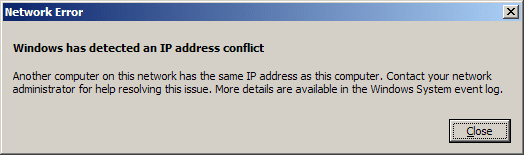
IP address conflict, network error.png

This laptop has been in Hibernation mode over night (all other PCs are shut down) but I fail to understand how there can be a conflict when no other PCs are "on" ?
I have done a search (of this forum) for ip address conflict but I cannot find a scenario that makes sense to me nor that I can understand.
In an attempt to do some research I have found and tested NETWORK SCANNER (by SoftPerfect) -- thanks to "Ztruker" at Need utility to find where IP address conflict is. and that Network tool indicates all open PCs are through one IP address. (That was when there were 3 PCs on, and one printer.
Other PCs occasionally also display the IP Address Conflict alert.

We do not have a formal network, all PCs are standalone and two PCs share one printer (one by USB and the second by WiFi)

I assume all devices we run (3 PCs, video streaming to TV, printer-scanner, 2 cell-phones when wifi connected to PCs) are all using the same address (or is it MAC ?). Fiddling with router settings is dangerous territory for me as I have overstepped by skills threshold already and if I sabotage the router settings I am isolated from seeking help here at sevenforums.

This laptop has been using hibernation mode for over a week just trying to research this IP address conflict, and has become very unstable desparately needs a reboot to refresh.
NetworkScanner when tested with VirusTotal reports 4 threats (incl one by Malwarebytes). I have contacted SoftPerfect.com and they referred me to their knowledge Base article Antivirus reports malware in one of SoftPerfect products

I would appreciate any help to resolve this IP conflict annoyance. Thank you :)

SPECS:
Toshiba Satellite C665
OS:= Windows 7 Home Premium (32-bit), sp1 (Build 7601) OEM
UI:=Classic Shell Start + Classic Explorer
Windows Indexing = disabled​
 

My Computer My Computer

Computer type
PC/Desktop
Computer Manufacturer/Model Number
Toshiba, Lenovo (laptops) + 4 rigs
OS
XP Pro (x86) | 7 HP (x86) & (x64) | 7 Pro (x64)
I would have to say that the first thing I would do is turn off the router and also turn off the computer for minimum of 15 seconds, then turn the router on and let it boot up for about a minute then turn on the computer.

If that does not work I would give the computer a static IP that's in your subnet.

EG:
Go high
192.168.xxx.199

or go low
192.168.xxx.51
 

My Computer My Computer

Computer type
PC/Desktop
Computer Manufacturer/Model Number
Compac
OS
Microsoft Windows 7 Ultimate 32-bit 7601
CPU
Intel(R) Pentium(R) Dual CPU E2160 @ 1.80GHz
Motherboard
MSI Boston
Memory
4.00 GB
Graphics Card(s)
(1) VNC Mirror Driver (2) Intel(R) G33/G31 Express Chipset
Sound Card
Disabled
Monitor(s) Displays
Headless
Screen Resolution
1280 x 960 x 32 bits (4294967296 colors) @ 60 Hz
Hard Drives
ST3320820AS ATA Device
Keyboard
Headless
Mouse
Headless
Antivirus
Malwarebytes pro
Other Info
Also
Windows 8.1 Laptop and Desktop both Acer
Hi sml156

I already reboot the modem/router every morning at 2am for a 15 minute shut down (using a time clock)
- the router used to drop out about every 48 hours (very annoying) when we were all working
- the time clock has stopped the irritating drop outs
I would also like to know why this conflict happens. Several years ago I read it has something to do with a "table" in the modem of the integrated modem-router. Some modems are not self cleaning, or should be (as I remember) ? The time clock is a quick-and-dirty solution that has stopped dropouts.

Should I give each device that uses the router a static IP ?
If so how would I do that ? I have reached the threshold of my incompetence. ;)
During my search for a solution I found a tutorial by HowToGeek, but now I cannot locate it.

In the last day or so I read that gamers can tweak their router (or was it modem) to improve game connectivity. But I didn't keep the reference.

Thank you for your help :)
Router/modem (integrated)
Netcomm NB604N
Age:- 3.5 yrs (and from experience routers die at around this age)
 
Last edited:

My Computer My Computer

Computer type
PC/Desktop
Computer Manufacturer/Model Number
Toshiba, Lenovo (laptops) + 4 rigs
OS
XP Pro (x86) | 7 HP (x86) & (x64) | 7 Pro (x64)
...I fail to understand how there can be a conflict when no other PCs are "on" ?...
You indicated that you have other devices on your network. Every single device (including printer connected via Wi-Fi) would need to be off.


...I assume all devices we run (3 PCs, video streaming to TV, printer-scanner, 2 cell-phones when wifi connected to PCs) are all using the same address (or is it MAC ?)...
Yes and no. There is probably only one "Internet facing" IP address that all of your devices make use via the router. You can forget about that IP address. It has nothing to do with the IP address conflict warning.

You solved one problem by automatically restarting the router each night - but, doing that has created this IP address conflict problem. Let me see if I can explain: most routers that I've worked with will assign each device (computer, cell phone, printer...) a unique private IP address. If the computer goes to sleep or hibernates, the router keeps track of the IP address that it assigned to that computer. It usually will not give that sleeping computer's IP address to any other device on the network.

Since you automatically restart the router each night, you are causing the router to forget about the sleeping computer's IP address. The router happily assigns that IP address to another device (maybe to your cell phone). When you wake the sleeping computer, you will get the IP conflict notice.

Some of your options are (maybe a geek friend can help you with 3 & 4):
1) turn the computer off - don't use hibernate or sleep. When you turn the computer on, it will ask for a new IP address - instead of trying to reuse the IP address that it had when it went to sleep.
2) assign a static IP address to the computer. I would not do that to a laptop. You would need to remove that static IP address if you ever took the laptop to another location (e.g. hotel).
3) fix the problem with the router (perhaps via firmware update) - or replace the router
4) if possible - tell the router to always give the laptop the same IP address. This is not the same as assigning a static IP address to the computer. If you want to try this, see if you can provide a link to the user manual for your router. You might need to locate the hardware version and firmware version in order to get the correct manual. Once we have the manual, we might be able to talk you thru how to complete this option.
 

My Computer My Computer

Computer type
Laptop
Computer Manufacturer/Model Number
Employer provided Dell Latitude
OS
W7 Pro SP1 64bit
CPU
i7
Memory
8GB
Graphics Card(s)
Intel HD Graphics
Hard Drives
crappy SSD
Antivirus
Employer mandated Symantec Endpoint Protection
Browser
Pale Moon 64bit, IE11 64bit & Chrome 64bit
An additional possibility is reducing the DHCP lease time in the router.

That said, I'd recommend UsernameIssues option 4; not just as a solution to the problem, but in general. My home and work networks are configured as such, and I wouldn't have it any other way.
 

My Computer My Computer

Computer type
PC/Desktop
OS
Windows 7 Professional x64, Arch Linux
Just assign all your devices static ip addresses.

And set your router not to go above 192.168.1.100, that is more then enough addresses.

You`ll never have a conflict again :)
 

My Computer My Computer

Computer type
PC/Desktop
Computer Manufacturer/Model Number
Skylake Special #666
OS
Windows 10 Pro x64
CPU
Intel Core i7 6700K
Motherboard
Asus Sabertooth Z170 Mark 1
Memory
GSkill TridentZ RGB 16GB 3600 16-16-16-36
Graphics Card(s)
EVGA GTX 980 Ti SC x2
Sound Card
Realtek High Definition
Monitor(s) Displays
AOC G2460PG
Screen Resolution
1920 x 1080 144Hz
Hard Drives
Samsung 860 Pro 256GB, Seagate Barracuda 4TB x2
PSU
EVGA 1000 P2, EVGA White Custom Braided Cables
Case
Corsair Vengeance C70 Gunmetal Black
Cooling
Corsair H100i v2, Corsair ML120 x2, Thermal Grizzly Kryonaut
Keyboard
Logitech G910 Orion Spectrum
Mouse
Logitech G700s
Internet Speed
Verizon Fios Quantum Gateway 75/75
Antivirus
Windows Defender, Malwarebytes Free 3.8.3
Browser
Chrome
Other Info
Corsair SP120 x4, LG Blu-ray Drive, Durabrand HT-395 100 Watt Dolby Digital Amp, Corsair H2100 Wireless 7.1 Headset
Just assign all your devices static ip addresses.

And set your router not to go above 192.168.1.100, that is more then enough addresses.

You`ll never have a conflict again :)
Are you suggesting that the static IP addresses be set at the router level, the device level or both?

It might be hard to assign a static IP address to each of the OP's cell phones at the device level.

I would not suggest setting a static IP address on the OP's laptop. That setup might work just fine for many months - until the OP tries to connect to a hotel's network. Maybe the hotel's night shift front desk staff knows to check for static IP addresses :-)
 

My Computer My Computer

Computer type
Laptop
Computer Manufacturer/Model Number
Employer provided Dell Latitude
OS
W7 Pro SP1 64bit
CPU
i7
Memory
8GB
Graphics Card(s)
Intel HD Graphics
Hard Drives
crappy SSD
Antivirus
Employer mandated Symantec Endpoint Protection
Browser
Pale Moon 64bit, IE11 64bit & Chrome 64bit
Back
Top