Limited access on WiFi

ianbrylle29

New member
Power User
Local time
4:20 AM
Messages
105
Location
Davao City
can anyone help about my problem?

I am using WiFi for my laptop's internet

the problems is that the connection says LIMITED ACCESS.

Please HElp
 

My Computer

OS
windows 10 64bit
CPU
Ryzen 3 2200g
Motherboard
msi a320m pro-vh plus
Memory
8.00 GB
Graphics Card(s)
Vega 8 integrated graphics

My Computer

Computer type
PC/Desktop
Computer Manufacturer/Model Number
Custom Asus Build
OS
Microsoft Windows 8.1 Pro 64-bit
CPU
Intel(R) Core(TM) i3-4130 CPU @ 3.40GHz
Motherboard
B85M-E
Memory
8.00 GB
Graphics Card(s)
None
Sound Card
Realtek High Definition Audio
Monitor(s) Displays
Asus 23.6" Monitor
Screen Resolution
1920 x 1080 x 32 bits (4294967296 colors) @ 60 Hz
Hard Drives
INTEL SSDSC2BW180A4
Samsung SSD 840 PRO Series
PSU
Seasonic S12II-380Bronze
Case
Lian Li
Cooling
Fan, Passive
Keyboard
Logitech K120
Mouse
Microsoft Touch Mouse
Internet Speed
4ms Ping, 19.0 Mbps Download, 19.0 Mbps Upload
Antivirus
Eset Endpoint
Browser
Internet Explorer, Chrome
thanks I did the uninstall and install part everything went well. hope nothing bad happens again. BTW THANKS A BUNCH!
 

My Computer

OS
windows 10 64bit
CPU
Ryzen 3 2200g
Motherboard
msi a320m pro-vh plus
Memory
8.00 GB
Graphics Card(s)
Vega 8 integrated graphics
No problem. Take care :)
 

My Computer

Computer type
PC/Desktop
Computer Manufacturer/Model Number
Custom Asus Build
OS
Microsoft Windows 8.1 Pro 64-bit
CPU
Intel(R) Core(TM) i3-4130 CPU @ 3.40GHz
Motherboard
B85M-E
Memory
8.00 GB
Graphics Card(s)
None
Sound Card
Realtek High Definition Audio
Monitor(s) Displays
Asus 23.6" Monitor
Screen Resolution
1920 x 1080 x 32 bits (4294967296 colors) @ 60 Hz
Hard Drives
INTEL SSDSC2BW180A4
Samsung SSD 840 PRO Series
PSU
Seasonic S12II-380Bronze
Case
Lian Li
Cooling
Fan, Passive
Keyboard
Logitech K120
Mouse
Microsoft Touch Mouse
Internet Speed
4ms Ping, 19.0 Mbps Download, 19.0 Mbps Upload
Antivirus
Eset Endpoint
Browser
Internet Explorer, Chrome
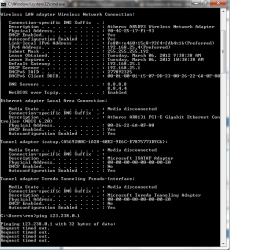
there is another problem sir my connection is not stable again i tried checking cmd ping this is the result when the internet connection icon shows a yellow mark
 

Attachments

  • 2.png
    2.png
    10.3 KB · Views: 20

My Computer

OS
windows 10 64bit
CPU
Ryzen 3 2200g
Motherboard
msi a320m pro-vh plus
Memory
8.00 GB
Graphics Card(s)
Vega 8 integrated graphics
did you right click that yellow mark and select troubleshoot? unplug your router and modem, wait 15 seconds, then plug them back in. Then diagnose your connection to let windows fix it. Let me know what you see.

Did you follow all of the tutorial?
 

My Computer

Computer type
PC/Desktop
Computer Manufacturer/Model Number
Custom Asus Build
OS
Microsoft Windows 8.1 Pro 64-bit
CPU
Intel(R) Core(TM) i3-4130 CPU @ 3.40GHz
Motherboard
B85M-E
Memory
8.00 GB
Graphics Card(s)
None
Sound Card
Realtek High Definition Audio
Monitor(s) Displays
Asus 23.6" Monitor
Screen Resolution
1920 x 1080 x 32 bits (4294967296 colors) @ 60 Hz
Hard Drives
INTEL SSDSC2BW180A4
Samsung SSD 840 PRO Series
PSU
Seasonic S12II-380Bronze
Case
Lian Li
Cooling
Fan, Passive
Keyboard
Logitech K120
Mouse
Microsoft Touch Mouse
Internet Speed
4ms Ping, 19.0 Mbps Download, 19.0 Mbps Upload
Antivirus
Eset Endpoint
Browser
Internet Explorer, Chrome
I guess there is a problem regarding my Ethernet adapter because there is no Ip address shown on the cmd prompt

on this part
"send 4 packets and receive 4 packets. Sent=4, Received=4, Lost=0."
mine is "send 4 packets and receive 0 packets. Sent=4, Received=4, Lost=0. (100%loss)"
 

Attachments

  • 2.png
    2.png
    21.7 KB · Views: 15

My Computer

OS
windows 10 64bit
CPU
Ryzen 3 2200g
Motherboard
msi a320m pro-vh plus
Memory
8.00 GB
Graphics Card(s)
Vega 8 integrated graphics
But you didn't let me know if you've followed every part of the tutorial I've given you above...

Did you troubleshoot? Did you unplug modem and router?
 

My Computer

Computer type
PC/Desktop
Computer Manufacturer/Model Number
Custom Asus Build
OS
Microsoft Windows 8.1 Pro 64-bit
CPU
Intel(R) Core(TM) i3-4130 CPU @ 3.40GHz
Motherboard
B85M-E
Memory
8.00 GB
Graphics Card(s)
None
Sound Card
Realtek High Definition Audio
Monitor(s) Displays
Asus 23.6" Monitor
Screen Resolution
1920 x 1080 x 32 bits (4294967296 colors) @ 60 Hz
Hard Drives
INTEL SSDSC2BW180A4
Samsung SSD 840 PRO Series
PSU
Seasonic S12II-380Bronze
Case
Lian Li
Cooling
Fan, Passive
Keyboard
Logitech K120
Mouse
Microsoft Touch Mouse
Internet Speed
4ms Ping, 19.0 Mbps Download, 19.0 Mbps Upload
Antivirus
Eset Endpoint
Browser
Internet Explorer, Chrome
oh! sorry i didn't unplug the router
 

My Computer

OS
windows 10 64bit
CPU
Ryzen 3 2200g
Motherboard
msi a320m pro-vh plus
Memory
8.00 GB
Graphics Card(s)
Vega 8 integrated graphics

My Computer

Computer type
PC/Desktop
Computer Manufacturer/Model Number
Custom Asus Build
OS
Microsoft Windows 8.1 Pro 64-bit
CPU
Intel(R) Core(TM) i3-4130 CPU @ 3.40GHz
Motherboard
B85M-E
Memory
8.00 GB
Graphics Card(s)
None
Sound Card
Realtek High Definition Audio
Monitor(s) Displays
Asus 23.6" Monitor
Screen Resolution
1920 x 1080 x 32 bits (4294967296 colors) @ 60 Hz
Hard Drives
INTEL SSDSC2BW180A4
Samsung SSD 840 PRO Series
PSU
Seasonic S12II-380Bronze
Case
Lian Li
Cooling
Fan, Passive
Keyboard
Logitech K120
Mouse
Microsoft Touch Mouse
Internet Speed
4ms Ping, 19.0 Mbps Download, 19.0 Mbps Upload
Antivirus
Eset Endpoint
Browser
Internet Explorer, Chrome
yes sir. thank you
 

My Computer

OS
windows 10 64bit
CPU
Ryzen 3 2200g
Motherboard
msi a320m pro-vh plus
Memory
8.00 GB
Graphics Card(s)
Vega 8 integrated graphics
I did it all sir. all the instructions. when i restarted my laptop the connection is ok now and I am hoping that the connection will not be disconnected again.

thanks very much sir. I really appreciate your help and I am sorry also coz im a bit slow.
thanks once again.
 

My Computer

OS
windows 10 64bit
CPU
Ryzen 3 2200g
Motherboard
msi a320m pro-vh plus
Memory
8.00 GB
Graphics Card(s)
Vega 8 integrated graphics
Not at all. If ever you need more of an explanation, feel free to ask. I'll try my best to lead you in the right direction, but sometimes it helps when you say what you have tried so far and whether or not it succeeded.

Glad it is working now, though. If it doesn't in the future, you can try restarting again. If you have more trouble, come right on back here and Look through the troubleshooting steps. If they don't seem to work, myself or someone else here would love nothing more than to help you out.

Take care
 

My Computer

Computer type
PC/Desktop
Computer Manufacturer/Model Number
Custom Asus Build
OS
Microsoft Windows 8.1 Pro 64-bit
CPU
Intel(R) Core(TM) i3-4130 CPU @ 3.40GHz
Motherboard
B85M-E
Memory
8.00 GB
Graphics Card(s)
None
Sound Card
Realtek High Definition Audio
Monitor(s) Displays
Asus 23.6" Monitor
Screen Resolution
1920 x 1080 x 32 bits (4294967296 colors) @ 60 Hz
Hard Drives
INTEL SSDSC2BW180A4
Samsung SSD 840 PRO Series
PSU
Seasonic S12II-380Bronze
Case
Lian Li
Cooling
Fan, Passive
Keyboard
Logitech K120
Mouse
Microsoft Touch Mouse
Internet Speed
4ms Ping, 19.0 Mbps Download, 19.0 Mbps Upload
Antivirus
Eset Endpoint
Browser
Internet Explorer, Chrome
thank you sir so much take care also sir
 

My Computer

OS
windows 10 64bit
CPU
Ryzen 3 2200g
Motherboard
msi a320m pro-vh plus
Memory
8.00 GB
Graphics Card(s)
Vega 8 integrated graphics
Back
Top