How to grant right to 'allow log on through Terminal Services' on Win7

thx1139

New member
Power User
Local time
7:53 AM
Messages
110
I have two accounts on my Win7 Home Premium desktop. One is my admin account and the other account, I would like to log into via remote desktop from a thin client running Windows XP Embedded. I can log into my admin account from the thin client but when I try to log into my Kitchen account, I get the following error:

To log on to this remote computer, you must be granted the Allow log on through Terminal Services right. By default, members of the Remote Desktop Users group have this right. If you are not a member of the Remote Desktop Users group or another group that has this right, or if the Remote Desktop User group does not have this right, you must be granted this right manually.

On Win7 Xtreme it would be a relatively simple procedure using gpedit.msc (the local group policy editor). The working classes however don't have this snap-in. Is there an alternative method?
 

My Computer My Computer

At a glance

Win 7 Home Premium (OEM) - Install date: 02-2010AMD X4 Phenom II 965OCZ Black Edition - 2x2GB DDR3-1600Sapphire HD 5770 1GB GDDR5
OS
Win 7 Home Premium (OEM) - Install date: 02-2010
CPU
AMD X4 Phenom II 965
Motherboard
Gigabyte GA 790FXTA-UD5
Memory
OCZ Black Edition - 2x2GB DDR3-1600
Graphics Card(s)
Sapphire HD 5770 1GB GDDR5
Sound Card
Integrated
Monitor(s) Displays
Generic CRT
Screen Resolution
1024x7xx
Hard Drives
System: OCZ Vertex 2, 60 GB SSD
Data: Western Digital Caviar Black WD1002FAEX, 1TB HDD
PSU
Thermaltake w705 - 700 watt
Case
Fractal R2 Define
Cooling
Air
Keyboard
Generic
Mouse
Gigabyte Optical Gaming Mouse
Internet Speed
IDSL
I have two accounts on my Win7 Home Premium desktop. One is my admin account and the other account, I would like to log into via remote desktop from a thin client running Windows XP Embedded. I can log into my admin account from the thin client but when I try to log into my Kitchen account, I get the following error:

To log on to this remote computer, you must be granted the Allow log on through Terminal Services right. By default, members of the Remote Desktop Users group have this right. If you are not a member of the Remote Desktop Users group or another group that has this right, or if the Remote Desktop User group does not have this right, you must be granted this right manually.

On Win7 Xtreme it would be a relatively simple procedure using gpedit.msc (the local group policy editor). The working classes however don't have this snap-in. Is there an alternative method?

I believe you can do this though the Local Security Policy.

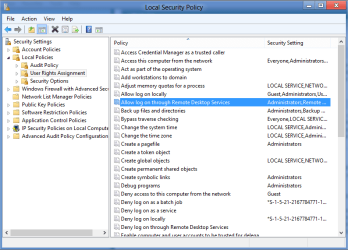
Click on Start and then click on Administrative Tools and then click on Local Security Policy. Then click on Local Policies and then User Rights Assignment. Then double click on “Allow log on through Remote Desktop Services” option. Then, under Local Security Setting tab, click on “Add User or Group” button, and then give the username or group name and click on OK. Then click on Apply and then OK.

They use to call Remote Desktop Services > Terminal Services but in Windows 7 it's called Remote Desktop Services.
 

Attachments

  • Remote Desktop Services.PNG
    Remote Desktop Services.PNG
    23.3 KB · Views: 403

My Computer My Computer

At a glance

Windows 7 Ult, Windows 8.1 Pro,Q9650-4.275GHz, E8600 4.5GHz, E6750-3.8GHzG.Skill PC2 9600 1200Mhz 5 5 5 15 2TGTX480
Computer type
PC/Desktop
Computer Manufacturer/Model Number
Home built
OS
Windows 7 Ult, Windows 8.1 Pro,
CPU
Q9650-4.275GHz, E8600 4.5GHz, E6750-3.8GHz
Motherboard
Evga 780i FTW
Memory
G.Skill PC2 9600 1200Mhz 5 5 5 15 2T
Graphics Card(s)
GTX480
Sound Card
Asus Xonar D2
Monitor(s) Displays
HannsG
Screen Resolution
1680X1050
Hard Drives
GSkill Phoenix Pro 120GB SSD
PSU
ThermalTake Toughpower 1000Watt modular
Case
ThermalTake XaserV
Cooling
Xigmatek S1283
Keyboard
Logitech G15
Mouse
Logitech G9
Internet Speed
T1
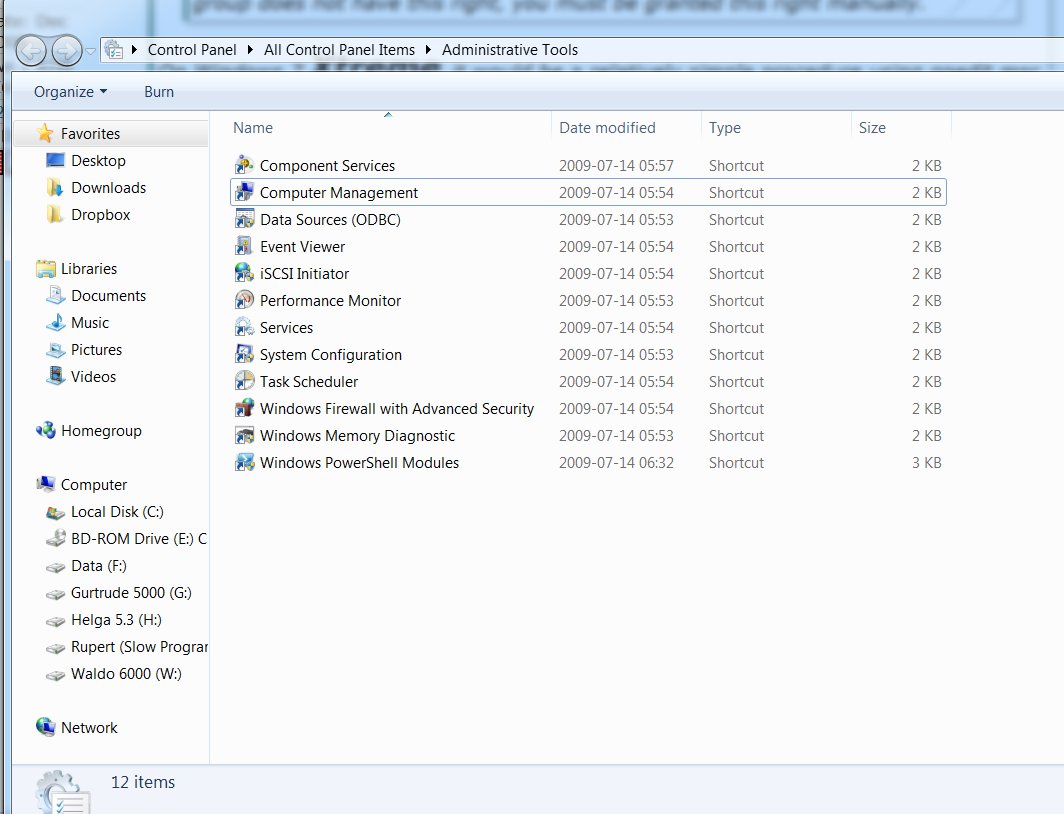
Are you sure that Local Security Policy is supposed to be available on Win7 Home Premium?

These are the options available to me in Administrative Tools:

7VwUy.jpg
 

My Computer My Computer

At a glance

Win 7 Home Premium (OEM) - Install date: 02-2010AMD X4 Phenom II 965OCZ Black Edition - 2x2GB DDR3-1600Sapphire HD 5770 1GB GDDR5
OS
Win 7 Home Premium (OEM) - Install date: 02-2010
CPU
AMD X4 Phenom II 965
Motherboard
Gigabyte GA 790FXTA-UD5
Memory
OCZ Black Edition - 2x2GB DDR3-1600
Graphics Card(s)
Sapphire HD 5770 1GB GDDR5
Sound Card
Integrated
Monitor(s) Displays
Generic CRT
Screen Resolution
1024x7xx
Hard Drives
System: OCZ Vertex 2, 60 GB SSD
Data: Western Digital Caviar Black WD1002FAEX, 1TB HDD
PSU
Thermaltake w705 - 700 watt
Case
Fractal R2 Define
Cooling
Air
Keyboard
Generic
Mouse
Gigabyte Optical Gaming Mouse
Internet Speed
IDSL
Are you sure that Local Security Policy is supposed to be available on Win7 Home Premium?

These are the options available to me in Administrative Tools:

7VwUy.jpg

Looks like home premium doesn't have Local security policies either. The only other way would be to go into the registry and find the key for local security policies and try to make adjustments there. I've looked around but couldn't find the key as yet though if you Google around you may find the correct key for this.
 

My Computer My Computer

At a glance

Windows 7 Ult, Windows 8.1 Pro,Q9650-4.275GHz, E8600 4.5GHz, E6750-3.8GHzG.Skill PC2 9600 1200Mhz 5 5 5 15 2TGTX480
Computer type
PC/Desktop
Computer Manufacturer/Model Number
Home built
OS
Windows 7 Ult, Windows 8.1 Pro,
CPU
Q9650-4.275GHz, E8600 4.5GHz, E6750-3.8GHz
Motherboard
Evga 780i FTW
Memory
G.Skill PC2 9600 1200Mhz 5 5 5 15 2T
Graphics Card(s)
GTX480
Sound Card
Asus Xonar D2
Monitor(s) Displays
HannsG
Screen Resolution
1680X1050
Hard Drives
GSkill Phoenix Pro 120GB SSD
PSU
ThermalTake Toughpower 1000Watt modular
Case
ThermalTake XaserV
Cooling
Xigmatek S1283
Keyboard
Logitech G15
Mouse
Logitech G9
Internet Speed
T1

My Computer My Computer

At a glance

Win 7 Home Premium (OEM) - Install date: 02-2010AMD X4 Phenom II 965OCZ Black Edition - 2x2GB DDR3-1600Sapphire HD 5770 1GB GDDR5
OS
Win 7 Home Premium (OEM) - Install date: 02-2010
CPU
AMD X4 Phenom II 965
Motherboard
Gigabyte GA 790FXTA-UD5
Memory
OCZ Black Edition - 2x2GB DDR3-1600
Graphics Card(s)
Sapphire HD 5770 1GB GDDR5
Sound Card
Integrated
Monitor(s) Displays
Generic CRT
Screen Resolution
1024x7xx
Hard Drives
System: OCZ Vertex 2, 60 GB SSD
Data: Western Digital Caviar Black WD1002FAEX, 1TB HDD
PSU
Thermaltake w705 - 700 watt
Case
Fractal R2 Define
Cooling
Air
Keyboard
Generic
Mouse
Gigabyte Optical Gaming Mouse
Internet Speed
IDSL
Are you sure that Local Security Policy is supposed to be available on Win7 Home Premium?

These are the options available to me in Administrative Tools:

7VwUy.jpg

Looks like home premium doesn't have Local security policies either. The only other way would be to go into the registry and find the key for local security policies and try to make adjustments there. I've looked around but couldn't find the key as yet though if you Google around you may find the correct key for this.

If it's not too much trouble coulld you back up your registry, then make a change to the Allow log on through Remote Desktop Services in your Local Security Policy and then make another backup of your registry? By comparing the two backups, I've read that you can determine the relevant keys.
 

My Computer My Computer

At a glance

Win 7 Home Premium (OEM) - Install date: 02-2010AMD X4 Phenom II 965OCZ Black Edition - 2x2GB DDR3-1600Sapphire HD 5770 1GB GDDR5
OS
Win 7 Home Premium (OEM) - Install date: 02-2010
CPU
AMD X4 Phenom II 965
Motherboard
Gigabyte GA 790FXTA-UD5
Memory
OCZ Black Edition - 2x2GB DDR3-1600
Graphics Card(s)
Sapphire HD 5770 1GB GDDR5
Sound Card
Integrated
Monitor(s) Displays
Generic CRT
Screen Resolution
1024x7xx
Hard Drives
System: OCZ Vertex 2, 60 GB SSD
Data: Western Digital Caviar Black WD1002FAEX, 1TB HDD
PSU
Thermaltake w705 - 700 watt
Case
Fractal R2 Define
Cooling
Air
Keyboard
Generic
Mouse
Gigabyte Optical Gaming Mouse
Internet Speed
IDSL
I attempted to use an elevated command prompt to add the user 'Kitchen' to the group Remote Desktop Users but the group did not exist.

Microsoft Windows [Version 6.1.7601] Copyright (c) 2009 Microsoft Corporation. All rights reserved.

C:\windows\system32>net localgroup "Remote Desktop Users" "Kitchen" /add

System error 1376 has occurred.


The specified local group does not exist.
I didn't expect it to work, but I tried creating the group and then adding the user 'Kitchen' to it, but I still get the original error when I try to log into that account remotely. Could Win 7 Home (Premium) be hardwired not allow me to use remote desktop with a non-admin account?
 

My Computer My Computer

At a glance

Win 7 Home Premium (OEM) - Install date: 02-2010AMD X4 Phenom II 965OCZ Black Edition - 2x2GB DDR3-1600Sapphire HD 5770 1GB GDDR5
OS
Win 7 Home Premium (OEM) - Install date: 02-2010
CPU
AMD X4 Phenom II 965
Motherboard
Gigabyte GA 790FXTA-UD5
Memory
OCZ Black Edition - 2x2GB DDR3-1600
Graphics Card(s)
Sapphire HD 5770 1GB GDDR5
Sound Card
Integrated
Monitor(s) Displays
Generic CRT
Screen Resolution
1024x7xx
Hard Drives
System: OCZ Vertex 2, 60 GB SSD
Data: Western Digital Caviar Black WD1002FAEX, 1TB HDD
PSU
Thermaltake w705 - 700 watt
Case
Fractal R2 Define
Cooling
Air
Keyboard
Generic
Mouse
Gigabyte Optical Gaming Mouse
Internet Speed
IDSL
Okay, I downloaded the ntrights utility from here: Download: Windows Server 2003 Resource Kit Tools - Microsoft Download Center - Download Details

I used it as follows:

C:\windows\system32>ntrights -u Kitchen +r SeRemoteInteractiveLogonRight

Granting SeRemoteInteractiveLogonRight to Kitchen ... successful

C:\windows\system32>

However, now when I try to log on, I get the error:

The requested session access is denied

I found a thread with a bunch of sys admins saying they solved it with the following registry key but it didn't work for me at all:

Open registry editor, under HKEY_LOCAL_MACHINE\SYSTEM\CurrentControlSet\Control\Terminal Server\ create a DWORD value called “IgnoreRegUserConfigErrors” and assign the value “1” to this property

Is there anything else worth a try?
 

My Computer My Computer

At a glance

Win 7 Home Premium (OEM) - Install date: 02-2010AMD X4 Phenom II 965OCZ Black Edition - 2x2GB DDR3-1600Sapphire HD 5770 1GB GDDR5
OS
Win 7 Home Premium (OEM) - Install date: 02-2010
CPU
AMD X4 Phenom II 965
Motherboard
Gigabyte GA 790FXTA-UD5
Memory
OCZ Black Edition - 2x2GB DDR3-1600
Graphics Card(s)
Sapphire HD 5770 1GB GDDR5
Sound Card
Integrated
Monitor(s) Displays
Generic CRT
Screen Resolution
1024x7xx
Hard Drives
System: OCZ Vertex 2, 60 GB SSD
Data: Western Digital Caviar Black WD1002FAEX, 1TB HDD
PSU
Thermaltake w705 - 700 watt
Case
Fractal R2 Define
Cooling
Air
Keyboard
Generic
Mouse
Gigabyte Optical Gaming Mouse
Internet Speed
IDSL
It is possible I am miss-remembering but I thought the Home version of Windows can only be a client of Remote Desktop and not a server. I.e., can only connect to other computers and not have computers connect to it.
 

My Computer My Computer

At a glance

Windows 10 Pro (x64)Intel Core i7-3930K (3.2GHz - 4.5GHz)4x Samsung 4GB PC3-12800 DDR3 (16GB 1600MHz)Nvidia Geforce GTX 690
Computer type
PC/Desktop
Computer Manufacturer/Model Number
Alienware Aurora ALX R4
OS
Windows 10 Pro (x64)
CPU
Intel Core i7-3930K (3.2GHz - 4.5GHz)
Motherboard
Alienware Aurora-R4 x79
Memory
4x Samsung 4GB PC3-12800 DDR3 (16GB 1600MHz)
Graphics Card(s)
Nvidia Geforce GTX 690
Sound Card
SteelSeries Siberia Elite
Monitor(s) Displays
Dell UltraSharp U3011
Screen Resolution
2560x1600
Hard Drives
Samsung 850 Pro 256 GB, Seagate 1TB Desktop Hybrid HDD, 2x Western Digital 4TB Green HDD
PSU
875W Some Dell PSU <.<
Case
Alienware Aurora ALX
Cooling
Custom Liquid Cooling (EK CPU & GPU blocks) dual EK 480RAD
Keyboard
Logitech G710+ Mechanical
Mouse
Logitech G700s
Internet Speed
Verizon Fios (50 mbps average)
Other Info
Server: Intel NUC D54250WYK: i5-4250U, 16GB, 256 GB mSATA, Windows Server 2012 R2
It does let me log into my admin account though. It's just non-admin accounts that I can't log onto.
 

My Computer My Computer

At a glance

Win 7 Home Premium (OEM) - Install date: 02-2010AMD X4 Phenom II 965OCZ Black Edition - 2x2GB DDR3-1600Sapphire HD 5770 1GB GDDR5
OS
Win 7 Home Premium (OEM) - Install date: 02-2010
CPU
AMD X4 Phenom II 965
Motherboard
Gigabyte GA 790FXTA-UD5
Memory
OCZ Black Edition - 2x2GB DDR3-1600
Graphics Card(s)
Sapphire HD 5770 1GB GDDR5
Sound Card
Integrated
Monitor(s) Displays
Generic CRT
Screen Resolution
1024x7xx
Hard Drives
System: OCZ Vertex 2, 60 GB SSD
Data: Western Digital Caviar Black WD1002FAEX, 1TB HDD
PSU
Thermaltake w705 - 700 watt
Case
Fractal R2 Define
Cooling
Air
Keyboard
Generic
Mouse
Gigabyte Optical Gaming Mouse
Internet Speed
IDSL
Back
Top