Wifi is connected but identifying frequently and yellow star on logo

raystef

New member
Local time
5:20 AM
Messages
18
Location
Antwerp
Hi,

My connection to the internet is always very good but there are some issues :

1. my wifi is identifying (turning blue circel) for a second or two and that happens frequently. But this identifying has no influence on my connection f.e. when i am downloading something or doing other stuff which demands download-capacity.

2. my wifi icon has always a yellow star or dot

For a good understanding : i have a 5 star signal strenght and in my surrounding there is only 1 wifi network and that is on channel 11 and mine is at channel 1 - so no interfering problem.

So, is there a solution for both the identifying and yellow star problem ?

Any help would be appreciated !

Thanks
Stefan
 

My Computer My Computer

At a glance

W7 Home Premium 64bitPentium Dual Core [email protected]4GBNVIDIA Geforce G 103M
Computer Manufacturer/Model Number
CQ71-420ED
OS
W7 Home Premium 64bit
CPU
Pentium Dual Core [email protected]
Motherboard
HP306c
Memory
4GB
Graphics Card(s)
NVIDIA Geforce G 103M
Screen Resolution
1600 x 900
Internet Speed
14Mbps
Have you tried you troubleshooter by right clicking the network icon in notification area and selecting troubleshooting? Do you have the latest driver for your network adapter?
 

My Computer My Computer

At a glance

Windows 7 Ultimate 64 bitAMD Phenom II X4 965 Black EditionGSkill 4 X 2 GB PC 8500XFX Radeon HD 6790 D
Computer Manufacturer/Model Number
Custom built
OS
Windows 7 Ultimate 64 bit
CPU
AMD Phenom II X4 965 Black Edition
Motherboard
Gigabyte GA-MA790X-DS4
Memory
GSkill 4 X 2 GB PC 8500
Graphics Card(s)
XFX Radeon HD 6790 D
Sound Card
On board RealTek HD
Monitor(s) Displays
Dual monitors:Samsung SyncMaster S20B300
Screen Resolution
1600 X 900
Hard Drives
Seagate Barracuda 1TB (primary)
Seagate Barracuda 2 X 320 GB
PSU
Ultra X4 750 watt fully modular
Case
Thermaltake Overseer RX 1 full tower
Cooling
Core-Contact 92 mm CPU Cooler
Keyboard
Logitech G510
Mouse
Razor DeathAdder
Internet Speed
50/5 Mbps UL/DL
Other Info
Optical: Super Muliti DVD burner w/lightscribe, Hauppauge WinTV HVR-1800
I did and nothing came up as a problem.
I have the latest driver installed and checked.
 

My Computer My Computer

At a glance

W7 Home Premium 64bitPentium Dual Core [email protected]4GBNVIDIA Geforce G 103M
Computer Manufacturer/Model Number
CQ71-420ED
OS
W7 Home Premium 64bit
CPU
Pentium Dual Core [email protected]
Motherboard
HP306c
Memory
4GB
Graphics Card(s)
NVIDIA Geforce G 103M
Screen Resolution
1600 x 900
Internet Speed
14Mbps
Where and how did you check for your network adapter? If you could please fill in your system specs in your profile area this will help a great deal in determining what drivers are outdated and needed.
 

My Computer My Computer

At a glance

Windows 7 Ultimate 64 bitAMD Phenom II X4 965 Black EditionGSkill 4 X 2 GB PC 8500XFX Radeon HD 6790 D
Computer Manufacturer/Model Number
Custom built
OS
Windows 7 Ultimate 64 bit
CPU
AMD Phenom II X4 965 Black Edition
Motherboard
Gigabyte GA-MA790X-DS4
Memory
GSkill 4 X 2 GB PC 8500
Graphics Card(s)
XFX Radeon HD 6790 D
Sound Card
On board RealTek HD
Monitor(s) Displays
Dual monitors:Samsung SyncMaster S20B300
Screen Resolution
1600 X 900
Hard Drives
Seagate Barracuda 1TB (primary)
Seagate Barracuda 2 X 320 GB
PSU
Ultra X4 750 watt fully modular
Case
Thermaltake Overseer RX 1 full tower
Cooling
Core-Contact 92 mm CPU Cooler
Keyboard
Logitech G510
Mouse
Razor DeathAdder
Internet Speed
50/5 Mbps UL/DL
Other Info
Optical: Super Muliti DVD burner w/lightscribe, Hauppauge WinTV HVR-1800
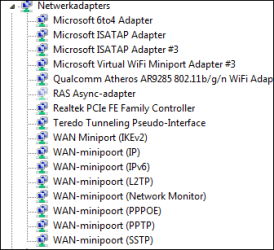
I checked my networkadapter under computeradministration-devices. I checked the Realtek and Atheros for the latest drivers. I have a png of my networkadapter shown. What system specs do you need other then W7 homepremium 64bit? Or how can i fill in the specs in my profile area ?
 

Attachments

  • networkadapters.PNG
    networkadapters.PNG
    3.1 KB · Views: 10

My Computer My Computer

At a glance

W7 Home Premium 64bitPentium Dual Core [email protected]4GBNVIDIA Geforce G 103M
Computer Manufacturer/Model Number
CQ71-420ED
OS
W7 Home Premium 64bit
CPU
Pentium Dual Core [email protected]
Motherboard
HP306c
Memory
4GB
Graphics Card(s)
NVIDIA Geforce G 103M
Screen Resolution
1600 x 900
Internet Speed
14Mbps
To fill in your system specs, click on your name in upper right hand corner and look for tab "system specs" and just fill in the blanks. Or you can use the "user cp" option.

I'm looking for PC make and model, mobo make and model.
 

My Computer My Computer

At a glance

Windows 7 Ultimate 64 bitAMD Phenom II X4 965 Black EditionGSkill 4 X 2 GB PC 8500XFX Radeon HD 6790 D
Computer Manufacturer/Model Number
Custom built
OS
Windows 7 Ultimate 64 bit
CPU
AMD Phenom II X4 965 Black Edition
Motherboard
Gigabyte GA-MA790X-DS4
Memory
GSkill 4 X 2 GB PC 8500
Graphics Card(s)
XFX Radeon HD 6790 D
Sound Card
On board RealTek HD
Monitor(s) Displays
Dual monitors:Samsung SyncMaster S20B300
Screen Resolution
1600 X 900
Hard Drives
Seagate Barracuda 1TB (primary)
Seagate Barracuda 2 X 320 GB
PSU
Ultra X4 750 watt fully modular
Case
Thermaltake Overseer RX 1 full tower
Cooling
Core-Contact 92 mm CPU Cooler
Keyboard
Logitech G510
Mouse
Razor DeathAdder
Internet Speed
50/5 Mbps UL/DL
Other Info
Optical: Super Muliti DVD burner w/lightscribe, Hauppauge WinTV HVR-1800
Have you tried rebooting you modem/router? Unplug it from the AC outlet and let it set for 1 minute and then plug it back in.
 

My Computer My Computer

At a glance

Windows 7 Ultimate 64 bitAMD Phenom II X4 965 Black EditionGSkill 4 X 2 GB PC 8500XFX Radeon HD 6790 D
Computer Manufacturer/Model Number
Custom built
OS
Windows 7 Ultimate 64 bit
CPU
AMD Phenom II X4 965 Black Edition
Motherboard
Gigabyte GA-MA790X-DS4
Memory
GSkill 4 X 2 GB PC 8500
Graphics Card(s)
XFX Radeon HD 6790 D
Sound Card
On board RealTek HD
Monitor(s) Displays
Dual monitors:Samsung SyncMaster S20B300
Screen Resolution
1600 X 900
Hard Drives
Seagate Barracuda 1TB (primary)
Seagate Barracuda 2 X 320 GB
PSU
Ultra X4 750 watt fully modular
Case
Thermaltake Overseer RX 1 full tower
Cooling
Core-Contact 92 mm CPU Cooler
Keyboard
Logitech G510
Mouse
Razor DeathAdder
Internet Speed
50/5 Mbps UL/DL
Other Info
Optical: Super Muliti DVD burner w/lightscribe, Hauppauge WinTV HVR-1800
i did reboot router - nothing helped
i updated some system specs - is there enough info ?
 

My Computer My Computer

At a glance

W7 Home Premium 64bitPentium Dual Core [email protected]4GBNVIDIA Geforce G 103M
Computer Manufacturer/Model Number
CQ71-420ED
OS
W7 Home Premium 64bit
CPU
Pentium Dual Core [email protected]
Motherboard
HP306c
Memory
4GB
Graphics Card(s)
NVIDIA Geforce G 103M
Screen Resolution
1600 x 900
Internet Speed
14Mbps
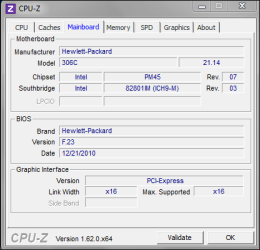
info MOBO
 

Attachments

  • mobo.PNG
    mobo.PNG
    10 KB · Views: 8

My Computer My Computer

At a glance

W7 Home Premium 64bitPentium Dual Core [email protected]4GBNVIDIA Geforce G 103M
Computer Manufacturer/Model Number
CQ71-420ED
OS
W7 Home Premium 64bit
CPU
Pentium Dual Core [email protected]
Motherboard
HP306c
Memory
4GB
Graphics Card(s)
NVIDIA Geforce G 103M
Screen Resolution
1600 x 900
Internet Speed
14Mbps

My Computer My Computer

At a glance

Windows 7 Ultimate 64 bitAMD Phenom II X4 965 Black EditionGSkill 4 X 2 GB PC 8500XFX Radeon HD 6790 D
Computer Manufacturer/Model Number
Custom built
OS
Windows 7 Ultimate 64 bit
CPU
AMD Phenom II X4 965 Black Edition
Motherboard
Gigabyte GA-MA790X-DS4
Memory
GSkill 4 X 2 GB PC 8500
Graphics Card(s)
XFX Radeon HD 6790 D
Sound Card
On board RealTek HD
Monitor(s) Displays
Dual monitors:Samsung SyncMaster S20B300
Screen Resolution
1600 X 900
Hard Drives
Seagate Barracuda 1TB (primary)
Seagate Barracuda 2 X 320 GB
PSU
Ultra X4 750 watt fully modular
Case
Thermaltake Overseer RX 1 full tower
Cooling
Core-Contact 92 mm CPU Cooler
Keyboard
Logitech G510
Mouse
Razor DeathAdder
Internet Speed
50/5 Mbps UL/DL
Other Info
Optical: Super Muliti DVD burner w/lightscribe, Hauppauge WinTV HVR-1800
model = CQ71-420ED ( is this the same as the 420EM ?)
I did an HP product identification and Hp just showed the 420EM.
There are updates indeed.
Should you advice to update the BIOS as well ?
I did update though the latest drivers for my Realtek and Atheros in the device manager-properties.
 

My Computer My Computer

At a glance

W7 Home Premium 64bitPentium Dual Core [email protected]4GBNVIDIA Geforce G 103M
Computer Manufacturer/Model Number
CQ71-420ED
OS
W7 Home Premium 64bit
CPU
Pentium Dual Core [email protected]
Motherboard
HP306c
Memory
4GB
Graphics Card(s)
NVIDIA Geforce G 103M
Screen Resolution
1600 x 900
Internet Speed
14Mbps
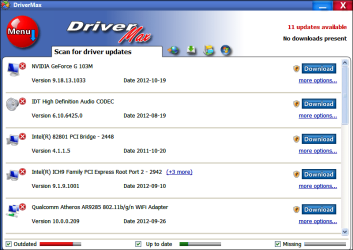
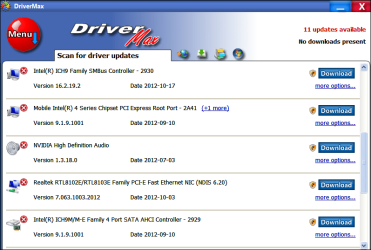
here is some data from drivermax - there is some to update...i will do this and report
 

Attachments

  • drivermax1.PNG
    drivermax1.PNG
    33.3 KB · Views: 7
  • drivermax2.PNG
    drivermax2.PNG
    33.9 KB · Views: 6

My Computer My Computer

At a glance

W7 Home Premium 64bitPentium Dual Core [email protected]4GBNVIDIA Geforce G 103M
Computer Manufacturer/Model Number
CQ71-420ED
OS
W7 Home Premium 64bit
CPU
Pentium Dual Core [email protected]
Motherboard
HP306c
Memory
4GB
Graphics Card(s)
NVIDIA Geforce G 103M
Screen Resolution
1600 x 900
Internet Speed
14Mbps
I would wait on the BIOS after you have updated all those drivers and see if those driver updates resolve your issue.

Updating the BIOS can be very hazardous to the PC if it's not done correctly. It can render the PC/laptop useless. I would check w HP/Compaq on how to update the BIOS for your laptop. Each vendor does it a little bit different. There are some good videos on youtube on "how to update" the BIOS.
 

My Computer My Computer

At a glance

Windows 7 Ultimate 64 bitAMD Phenom II X4 965 Black EditionGSkill 4 X 2 GB PC 8500XFX Radeon HD 6790 D
Computer Manufacturer/Model Number
Custom built
OS
Windows 7 Ultimate 64 bit
CPU
AMD Phenom II X4 965 Black Edition
Motherboard
Gigabyte GA-MA790X-DS4
Memory
GSkill 4 X 2 GB PC 8500
Graphics Card(s)
XFX Radeon HD 6790 D
Sound Card
On board RealTek HD
Monitor(s) Displays
Dual monitors:Samsung SyncMaster S20B300
Screen Resolution
1600 X 900
Hard Drives
Seagate Barracuda 1TB (primary)
Seagate Barracuda 2 X 320 GB
PSU
Ultra X4 750 watt fully modular
Case
Thermaltake Overseer RX 1 full tower
Cooling
Core-Contact 92 mm CPU Cooler
Keyboard
Logitech G510
Mouse
Razor DeathAdder
Internet Speed
50/5 Mbps UL/DL
Other Info
Optical: Super Muliti DVD burner w/lightscribe, Hauppauge WinTV HVR-1800
model = CQ71-420ED ( is this the same as the 420EM ?)
I did an HP product identification and Hp just showed the 420EM.
There are updates indeed.
Should you advice to update the BIOS as well ?
I did update though the latest drivers for my Realtek and Atheros in the device manager-properties.


You can use HP's find it software locate your drivers for you. Maybe that will give you your exact model driver downloads.

Here's the CQ71-420ED driver page.....
http://h10025.www1.hp.com/ewfrf/wc/...en&cc=us&dlc=en&sw_lang=&product=4131631#N415
 

My Computer My Computer

At a glance

Windows 7 Ultimate 64 bitAMD Phenom II X4 965 Black EditionGSkill 4 X 2 GB PC 8500XFX Radeon HD 6790 D
Computer Manufacturer/Model Number
Custom built
OS
Windows 7 Ultimate 64 bit
CPU
AMD Phenom II X4 965 Black Edition
Motherboard
Gigabyte GA-MA790X-DS4
Memory
GSkill 4 X 2 GB PC 8500
Graphics Card(s)
XFX Radeon HD 6790 D
Sound Card
On board RealTek HD
Monitor(s) Displays
Dual monitors:Samsung SyncMaster S20B300
Screen Resolution
1600 X 900
Hard Drives
Seagate Barracuda 1TB (primary)
Seagate Barracuda 2 X 320 GB
PSU
Ultra X4 750 watt fully modular
Case
Thermaltake Overseer RX 1 full tower
Cooling
Core-Contact 92 mm CPU Cooler
Keyboard
Logitech G510
Mouse
Razor DeathAdder
Internet Speed
50/5 Mbps UL/DL
Other Info
Optical: Super Muliti DVD burner w/lightscribe, Hauppauge WinTV HVR-1800
update.
I have looked for drivers via hp but i was suprised that Drivermax found some newer ones.
Now i have the latest and they are :
Realtek 3-10-2012 7.63.1003.2012
Atheros 26.09.2012 10.0.0.209
Result : nothing was solved. Even after rebooting.

I did remember that completely removing the networkadapter trough devicemanager, so uninstalling Atheros and Relatek could help which i did. I rebooted and the drivers installed thereselves.
Result : icon logo became normal and no identifying blue circles anymore.

But after rebooting a second time everything went bad again.

Any suggestions ?

ps : BIOS was already the newest one : 23
 

My Computer My Computer

At a glance

W7 Home Premium 64bitPentium Dual Core [email protected]4GBNVIDIA Geforce G 103M
Computer Manufacturer/Model Number
CQ71-420ED
OS
W7 Home Premium 64bit
CPU
Pentium Dual Core [email protected]
Motherboard
HP306c
Memory
4GB
Graphics Card(s)
NVIDIA Geforce G 103M
Screen Resolution
1600 x 900
Internet Speed
14Mbps
Sorry...I'm out of options....but the bottom line seems to be a driver/compatibility issue. The only other possibility is the the wi-fi hardware itself could be faulty or going bad. you could try a wi-fi dongle (usb adapter) and see it that works...barrow one from a friend.
 

My Computer My Computer

At a glance

Windows 7 Ultimate 64 bitAMD Phenom II X4 965 Black EditionGSkill 4 X 2 GB PC 8500XFX Radeon HD 6790 D
Computer Manufacturer/Model Number
Custom built
OS
Windows 7 Ultimate 64 bit
CPU
AMD Phenom II X4 965 Black Edition
Motherboard
Gigabyte GA-MA790X-DS4
Memory
GSkill 4 X 2 GB PC 8500
Graphics Card(s)
XFX Radeon HD 6790 D
Sound Card
On board RealTek HD
Monitor(s) Displays
Dual monitors:Samsung SyncMaster S20B300
Screen Resolution
1600 X 900
Hard Drives
Seagate Barracuda 1TB (primary)
Seagate Barracuda 2 X 320 GB
PSU
Ultra X4 750 watt fully modular
Case
Thermaltake Overseer RX 1 full tower
Cooling
Core-Contact 92 mm CPU Cooler
Keyboard
Logitech G510
Mouse
Razor DeathAdder
Internet Speed
50/5 Mbps UL/DL
Other Info
Optical: Super Muliti DVD burner w/lightscribe, Hauppauge WinTV HVR-1800
Even strange that after i reinstalled the networkadapter-drivers from scratch and rebooted, everything seemed ok...after a second reboot...same trouble like before.
Couldn't this be a networkproblem. It's like the machine is constantly looking for another network perhaps?
Isn't there a possibility to look up some old networks in registery that have been on the machine ? I am not that experienced but i saw some thread about that in another forum.
 

My Computer My Computer

At a glance

W7 Home Premium 64bitPentium Dual Core [email protected]4GBNVIDIA Geforce G 103M
Computer Manufacturer/Model Number
CQ71-420ED
OS
W7 Home Premium 64bit
CPU
Pentium Dual Core [email protected]
Motherboard
HP306c
Memory
4GB
Graphics Card(s)
NVIDIA Geforce G 103M
Screen Resolution
1600 x 900
Internet Speed
14Mbps
I checked hidden networkadapters -see result in png.
Is this a normal networkadapter situation ?
 

Attachments

  • hidden networkadapters.PNG
    hidden networkadapters.PNG
    5.5 KB · Views: 4

My Computer My Computer

At a glance

W7 Home Premium 64bitPentium Dual Core [email protected]4GBNVIDIA Geforce G 103M
Computer Manufacturer/Model Number
CQ71-420ED
OS
W7 Home Premium 64bit
CPU
Pentium Dual Core [email protected]
Motherboard
HP306c
Memory
4GB
Graphics Card(s)
NVIDIA Geforce G 103M
Screen Resolution
1600 x 900
Internet Speed
14Mbps
We've over looked the possibility of spyware and malware infection, which has been known to cause such problems...couldn't hurt to check.
 

My Computer My Computer

At a glance

Windows 7 Ultimate 64 bitAMD Phenom II X4 965 Black EditionGSkill 4 X 2 GB PC 8500XFX Radeon HD 6790 D
Computer Manufacturer/Model Number
Custom built
OS
Windows 7 Ultimate 64 bit
CPU
AMD Phenom II X4 965 Black Edition
Motherboard
Gigabyte GA-MA790X-DS4
Memory
GSkill 4 X 2 GB PC 8500
Graphics Card(s)
XFX Radeon HD 6790 D
Sound Card
On board RealTek HD
Monitor(s) Displays
Dual monitors:Samsung SyncMaster S20B300
Screen Resolution
1600 X 900
Hard Drives
Seagate Barracuda 1TB (primary)
Seagate Barracuda 2 X 320 GB
PSU
Ultra X4 750 watt fully modular
Case
Thermaltake Overseer RX 1 full tower
Cooling
Core-Contact 92 mm CPU Cooler
Keyboard
Logitech G510
Mouse
Razor DeathAdder
Internet Speed
50/5 Mbps UL/DL
Other Info
Optical: Super Muliti DVD burner w/lightscribe, Hauppauge WinTV HVR-1800
did check all of that (virussen, spybots, malware) too - no problems detected.

But today i checked my wifi on another place. All problems seems to be gone.
I had to check on the new network with the WEP password - i connected and no problems anymore.
So what is making the difference ?
The only difference i can view in the network-properties is that the new network is an 'open' one and mine at home is a private one.
Is this making any sence and giving us a new explanation to the problem ?
 

Attachments

  • open network.PNG
    open network.PNG
    1.4 KB · Views: 40
  • pivate network.PNG
    pivate network.PNG
    2 KB · Views: 40
Last edited:

My Computer My Computer

At a glance

W7 Home Premium 64bitPentium Dual Core [email protected]4GBNVIDIA Geforce G 103M
Computer Manufacturer/Model Number
CQ71-420ED
OS
W7 Home Premium 64bit
CPU
Pentium Dual Core [email protected]
Motherboard
HP306c
Memory
4GB
Graphics Card(s)
NVIDIA Geforce G 103M
Screen Resolution
1600 x 900
Internet Speed
14Mbps
Back
Top