Solved Can only access google sites!!!

uLemon

New member
Local time
7:24 AM
Messages
13
Heres a quick run down, it affects all browsers and all operationg systems on MY computer, move over to my parents and all websites work!!!
I have cleared dns and checked MTU values!

Pluged in the eithernet cord, bam all websites work....
So I tried my usb wireless adapter, that works, this leads me to believe there might be a problem with the card? any suggestions?
 

My Computer

OS
Windows 7 Ultimate x64
...any suggestions?
Remove any software that is managing your wireless connections and let W7 handle that.

Remove any connections that you have saved here:
Control Panel\Network and Internet\Manage Wireless Networks
Restart the laptop and try to connect again.
 

My Computer

Computer type
Laptop
Computer Manufacturer/Model Number
Employer provided Dell Latitude
OS
W7 Pro SP1 64bit
CPU
i7
Memory
8GB
Graphics Card(s)
Intel HD Graphics
Hard Drives
crappy SSD
Antivirus
Employer mandated Symantec Endpoint Protection
Browser
Pale Moon 64bit, IE11 64bit & Chrome 64bit
...any suggestions?
Remove any software that is managing your wireless connections and let W7 handle that.

Remove any connections that you have saved here:
Control Panel\Network and Internet\Manage Wireless Networks
Restart the laptop and try to connect again.

Would avast affect it? If it is then changing wireless cards wouldn't affect it blocking sites.
 

My Computer

OS
Windows 7 Ultimate x64
...........
Would avast affect it? If it is then changing wireless cards wouldn't affect it blocking sites.
I doubt that AVAST is the issue - but hey, it is only software. Uninstall Avast and install MSE just as a test.

And you are right: The authentication (saved SSIDs and keys) should be common to the "bad" wireless network adapter and the good one... so that test is not very logical. I forgot that you had tested on another wireless network adapter.

Edit: like openminds mentions below - check your DNS settings - they are unique to each NIC. The HOST file is common to all network adapters - so that is probably not the issue.
 
Last edited:

My Computer

Computer type
Laptop
Computer Manufacturer/Model Number
Employer provided Dell Latitude
OS
W7 Pro SP1 64bit
CPU
i7
Memory
8GB
Graphics Card(s)
Intel HD Graphics
Hard Drives
crappy SSD
Antivirus
Employer mandated Symantec Endpoint Protection
Browser
Pale Moon 64bit, IE11 64bit & Chrome 64bit
Are you setting your computer to get an IP and other addresses auto from the router? Or maybe there is a custom value put in there? (Mainly your DNS server address) Either by your own doing or from some software that may have changed it like mentioned above...

Also, check your trusted sites. Or you may have also had some software change your "Host" file.
 

My Computer

Computer type
Laptop
OS
Windows 7 64-bit
CPU
Quad-Cores!!
Motherboard
Asus
Memory
Lots
Graphics Card(s)
NVidea
Hard Drives
WD 500G Hybrids
Are you setting your computer to get an IP and other addresses auto from the router? Or maybe there is a custom value put in there? (Mainly your DNS server address) Either by your own doing or from some software that may have changed it like mentioned above...

Also, check your trusted sites. Or you may have also had some software change your "Host" file.
All my cards get the IP automatically
 

My Computer

OS
Windows 7 Ultimate x64

My Computer

Computer type
Laptop
Computer Manufacturer/Model Number
Employer provided Dell Latitude
OS
W7 Pro SP1 64bit
CPU
i7
Memory
8GB
Graphics Card(s)
Intel HD Graphics
Hard Drives
crappy SSD
Antivirus
Employer mandated Symantec Endpoint Protection
Browser
Pale Moon 64bit, IE11 64bit & Chrome 64bit
Please use the "bad" network adapter and post the file mentioned here:
http://www.sevenforums.com/network-...le-dns-server-not-responding.html#post2318682
Code:
Windows IP Configuration

   Host Name . . . . . . . . . . . . : Gandalf
   Primary Dns Suffix  . . . . . . . : 
   Node Type . . . . . . . . . . . . : Hybrid
   IP Routing Enabled. . . . . . . . : No
   WINS Proxy Enabled. . . . . . . . : No
   DNS Suffix Search List. . . . . . : domain.actdsltmp

Wireless LAN adapter Wireless Network Connection 2:

   Connection-specific DNS Suffix  . : domain.actdsltmp
   Description . . . . . . . . . . . : NETGEAR WPN311 RangeMax(TM) Wireless PCI Adapter #2
   Physical Address. . . . . . . . . : 00-14-6C-2F-14-0B
   DHCP Enabled. . . . . . . . . . . : Yes
   Autoconfiguration Enabled . . . . : Yes
   Link-local IPv6 Address . . . . . : fe80::2072:c46b:6582:cd7f%16(Preferred) 
   IPv4 Address. . . . . . . . . . . : 192.168.0.4(Preferred) 
   Subnet Mask . . . . . . . . . . . : 255.255.255.0
   Lease Obtained. . . . . . . . . . : Monday, March 25, 2013 10:12:17 PM
   Lease Expires . . . . . . . . . . : Monday, April 01, 2013 10:12:16 PM
   Default Gateway . . . . . . . . . : 192.168.0.1
   DHCP Server . . . . . . . . . . . : 192.168.0.1
   DHCPv6 IAID . . . . . . . . . . . : 352326764
   DHCPv6 Client DUID. . . . . . . . : 00-01-00-01-18-4F-59-3E-00-25-22-33-BD-E0
   DNS Servers . . . . . . . . . . . : 192.168.0.1
                                       205.171.3.25
   NetBIOS over Tcpip. . . . . . . . : Enabled

Tunnel adapter isatap.{51A2AEA4-28B2-4225-A59E-16DD7A8D6479}:

   Media State . . . . . . . . . . . : Media disconnected
   Connection-specific DNS Suffix  . : 
   Description . . . . . . . . . . . : Microsoft ISATAP Adapter
   Physical Address. . . . . . . . . : 00-00-00-00-00-00-00-E0
   DHCP Enabled. . . . . . . . . . . : No
   Autoconfiguration Enabled . . . . : Yes

Tunnel adapter Teredo Tunneling Pseudo-Interface:

   Media State . . . . . . . . . . . : Media disconnected
   Connection-specific DNS Suffix  . : 
   Description . . . . . . . . . . . : Teredo Tunneling Pseudo-Interface
   Physical Address. . . . . . . . . : 00-00-00-00-00-00-00-E0
   DHCP Enabled. . . . . . . . . . . : No
   Autoconfiguration Enabled . . . . : Yes

Tunnel adapter isatap.domain.actdsltmp:

   Media State . . . . . . . . . . . : Media disconnected
   Connection-specific DNS Suffix  . : 
   Description . . . . . . . . . . . : Microsoft ISATAP Adapter #2
   Physical Address. . . . . . . . . : 00-00-00-00-00-00-00-E0
   DHCP Enabled. . . . . . . . . . . : No
   Autoconfiguration Enabled . . . . : Yes
 

My Computer

OS
Windows 7 Ultimate x64
Thanks for that info.

Just for fun, please manually assign DNS IP addresses from OpenDNS to this "bad card".
208.67.222.222 and 208.67.220.220

Then let us know if you can surf to places other than Google sites.
 

My Computer

Computer type
Laptop
Computer Manufacturer/Model Number
Employer provided Dell Latitude
OS
W7 Pro SP1 64bit
CPU
i7
Memory
8GB
Graphics Card(s)
Intel HD Graphics
Hard Drives
crappy SSD
Antivirus
Employer mandated Symantec Endpoint Protection
Browser
Pale Moon 64bit, IE11 64bit & Chrome 64bit
Thanks for that info.

Just for fun, please manually assign DNS IP addresses from OpenDNS to this "bad card".
208.67.222.222 and 208.67.220.220

Then let us know if you can surf to places other than Google sites.
Okay how exactly do I do this?
Capture-3_zpsd2813e2c.jpg

If that is what you meant, then it still doesn't work with anything but google sites
 

My Computer

OS
Windows 7 Ultimate x64

Attachments

Last edited:

My Computer

Computer type
Laptop
Computer Manufacturer/Model Number
Employer provided Dell Latitude
OS
W7 Pro SP1 64bit
CPU
i7
Memory
8GB
Graphics Card(s)
Intel HD Graphics
Hard Drives
crappy SSD
Antivirus
Employer mandated Symantec Endpoint Protection
Browser
Pale Moon 64bit, IE11 64bit & Chrome 64bit
Yes, that is the place.

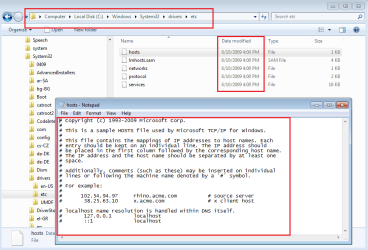
Please see if you have the default HOSTS files (like openminds suggested).

View attachment 261445

If not, I've attached one to this post.
You will just have to remove the ".TXT" from the end.
You might need this info if you don't see ".TXT" on the end.
http://www.sevenforums.com/tutorials/10570-file-extensions-hide-show.html

more info here:
http://www.sevenforums.com/tutorials/78266-hosts-file-use-windows-7-vista.html
Yup I checked that first, its all default nothing added
 

My Computer

OS
Windows 7 Ultimate x64
Maybe the NETGEAR WPN311 card is always getting the same IP address from your router (wireless access point).

Maybe some of the router's settings are restricting where that IP can surf to. Connect to the router and look around at the settings, or just reset your router back to its default settings - then set it up again.
 

My Computer

Computer type
Laptop
Computer Manufacturer/Model Number
Employer provided Dell Latitude
OS
W7 Pro SP1 64bit
CPU
i7
Memory
8GB
Graphics Card(s)
Intel HD Graphics
Hard Drives
crappy SSD
Antivirus
Employer mandated Symantec Endpoint Protection
Browser
Pale Moon 64bit, IE11 64bit & Chrome 64bit
Maybe the NETGEAR WPN311 card is always getting the same IP address from your router (wireless access point).

Maybe some of the router's settings are restricting where that IP can surf to. Connect to the router and look around at the settings, or just reset your router back to its default settings - then set it up again.
Took some time (because I had to call to get the PPO password) but I finally did this and yup, it all works great now
 

My Computer

OS
Windows 7 Ultimate x64
good to hear - please mark this thread as solved.
 

My Computer

Computer type
Laptop
Computer Manufacturer/Model Number
Employer provided Dell Latitude
OS
W7 Pro SP1 64bit
CPU
i7
Memory
8GB
Graphics Card(s)
Intel HD Graphics
Hard Drives
crappy SSD
Antivirus
Employer mandated Symantec Endpoint Protection
Browser
Pale Moon 64bit, IE11 64bit & Chrome 64bit
Back
Top