Unexpected Message-Remote Connection Could Not Connect to xx.xx.xx.xx

blg56

New member
Local time
8:01 AM
Messages
13
I have recently finished a clean re-install of Windows 7 Home Premium from the original MS disc. Since the re-install, I have noticed an occasional pop-up with the subject message.

I have run AVG scan multiple times with no threats found and don't see anything running that would explain the message. I have done a trace on a couple of the IPs and they almost seem random - no correlation that I can see.

Questions:
- can someone confirm, does the message indicate something is trying to establish a remote connection (remote desktop connection?) from my computer to the IP in the message
- any suggestions on how to track / trace? I've installed process monitor based on an older thread in this forum but don't see how it can be used to log events and tie back to the pop up (especially given the pop up is on my computer when I walk up - hence, no way for me to know for sure when the event occurred)

Any suggestions on how to get to the root of this would be appreciated. Since I have just done a fresh / clean install, I'm not enthusiastic about doing that again without some idea it might help.

Thanks
 

My Computer My Computer

At a glance

Windows 7 Home Premium 64bitAMD Phenom Quad4GB
Computer type
PC/Desktop
Computer Manufacturer/Model Number
Dell Inspiron 546
OS
Windows 7 Home Premium 64bit
CPU
AMD Phenom Quad
Memory
4GB
Hard Drives
WD Black 1TB 6Gb/s SATA
Antivirus
AVG
Browser
IE8/FF
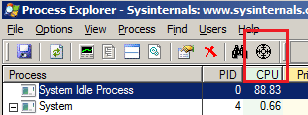
The next time that the popup happens, leave it there, start Process Explorer* and drag this little icon and "drop" it on to the popup.

Process-Monitor-app-locator.png

It might show you the app that made the popup - or the app might call another app to make the popup, then things get a bit harder to trace.

Process Monitor has the same icon and it works in sort of the same way. When you drag/drop that icon, it will add a filter to Process Monitor using the PID of the app that made the popup.

*edit:
Download the zipped (compressed) file
Open the zipped (compressed) file (folder)
Copy the files somewhere
Run the exe as admin
Agree to the EULA
 
Last edited:

My Computer My Computer

At a glance

W7 Pro SP1 64biti78GBIntel HD Graphics
Computer type
Laptop
Computer Manufacturer/Model Number
Employer provided Dell Latitude
OS
W7 Pro SP1 64bit
CPU
i7
Memory
8GB
Graphics Card(s)
Intel HD Graphics
Hard Drives
crappy SSD
Antivirus
Employer mandated Symantec Endpoint Protection
Browser
Pale Moon 64bit, IE11 64bit & Chrome 64bit
Thanks - I finally captured the initiating program with process monitor. Looks like probes at vnc. I do have a vnc port open in my router (always have, not sure why I'm just now seeing the pop-ups). However, I have vnc password protected and it looks like all probes are failing.

Thanks again for the pointer to process monitor - very helpful tool
 

My Computer My Computer

At a glance

Windows 7 Home Premium 64bitAMD Phenom Quad4GB
Computer type
PC/Desktop
Computer Manufacturer/Model Number
Dell Inspiron 546
OS
Windows 7 Home Premium 64bit
CPU
AMD Phenom Quad
Memory
4GB
Hard Drives
WD Black 1TB 6Gb/s SATA
Antivirus
AVG
Browser
IE8/FF
Which flavor of VNC are you using? Tight? Ultra? Tiny? Real?
 

My Computer My Computer

At a glance

W7 Pro SP1 64biti78GBIntel HD Graphics
Computer type
Laptop
Computer Manufacturer/Model Number
Employer provided Dell Latitude
OS
W7 Pro SP1 64bit
CPU
i7
Memory
8GB
Graphics Card(s)
Intel HD Graphics
Hard Drives
crappy SSD
Antivirus
Employer mandated Symantec Endpoint Protection
Browser
Pale Moon 64bit, IE11 64bit & Chrome 64bit
UsernameIssues: I'm using UltraVNC - have been using it since going from XP to Win7. As I mentioned, I don't recall seeing the prompt before. Not only have I recently done a clean install of Win 7 (hard drive failure) but I also replaced my old Linksys/Cisco with a Netgear 6300 and I began seeing the pop-ups.

I'm experimenting right now by adding each IP I see to a blocked IP list in the firewall. Assuming I shouldn't see any repeats of the same IP once in the blocked list.
 

My Computer My Computer

At a glance

Windows 7 Home Premium 64bitAMD Phenom Quad4GB
Computer type
PC/Desktop
Computer Manufacturer/Model Number
Dell Inspiron 546
OS
Windows 7 Home Premium 64bit
CPU
AMD Phenom Quad
Memory
4GB
Hard Drives
WD Black 1TB 6Gb/s SATA
Antivirus
AVG
Browser
IE8/FF

My Computer My Computer

At a glance

W7 Pro SP1 64biti78GBIntel HD Graphics
Computer type
Laptop
Computer Manufacturer/Model Number
Employer provided Dell Latitude
OS
W7 Pro SP1 64bit
CPU
i7
Memory
8GB
Graphics Card(s)
Intel HD Graphics
Hard Drives
crappy SSD
Antivirus
Employer mandated Symantec Endpoint Protection
Browser
Pale Moon 64bit, IE11 64bit & Chrome 64bit
I'm currently on 1.0.9.5 - like you, I've been using Ultra for quite some time. Not sure an upgrade will change this particular situation but it's time to upgrade any way - thanks for the heads up.
 

My Computer My Computer

At a glance

Windows 7 Home Premium 64bitAMD Phenom Quad4GB
Computer type
PC/Desktop
Computer Manufacturer/Model Number
Dell Inspiron 546
OS
Windows 7 Home Premium 64bit
CPU
AMD Phenom Quad
Memory
4GB
Hard Drives
WD Black 1TB 6Gb/s SATA
Antivirus
AVG
Browser
IE8/FF
Another update for the forum readers - when I replaced my router, I apparently set "respond to ping". It is my suspicion that is the reason for the high level of probing the VNC port (which is the origin of the pop-up messages I've been seeing). Have turned off respond to ping and expect to see a dramatic drop in that message frequency.
 

My Computer My Computer

At a glance

Windows 7 Home Premium 64bitAMD Phenom Quad4GB
Computer type
PC/Desktop
Computer Manufacturer/Model Number
Dell Inspiron 546
OS
Windows 7 Home Premium 64bit
CPU
AMD Phenom Quad
Memory
4GB
Hard Drives
WD Black 1TB 6Gb/s SATA
Antivirus
AVG
Browser
IE8/FF
Back
Top