
bandwidth monitor on network

CosmicJest

New member
Member
VIP
Local time
10:01 PM
Messages
152
Hello,

We are trying to get a grasp on how much bandwidth we use in my small office. I'm testing out two bandwidth monitors (NetWorx, recommended right here on SevenForums, and ShaPlus) to see which one meets our needs best, but I'm quite confused as to which of the network options I should be choosing to monitor on each of the computers. Can someone please explain what each of the options on the attached screenclip does if enabled/disabled?
 

Attachments
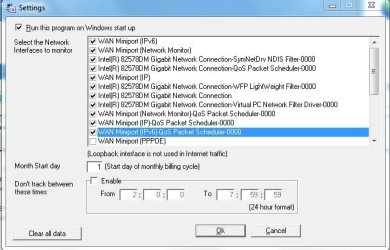
  • ShaPlus options.JPG
    ShaPlus options.JPG
    50.5 KB · Views: 11

My Computer My Computer

At a glance

Windows 7 Pro 64-bitAMD 2.9GHz / Intel 3.2GHz8GB / 4GB
Computer type
PC/Desktop
Computer Manufacturer/Model Number
Lenovo ThinkPad E545 / Dell Optiplex 980
OS
Windows 7 Pro 64-bit
CPU
AMD 2.9GHz / Intel 3.2GHz
Memory
8GB / 4GB
Antivirus
AVG / Norton 360
Browser
Firefox & Chrome
In my option, the best Bandwidth Monitoring tool is: 'GFI Monitoring' - I have always invested in this - It works a charm. Give it a Google and find out more on it :)

Failing that you could always use Spiceworks - they've got an inbuilt bandwidth monitoring tool.

Thanks,
 

My Computer My Computer

At a glance

Windows 7 Professional x64Intel Core i5 Second Generation8GB DDR3
Computer type
PC/Desktop
Computer Manufacturer/Model Number
Custom Build
OS
Windows 7 Professional x64
CPU
Intel Core i5 Second Generation
Motherboard
MSI h67ma-e35
Memory
8GB DDR3
Monitor(s) Displays
LG Flatron W2253TQ
Screen Resolution
1920x1080
Hard Drives
2x 1TB Western Digital 7200rpm
Keyboard
Logitech K360
Mouse
Logitech M325
Internet Speed
10mb Leased Line
Antivirus
Trend Micro Worry-Free Advanced Business Security
Browser
Internet Explorer 10
Thanks hargreaves :-)
 

My Computer My Computer

At a glance

Windows 7 Pro 64-bitAMD 2.9GHz / Intel 3.2GHz8GB / 4GB
Computer type
PC/Desktop
Computer Manufacturer/Model Number
Lenovo ThinkPad E545 / Dell Optiplex 980
OS
Windows 7 Pro 64-bit
CPU
AMD 2.9GHz / Intel 3.2GHz
Memory
8GB / 4GB
Antivirus
AVG / Norton 360
Browser
Firefox & Chrome
No problem - Like I said, if you have any issues, give me a shout.
 

My Computer My Computer

At a glance

Windows 7 Professional x64Intel Core i5 Second Generation8GB DDR3
Computer type
PC/Desktop
Computer Manufacturer/Model Number
Custom Build
OS
Windows 7 Professional x64
CPU
Intel Core i5 Second Generation
Motherboard
MSI h67ma-e35
Memory
8GB DDR3
Monitor(s) Displays
LG Flatron W2253TQ
Screen Resolution
1920x1080
Hard Drives
2x 1TB Western Digital 7200rpm
Keyboard
Logitech K360
Mouse
Logitech M325
Internet Speed
10mb Leased Line
Antivirus
Trend Micro Worry-Free Advanced Business Security
Browser
Internet Explorer 10
hey hargreaves, I ended up installing Spiceworks, which looks pretty awesome. But it's also pretty complicated for someone with my limited experience. If you're familiar with it, perhaps you could direct me to the inbuilt bandwidth monitoring tool you speak of, as I'm not finding it...
 

My Computer My Computer

At a glance

Windows 7 Pro 64-bitAMD 2.9GHz / Intel 3.2GHz8GB / 4GB
Computer type
PC/Desktop
Computer Manufacturer/Model Number
Lenovo ThinkPad E545 / Dell Optiplex 980
OS
Windows 7 Pro 64-bit
CPU
AMD 2.9GHz / Intel 3.2GHz
Memory
8GB / 4GB
Antivirus
AVG / Norton 360
Browser
Firefox & Chrome
Back
Top