

- Local time
- 11:54 AM
- Messages
- 152
Hello,
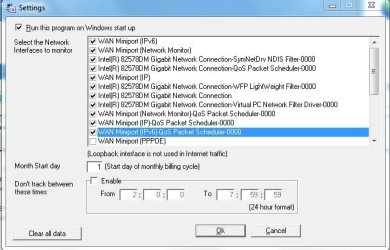
We are trying to get a grasp on how much bandwidth we use in my small office. I'm testing out two bandwidth monitors (NetWorx, recommended right here on SevenForums, and ShaPlus) to see which one meets our needs best, but I'm quite confused as to which of the network options I should be choosing to monitor on each of the computers. Can someone please explain what each of the options on the attached screenclip does if enabled/disabled?
We are trying to get a grasp on how much bandwidth we use in my small office. I'm testing out two bandwidth monitors (NetWorx, recommended right here on SevenForums, and ShaPlus) to see which one meets our needs best, but I'm quite confused as to which of the network options I should be choosing to monitor on each of the computers. Can someone please explain what each of the options on the attached screenclip does if enabled/disabled?
Attachments
My Computer
At a glance
Windows 7 Pro 64-bitAMD 2.9GHz / Intel 3.2GHz8GB / 4GB
- Computer type
- PC/Desktop
- Computer Manufacturer/Model Number
- Lenovo ThinkPad E545 / Dell Optiplex 980
- OS
- Windows 7 Pro 64-bit
- CPU
- AMD 2.9GHz / Intel 3.2GHz
- Memory
- 8GB / 4GB
- Antivirus
- AVG / Norton 360
- Browser
- Firefox & Chrome


