How to connect 2 pc with router.

IamLEGEND

New member
Member
VIP
Local time
5:43 PM
Messages
138
Hi to all seven forums.
I have a acer computer with windows 7 ultimate 64bits and a laptop with windows 8 pro 64 bits. and these two computers gain access to internet from a (LAN+wifi) modem which is provided by our isp.
acer computer connect with internet through LAN. and laptop connects with wifi. I better draw a sketch..
look at that, this is my setup.

sharing.gif

I want both pc's every drive share with each other. so tell me how do I do that.? please guide me in simple steps.
sorry for my English.
oh I remember just before posting this. these 2 pc almost had same name. with a little difference:
acer (win 7) pc name
MyComputer-PC
dell laptop (win 8) pc name
MyComputer
and laptop with windows 8 is password protected whether acer pc is not.
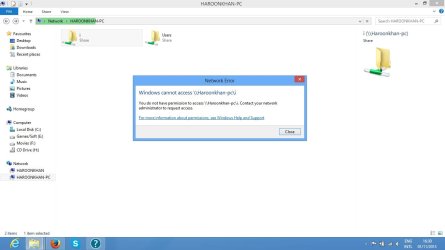
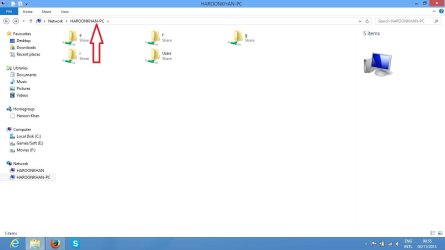
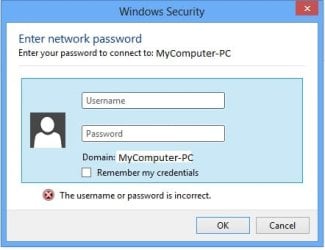
I even could see 2nd computer name in 1st one's network places. so simply I share 2nd pc drive and tried to open it in first computer network place but this thing appears all the time.
trying to open acer (win 7) shared drive in laptop (win 8)
Untitled.jpg
 

My Computer

Computer type
PC/Desktop
Computer Manufacturer/Model Number
Acer Veriton S670/G M670/G
OS
Windows 7 SP1 Ultimate x64
CPU
Intel(R) Core(TM) 2 Due cpu E8400 @ 3.0ghz
Motherboard
Acer EQ45M
Memory
3x2gb DDR3 PC3-10600
Graphics Card(s)
NVIDIA GeForce 9800 GT
Sound Card
Digital Audio (S/PDIF) (High Definition Audio Device)
Monitor(s) Displays
Asus VK222H 22" lcd HDMI wide.
Screen Resolution
1680x1050 @ 60 Hz
Hard Drives
2x1TB WD 10EAR
Internet Speed
4mbps
Browser
FireFox v27.01

My Computer

Computer type
Laptop
Computer Manufacturer/Model Number
HP Pavilion dv6-6c10us
OS
x64 (6.3.9600) Win8.1 Pro & soon dual boot x64 (6.1.7601) Win7_SP1 HomePrem
CPU
AMD A6-3420M APU with Radeon(tm) HD Graphics
Motherboard
Hewlett-Packard 1805
Memory
6.00 GB
Graphics Card(s)
AMD Radeon(TM) HD 6520G
Sound Card
(1) AMD High Definition Audio Device (2) IDT High Definiti
Monitor(s) Displays
HP W2072a 20" LCD (1600 x 900) @ 60 Hz
Screen Resolution
1366 x 768 x 32 bits (4294967296 colors) @ 60 Hz
Hard Drives
ST640LM0 00 HM641JI SATA Disk Device
Keyboard
Logitech k520 wireless KB
Mouse
Logitech m320 wireless mouse (bundled with KB)
Internet Speed
15/5 | 54 MB Wireless 'n'
Antivirus
Realtime: Defender or Avast | On-demand: Malwarebytes, ESET
Browser
IE 11 on Win8, IE 10 on win 7
Other Info
Media: [Gimp, Audacity, VLC] || Comm: [WEmail 2012, Skype] || Productivity: [OpenOffice,| Textpad] || Utils: [Sysinternals, cCleaner, Speccy, Defraggler]
I know lots of help on the internet. but I want specific replies on my setting. I mean as I describe one of my pc connects with router via wireless and one with LAN.
also I m not very familiar with networking, so I need answer here. If anyone want to help me.
 

My Computer

Computer type
PC/Desktop
Computer Manufacturer/Model Number
Acer Veriton S670/G M670/G
OS
Windows 7 SP1 Ultimate x64
CPU
Intel(R) Core(TM) 2 Due cpu E8400 @ 3.0ghz
Motherboard
Acer EQ45M
Memory
3x2gb DDR3 PC3-10600
Graphics Card(s)
NVIDIA GeForce 9800 GT
Sound Card
Digital Audio (S/PDIF) (High Definition Audio Device)
Monitor(s) Displays
Asus VK222H 22" lcd HDMI wide.
Screen Resolution
1680x1050 @ 60 Hz
Hard Drives
2x1TB WD 10EAR
Internet Speed
4mbps
Browser
FireFox v27.01
Fair enough... It looks as though you have a network configured and you're asking why the login dialog refuses to accept your login and password across the network.

Are the logins and passwords the same on both machines?

Microsoft said:
Troubleshoot file and printer sharing
Password protected sharing is enabled.

Password protected sharing is on by default for computers on workgroups. When password protected sharing is enabled, people using other computers on your network can't access your shared folders or printers unless they have a user account on your computer. There are two ways to enable file or printer sharing:
  • Create identical user accounts on all computers on the workgroup (recommended). For more information, see Create a user account.
  • Turn off password protected sharing. To turn off password protected sharing, follow these steps:
  1. Open Network and Sharing Center by clicking the Start button
    4f6cbd09-148c-4dd8-b1f2-48f232a2fd33_47.png
    , clicking Control Panel, clicking Network and Internet, and then clicking Network and Sharing Center.
  2. Under Sharing and Discovery, click the arrow button
    37e3586e-5cc5-4135-8a0a-4eaffd7d47ba_20.png
    next to Password protected sharing.
  3. Click Turn off password protected sharing, and then click Apply.
    18abb370-ac1e-4b6b-b663-e028a75bf05b_41.png
    If you are prompted for an administrator password or confirmation, type the password or provide confirmation.
Another good tutorial on Home Groups: HomeGroup from start to finish - Microsoft Windows Help [disregard the Silverlight prompt on the pages]
 

My Computer

Computer type
Laptop
Computer Manufacturer/Model Number
HP Pavilion dv6-6c10us
OS
x64 (6.3.9600) Win8.1 Pro & soon dual boot x64 (6.1.7601) Win7_SP1 HomePrem
CPU
AMD A6-3420M APU with Radeon(tm) HD Graphics
Motherboard
Hewlett-Packard 1805
Memory
6.00 GB
Graphics Card(s)
AMD Radeon(TM) HD 6520G
Sound Card
(1) AMD High Definition Audio Device (2) IDT High Definiti
Monitor(s) Displays
HP W2072a 20" LCD (1600 x 900) @ 60 Hz
Screen Resolution
1366 x 768 x 32 bits (4294967296 colors) @ 60 Hz
Hard Drives
ST640LM0 00 HM641JI SATA Disk Device
Keyboard
Logitech k520 wireless KB
Mouse
Logitech m320 wireless mouse (bundled with KB)
Internet Speed
15/5 | 54 MB Wireless 'n'
Antivirus
Realtime: Defender or Avast | On-demand: Malwarebytes, ESET
Browser
IE 11 on Win8, IE 10 on win 7
Other Info
Media: [Gimp, Audacity, VLC] || Comm: [WEmail 2012, Skype] || Productivity: [OpenOffice,| Textpad] || Utils: [Sysinternals, cCleaner, Speccy, Defraggler]
thanks. with this reply I atleast can see the shared drive of win 7 computer on win 8 computer's network place. but still can't open it.
"I" drive is shared win 7 computer drive and when I tried to open it (in win 8 computer) an error appears. look at that:

pc.jpg

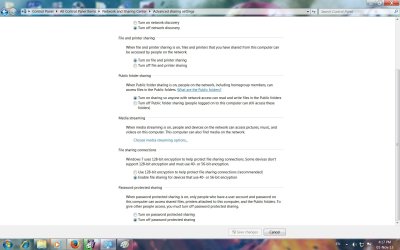
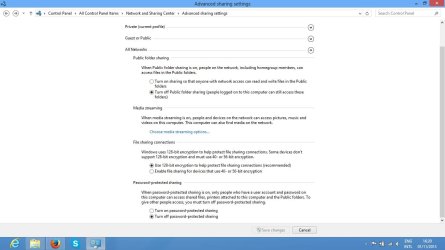
and this is my win 7 and win 8 Advance sharing setting:

win7
Network win7.jpg
win8
Network win 8.jpg

the job is almost getting done, just a little help required. thanks.
 

My Computer

Computer type
PC/Desktop
Computer Manufacturer/Model Number
Acer Veriton S670/G M670/G
OS
Windows 7 SP1 Ultimate x64
CPU
Intel(R) Core(TM) 2 Due cpu E8400 @ 3.0ghz
Motherboard
Acer EQ45M
Memory
3x2gb DDR3 PC3-10600
Graphics Card(s)
NVIDIA GeForce 9800 GT
Sound Card
Digital Audio (S/PDIF) (High Definition Audio Device)
Monitor(s) Displays
Asus VK222H 22" lcd HDMI wide.
Screen Resolution
1680x1050 @ 60 Hz
Hard Drives
2x1TB WD 10EAR
Internet Speed
4mbps
Browser
FireFox v27.01
ps: windows 8 have log in password. and windows 7 is not.
 

My Computer

Computer type
PC/Desktop
Computer Manufacturer/Model Number
Acer Veriton S670/G M670/G
OS
Windows 7 SP1 Ultimate x64
CPU
Intel(R) Core(TM) 2 Due cpu E8400 @ 3.0ghz
Motherboard
Acer EQ45M
Memory
3x2gb DDR3 PC3-10600
Graphics Card(s)
NVIDIA GeForce 9800 GT
Sound Card
Digital Audio (S/PDIF) (High Definition Audio Device)
Monitor(s) Displays
Asus VK222H 22" lcd HDMI wide.
Screen Resolution
1680x1050 @ 60 Hz
Hard Drives
2x1TB WD 10EAR
Internet Speed
4mbps
Browser
FireFox v27.01
with the help of MS tutorial "homegroup start to finish" I able to open windows 8 shared drive in windows 7 computer.
but windows 7 pc drives still cant open in windows 8 pc.
facing the same error. "you do not have permission to access..........,,
 

My Computer

Computer type
PC/Desktop
Computer Manufacturer/Model Number
Acer Veriton S670/G M670/G
OS
Windows 7 SP1 Ultimate x64
CPU
Intel(R) Core(TM) 2 Due cpu E8400 @ 3.0ghz
Motherboard
Acer EQ45M
Memory
3x2gb DDR3 PC3-10600
Graphics Card(s)
NVIDIA GeForce 9800 GT
Sound Card
Digital Audio (S/PDIF) (High Definition Audio Device)
Monitor(s) Displays
Asus VK222H 22" lcd HDMI wide.
Screen Resolution
1680x1050 @ 60 Hz
Hard Drives
2x1TB WD 10EAR
Internet Speed
4mbps
Browser
FireFox v27.01
with the help of MS tutorial "homegroup start to finish" I able to open windows 8 shared drive in windows 7 computer.
but windows 7 pc drives still cant open in windows 8 pc.
facing the same error. "you do not have permission to access..........,,

For drive sharing follow the instructions in the link. It's best to share from the Users folder rather than the root of the drive which is a security risk.

You will also want to turn on Network Discovery in the Advanced Sharing settings on both PC's. I noticed that you have this turned off on the Windows 7 machine. Remember that with Windows 8 there are a few places you need to check this setting.

http://www.sevenforums.com/network-sharing/92521-hdd-sharing.html#post798310
 

My Computer

Computer type
PC/Desktop
Computer Manufacturer/Model Number
Home built
OS
Windows 7 Ult, Windows 8.1 Pro,
CPU
Q9650-4.275GHz, E8600 4.5GHz, E6750-3.8GHz
Motherboard
Evga 780i FTW
Memory
G.Skill PC2 9600 1200Mhz 5 5 5 15 2T
Graphics Card(s)
GTX480
Sound Card
Asus Xonar D2
Monitor(s) Displays
HannsG
Screen Resolution
1680X1050
Hard Drives
GSkill Phoenix Pro 120GB SSD
PSU
ThermalTake Toughpower 1000Watt modular
Case
ThermalTake XaserV
Cooling
Xigmatek S1283
Keyboard
Logitech G15
Mouse
Logitech G9
Internet Speed
T1
Fair enough... It looks as though you have a network configured and you're asking why the login dialog refuses to accept your login and password across the network.

Are the logins and passwords the same on both machines?

Microsoft said:
Troubleshoot file and printer sharing
Password protected sharing is enabled.

Password protected sharing is on by default for computers on workgroups. When password protected sharing is enabled, people using other computers on your network can't access your shared folders or printers unless they have a user account on your computer. There are two ways to enable file or printer sharing:
  • Create identical user accounts on all computers on the workgroup (recommended). For more information, see Create a user account.
  • Turn off password protected sharing. To turn off password protected sharing, follow these steps:

  1. Open Network and Sharing Center by clicking the Start button
    4f6cbd09-148c-4dd8-b1f2-48f232a2fd33_47.png
    , clicking Control Panel, clicking Network and Internet, and then clicking Network and Sharing Center.
  2. Under Sharing and Discovery, click the arrow button
    37e3586e-5cc5-4135-8a0a-4eaffd7d47ba_20.png
    next to Password protected sharing.
  3. Click Turn off password protected sharing, and then click Apply.
    18abb370-ac1e-4b6b-b663-e028a75bf05b_41.png
    If you are prompted for an administrator password or confirmation, type the password or provide confirmation.
Another good tutorial on Home Groups: HomeGroup from start to finish - Microsoft Windows Help [disregard the Silverlight prompt on the pages]

with the help of MS tutorial "homegroup start to finish" I able to open windows 8 shared drive in windows 7 computer.
but windows 7 pc drives still cant open in windows 8 pc.
facing the same error. "you do not have permission to access..........,,

For drive sharing follow the instructions in the link. It's best to share from the Users folder rather than the root of the drive which is a security risk.

You will also want to turn on Network Discovery in the Advanced Sharing settings on both PC's. I noticed that you have this turned off on the Windows 7 machine. Remember that with Windows 8 there are a few places you need to check this setting.

http://www.sevenforums.com/network-sharing/92521-hdd-sharing.html#post798310

thank you both for your precious replies. My problem is solved. after network discovery is turning on in windows 7 pc and other setting. problem is still not solved. so then I restart windows 8 pc (and you better know that there is huge different between restart and shutdown in windows 8) and both pc hard drive (which I shared) is accessible on both machines.
for curiosity i wanted to know 2 things.
1. why we do not directly share specified drive.? what security risk.? and why you insisting on sharing only users folder.? do we access all hard drive when users folder shared.?
2. sometimes I cant access windows 7 shared drive in win 8 pc. even sometimes the windows 7 machine (user name) which I can see in windows 8 pc cant open. why is this.? is this because windows 8 machine connected with router via wifi.??
(windows 7 pc connected with router with LAN wire, and windows 8 laptop connected with router via wifi)
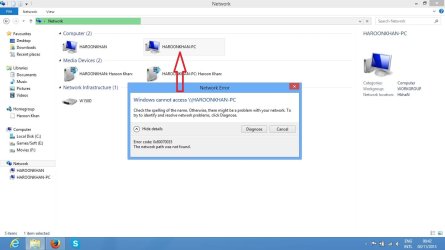
this error appears.

Untitled.jpg
 

My Computer

Computer type
PC/Desktop
Computer Manufacturer/Model Number
Acer Veriton S670/G M670/G
OS
Windows 7 SP1 Ultimate x64
CPU
Intel(R) Core(TM) 2 Due cpu E8400 @ 3.0ghz
Motherboard
Acer EQ45M
Memory
3x2gb DDR3 PC3-10600
Graphics Card(s)
NVIDIA GeForce 9800 GT
Sound Card
Digital Audio (S/PDIF) (High Definition Audio Device)
Monitor(s) Displays
Asus VK222H 22" lcd HDMI wide.
Screen Resolution
1680x1050 @ 60 Hz
Hard Drives
2x1TB WD 10EAR
Internet Speed
4mbps
Browser
FireFox v27.01
what is this mystery..?? I done nothing but uncheck and then check again on sharing in each drive and now these can open..? (windows 7 machines drive in windows 8)
Untitled.jpg
 

My Computer

Computer type
PC/Desktop
Computer Manufacturer/Model Number
Acer Veriton S670/G M670/G
OS
Windows 7 SP1 Ultimate x64
CPU
Intel(R) Core(TM) 2 Due cpu E8400 @ 3.0ghz
Motherboard
Acer EQ45M
Memory
3x2gb DDR3 PC3-10600
Graphics Card(s)
NVIDIA GeForce 9800 GT
Sound Card
Digital Audio (S/PDIF) (High Definition Audio Device)
Monitor(s) Displays
Asus VK222H 22" lcd HDMI wide.
Screen Resolution
1680x1050 @ 60 Hz
Hard Drives
2x1TB WD 10EAR
Internet Speed
4mbps
Browser
FireFox v27.01
Back
Top