
Solved Unidentified Network - Default Gateway address disappears on powerdown

Sillytowser

New member
Local time
6:05 AM
Messages
15
Hi
Hope someone can help. I have 3 x Win7 PCs SP1 on a small network. One of them looses its default gateway settings on power-down. When powered up the gateway settings are completely blank (see screenshot below). and the network name changes to Unidentified network. The network type becomes Public rather than my Work Network. When I re-enter the gateway IP address I can again connect to the net - until the next power down

I have already eliminated possible hardware causes - network cables, switch and router ports etc. I have also rebuilt the TCP/IP and tried rebooting in Safe Mode with networking, but the systems remain the same.

Any ideas
Sillytowser
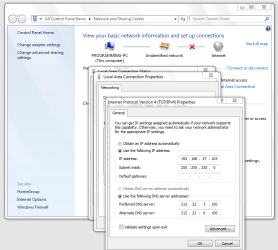
Capture.PNG
 

My Computer My Computer

At a glance

Windows 7
Computer type
PC/Desktop
OS
Windows 7
You could try running the following command in an elevated command prompt and see if it sticks. Just replace the gateway IP "192.168.0.1" with your routers gateway IP.

Code:
name="Local Area Connection" static 192.168.37.105 255.255.255.0 192.168.0.1

There doesn't seem to be a firm resolution for this particular problem but it can be a driver problem or problem with winsock so running the two winsock commands one at a time in an elevated command prompt may help.

Code:
netsh winsock reset catalog
(reset winsock entries)

Code:
netsh int ip reset reset.log hit
(reset TCP/IP stack)
 

My Computer My Computer

At a glance

Windows 7 Ult, Windows 8.1 Pro,Q9650-4.275GHz, E8600 4.5GHz, E6750-3.8GHzG.Skill PC2 9600 1200Mhz 5 5 5 15 2TGTX480
Computer type
PC/Desktop
Computer Manufacturer/Model Number
Home built
OS
Windows 7 Ult, Windows 8.1 Pro,
CPU
Q9650-4.275GHz, E8600 4.5GHz, E6750-3.8GHz
Motherboard
Evga 780i FTW
Memory
G.Skill PC2 9600 1200Mhz 5 5 5 15 2T
Graphics Card(s)
GTX480
Sound Card
Asus Xonar D2
Monitor(s) Displays
HannsG
Screen Resolution
1680X1050
Hard Drives
GSkill Phoenix Pro 120GB SSD
PSU
ThermalTake Toughpower 1000Watt modular
Case
ThermalTake XaserV
Cooling
Xigmatek S1283
Keyboard
Logitech G15
Mouse
Logitech G9
Internet Speed
T1
Thanks for the response but I have already tried that.
When you say that there does not seem to be a resolution yet, I take it that this is a problem known to Microsoft and that a solution is being worked on??

Sillytowser
 

My Computer My Computer

At a glance

Windows 7
Computer type
PC/Desktop
OS
Windows 7
Thanks for the response but I have already tried that.
When you say that there does not seem to be a resolution yet, I take it that this is a problem known to Microsoft and that a solution is being worked on??

Sillytowser

I see many similar complaints when I do a search, and I've seen this problem before a few other times although the solutions seem to be different in each case.

You might try the registry adjustment per the link below by Ron Welker.
http://answers.microsoft.com/en-us/...r-reboot/d544b87d-f524-4d6a-945c-c7fd37bc6ce1

The fix "in this case" is to make a registry adjustment as described below.
1. Open the registry with regedit.exe

2. Go to the path: HKLM/System/CurrentControlSet/Services/Tcpip/Parameters/Interfaces/

3. Here you'll need to select the CLSID of your network adapter where you change the settings. You'll probably recognize it by looking at the value IP Address that will have the IP of this adapter.

4. Open the value "Default Gateway" by double clicking it. You will see a list of all the gateways that disappeared! (maybe in your case it will be only one, in my case there were due to lots of testing several addresses) Very likely, the first line will be empty. I'm not sure, how this little flaw can make such a big problem. However, if you manually remove this first empty line, click OK and reboot your system everything should be working fine again.
Things worked fine until the last system update which added this old problem this old problem back into the system.

This TechNet thread talks about the problem which was reported as a bug officially. It shows some solutions that may help.
http://social.technet.microsoft.com...sing-after-restart?forum=itprovistanetworking

This is reported as solved by the Op > Unidentified Network -... 22 Jan 2014 03:49 AMSillytowser Thanks for pointing me at the solution
 
Last edited:

My Computer My Computer

At a glance

Windows 7 Ult, Windows 8.1 Pro,Q9650-4.275GHz, E8600 4.5GHz, E6750-3.8GHzG.Skill PC2 9600 1200Mhz 5 5 5 15 2TGTX480
Computer type
PC/Desktop
Computer Manufacturer/Model Number
Home built
OS
Windows 7 Ult, Windows 8.1 Pro,
CPU
Q9650-4.275GHz, E8600 4.5GHz, E6750-3.8GHz
Motherboard
Evga 780i FTW
Memory
G.Skill PC2 9600 1200Mhz 5 5 5 15 2T
Graphics Card(s)
GTX480
Sound Card
Asus Xonar D2
Monitor(s) Displays
HannsG
Screen Resolution
1680X1050
Hard Drives
GSkill Phoenix Pro 120GB SSD
PSU
ThermalTake Toughpower 1000Watt modular
Case
ThermalTake XaserV
Cooling
Xigmatek S1283
Keyboard
Logitech G15
Mouse
Logitech G9
Internet Speed
T1
Back
Top