How to make Windows 7 Pro only see local area network, not internet?

erik2282

New member
Local time
11:49 AM
Messages
7
Can this be done on the win7 machine? I have a Comcast SMC. Do I have to do this on the router?
 

My Computer My Computer

At a glance

windows 7 professional 32 bit
OS
windows 7 professional 32 bit
Hi there,

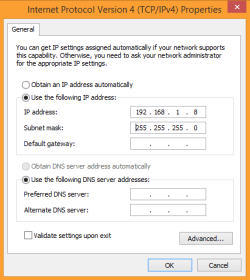
If you don't want your computer to have internet access and only see the LAN or have access to the shared network resources, you may remove the Gateway and DNS'es from your LAN or WLAN settings. See the image below. This is just an example, your Subnet might be different than mine. If you need a step by step guide please don't hesitate to ask.

 

Attachments

  • LAN-no DNS and Gateway.PNG
    LAN-no DNS and Gateway.PNG
    8 KB · Views: 30

My Computer My Computer

At a glance

Win7 & Win8 64bitIntel i5
Computer Manufacturer/Model Number
Lenovo Desktop/Samsung Laptop
OS
Win7 & Win8 64bit
CPU
Intel i5
Internet Speed
Charter-20 Mbps
Antivirus
Avast
Browser
FF, IE9 and Chrome
2xg solution works well (as expected :-). You might want read thru the info in this post so that you don't run into an IP address conflict.

If you want to turn internet access on and off at certain times, then the router might be the place to do so. See if the info in this post helps.
 

My Computer My Computer

At a glance

W7 Pro SP1 64biti78GBIntel HD Graphics
Computer type
Laptop
Computer Manufacturer/Model Number
Employer provided Dell Latitude
OS
W7 Pro SP1 64bit
CPU
i7
Memory
8GB
Graphics Card(s)
Intel HD Graphics
Hard Drives
crappy SSD
Antivirus
Employer mandated Symantec Endpoint Protection
Browser
Pale Moon 64bit, IE11 64bit & Chrome 64bit
Back
Top