Solved Internet Connected but can not access anything that requires internet

ekim102095

New member
Local time
12:46 AM
Messages
2
To expand on the title a bit, I can't go on anything that ranges from browsing the internet or playing games that require internet. I usually use google chrome but no other browsers work. When i click a browser it just loads forever. I've tried some solutions online that range from clearing my DMS to going to my browser settings. This problem started ever since I restarted my labtop for one of the scheduled windows update things. I use windows 8.1 x64. I've also tried disabling firewalll, antivirus, and restoring my computer to an earlier time.

Here is my ipconfig /all if it helps:

Microsoft Windows [Version 6.3.9600]
(c) 2013 Microsoft Corporation. All rights reserved.

C:\WINDOWS\system32>ipconfig /all

Windows IP Configuration

Host Name . . . . . . . . . . . . : EricKim
Primary Dns Suffix . . . . . . . :
Node Type . . . . . . . . . . . . : Peer-Peer
IP Routing Enabled. . . . . . . . : No
WINS Proxy Enabled. . . . . . . . : No
DNS Suffix Search List. . . . . . : home

Wireless LAN adapter Local Area Connection* 12:

Media State . . . . . . . . . . . : Media disconnected
Connection-specific DNS Suffix . :
Description . . . . . . . . . . . : Microsoft Wi-Fi Direct Virtual Adapter
Physical Address. . . . . . . . . : 16-B7-E2-13-5F-17
DHCP Enabled. . . . . . . . . . . : Yes
Autoconfiguration Enabled . . . . : Yes

Ethernet adapter Bluetooth Network Connection:

Media State . . . . . . . . . . . : Media disconnected
Connection-specific DNS Suffix . :
Description . . . . . . . . . . . : Bluetooth Device (Personal Area Network)
Physical Address. . . . . . . . . : F4-B7-E2-13-5F-18
DHCP Enabled. . . . . . . . . . . : Yes
Autoconfiguration Enabled . . . . : Yes

Ethernet adapter Ethernet:

Media State . . . . . . . . . . . : Media disconnected
Connection-specific DNS Suffix . : pepperdine.edu
Description . . . . . . . . . . . : Broadcom NetLink (TM) Gigabit Ethernet
Physical Address. . . . . . . . . : B8-88-E3-B4-72-CB
DHCP Enabled. . . . . . . . . . . : Yes
Autoconfiguration Enabled . . . . : Yes

Wireless LAN adapter Wi-Fi:

Connection-specific DNS Suffix . : home
Description . . . . . . . . . . . : Qualcomm Atheros AR5BWB222 Wireless Netwo
rk Adapter
Physical Address. . . . . . . . . : F4-B7-E2-13-5F-17
DHCP Enabled. . . . . . . . . . . : Yes
Autoconfiguration Enabled . . . . : Yes
Link-local IPv6 Address . . . . . : fe80::9d44:102:391:9885%3(Preferred)
IPv4 Address. . . . . . . . . . . : 192.168.1.10(Preferred)
Subnet Mask . . . . . . . . . . . : 255.255.255.0
Lease Obtained. . . . . . . . . . : Monday, May 19, 2014 10:30:31 AM
Lease Expires . . . . . . . . . . : Tuesday, May 20, 2014 10:30:31 AM
Default Gateway . . . . . . . . . : 192.168.1.1
DHCP Server . . . . . . . . . . . : 192.168.1.1
DHCPv6 IAID . . . . . . . . . . . : 401913826
DHCPv6 Client DUID. . . . . . . . : 00-01-00-01-18-87-96-FC-B8-88-E3-B4-72-CB

DNS Servers . . . . . . . . . . . : 192.168.1.1
NetBIOS over Tcpip. . . . . . . . : Enabled

Tunnel adapter Local Area Connection* 8:

Connection-specific DNS Suffix . :
Description . . . . . . . . . . . : Teredo Tunneling Pseudo-Interface
Physical Address. . . . . . . . . : 00-00-00-00-00-00-00-E0
DHCP Enabled. . . . . . . . . . . : No
Autoconfiguration Enabled . . . . : Yes
IPv6 Address. . . . . . . . . . . : 2001:0:5ef5:79fd:24cc:35ba:3f57:fef5(Pref
erred)
Link-local IPv6 Address . . . . . : fe80::24cc:35ba:3f57:fef5%11(Preferred)
Default Gateway . . . . . . . . . : ::
DHCPv6 IAID . . . . . . . . . . . : 251658240
DHCPv6 Client DUID. . . . . . . . : 00-01-00-01-18-87-96-FC-B8-88-E3-B4-72-CB

NetBIOS over Tcpip. . . . . . . . : Disabled

Tunnel adapter isatap.home:

Media State . . . . . . . . . . . : Media disconnected
Connection-specific DNS Suffix . : home
Description . . . . . . . . . . . : Microsoft ISATAP Adapter #5
Physical Address. . . . . . . . . : 00-00-00-00-00-00-00-E0
DHCP Enabled. . . . . . . . . . . : No
Autoconfiguration Enabled . . . . : Yes

C:\WINDOWS\system32>

I very much appreciate any suggestions on how I can repair this issue.

Thanks in advance!:)
 

My Computer My Computer

At a glance

windows 8.1 x64intel i7
Computer type
Laptop
Computer Manufacturer/Model Number
Acer
OS
windows 8.1 x64
CPU
intel i7
Browser
Google Chrome

My Computer My Computer

At a glance

Windows 7 Ultimate x64AMD turion 64x2 TL-64 2.2GhzSodimm DDR2 4GBATI Radeon 1250 128MB IGP
Computer Manufacturer/Model Number
HP Compaq 6715B
OS
Windows 7 Ultimate x64
CPU
AMD turion 64x2 TL-64 2.2Ghz
Motherboard
HC030
Memory
Sodimm DDR2 4GB
Graphics Card(s)
ATI Radeon 1250 128MB IGP
Hard Drives
Fujitsu Siemens 500GB sata 3.0 Gb/s
To expand on the title a bit, I can't go on anything that ranges from browsing the internet or playing games that require internet. I usually use google chrome but no other browsers work. When i click a browser it just loads forever. I've tried some solutions online that range from clearing my DMS to going to my browser settings. This problem started ever since I restarted my labtop for one of the scheduled windows update things. I use windows 8.1 x64. I've also tried disabling firewalll, antivirus, and restoring my computer to an earlier time.

Here is my ipconfig /all if it helps:

Microsoft Windows [Version 6.3.9600]
(c) 2013 Microsoft Corporation. All rights reserved.

C:\WINDOWS\system32>ipconfig /all

Windows IP Configuration

Host Name . . . . . . . . . . . . : EricKim
Primary Dns Suffix . . . . . . . :
Node Type . . . . . . . . . . . . : Peer-Peer
IP Routing Enabled. . . . . . . . : No
WINS Proxy Enabled. . . . . . . . : No
DNS Suffix Search List. . . . . . : home

Wireless LAN adapter Local Area Connection* 12:

Media State . . . . . . . . . . . : Media disconnected
Connection-specific DNS Suffix . :
Description . . . . . . . . . . . : Microsoft Wi-Fi Direct Virtual Adapter
Physical Address. . . . . . . . . : 16-B7-E2-13-5F-17
DHCP Enabled. . . . . . . . . . . : Yes
Autoconfiguration Enabled . . . . : Yes

Ethernet adapter Bluetooth Network Connection:

Media State . . . . . . . . . . . : Media disconnected
Connection-specific DNS Suffix . :
Description . . . . . . . . . . . : Bluetooth Device (Personal Area Network)
Physical Address. . . . . . . . . : F4-B7-E2-13-5F-18
DHCP Enabled. . . . . . . . . . . : Yes
Autoconfiguration Enabled . . . . : Yes

Ethernet adapter Ethernet:

Media State . . . . . . . . . . . : Media disconnected
Connection-specific DNS Suffix . : pepperdine.edu
Description . . . . . . . . . . . : Broadcom NetLink (TM) Gigabit Ethernet
Physical Address. . . . . . . . . : B8-88-E3-B4-72-CB
DHCP Enabled. . . . . . . . . . . : Yes
Autoconfiguration Enabled . . . . : Yes

Wireless LAN adapter Wi-Fi:

Connection-specific DNS Suffix . : home
Description . . . . . . . . . . . : Qualcomm Atheros AR5BWB222 Wireless Netwo
rk Adapter
Physical Address. . . . . . . . . : F4-B7-E2-13-5F-17
DHCP Enabled. . . . . . . . . . . : Yes
Autoconfiguration Enabled . . . . : Yes
Link-local IPv6 Address . . . . . : fe80::9d44:102:391:9885%3(Preferred)
IPv4 Address. . . . . . . . . . . : 192.168.1.10(Preferred)
Subnet Mask . . . . . . . . . . . : 255.255.255.0
Lease Obtained. . . . . . . . . . : Monday, May 19, 2014 10:30:31 AM
Lease Expires . . . . . . . . . . : Tuesday, May 20, 2014 10:30:31 AM
Default Gateway . . . . . . . . . : 192.168.1.1
DHCP Server . . . . . . . . . . . : 192.168.1.1
DHCPv6 IAID . . . . . . . . . . . : 401913826
DHCPv6 Client DUID. . . . . . . . : 00-01-00-01-18-87-96-FC-B8-88-E3-B4-72-CB

DNS Servers . . . . . . . . . . . : 192.168.1.1
NetBIOS over Tcpip. . . . . . . . : Enabled

Tunnel adapter Local Area Connection* 8:

Connection-specific DNS Suffix . :
Description . . . . . . . . . . . : Teredo Tunneling Pseudo-Interface
Physical Address. . . . . . . . . : 00-00-00-00-00-00-00-E0
DHCP Enabled. . . . . . . . . . . : No
Autoconfiguration Enabled . . . . : Yes
IPv6 Address. . . . . . . . . . . : 2001:0:5ef5:79fd:24cc:35ba:3f57:fef5(Pref
erred)
Link-local IPv6 Address . . . . . : fe80::24cc:35ba:3f57:fef5%11(Preferred)
Default Gateway . . . . . . . . . : ::
DHCPv6 IAID . . . . . . . . . . . : 251658240
DHCPv6 Client DUID. . . . . . . . : 00-01-00-01-18-87-96-FC-B8-88-E3-B4-72-CB

NetBIOS over Tcpip. . . . . . . . : Disabled

Tunnel adapter isatap.home:

Media State . . . . . . . . . . . : Media disconnected
Connection-specific DNS Suffix . : home
Description . . . . . . . . . . . : Microsoft ISATAP Adapter #5
Physical Address. . . . . . . . . : 00-00-00-00-00-00-00-E0
DHCP Enabled. . . . . . . . . . . : No
Autoconfiguration Enabled . . . . : Yes

C:\WINDOWS\system32>

I very much appreciate any suggestions on how I can repair this issue.

Thanks in advance!:)

Have you tried resetting winsock or the TCP/IP stack? You are showing a valid IP here so resetting those may help.

To reset the network stack just unzip and run the file below, your machine will reboot itself. Let us know if anything changes after the reset.
 

Attachments

My Computer My Computer

At a glance

Windows 7 Ult, Windows 8.1 Pro,Q9650-4.275GHz, E8600 4.5GHz, E6750-3.8GHzG.Skill PC2 9600 1200Mhz 5 5 5 15 2TGTX480
Computer type
PC/Desktop
Computer Manufacturer/Model Number
Home built
OS
Windows 7 Ult, Windows 8.1 Pro,
CPU
Q9650-4.275GHz, E8600 4.5GHz, E6750-3.8GHz
Motherboard
Evga 780i FTW
Memory
G.Skill PC2 9600 1200Mhz 5 5 5 15 2T
Graphics Card(s)
GTX480
Sound Card
Asus Xonar D2
Monitor(s) Displays
HannsG
Screen Resolution
1680X1050
Hard Drives
GSkill Phoenix Pro 120GB SSD
PSU
ThermalTake Toughpower 1000Watt modular
Case
ThermalTake XaserV
Cooling
Xigmatek S1283
Keyboard
Logitech G15
Mouse
Logitech G9
Internet Speed
T1
Hi from Sevenforums,

Follow this to change the node from peer to peer to hybrid if you connect via a router.

How to Change Node Types With Regedit | eHow

To expand on the title a bit, I can't go on anything that ranges from browsing the internet or playing games that require internet. I usually use google chrome but no other browsers work. When i click a browser it just loads forever. I've tried some solutions online that range from clearing my DMS to going to my browser settings. This problem started ever since I restarted my labtop for one of the scheduled windows update things. I use windows 8.1 x64. I've also tried disabling firewalll, antivirus, and restoring my computer to an earlier time.

Here is my ipconfig /all if it helps:

Microsoft Windows [Version 6.3.9600]
(c) 2013 Microsoft Corporation. All rights reserved.

C:\WINDOWS\system32>ipconfig /all

Windows IP Configuration

Host Name . . . . . . . . . . . . : EricKim
Primary Dns Suffix . . . . . . . :
Node Type . . . . . . . . . . . . : Peer-Peer
IP Routing Enabled. . . . . . . . : No
WINS Proxy Enabled. . . . . . . . : No
DNS Suffix Search List. . . . . . : home

Wireless LAN adapter Local Area Connection* 12:

Media State . . . . . . . . . . . : Media disconnected
Connection-specific DNS Suffix . :
Description . . . . . . . . . . . : Microsoft Wi-Fi Direct Virtual Adapter
Physical Address. . . . . . . . . : 16-B7-E2-13-5F-17
DHCP Enabled. . . . . . . . . . . : Yes
Autoconfiguration Enabled . . . . : Yes

Ethernet adapter Bluetooth Network Connection:

Media State . . . . . . . . . . . : Media disconnected
Connection-specific DNS Suffix . :
Description . . . . . . . . . . . : Bluetooth Device (Personal Area Network)
Physical Address. . . . . . . . . : F4-B7-E2-13-5F-18
DHCP Enabled. . . . . . . . . . . : Yes
Autoconfiguration Enabled . . . . : Yes

Ethernet adapter Ethernet:

Media State . . . . . . . . . . . : Media disconnected
Connection-specific DNS Suffix . : pepperdine.edu
Description . . . . . . . . . . . : Broadcom NetLink (TM) Gigabit Ethernet
Physical Address. . . . . . . . . : B8-88-E3-B4-72-CB
DHCP Enabled. . . . . . . . . . . : Yes
Autoconfiguration Enabled . . . . : Yes

Wireless LAN adapter Wi-Fi:

Connection-specific DNS Suffix . : home
Description . . . . . . . . . . . : Qualcomm Atheros AR5BWB222 Wireless Netwo
rk Adapter
Physical Address. . . . . . . . . : F4-B7-E2-13-5F-17
DHCP Enabled. . . . . . . . . . . : Yes
Autoconfiguration Enabled . . . . : Yes
Link-local IPv6 Address . . . . . : fe80::9d44:102:391:9885%3(Preferred)
IPv4 Address. . . . . . . . . . . : 192.168.1.10(Preferred)
Subnet Mask . . . . . . . . . . . : 255.255.255.0
Lease Obtained. . . . . . . . . . : Monday, May 19, 2014 10:30:31 AM
Lease Expires . . . . . . . . . . : Tuesday, May 20, 2014 10:30:31 AM
Default Gateway . . . . . . . . . : 192.168.1.1
DHCP Server . . . . . . . . . . . : 192.168.1.1
DHCPv6 IAID . . . . . . . . . . . : 401913826
DHCPv6 Client DUID. . . . . . . . : 00-01-00-01-18-87-96-FC-B8-88-E3-B4-72-CB

DNS Servers . . . . . . . . . . . : 192.168.1.1
NetBIOS over Tcpip. . . . . . . . : Enabled

Tunnel adapter Local Area Connection* 8:

Connection-specific DNS Suffix . :
Description . . . . . . . . . . . : Teredo Tunneling Pseudo-Interface
Physical Address. . . . . . . . . : 00-00-00-00-00-00-00-E0
DHCP Enabled. . . . . . . . . . . : No
Autoconfiguration Enabled . . . . : Yes
IPv6 Address. . . . . . . . . . . : 2001:0:5ef5:79fd:24cc:35ba:3f57:fef5(Pref
erred)
Link-local IPv6 Address . . . . . : fe80::24cc:35ba:3f57:fef5%11(Preferred)
Default Gateway . . . . . . . . . : ::
DHCPv6 IAID . . . . . . . . . . . : 251658240
DHCPv6 Client DUID. . . . . . . . : 00-01-00-01-18-87-96-FC-B8-88-E3-B4-72-CB

NetBIOS over Tcpip. . . . . . . . : Disabled

Tunnel adapter isatap.home:

Media State . . . . . . . . . . . : Media disconnected
Connection-specific DNS Suffix . : home
Description . . . . . . . . . . . : Microsoft ISATAP Adapter #5
Physical Address. . . . . . . . . : 00-00-00-00-00-00-00-E0
DHCP Enabled. . . . . . . . . . . : No
Autoconfiguration Enabled . . . . : Yes

C:\WINDOWS\system32>

I very much appreciate any suggestions on how I can repair this issue.

Thanks in advance!:)

Have you tried resetting winsock or the TCP/IP stack? You are showing a valid IP here so resetting those may help.

To reset the network stack just unzip and run the file below, your machine will reboot itself. Let us know if anything changes after the reset.

I really appreciate you guys responding to my post. Unfortunately both of your guys' suggestions didn't work. Are there any other things that I can try to fix this problem?
 

My Computer My Computer

At a glance

windows 8.1 x64intel i7
Computer type
Laptop
Computer Manufacturer/Model Number
Acer
OS
windows 8.1 x64
CPU
intel i7
Browser
Google Chrome
Did you restart the computer?

They both require adminstrator log on or run as administrator.
 

My Computer My Computer

At a glance

Windows 7 Ultimate x64AMD turion 64x2 TL-64 2.2GhzSodimm DDR2 4GBATI Radeon 1250 128MB IGP
Computer Manufacturer/Model Number
HP Compaq 6715B
OS
Windows 7 Ultimate x64
CPU
AMD turion 64x2 TL-64 2.2Ghz
Motherboard
HC030
Memory
Sodimm DDR2 4GB
Graphics Card(s)
ATI Radeon 1250 128MB IGP
Hard Drives
Fujitsu Siemens 500GB sata 3.0 Gb/s
I really appreciate you guys responding to my post. Unfortunately both of your guys' suggestions didn't work. Are there any other things that I can try to fix this problem?

You are showing a valid IP here so you should be online unless something is blocking the connection or the router has a problem that requires a reset.

Have you tried resetting the router yet? This will be required even if other machines are connected to the router.
 

My Computer My Computer

At a glance

Windows 7 Ult, Windows 8.1 Pro,Q9650-4.275GHz, E8600 4.5GHz, E6750-3.8GHzG.Skill PC2 9600 1200Mhz 5 5 5 15 2TGTX480
Computer type
PC/Desktop
Computer Manufacturer/Model Number
Home built
OS
Windows 7 Ult, Windows 8.1 Pro,
CPU
Q9650-4.275GHz, E8600 4.5GHz, E6750-3.8GHz
Motherboard
Evga 780i FTW
Memory
G.Skill PC2 9600 1200Mhz 5 5 5 15 2T
Graphics Card(s)
GTX480
Sound Card
Asus Xonar D2
Monitor(s) Displays
HannsG
Screen Resolution
1680X1050
Hard Drives
GSkill Phoenix Pro 120GB SSD
PSU
ThermalTake Toughpower 1000Watt modular
Case
ThermalTake XaserV
Cooling
Xigmatek S1283
Keyboard
Logitech G15
Mouse
Logitech G9
Internet Speed
T1
You haven't got peer to peer as Node type?

Do your downloads finish ooff or do they go up till they look full or reach 100% but not finish off.

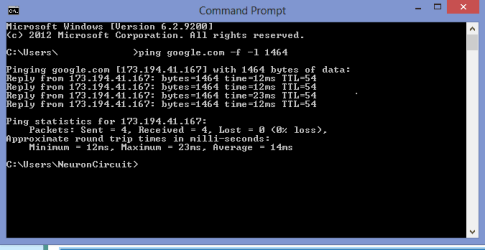
Could be an mtu (Maximum transmission Unit).

Should look like below:

cmdprompt.PNG

Mtu=1492 1464+28(byte header)=1492 mtu A very popular mtu, you would take off the 28byte header before doing mtu.

1500mtu 1472+28=1500 is another mtu used by isp's and is the maximum.

If the screen looks like this:

cmdprompt2.PNG

Move down by 2 from 1472 trying that first.

You could contact your isp and ask for mtu that should work.
 

My Computer My Computer

At a glance

Windows 7 Ultimate x64AMD turion 64x2 TL-64 2.2GhzSodimm DDR2 4GBATI Radeon 1250 128MB IGP
Computer Manufacturer/Model Number
HP Compaq 6715B
OS
Windows 7 Ultimate x64
CPU
AMD turion 64x2 TL-64 2.2Ghz
Motherboard
HC030
Memory
Sodimm DDR2 4GB
Graphics Card(s)
ATI Radeon 1250 128MB IGP
Hard Drives
Fujitsu Siemens 500GB sata 3.0 Gb/s
Back
Top