
Solved Unknown Wifi device ID on Gigabyte Aorus B450 Pro Wifi board

EmeraldShard

New member
Member
Local time
12:23 PM
Messages
57
Hello all,

This is related to the following thread, on which a definite fix was not yet found: https://www.sevenforums.com/network-sharing/415513-intel-wifi-ac-9260-driver-fir-win7-x32-x64.html . Since it's fairly old it seemed better to make a new thread, and my issue is a bit different anyway.

I recently built the following machine and installed Win7 Pro on it: System Builder - Ryzen 7 2700X 3.7 GHz 8-Core, Radeon RX 560 - 896 4 GB, Core V1 Mini ITX Desktop - PCPartPicker

After fighting with the USB drivers for a couple days (thank you SIW2), I finally got it booted and set up. My goal now is to load it up with basic drivers and make a "base" image I can go back to if anything goes wrong. The one device that's refusing to work for me is the Wifi card.

Doing some research on it here and elsewhere, it seems like Intel has ended Win7 support on newer cards such as the 9xxx series, and those can only be installed on Win7 by modding those drivers (to mixed success at best). In my case, the difference is I literally don't know which card I have and every effort I've made to figure that out has so far been flustered.

The device shows up as "Network Controller" in devmgmt. Its IDs are:
PCI\VEN_8086&DEV_2562&SUBSYS_00148086&REV_29
PCI\VEN_8086&DEV_2562&SUBSYS_00148086
PCI\VEN_8086&DEV_2562&CC_028000
PCI\VEN_8086&DEV_2562&CC_0280

I've downloaded several versions of the Intel driver - from Gigabyte's website as well as Intel's - and run the installers for each. All of them failed to get the device out of unknown state (I removed them after they failed). When I browse to their folders in an attempt to update them manually from devmgmt, it fails to find a driver.

Attempting to auto-load it from Windows Update over LAN also fails (perhaps predictably).

The Gigabyte website does not name which card my mobo has - it just lists several drivers, all of them for Win10. But the CD which came with the mobo tells a different story. Most importantly, it does have driver information for Win7 as well - specifically a folder for \Network\IntelWIFI\Win64\Drivers\Win7, and the Netwsw04.inf file within is clearly intended for Win7x64. I searched that file but my device ID was not found.

When running the CD's launcher, the option for installing the Wifi driver (which of course fails) specifies it as being a 3165/8265 card. But the thread I linked above mentions the 8265 as the base driver for its (unsuccessful) modifications, and yet even there, the 8265 listed in that thread has a different install ID than my own.

So I tried to search my Netwsw04 for the install ID listed in that thread, which I found. I copied and pasted both lines which referenced it and changed the install ID to my own. This time when I tried to install, Win7 claimed it wasn't signed (maybe because I modified it?). I installed it anyway, and it came up as "Intel(R) Dual Band Wireless-AC 8265," but the device would not start. I believe that name only comes from the string listed later on in Netwsw04 for the line I copied, anyway (specifically NIC_8265_2x2_AC = that name), meaning I can't trust its use of that name as any actual proof that I own a 8265. I've since uninstalled it.

Even searching on Google, etc. for the device ID returns nothing at all.

Anyone have an idea where I can go from here? If it turns out I have a 9xxx series which really doesn't have a Win7 driver (at present), then I guess I can live with an external one. But at the very least I'd like to know for sure which one I have.
 

My Computer My Computer

At a glance

Win7 Pro x64AMD Ryzen 7 2700X32GB (Corsair Vengeance)Radeon RX 560 4GB (Gigabyte)
Computer type
PC/Desktop
OS
Win7 Pro x64
CPU
AMD Ryzen 7 2700X
Motherboard
Gigabyte Aorus B450 I Pro Wifi
Memory
32GB (Corsair Vengeance)
Graphics Card(s)
Radeon RX 560 4GB (Gigabyte)
Sound Card
Realtek (onboard)
Hard Drives
WD SSD 500GB / WD HDD 1TB
Browser
Firefox (Main), Opera (Alt)
Other Info
TP-Link Archer T3U Wireless NIC (onboard wifi wasn't Win7 compatible)
I can't remember if I tried this software or not but this might work. Unknown Device Identifier - Freeware Download
Thanks for the suggestion but I can't say it was terribly useful. Below is everything it told me - nothing I didn't already know. For giggles I tried telling it to find driver, but in retrospect I'm kinda glad I wasn't LAN'd at the time, because all it did was run a Google search, and for some reason it tried to search for Radeon RX 560 instead (and my GPU is working fine).

I went out on a limb and assumed that I could find ways to contact Intel myself if I so chose (which has crossed my mind, admittedly, but I thought I'd ask if someone here knew first), so I didn't bother with that feature.

Thanks anyway.
 

Attachments

  • udi_screen.png
    udi_screen.png
    9 KB · Views: 12

My Computer My Computer

At a glance

Win7 Pro x64AMD Ryzen 7 2700X32GB (Corsair Vengeance)Radeon RX 560 4GB (Gigabyte)
Computer type
PC/Desktop
OS
Win7 Pro x64
CPU
AMD Ryzen 7 2700X
Motherboard
Gigabyte Aorus B450 I Pro Wifi
Memory
32GB (Corsair Vengeance)
Graphics Card(s)
Radeon RX 560 4GB (Gigabyte)
Sound Card
Realtek (onboard)
Hard Drives
WD SSD 500GB / WD HDD 1TB
Browser
Firefox (Main), Opera (Alt)
Other Info
TP-Link Archer T3U Wireless NIC (onboard wifi wasn't Win7 compatible)

My Computer My Computer

At a glance

W7 home premium 32bit/W7HP 64bit/w10 tp insid...E5300 dual core3gbNvidia Geforce 7100 Nforce 630i
Computer type
PC/Desktop
Computer Manufacturer/Model Number
medionl/Aspire 6930G/acer x55a
OS
W7 home premium 32bit/W7HP 64bit/w10 tp insider ring
CPU
E5300 dual core
Motherboard
medion MS7366
Memory
3gb
Graphics Card(s)
Nvidia Geforce 7100 Nforce 630i
Monitor(s) Displays
avixc
Internet Speed
n (isp resticted to 72)
Antivirus
mse/pands
Browser
palemoon
Other Info
Belkin Fd7050 n USB using Railink RT2870 drivers, more upto date
Hi

Try the driver from this dell package
If Intel Pro set is on your comp remove it first
https://www.dell.com/support/home/uk/en/ukdhs1/drivers/driversdetails?driverId=5XTG6


Roy
Thanks for the suggestion! I extracted this and searched the Netwsw04.inf file for my device ID, but it wasn't found. Tried updating the driver by pointing devmgmt to the extracted folder, this also failed. It appears that this driver file is the same as the ones I previously tried from Intel.


Anyone have other suggestions?
 

My Computer My Computer

At a glance

Win7 Pro x64AMD Ryzen 7 2700X32GB (Corsair Vengeance)Radeon RX 560 4GB (Gigabyte)
Computer type
PC/Desktop
OS
Win7 Pro x64
CPU
AMD Ryzen 7 2700X
Motherboard
Gigabyte Aorus B450 I Pro Wifi
Memory
32GB (Corsair Vengeance)
Graphics Card(s)
Radeon RX 560 4GB (Gigabyte)
Sound Card
Realtek (onboard)
Hard Drives
WD SSD 500GB / WD HDD 1TB
Browser
Firefox (Main), Opera (Alt)
Other Info
TP-Link Archer T3U Wireless NIC (onboard wifi wasn't Win7 compatible)
So chasing a hunch I may have discovered some bad news for any others who got this board and run Win7 with it:
PCI\VEN_8086&DEV_2526 - Wireless-AC 9260 | Device Hunt
(Evidently searching for the entire string was what led to no results the other day)

I actually broke down and contacted Intel (who were surprisingly helpful, but apparently couldn't identify their own hardware ID) and Gigabyte (who I fully expect to not be helpful) yesterday evening before finding the above. I'll see if either of them give me a straighter answer, but right now I'm considering a more physical solution referenced in other threads: just buying an 8265 and swapping it out in the M.2 slot on the board.

Problem with that is... this is a picture of my board. There's no M.2 slot visible. If I'm right, the card is underneath the metal(?) cover second from the top-left. (It seems to be about the right size and shape)

https://www.aorus.com/upload/Album/2018081416523734_big.png

Obviously if I can and should open it, it'd remove all doubt as to the model. There's some metal piece which connects it to the board at the bottom, but it doesn't seem to be a screw, and I don't know enough about this kind of thing to be able to tell for sure how to remove it or what tool to use. Is there anyone present who knows more about board modification who could share some insight on this?


EDIT: Alternatively, what's the speed difference when using a good USB-based wifi card these days? Is it inherently slower to involve USB rather than direct to the board like the M.2 slot, or would a faster USB device which actually has Win7 drivers make up for it? I don't know which of the two would be the bottleneck.
 
Last edited:

My Computer My Computer

At a glance

Win7 Pro x64AMD Ryzen 7 2700X32GB (Corsair Vengeance)Radeon RX 560 4GB (Gigabyte)
Computer type
PC/Desktop
OS
Win7 Pro x64
CPU
AMD Ryzen 7 2700X
Motherboard
Gigabyte Aorus B450 I Pro Wifi
Memory
32GB (Corsair Vengeance)
Graphics Card(s)
Radeon RX 560 4GB (Gigabyte)
Sound Card
Realtek (onboard)
Hard Drives
WD SSD 500GB / WD HDD 1TB
Browser
Firefox (Main), Opera (Alt)
Other Info
TP-Link Archer T3U Wireless NIC (onboard wifi wasn't Win7 compatible)
Hi

Doesnt make a blind bit of difference, provided the USB wifi has decent specs, its purely a receiver and depends on your routers output modes, a is best then n, not forgetting what level your ISP provides
Obviously an ethernet cable is a better option - if practical

Roy
 

My Computer My Computer

At a glance

W7 home premium 32bit/W7HP 64bit/w10 tp insid...E5300 dual core3gbNvidia Geforce 7100 Nforce 630i
Computer type
PC/Desktop
Computer Manufacturer/Model Number
medionl/Aspire 6930G/acer x55a
OS
W7 home premium 32bit/W7HP 64bit/w10 tp insider ring
CPU
E5300 dual core
Motherboard
medion MS7366
Memory
3gb
Graphics Card(s)
Nvidia Geforce 7100 Nforce 630i
Monitor(s) Displays
avixc
Internet Speed
n (isp resticted to 72)
Antivirus
mse/pands
Browser
palemoon
Other Info
Belkin Fd7050 n USB using Railink RT2870 drivers, more upto date
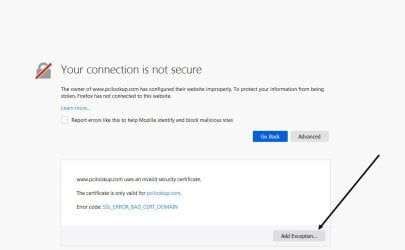
Just for future reference in case someone else wants the Info. I was going through my long, long list of computer related bookmarks and found this site I bookmarked long ago. Their site right now throws a TLS error, but if you can temp allow it, it will go through. The Admin. on that site has to fix their TLS Cert. https://www.pcilookup.com/

Now in stupid Firefox or Chrome fashion you may not even have the ability to surpass the TLS warning. If so roll Pale Moon, what can I say? LOL This is my browser of choice and it's a hell of a lot more customizable, but Google gives you hell with their Recaptcha with this browser because they blatantly discriminate against browsers. Solving a Recaptcha with Firefox or Chrome completes in no time. With Pale Moon it's an endless game of puzzles that will never solve. The Dev of Pale Moon indicates to remedy this to stay logged into your Google account. I never stay logged into anything, nor do I keep cookies and cache so I'm certainly not doing that. Especially with Google being logged in all the time. No way in hell. If websites would just stop relying on Recaptcha for their captcha needs and just roll their own it be better. eBay has a simple one I had to use because I omit my WebGL signature and I look like a bot. LOL I also poison canvas data among other things. LOL I'm a very secure and private computer user. Did I mention I encrypt all of my computers and their clones?

Anyway, that link may or may not help for someone.


Edit-

Okay, I see this option in Firefox 65. Don't perma allow the exception, just temporally.
 

Attachments

  • hjntg.jpg
    hjntg.jpg
    32.5 KB · Views: 0

My Computer My Computer

At a glance

Windows 7 Ultimate x64
Computer type
PC/Desktop
OS
Windows 7 Ultimate x64

My Computer My Computer

At a glance

Windows 7 Ultimate x64
Computer type
PC/Desktop
OS
Windows 7 Ultimate x64
   Warning
The link above is being blocked by my security systems - Be careful


It's only an expired/illegal security certificate so may be OK
 

My Computers My Computers

  • At a glance

    Windows 11 Pro x64 [Latest Release and Releas...Ryzen 9 5950X, 3.8 - 5.2 MHz64GB [2 x 32GB] DDR4 3200MHz4GB NVIDIA GEFORCE GTX 1650 Ti
    Computer type
    PC/Desktop
    Computer Manufacturer/Model Number
    ChillBlast - Custom to my design
    OS
    Windows 11 Pro x64 [Latest Release and Release Preview]
    CPU
    Ryzen 9 5950X, 3.8 - 5.2 MHz
    Motherboard
    Asus Prime X570-Pro
    Memory
    64GB [2 x 32GB] DDR4 3200MHz
    Graphics Card(s)
    4GB NVIDIA GEFORCE GTX 1650 Ti
    Sound Card
    On-board SPDIF to 5.1 System + HDMI [5.1 system]
    Monitor(s) Displays
    32" UHD 32 Bit HDR Monitor + 43" UHD 4K 32Bit HDR TV
    Screen Resolution
    2 x 3840 x 2160 @60Hz
    Hard Drives
    1TB M2 SSD OS, 500GB Fast Access SSD, 2 x 8TB Data + Various Externals from 1TB to 4TB, 10TB NAS
    PSU
    NZXT C750 80 PLUS Gold 750W Modular PSU
    Case
    Workstation Case [Matt Black]
    Cooling
    NZXT Kraken X63 280mm CPU Cooler +2x Quiet Case fans
    Keyboard
    Logitech Wireless MX Keys & K400 + others
    Mouse
    Logitech Wireless MX Master 3S
    Internet Speed
    920 MB Down 50 MB Up
    Antivirus
    BitDefender Total Security Pro
    Browser
    Chrome (always run latest Non-Beta)
    Other Info
    Also run ...
    Laptop - Quad 8GB - Windows 10 Pro x64
    Nexus 7 Android tablet x2
    Samsung 10.2" tablet
    Blackview TAB 8 4G Android Tablet c/w Keyboard
    Wacom Intuos Pro Medium Pen Pad
    Wacom Intuos Pro Small Pen Pad
    Wacom Expresskeys Remote
    Loopdeck+ Graphics Controller
    Shuttle Pro v2 Control
  • At a glance

    Windows 11 Pro x64 Latest RPIntel I7 10750H 5.0GHz32GB [2x16GB] DDR4 2933 MHznVidia GTX1650Ti 4 GB GDDR6
    Computer type
    Laptop
    System Manufacturer/Model Number
    Dell XPS 17 10750H
    OS
    Windows 11 Pro x64 Latest RP
    CPU
    Intel I7 10750H 5.0GHz
    Motherboard
    Dell XPS
    Memory
    32GB [2x16GB] DDR4 2933 MHz
    Graphics Card(s)
    nVidia GTX1650Ti 4 GB GDDR6
    Sound Card
    Stock [Realtek] 4 Speaker
    Monitor(s) Displays
    17" IPS UHD+ Infinity Edge Touchscreen
    Screen Resolution
    3840 x 2400
    Hard Drives
    2TB M2 NVMe, 4TB External + various 500GB & 1TB External NVMe (also have access to spinner HDD from
    PSU
    Stock
    Case
    Stock XPS Aluminium & Carbon Fibre
    Cooling
    Stock - Active Fan Control
    Keyboard
    Backlit + Various Logitech
    Mouse
    Stock Track Pad + Logitech MX Trackball
    Internet Speed
    72 MB Down 18MB Up
    Browser
    Chrome
    Other Info
    Also run ...
    Laptop - Quad 8GB - Windows 10 Pro x64
    Nexus 7 Android tablet x2
    10.2" tablet
    Sony Z3 Android Smartphone
    Wacom Intuos Pro Medium Pen Pad
    Wacom Intuos Pro Small Pen Pad
    Wacom Expresskeys Remote
    Loopdeck+ Graphics Controller
    Shuttle Pro v2 Control Pad
    10TB NAS
Thanks for the additional info folks.

I think I'm pretty convinced it's a 9260 now. Over the last day or two I've been looking into the possibility of swapping it out with an 8265 as mentioned in my previous post. Come to find out, the screws for doing this are on the back of the board. I theorize that loosening them will allow you to take the metal cover off.

I'm still looking into whether anyone's actually tried to attempt this swap yet - and I haven't entirely ruled out doing so myself - but to be honest I'm kind of tired of researching it anymore and I'm not keen to pull the mobo out of the case again (especially since last time I tried to do cable management, I tried to disconnect the USB3.0 cable and managed to pull the connector off of its pins with it... I feel lucky that the ports still work at this point). So I picked up a USB NIC for the time being:
TP-LINK Archer T3U AC1300 Mini Wireless - Micro Center
Works well so far. Initially it kept failing to connect to my 5G band and froze the machine when I tried to disable/re-enable it. Then I connected it to my 2.4G band and evidently that fixed whatever problem it was having - next attempt to connect to 5G worked and it's given no problems since then (knock on wood).

I'm waiting on a few more people to get back to me (including Intel and Gigabyte) and once that happens, I'll likely summarize my findings and mark this solved (as it were) unless I'm struck by the urgent desire to try the 8265 swap (or the USB NIC craps out).


EDIT: In case it wasn't obvious by this point, the actual model of the board I have is B450 I AORUS Pro Wifi. Apparently the regular B450 (no I) is a bigger board. Not sure how I missed this, but I can't edit the thread title now.
 

My Computer My Computer

At a glance

Win7 Pro x64AMD Ryzen 7 2700X32GB (Corsair Vengeance)Radeon RX 560 4GB (Gigabyte)
Computer type
PC/Desktop
OS
Win7 Pro x64
CPU
AMD Ryzen 7 2700X
Motherboard
Gigabyte Aorus B450 I Pro Wifi
Memory
32GB (Corsair Vengeance)
Graphics Card(s)
Radeon RX 560 4GB (Gigabyte)
Sound Card
Realtek (onboard)
Hard Drives
WD SSD 500GB / WD HDD 1TB
Browser
Firefox (Main), Opera (Alt)
Other Info
TP-Link Archer T3U Wireless NIC (onboard wifi wasn't Win7 compatible)
Ok, well I'm marking this thread as "solved" since I found the basic answer to my question, even though it wasn't one I particularly liked.

If you are coming to this thread looking for help on how to make the Gigabyte Aurous B450 I PRO WIFI board work for Win7
(not the B450 non-I version - that was my mistake in the thread title), take note of the below.

  • First off, I'm assuming if you've gotten this far, then like me, you've dealt with the USB compatibility issues with modern processors already (in my case, Ryzen 7). If not, go to this thread by SIW2 and run the offered there to modify your boot media: Update your Win 7 installation media. On page 59 there's a modded USB driver posted by SIW2 which is what I needed to inject.
  • Assuming you get as far as finishing installing the OS - note that the Wifi card on this model is a Intel 9260. This card is NOT compatible with Win7 (unless someone successfully makes a modded driver in the future). Some of these mobos have the card model on a sticker on the side of the metal cover behind the antenna mounts, but in my case it did not.
  • The last Intel wifi card which was compatible is the 8265. In theory it should work if you bought one of them and installed it in the M.2 slot on the motherboard, but I have NOT tested this, and I'm not aware of anyone who has. On one hand, it's possible that something else in the chipset will be incompatible with the 8265. On the other hand, there are 8265 drivers on the DVD and the autorun app on the DVD lists the card (incorrectly) as an 8265, so that's definitely a point in favor of it being compatible, should you choose to go this route.
  • The wifi card is located under the above mentioned metal cover (or at least, per the mobo manual, that's where the M.2 slot is). There are screws underneath the board which would presumably loosen the cover so you can swap out the card.
  • Ultimately your simplest option is probably going to be getting a USB NIC. I went with this one for its comparatively low profile vis-a-vis my case: TP-LINK Archer T3U AC1300 Mini Wireless - Micro Center . It works pretty well, though in my particular case, it failed to connect to my 5G band at first and I had to put it on my 2.4G band before it would connect to the 5G without complaint. Also, I've caught it disconnecting once or twice necessitating the NIC be disabled/re-enabled, but this seems to be a rare occurrence.
  • Unrelated, but just FYI for anyone else using this board: the RGB controller app is basically useless in Win7. You can install the Gigabyte App Center and RGB Fusion from the DVD, but in my case, it immediately crashed when trying to launch it. I also found an installer for an earlier version of RGB Fusion which still works with the newer App Center, but this one only got as far as a "please wait..." message and never loaded up. So if you have RGB components, prepare for being unable to sync them until/unless someone makes a fully functional universal RGB controller (which at time of writing, it seems like a couple people are trying, but nothing totally there yet).
Since my last post, Intel has followed up with me once or twice, but they couldn't tell me much more than I already knew, nor were they able to look up their own device by the hardware IDs (good service though). They kept referring me to Gigabyte, who at time of writing still hasn't answered me at all. I don't expect any miracles, but on the off-chance they say something remotely useful I'll edit this post.
 

My Computer My Computer

At a glance

Win7 Pro x64AMD Ryzen 7 2700X32GB (Corsair Vengeance)Radeon RX 560 4GB (Gigabyte)
Computer type
PC/Desktop
OS
Win7 Pro x64
CPU
AMD Ryzen 7 2700X
Motherboard
Gigabyte Aorus B450 I Pro Wifi
Memory
32GB (Corsair Vengeance)
Graphics Card(s)
Radeon RX 560 4GB (Gigabyte)
Sound Card
Realtek (onboard)
Hard Drives
WD SSD 500GB / WD HDD 1TB
Browser
Firefox (Main), Opera (Alt)
Other Info
TP-Link Archer T3U Wireless NIC (onboard wifi wasn't Win7 compatible)
Back
Top