Solved Download speed always drops to 0 Ko/s

darkyne

New member
Local time
10:31 PM
Messages
7
Hello.

I am trying to re-use my old desktop that I haven't used for 4 years.
Everything seems to run smoothly, really reactive and fast.
Only big problem making it quite unusable:
I can't download anything.

Actually I can surf smoothly, speedtest shows me 15ms ping, 60 Mbps download and 25 Mbps upload, youtube videos load instantly,... Also, I am using Discord software to talk with friends, no problem, they hear me nicely.

But when trying to download anything, the download speed drops to about 0 Ko/s after few seconds.
This happens everytime I try to download something via Google Chrome or with a launcher application (for example video game update launcher).
Even some very small softwares of 5-10 Mo can't be downloaded since it starts at 2-3 Mo/s and directly drops to 0-10 Ko/s after 2-3 sec (showing things like days of remaining time).

Other computers have no problem, only this one is facing this issue.
The desktop is directly connected with Ethernet onto my modem. I tried plugging the ethernet cable onto my laptop to check if it was wire related... no problem with downloads.

I tried release/renew my IP, flushing DNS, desabling windows defender and firewall, booting in safe mode, no difference.

The fact this issue does not disappear with safe mode makes me believe it might be hardware or pilote related. But not sure about it. Anyway, looks like even windows update can't download anything (I see two non-major updates available but it fails when trying to install them, probably due to the download issue).

I've read some similar issues onto different forums but can't find a fix for this.
Would love any advice/support.

Thanks.
 

My Computer My Computer

At a glance

Windows 7 Familial Premium x64i7 26004 GoAMD Radeon HD 6450
Computer type
PC/Desktop
Computer Manufacturer/Model Number
Medion
OS
Windows 7 Familial Premium x64
CPU
i7 2600
Memory
4 Go
Graphics Card(s)
AMD Radeon HD 6450
Hard Drives
1 To HDD
Browser
Google Chrome
I've written a post on resetting the crap out of the TCP/IP stack here. Either run all those command one by one or just run my batch file in batch file format or the EXE. They do the same thing.


Now try LSPFix. LSP-Fix - a free program to repair damaged Winsock 2 stacks


Do you have Avast installed by chance? Uninstall it once. Or uninstall any anti virus temporally and see what happens.


If after all this there's still an issue I'll have to see what you have running on your computer.


By the way, did you use safe mode with networking? Was that the specific safe mode you used?


Also, go to the event viewer and see if any warnings or errors show up under system and the application entries. To quickly get to the event viewer type event viewer in the search box in the start orb lower left hand side.
 
Last edited:

My Computer My Computer

At a glance

Windows 7 Ultimate x64
Computer type
PC/Desktop
OS
Windows 7 Ultimate x64
Thanks for your answer.
Looks like I can't run the exe because of "invalid side-by-side configuration" (My system is in french so my translation might not be 100% exact).
I am trying your 10 commands right now and restarting, telling you if it solved the issue.

After that, if the problem is not solved I'll check that LSPFix thing (if I'm able to download it).

There is no antivirus software installed and I even temporarly disabled windows defenders and the firewall.
That being said, maybe like 8 years ago there was some kind of antivirus software I don't remember.

About the safe mode, yes it was safe mode with networking.

Never used the event viewer before so not sure if everything is fine or not. But I believe there is no warning.
 

My Computer My Computer

At a glance

Windows 7 Familial Premium x64i7 26004 GoAMD Radeon HD 6450
Computer type
PC/Desktop
Computer Manufacturer/Model Number
Medion
OS
Windows 7 Familial Premium x64
CPU
i7 2600
Memory
4 Go
Graphics Card(s)
AMD Radeon HD 6450
Hard Drives
1 To HDD
Browser
Google Chrome
Tried your 10 commands and restarted.
Looks like I was able to download a little file like 10 Mo but still noticed the download speed was going down quickly (speed started a bit higher than usual but drops quickly).
Tried on a bigger file (about 30 Mo), it still went down to ~ 0 Ko/s.
Looks like it did not solve my issue.

Tried LSPFix, it did not detect any problem.

Any other idea?
About having a look about what is running on my computer, well to be honnest since I haven't used it for 4-5 years, I have no idea what is running on it exactly but I believe nearly nothing runs at background.

By the way, I noticed windows update is now detecting more waiting updates but obviously it can't download them (0 ko/s 0% completed).

When thinking about it I believe when I stopped using this computer 5 years ago, I was already facing this issue and that pushed me to stop using it. Or at least this problem reminds me of bad memories...
 

My Computer My Computer

At a glance

Windows 7 Familial Premium x64i7 26004 GoAMD Radeon HD 6450
Computer type
PC/Desktop
Computer Manufacturer/Model Number
Medion
OS
Windows 7 Familial Premium x64
CPU
i7 2600
Memory
4 Go
Graphics Card(s)
AMD Radeon HD 6450
Hard Drives
1 To HDD
Browser
Google Chrome
Try the following:


1) Reset your modem. There may be a small recessed hole in the back of the modem that you'd use with something like a tooth pick. Pres and hold that button for at least 30 seconds then let go. Wait at least five minutes and then try a download. I'm suspecting maybe some QoS (Quality of Service) restriction or a router table mess up of some type.


2) I'd like to get an idea on all the stuff you got running in the background. Run Autoruns and let it scan which may take at least 30 seconds. Now go above to File and save the ARN file. Zip the ARN file and attach it here. Go to the "Go Advanced" button under the quick reply post box to get the add an attachment option.


Do you have very important data? Is this an OEM computer? Do you have the Windows 7 reinstall disk? If after all this then a repair reinstall may fix the issue.
 

My Computer My Computer

At a glance

Windows 7 Ultimate x64
Computer type
PC/Desktop
OS
Windows 7 Ultimate x64
Tank you for your advices.
I'll not be able to use the concerned computer for a few days but should be able to do that this weekend.

I doubt it's a modem problem since every other computer works fine but I'll try a hard reset this weekend.
I will also send you the Autoruns ARN file.

About the computer, it is an OEM computer (from Medion). Already tried a full factory reset but faced the problem "no factory image, contact your manufacturer". I have no important data on it. No windows reinstall disk.

By the way, I tried to reach Medion website (MEDION Service) and noticed I was not able to load the web page with that computer (up to there I thought it was able to load any webpage).
I guess it can not load too heavy webpages (but it can load youtube videos...).
 

My Computer My Computer

At a glance

Windows 7 Familial Premium x64i7 26004 GoAMD Radeon HD 6450
Computer type
PC/Desktop
Computer Manufacturer/Model Number
Medion
OS
Windows 7 Familial Premium x64
CPU
i7 2600
Memory
4 Go
Graphics Card(s)
AMD Radeon HD 6450
Hard Drives
1 To HDD
Browser
Google Chrome
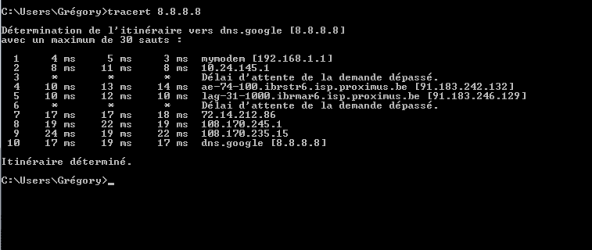
Just for the heck of it. Go into command prompt by entering cmd into the search box in the start orb and in command prompt enter the following: tracert 8.8.8.8
 

My Computer My Computer

At a glance

Windows 7 Ultimate x64
Computer type
PC/Desktop
OS
Windows 7 Ultimate x64
I had the opportunity tu use the concerned computer again.

1) As you suggested, I did a full reset on the modem but it did not change anything.

2) I've run Autoruns (took like 15min to download the 2.5 Mo hahaha) and was quite surprised by the number of background things running.
Since I haven't used this computer for years, it's probable some old useless/dirty programs I may have forgotten about are sleeping somewhere. The arn file is in attachment (I had to zip it since arn file was not allowed).

3) I'm not directly plugged in the modem anymore (using CPL instead) but the tracert 8.8.8.8 result (looks ok) is in attachment.

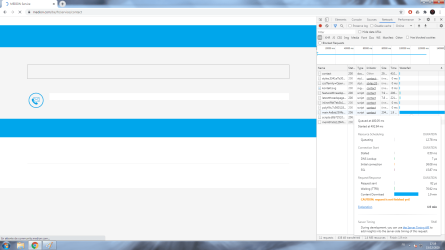
4) One last thing: I've put in attachment an image where you can see an example of the problem. As you can see it starts loading the page then it stays blocked on "downloading content". As you can notice on the right side (chrome inspect tool -> network) it stays blocked for minutes without progressing. This is exactly what is also happening to my files downloads, starting then blocking.

Thank you for your support.
 

Attachments

  • BAD-PC.zip
    BAD-PC.zip
    252.5 KB · Views: 1
  • Tracert.png
    Tracert.png
    4 KB · Views: 1
  • Loading page download error.png
    Loading page download error.png
    68.2 KB · Views: 4

My Computer My Computer

At a glance

Windows 7 Familial Premium x64i7 26004 GoAMD Radeon HD 6450
Computer type
PC/Desktop
Computer Manufacturer/Model Number
Medion
OS
Windows 7 Familial Premium x64
CPU
i7 2600
Memory
4 Go
Graphics Card(s)
AMD Radeon HD 6450
Hard Drives
1 To HDD
Browser
Google Chrome
3) I'm not directly plugged in the modem anymore (using CPL instead) but the tracert 8.8.8.8 result (looks ok) is in attachment.

You have a lot of missing or uninstalled software that has kept their startups. Run Revouninstaller and just go through and get rid of everything you don't use anymore. If the program can't be uninstalled, then allow it to delete the registry values and any lose files. You have to be careful on what registry values it deletes. If it doesn't look related to the program then you may not want to delete it. Revo Uninstaller Free - Remove unwanted programs easily

The previous anti-virus you had was NOD32. It doesn't seem like it's installed anymore. There could be remnants of it though.

Got to the network adapters and right click your network adapter. Take a screen shot of all the components installed.

What is the model of this computer?

Go to search and enter event viewer. Expand the Windows Logs tree and right click application and system and save the log files. Zip those and upload here.
 

My Computer My Computer

At a glance

Windows 7 Ultimate x64
Computer type
PC/Desktop
OS
Windows 7 Ultimate x64
+1 F22SimPlilot -- "...Revo Uninstaller..." Adding to his very good advice...if one lets Revo do only Safe (not Moderate or Advanced) scans after a program has just been uninstalled, usually the deletions are quite harmless to other still-existing programs. Moderate or Advanced sometimes can do a little bit of an "over-reach".
 

My Computer My Computer

At a glance

Windows 7 Professional 64-bitDesktop i5; Acers i5 & i7desktop 16GB; 1 Acer 8GB & 1 Acer 16GB
Computer type
PC/Desktop
Computer Manufacturer/Model Number
Antec desktop; Acer Aspire laptops
OS
Windows 7 Professional 64-bit
CPU
Desktop i5; Acers i5 & i7
Memory
desktop 16GB; 1 Acer 8GB & 1 Acer 16GB
Hard Drives
1TB split into 2 equal partitions [OS and data] usable by RJS
Internet Speed
AT&T DSL
Browser
FF, GChrome, msIE
Other Info
Windows 7 Firewall, Emsisoft AM/AV, MSE [scan-only], SpywareBlaster, Ruiware/BillP combine
I am sorry, more work than expected on this end of the year...
Haven't touched to the concerned computer and looks like I have no time for it right now...
But I'll get back onto resolving this issue whenever I have time (probably in january).
Anyway, thanks already for the tips and instructions and merry christmass (one day ealier...).
 

My Computer My Computer

At a glance

Windows 7 Familial Premium x64i7 26004 GoAMD Radeon HD 6450
Computer type
PC/Desktop
Computer Manufacturer/Model Number
Medion
OS
Windows 7 Familial Premium x64
CPU
i7 2600
Memory
4 Go
Graphics Card(s)
AMD Radeon HD 6450
Hard Drives
1 To HDD
Browser
Google Chrome
Well... Found a new job and money to buy a new computer. I believe buying a new one will be much less work and more effective than resurrect that old computer...
Still thank you for your advices, closing this.
 

My Computer My Computer

At a glance

Windows 7 Familial Premium x64i7 26004 GoAMD Radeon HD 6450
Computer type
PC/Desktop
Computer Manufacturer/Model Number
Medion
OS
Windows 7 Familial Premium x64
CPU
i7 2600
Memory
4 Go
Graphics Card(s)
AMD Radeon HD 6450
Hard Drives
1 To HDD
Browser
Google Chrome
Back
Top