Solved network live download and upload speed software at tray or desktop top

jraju

New member
Member
VIP
Local time
3:19 PM
Messages
759
Hi, Please give me a free network monitoring software that gives live download and upload speed of any downloading and uploading details all the times and at tray or on desktop .
I tried network meter gadgets from addgadgets.com.But now they have closed their site and avast delete it in its security scan.
 

My Computer My Computer

At a glance

Microsoft Windows 7 Ultimate 64-bit 7601 Mult...Intel(R) Core(TM)2 Duo CPU E7200 @ 2.53GHz4.00 GBNVIDIA GeForce 210
Computer type
PC/Desktop
Computer Manufacturer/Model Number
custom build
OS
Microsoft Windows 7 Ultimate 64-bit 7601 Multiprocessor Free Service Pack 1
CPU
Intel(R) Core(TM)2 Duo CPU E7200 @ 2.53GHz
Motherboard
To be filled by O.E.M. To be filled by O.E.M.
Memory
4.00 GB
Graphics Card(s)
NVIDIA GeForce 210
Sound Card
(1) NVIDIA High Definition Audio (2) Realtek High Definiti
Screen Resolution
1920 x 1080 x 32 bits (4294967296 colors) @ 60 Hz
Hard Drives
ST3500312CS ATA Device
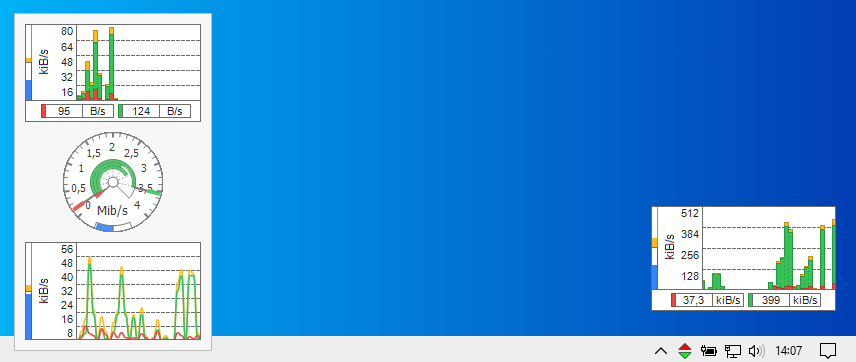
I like NetTraffic
NetTraffic - essential network throughput monitor | Official Website

07JkA9G.png


It requires just .NET Framework 2.0.

-----------
If you feel geeky and just want a basic upload and download speed info.
You can make your own script.

1. Download and Install AutoIt 3
AutoIt Downloads - AutoIt

2. Paste the lines on that link in a new file with the extension .au3

updown - Pastebin.com

3. Compile it with right click or run it directly.


You will get a window like this one. It will be on top and you can drag it.

6ivAmT6.gif


The advantage is that you can modify it to your needs, with fairly little effort.
 

My Computers My Computers

  • At a glance

    Windows 7 Ultimate 64-bit SP1Intel Core 2 Quad Q6700 @ 2.66GHz4.00GB Single-Channel DDR2 @ 399MHz2047MB NVIDIA GeForce GT 710 (ASUStek Compute...
    Computer type
    PC/Desktop
    OS
    Windows 7 Ultimate 64-bit SP1
    CPU
    Intel Core 2 Quad Q6700 @ 2.66GHz
    Motherboard
    ECS MCP73PVT-SM
    Memory
    4.00GB Single-Channel DDR2 @ 399MHz
    Graphics Card(s)
    2047MB NVIDIA GeForce GT 710 (ASUStek Computer Inc)
    Sound Card
    Realtek High Definition Audio
    Monitor(s) Displays
    HP 21kd
    Screen Resolution
    1920x1080@60Hz
    Hard Drives
    149GB Western Digital WDC WD1600AABS-61PRA0 ATA Device (SATA )
    4000GB Seagate ST4000DM004-2U9104 ATA Device (SATA )
    931GB TOSHIBA External USB 3.0 USB Device (USB (SATA) )
    Antivirus
    None. Don't Need it.
    Browser
    Librewolf Portable
    Other Info
    It's a very old system.
  • Computer type
    PC/Desktop
Hi, thanks , let me try the second one.
download ok.
2. should i copy the text in the 2ndlink and save it with ae3 ok.
Then how do I compile . please say.
Moreover the software given in the link shows the peed but with 0 inbtween the speeds. Why
 

My Computer My Computer

At a glance

Microsoft Windows 7 Ultimate 64-bit 7601 Mult...Intel(R) Core(TM)2 Duo CPU E7200 @ 2.53GHz4.00 GBNVIDIA GeForce 210
Computer type
PC/Desktop
Computer Manufacturer/Model Number
custom build
OS
Microsoft Windows 7 Ultimate 64-bit 7601 Multiprocessor Free Service Pack 1
CPU
Intel(R) Core(TM)2 Duo CPU E7200 @ 2.53GHz
Motherboard
To be filled by O.E.M. To be filled by O.E.M.
Memory
4.00 GB
Graphics Card(s)
NVIDIA GeForce 210
Sound Card
(1) NVIDIA High Definition Audio (2) Realtek High Definiti
Screen Resolution
1920 x 1080 x 32 bits (4294967296 colors) @ 60 Hz
Hard Drives
ST3500312CS ATA Device
Hi, thanks , let me try the second one.
download ok.
2. should i copy the text in the 2ndlink and save it with ae3 ok.
Then how do I compile . please say.

During the installation of AutoIt3 you will be asked if you want to run or edit an .au3 file by double clicking on it.

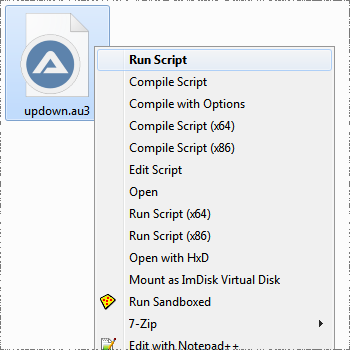
If you installed autoit correctly, you will see this menu when you right click on each .au3 file
Choose run, or compile.


rIFPVvD.png


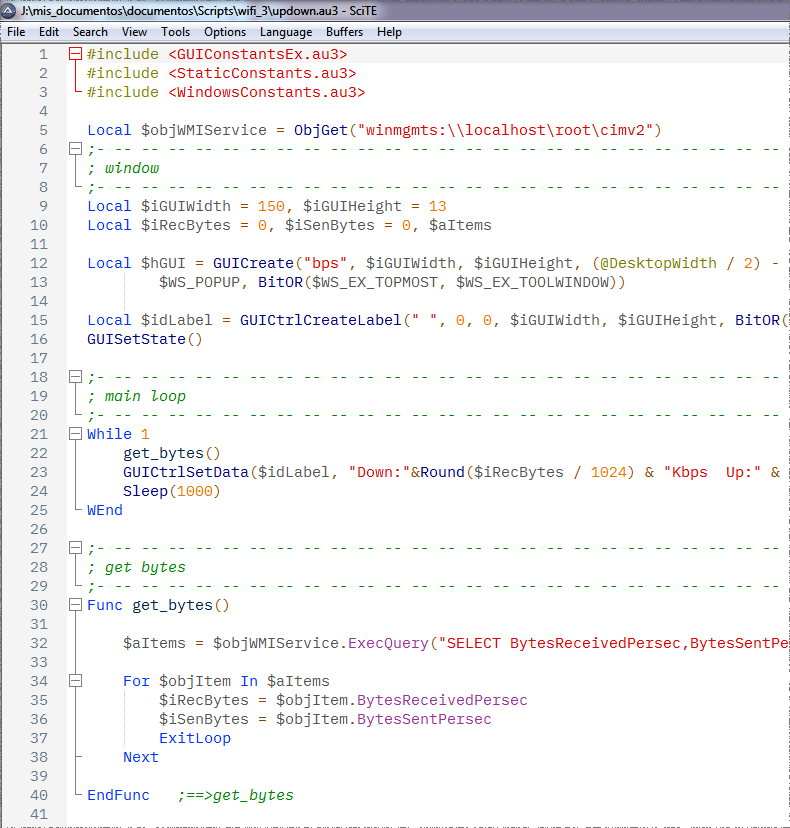
To run the script from the SciTE editor, just press F5


4A8N7oB.png


Moreover the software given in the link shows the peed but with 0 inbtween the speeds. Why

Are you saying that "NetTraffic" sometimes shows a 0 speed? This is normal if you are not using the network.
But if it always shows 0 in the speed I don't know what could be the problem, NetTraffic is configured to detect the speed of all the network adapters you have by default.
 

My Computers My Computers

  • At a glance

    Windows 7 Ultimate 64-bit SP1Intel Core 2 Quad Q6700 @ 2.66GHz4.00GB Single-Channel DDR2 @ 399MHz2047MB NVIDIA GeForce GT 710 (ASUStek Compute...
    Computer type
    PC/Desktop
    OS
    Windows 7 Ultimate 64-bit SP1
    CPU
    Intel Core 2 Quad Q6700 @ 2.66GHz
    Motherboard
    ECS MCP73PVT-SM
    Memory
    4.00GB Single-Channel DDR2 @ 399MHz
    Graphics Card(s)
    2047MB NVIDIA GeForce GT 710 (ASUStek Computer Inc)
    Sound Card
    Realtek High Definition Audio
    Monitor(s) Displays
    HP 21kd
    Screen Resolution
    1920x1080@60Hz
    Hard Drives
    149GB Western Digital WDC WD1600AABS-61PRA0 ATA Device (SATA )
    4000GB Seagate ST4000DM004-2U9104 ATA Device (SATA )
    931GB TOSHIBA External USB 3.0 USB Device (USB (SATA) )
    Antivirus
    None. Don't Need it.
    Browser
    Librewolf Portable
    Other Info
    It's a very old system.
  • Computer type
    PC/Desktop
Hi, I again installed the auto it from the link.
I saved the link script and I enclose.
When I right click, I do not get the menu you prescribed diz,
Please I have extra lines in the link.
I enclosed the same for your perusal
I renamed it to accept the file . Please add extn ae3 and check

- - - Updated - - -

hI, THANKS diz,

I have done a error.so, it is not working. Now I found out it. Instead of renaming it to aue, I named it as ae3. This is the error.
I corrected it and i could see the download and upload screen as you put it .
Thanks. But how do you increase the size of the download upload window.
I am new to programming
please say and thanks to you. Please also say, how to change to mega bytes instead ofkbps and also change the colour as I am using dark mode to ease my eye strain. Black to white and white to black , the speed window of the script
 

Attachments

My Computer My Computer

At a glance

Microsoft Windows 7 Ultimate 64-bit 7601 Mult...Intel(R) Core(TM)2 Duo CPU E7200 @ 2.53GHz4.00 GBNVIDIA GeForce 210
Computer type
PC/Desktop
Computer Manufacturer/Model Number
custom build
OS
Microsoft Windows 7 Ultimate 64-bit 7601 Multiprocessor Free Service Pack 1
CPU
Intel(R) Core(TM)2 Duo CPU E7200 @ 2.53GHz
Motherboard
To be filled by O.E.M. To be filled by O.E.M.
Memory
4.00 GB
Graphics Card(s)
NVIDIA GeForce 210
Sound Card
(1) NVIDIA High Definition Audio (2) Realtek High Definiti
Screen Resolution
1920 x 1080 x 32 bits (4294967296 colors) @ 60 Hz
Hard Drives
ST3500312CS ATA Device
I'm glad you found the errors. You should take a look at the autoit forum (Forums - AutoIt Forums)


- Window width: Change 150 to any number you want, 350 for example.

From:
$iGUIWidth = 150
To:
$iGUIWidth = 350

- Window height: Change 13 to any number you want, 50 for example.
From:
$iGUIHeight = 13
To:
$iGUIHeight = 50

- Background color and font: add three new lines after ... GUICtrlCreateLabel ...

GUICtrlSetBkColor($idLabel, 0x000000)
GUICtrlSetColor($idLabel, 0xFFFFFF)
GUICtrlSetFont($idLabel,20,400,0,"Consolas",5)


- If you want megabytes multiply 1024*1024 in the main loop label and change the text to 'Mbps', and you may also want to add a decimal place.
... "Down:"&Round($iRecBytes / (1024*1024),1) & "Mbps")
... " Up:"&Round($iSenBytes / (1024*1024),1) & "Mbps")


Or, Just download the new version that I have attached. This version automatically adjusts Mbps, Kbps or Bps, dynamically. And I have made some improvements.

I have tested it with random values because my speed is not that fast. This is how it looks:

aBAdGTf.gif
 

Attachments

My Computers My Computers

  • At a glance

    Windows 7 Ultimate 64-bit SP1Intel Core 2 Quad Q6700 @ 2.66GHz4.00GB Single-Channel DDR2 @ 399MHz2047MB NVIDIA GeForce GT 710 (ASUStek Compute...
    Computer type
    PC/Desktop
    OS
    Windows 7 Ultimate 64-bit SP1
    CPU
    Intel Core 2 Quad Q6700 @ 2.66GHz
    Motherboard
    ECS MCP73PVT-SM
    Memory
    4.00GB Single-Channel DDR2 @ 399MHz
    Graphics Card(s)
    2047MB NVIDIA GeForce GT 710 (ASUStek Computer Inc)
    Sound Card
    Realtek High Definition Audio
    Monitor(s) Displays
    HP 21kd
    Screen Resolution
    1920x1080@60Hz
    Hard Drives
    149GB Western Digital WDC WD1600AABS-61PRA0 ATA Device (SATA )
    4000GB Seagate ST4000DM004-2U9104 ATA Device (SATA )
    931GB TOSHIBA External USB 3.0 USB Device (USB (SATA) )
    Antivirus
    None. Don't Need it.
    Browser
    Librewolf Portable
    Other Info
    It's a very old system.
  • Computer type
    PC/Desktop
hi thanks for your excellent tips. before closing let me have also movement anywhere on my screen.
also, i would like to know, from where it gives the speed of download and upload. Is it from windows itself or some other sites.
I will also try to read which lines give this , but program language letters are different.
Now this shows extreme middle top position.
I curse myself for not learning anyj program language in my younger years.
thanks
 

My Computer My Computer

At a glance

Microsoft Windows 7 Ultimate 64-bit 7601 Mult...Intel(R) Core(TM)2 Duo CPU E7200 @ 2.53GHz4.00 GBNVIDIA GeForce 210
Computer type
PC/Desktop
Computer Manufacturer/Model Number
custom build
OS
Microsoft Windows 7 Ultimate 64-bit 7601 Multiprocessor Free Service Pack 1
CPU
Intel(R) Core(TM)2 Duo CPU E7200 @ 2.53GHz
Motherboard
To be filled by O.E.M. To be filled by O.E.M.
Memory
4.00 GB
Graphics Card(s)
NVIDIA GeForce 210
Sound Card
(1) NVIDIA High Definition Audio (2) Realtek High Definiti
Screen Resolution
1920 x 1080 x 32 bits (4294967296 colors) @ 60 Hz
Hard Drives
ST3500312CS ATA Device
hi thanks for your excellent tips. before closing let me have also movement anywhere on my screen.
also, i would like to know, from where it gives the speed of download and upload. Is it from windows itself or some other sites.
I will also try to read which lines give this , but program language letters are different.
Now this shows extreme middle top position.
I curse myself for not learning anyj program language in my younger years.
thanks

---------------
Hi, you are welcome.

You don't have to modify your file.

Just Download the attached file: updown.au3.zip

-----------------
- 'Movement on your screen':
You mean you want to move the window.
Modify the variables:

$iPosX =
$iPosy =

to any position on the screen in pixels.
example:

$iPosX = 1
$iPosY = 1

is the top left corner.

(I also remind you that you can drag the window with the mouse.)
-----------------

Q. 'where it gives the speed of download and upload'
A. From the WMI service. (Windows Management Instrumentation) . You can ask the wmi service for a lot of information about the computer. About memory, cpu, hard disks, networks, devices, etc.
 

Attachments

Last edited:

My Computers My Computers

  • At a glance

    Windows 7 Ultimate 64-bit SP1Intel Core 2 Quad Q6700 @ 2.66GHz4.00GB Single-Channel DDR2 @ 399MHz2047MB NVIDIA GeForce GT 710 (ASUStek Compute...
    Computer type
    PC/Desktop
    OS
    Windows 7 Ultimate 64-bit SP1
    CPU
    Intel Core 2 Quad Q6700 @ 2.66GHz
    Motherboard
    ECS MCP73PVT-SM
    Memory
    4.00GB Single-Channel DDR2 @ 399MHz
    Graphics Card(s)
    2047MB NVIDIA GeForce GT 710 (ASUStek Computer Inc)
    Sound Card
    Realtek High Definition Audio
    Monitor(s) Displays
    HP 21kd
    Screen Resolution
    1920x1080@60Hz
    Hard Drives
    149GB Western Digital WDC WD1600AABS-61PRA0 ATA Device (SATA )
    4000GB Seagate ST4000DM004-2U9104 ATA Device (SATA )
    931GB TOSHIBA External USB 3.0 USB Device (USB (SATA) )
    Antivirus
    None. Don't Need it.
    Browser
    Librewolf Portable
    Other Info
    It's a very old system.
  • Computer type
    PC/Desktop
Hi, Thank you so much . will try.
Does the Wmi service show the net speed of the adapter or the ISP. We are having router and ISP speed could be seen there in the status. Is it not the speed of the internet at any point of time.
Ok. Or may i take it , the speed at which a file is downloaded from a site is given in the window, that is created by script.
Where I could capture the actual speed of my connection with the ISP. please , diz
You are not only answering to me, but you are giving a kind of solution.
I was using ookla and speed net sites for my speed with is full crap of advertisements and unwanted click advertisement.
If this information could be got from the windows, everybody would love to have.
Rain meter gadgets do give some gadgets, but the sites they choose is , some other sites.
We can safely see the speeds at the top of the screen, what else one would want
 

My Computer My Computer

At a glance

Microsoft Windows 7 Ultimate 64-bit 7601 Mult...Intel(R) Core(TM)2 Duo CPU E7200 @ 2.53GHz4.00 GBNVIDIA GeForce 210
Computer type
PC/Desktop
Computer Manufacturer/Model Number
custom build
OS
Microsoft Windows 7 Ultimate 64-bit 7601 Multiprocessor Free Service Pack 1
CPU
Intel(R) Core(TM)2 Duo CPU E7200 @ 2.53GHz
Motherboard
To be filled by O.E.M. To be filled by O.E.M.
Memory
4.00 GB
Graphics Card(s)
NVIDIA GeForce 210
Sound Card
(1) NVIDIA High Definition Audio (2) Realtek High Definiti
Screen Resolution
1920 x 1080 x 32 bits (4294967296 colors) @ 60 Hz
Hard Drives
ST3500312CS ATA Device
Your internet speed is a fixed number. Like 100MBps for example. It wouldn't make much sense to have it always visible on your desktop.

If you want a speed test you can use :

Internet Speed Test | Fast.com

There are plenty of sites for that purpose:

speed test - Google Search

------------------

If you want a software that does that, you can use:

Internet Download Speed Test Software

-------------------


If you want that information in your desktop, the script can be modified in three parts.

[down:## mbps up:##mbps max:##mbps]

Where max speed will be the maximum speed recorded.
 

My Computers My Computers

  • At a glance

    Windows 7 Ultimate 64-bit SP1Intel Core 2 Quad Q6700 @ 2.66GHz4.00GB Single-Channel DDR2 @ 399MHz2047MB NVIDIA GeForce GT 710 (ASUStek Compute...
    Computer type
    PC/Desktop
    OS
    Windows 7 Ultimate 64-bit SP1
    CPU
    Intel Core 2 Quad Q6700 @ 2.66GHz
    Motherboard
    ECS MCP73PVT-SM
    Memory
    4.00GB Single-Channel DDR2 @ 399MHz
    Graphics Card(s)
    2047MB NVIDIA GeForce GT 710 (ASUStek Computer Inc)
    Sound Card
    Realtek High Definition Audio
    Monitor(s) Displays
    HP 21kd
    Screen Resolution
    1920x1080@60Hz
    Hard Drives
    149GB Western Digital WDC WD1600AABS-61PRA0 ATA Device (SATA )
    4000GB Seagate ST4000DM004-2U9104 ATA Device (SATA )
    931GB TOSHIBA External USB 3.0 USB Device (USB (SATA) )
    Antivirus
    None. Don't Need it.
    Browser
    Librewolf Portable
    Other Info
    It's a very old system.
  • Computer type
    PC/Desktop
Ok. Thanks.

- - - Updated - - -

please clarify this.
The actual download and upload speeds are given by wmi.Ok.
Can we access the data from where it comes from. I mean, cimv2, or is it a hidden thing that cannot be accessed.
for example the data on download and upload speed actual from cimv2.
This query is being asked for academic purpose and I thank you very much for your improved gadget. Simple and just what I needed instead of checking with ookla and speedtest net.
I just tried wbemtest.exe but could not go further down the menus
 
Last edited:

My Computer My Computer

At a glance

Microsoft Windows 7 Ultimate 64-bit 7601 Mult...Intel(R) Core(TM)2 Duo CPU E7200 @ 2.53GHz4.00 GBNVIDIA GeForce 210
Computer type
PC/Desktop
Computer Manufacturer/Model Number
custom build
OS
Microsoft Windows 7 Ultimate 64-bit 7601 Multiprocessor Free Service Pack 1
CPU
Intel(R) Core(TM)2 Duo CPU E7200 @ 2.53GHz
Motherboard
To be filled by O.E.M. To be filled by O.E.M.
Memory
4.00 GB
Graphics Card(s)
NVIDIA GeForce 210
Sound Card
(1) NVIDIA High Definition Audio (2) Realtek High Definiti
Screen Resolution
1920 x 1080 x 32 bits (4294967296 colors) @ 60 Hz
Hard Drives
ST3500312CS ATA Device

My Computers My Computers

  • At a glance

    Windows 7 Ultimate 64-bit SP1Intel Core 2 Quad Q6700 @ 2.66GHz4.00GB Single-Channel DDR2 @ 399MHz2047MB NVIDIA GeForce GT 710 (ASUStek Compute...
    Computer type
    PC/Desktop
    OS
    Windows 7 Ultimate 64-bit SP1
    CPU
    Intel Core 2 Quad Q6700 @ 2.66GHz
    Motherboard
    ECS MCP73PVT-SM
    Memory
    4.00GB Single-Channel DDR2 @ 399MHz
    Graphics Card(s)
    2047MB NVIDIA GeForce GT 710 (ASUStek Computer Inc)
    Sound Card
    Realtek High Definition Audio
    Monitor(s) Displays
    HP 21kd
    Screen Resolution
    1920x1080@60Hz
    Hard Drives
    149GB Western Digital WDC WD1600AABS-61PRA0 ATA Device (SATA )
    4000GB Seagate ST4000DM004-2U9104 ATA Device (SATA )
    931GB TOSHIBA External USB 3.0 USB Device (USB (SATA) )
    Antivirus
    None. Don't Need it.
    Browser
    Librewolf Portable
    Other Info
    It's a very old system.
  • Computer type
    PC/Desktop
Take your pick. Search for freeware and shareware at SnapFiles


I'd stay away from Windows gadgets that Windows 7 and I think Vista had. They'll probably not work or may have performance issues and are a MASSIVE vulnerability. Using a gadget is like opening a door to your computer. It's why they were done away with in newer versions of Windows.

Kinda a shame I guess. I used a few in the past. Perhaps they could fix them for better security, but I doubt that will ever happen based on Microsoft's direction with the current desktop OS.
 

My Computer My Computer

At a glance

Windows 7 Ultimate x64
Computer type
PC/Desktop
OS
Windows 7 Ultimate x64
Hi, simplott, I want to done away with gadgets. So, I took the second recommendation by diz.
That was nice and from the thread I came to know, that it takes the speed from the wmi.
The program recommended by diz works perfectly and I think ,that you get yourspeed from your system itself insead of some other websites.
To know, from where it takes the speed , is for what I continued after getting the solution.
I do not want gadgets as you say it has vulnerabilities thro the back door.
Anyhow, thanks for the comment.
For academic purpose, I want to see from where it takes the speed

- - - Updated - - -

Hi, diz it is nice of you. to show a moving cinema like cursor teaching.
May I know, which technique you use in arrow teaching clip
 

My Computer My Computer

At a glance

Microsoft Windows 7 Ultimate 64-bit 7601 Mult...Intel(R) Core(TM)2 Duo CPU E7200 @ 2.53GHz4.00 GBNVIDIA GeForce 210
Computer type
PC/Desktop
Computer Manufacturer/Model Number
custom build
OS
Microsoft Windows 7 Ultimate 64-bit 7601 Multiprocessor Free Service Pack 1
CPU
Intel(R) Core(TM)2 Duo CPU E7200 @ 2.53GHz
Motherboard
To be filled by O.E.M. To be filled by O.E.M.
Memory
4.00 GB
Graphics Card(s)
NVIDIA GeForce 210
Sound Card
(1) NVIDIA High Definition Audio (2) Realtek High Definiti
Screen Resolution
1920 x 1080 x 32 bits (4294967296 colors) @ 60 Hz
Hard Drives
ST3500312CS ATA Device
...May I know, which technique you use in arrow teaching clip

Sure, the animation is a .GIF image.

I record my screen with a program called 'Screen to Gif' . It's free and open source.

ScreenToGif


bBzqrJU.gif


A gif tends to be large in size. So, make it fast. The shorter it is, the smaller it will be. And try to keep the image size small. The maximum width of this forum seems to be 800px on a wide screen. Beyond that it will start to distort the image.
 

My Computers My Computers

  • At a glance

    Windows 7 Ultimate 64-bit SP1Intel Core 2 Quad Q6700 @ 2.66GHz4.00GB Single-Channel DDR2 @ 399MHz2047MB NVIDIA GeForce GT 710 (ASUStek Compute...
    Computer type
    PC/Desktop
    OS
    Windows 7 Ultimate 64-bit SP1
    CPU
    Intel Core 2 Quad Q6700 @ 2.66GHz
    Motherboard
    ECS MCP73PVT-SM
    Memory
    4.00GB Single-Channel DDR2 @ 399MHz
    Graphics Card(s)
    2047MB NVIDIA GeForce GT 710 (ASUStek Computer Inc)
    Sound Card
    Realtek High Definition Audio
    Monitor(s) Displays
    HP 21kd
    Screen Resolution
    1920x1080@60Hz
    Hard Drives
    149GB Western Digital WDC WD1600AABS-61PRA0 ATA Device (SATA )
    4000GB Seagate ST4000DM004-2U9104 ATA Device (SATA )
    931GB TOSHIBA External USB 3.0 USB Device (USB (SATA) )
    Antivirus
    None. Don't Need it.
    Browser
    Librewolf Portable
    Other Info
    It's a very old system.
  • Computer type
    PC/Desktop
Hi, diz, It is very useful that I am learning something hidden treasure from your suggested video arrow clip. but i miss some menu, so it is not populating.
Moreover, I find android in your first clip, do i have to use andoid phone instead of pc
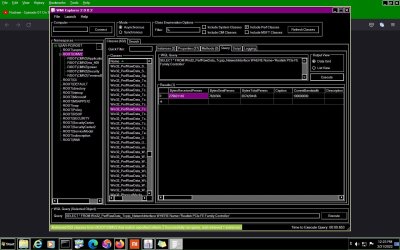
I just opened the screen and click connect, I could get cimv2, then...patiently waiting to populate. I captured the data as per your suggestion. I enclose, what to make of this . what is the speed of my download from this data i enclosed. Do I have to peruse some other details also
Hi, diz, my actual download speed is around 1.2 to 1.3 megabytes per second. Is that tallies
My router shows 612kbytes upload speed and 12495kbytes download speed .
P S. It just shows 0 and I got confused.
then I remember that I do not have any active download. So, once started download, this gives some figures, which i captured. thank you so much.

- - - Updated - - -

Thanks diz so much. Wmi seems to be a major subject of interest. I think that it gives other useful information to for diagnostic purpose as well as status of performance.
thanks once again
 

Attachments

  • speed downloadupload.jpg
    speed downloadupload.jpg
    194.7 KB · Views: 2

My Computer My Computer

At a glance

Microsoft Windows 7 Ultimate 64-bit 7601 Mult...Intel(R) Core(TM)2 Duo CPU E7200 @ 2.53GHz4.00 GBNVIDIA GeForce 210
Computer type
PC/Desktop
Computer Manufacturer/Model Number
custom build
OS
Microsoft Windows 7 Ultimate 64-bit 7601 Multiprocessor Free Service Pack 1
CPU
Intel(R) Core(TM)2 Duo CPU E7200 @ 2.53GHz
Motherboard
To be filled by O.E.M. To be filled by O.E.M.
Memory
4.00 GB
Graphics Card(s)
NVIDIA GeForce 210
Sound Card
(1) NVIDIA High Definition Audio (2) Realtek High Definiti
Screen Resolution
1920 x 1080 x 32 bits (4294967296 colors) @ 60 Hz
Hard Drives
ST3500312CS ATA Device
Hi, diz, the data we get by going to wmi, cmiv is the perfraw data.
Is the data , that we get in the script window, refined or final data on download and upload speed.
I found it accurately correct speed when I use your au script, but not in the raw data . That data seems to suggest, th speed of bytes when turning to mega bytes shows diferently.
or I am missing something.

- - - Updated - - -

Hi, Now I have included the au3 file as exe in my task scheduler so that anylog in will be showing continuous process of download speed at the top.
Does the download include a sub part of upload to access the download page?
This is I ask because, normally upload means , when one upload a file to the sites like youtube etc.
The autoit full install has helped me to convert this as exe to work in my task scheduler.
Have you given the example cimv2 screen shot, as an example to the source of data as an example.
I ask this because, I am yet to receive a reply from you for my query 16 , in which I have given the data from the cimv2 query. Is this the data you get in the speed window updown from the script commands . It is only for academic interest to know something more
 

My Computer My Computer

At a glance

Microsoft Windows 7 Ultimate 64-bit 7601 Mult...Intel(R) Core(TM)2 Duo CPU E7200 @ 2.53GHz4.00 GBNVIDIA GeForce 210
Computer type
PC/Desktop
Computer Manufacturer/Model Number
custom build
OS
Microsoft Windows 7 Ultimate 64-bit 7601 Multiprocessor Free Service Pack 1
CPU
Intel(R) Core(TM)2 Duo CPU E7200 @ 2.53GHz
Motherboard
To be filled by O.E.M. To be filled by O.E.M.
Memory
4.00 GB
Graphics Card(s)
NVIDIA GeForce 210
Sound Card
(1) NVIDIA High Definition Audio (2) Realtek High Definiti
Screen Resolution
1920 x 1080 x 32 bits (4294967296 colors) @ 60 Hz
Hard Drives
ST3500312CS ATA Device
Try this

I have used BitMeter for some time. I'm no programmer so simple is as simple does. www.codebox.org.uk
It monitors download and upload, summates total, and shows spikes etc.
Very useful tool and you can change parameters to suit your personal preferences.

you need to click on "pages" to find Bitmeter.
 
Last edited:

My Computers My Computers

  • At a glance

    Windows 7 Home Premium 64 bitIntel i5 2nd Gen8gbNVIDIA
    Computer type
    PC/Desktop
    Computer Manufacturer/Model Number
    ASUS
    OS
    Windows 7 Home Premium 64 bit
    CPU
    Intel i5 2nd Gen
    Motherboard
    ASUS P8H67-V
    Memory
    8gb
    Graphics Card(s)
    NVIDIA
  • Computer type
    PC/Desktop
Back
Top