Icons in menus and folders load/display slowly

Zathras

New member
Member
Local time
9:49 AM
Messages
61
I'm running a reasonably potent system with Win7 x64, and it seems kind of sluggish at loading & handling icons. For example, after a fresh reboot, if I open the Start menu (or whatever it's called in 7) and click on All Programs, I can hear the hard drive being accessed and the icons sort of fill in down the list of programs. Same thing when I navigate folders, often I can see the icons sequentially being loaded as the page is displayed. I don't remember this much delay in icons being loaded and drawn as I navigated XP.

It seems to me that with 4 gigs of ram, that ought to be more than enough for most icons (at least the common ones that are part of Win7) should be loaded into RAM at bootup, so that all icons would be displayed instantly when you open a page or folder. It really looks kind of primitive to see the icons populate.

I've already tried increasing the Icon Cache Size/Max Cached icons via the registry, but I can't really tell a difference.

Does anyone else see this pokey icon drawing behavior in Win7 or am I crazy?
 

My Computer My Computer

At a glance

Win7 Home Premium x64Intel Core i7/8604 GB PC 1333Nvidia GTS 250 (1 GB mem)
OS
Win7 Home Premium x64
CPU
Intel Core i7/860
Motherboard
Gigabyte GA-P55M-UD2
Memory
4 GB PC 1333
Graphics Card(s)
Nvidia GTS 250 (1 GB mem)
Sound Card
Onboard Realtek ALC888B
Hard Drives
Western Digital 500 gig, 7200 rpm
PSU
700W
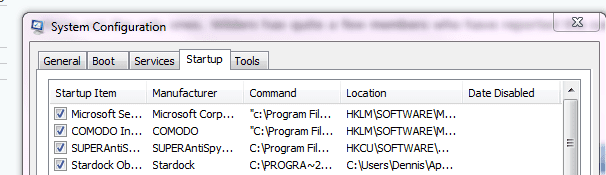
What all do you have loading at startup?
Check msconfig and see what's going on under startup. IMO
 

My Computer My Computer

At a glance

Windows 7 Home Premium 64bitIntel(R)Core(TM)2 quad [email protected] 2.39GHz6GB DDR2 6400GeForce 8500/512MB
Computer Manufacturer/Model Number
HP M9077c
OS
Windows 7 Home Premium 64bit
CPU
Intel(R)Core(TM)2 quad [email protected] 2.39GHz
Motherboard
ASUSeK
Memory
6GB DDR2 6400
Graphics Card(s)
GeForce 8500/512MB
Sound Card
Realtek High Def Audio
Monitor(s) Displays
HP w2408 LCD 24" widescreen
Screen Resolution
1920x1200
Cooling
6 pack of Bud
Keyboard
MS wireless Inteli
Mouse
MS wireless Inteli
Probably not related but with Microsoft Security Essentials installed, this is one of the symptoms for me.
 

My Computer My Computer

At a glance

Windows 7 Professional 32-bit (6.1, Build 7600)Intel(R) Pentium(R) 4 3.00 GHz HT2.0 GBATI Mobility Radeon 9600 64MB
Computer Manufacturer/Model Number
Averatec 6130HS-20
OS
Windows 7 Professional 32-bit (6.1, Build 7600)
CPU
Intel(R) Pentium(R) 4 3.00 GHz HT
Memory
2.0 GB
Graphics Card(s)
ATI Mobility Radeon 9600 64MB
Sound Card
Realtek AC'97 Audio
Screen Resolution
1280 x 800
Hard Drives
Seagate 96023A 60GB 7200RPM -
Seagate FreeAgentDesktop 250GB
Cooling
20 Inch Box Fan
Mouse
Targus PAWM10 Wireless Optical Laptop Mouse
I have this slow icon loading and do believe it is related to MSE.
 

My Computer My Computer

At a glance

Win 7 32 bit , Win xp Sp3
OS
Win 7 32 bit , Win xp Sp3
I have this slow icon loading and do believe it is related to MSE.

We're not the only ones. Wilders has quite a few members who have reported the same
 

My Computer My Computer

At a glance

Windows 7 Professional 32-bit (6.1, Build 7600)Intel(R) Pentium(R) 4 3.00 GHz HT2.0 GBATI Mobility Radeon 9600 64MB
Computer Manufacturer/Model Number
Averatec 6130HS-20
OS
Windows 7 Professional 32-bit (6.1, Build 7600)
CPU
Intel(R) Pentium(R) 4 3.00 GHz HT
Memory
2.0 GB
Graphics Card(s)
ATI Mobility Radeon 9600 64MB
Sound Card
Realtek AC'97 Audio
Screen Resolution
1280 x 800
Hard Drives
Seagate 96023A 60GB 7200RPM -
Seagate FreeAgentDesktop 250GB
Cooling
20 Inch Box Fan
Mouse
Targus PAWM10 Wireless Optical Laptop Mouse
Here is all I have at startup
startup1.PNG

and have had NO problems with MSE
 

My Computer My Computer

At a glance

Windows 7 Home Premium 64bitIntel(R)Core(TM)2 quad [email protected] 2.39GHz6GB DDR2 6400GeForce 8500/512MB
Computer Manufacturer/Model Number
HP M9077c
OS
Windows 7 Home Premium 64bit
CPU
Intel(R)Core(TM)2 quad [email protected] 2.39GHz
Motherboard
ASUSeK
Memory
6GB DDR2 6400
Graphics Card(s)
GeForce 8500/512MB
Sound Card
Realtek High Def Audio
Monitor(s) Displays
HP w2408 LCD 24" widescreen
Screen Resolution
1920x1200
Cooling
6 pack of Bud
Keyboard
MS wireless Inteli
Mouse
MS wireless Inteli
Thanks for the replies. I have very few startup apps or third party processes: AVG Free antivirus v9, the dumb Adobe speedlauncher that you can't easily get rid of, and the Java updater process that won't turn off. Everything else is just standard Windows processes. Also, I'm not using MSE. Maybe I should try temporarily disabling AVG and see if this changes.

On my other, substantially older PC running XP, there is no detectible delay in loading or displaying icons in menus and such.

Maybe I'll make a short video of this using FRAPS or some other utility. It's not a huge problem, but it's something that seems klunky for a modern OS.
 

My Computer My Computer

At a glance

Win7 Home Premium x64Intel Core i7/8604 GB PC 1333Nvidia GTS 250 (1 GB mem)
OS
Win7 Home Premium x64
CPU
Intel Core i7/860
Motherboard
Gigabyte GA-P55M-UD2
Memory
4 GB PC 1333
Graphics Card(s)
Nvidia GTS 250 (1 GB mem)
Sound Card
Onboard Realtek ALC888B
Hard Drives
Western Digital 500 gig, 7200 rpm
PSU
700W
Does it persist for the whole time the PC is up, or does it go away after some time and things are snappy?
 

My Computer My Computer

At a glance

Windows 10 Pro x64Intel Core i7 4790K @ 4.5GHz32GB DDR3Nvidia GeForce GTX970
Computer type
PC/Desktop
Computer Manufacturer/Model Number
Custom
OS
Windows 10 Pro x64
CPU
Intel Core i7 4790K @ 4.5GHz
Motherboard
Asus Maximus Hero VII
Memory
32GB DDR3
Graphics Card(s)
Nvidia GeForce GTX970
Sound Card
Realtek HD Audio
Screen Resolution
1920x1200
Hard Drives
1x Samsung 250GB SSD
4x WD RE 2TB (RAIDZ)
PSU
Corsair AX760i
Case
Fractal Design Define R4
Cooling
Noctua NH-D15
Does it persist for the whole time the PC is up, or does it go away after some time and things are snappy?

It only happens the first time the folder or menu item is accessed. After that, the icon data seems to be in memory and it displays immediately (until the next reboot).

Below is a link to video of what I'm talking about: at 0:07, when I click on the Accessories folder in the start menu, you can see the icons being loaded and drawn in from top to bottom. It only takes a half second, but it's still a visual annoyance. Most people probably wouldn't care. IMHO those icons (which are default Windows system icons) should be preloaded into memory at boot, but it seems they are loaded from the hard drive on an "on demand" basis.

YouTube - Windows 7 - Icons in menus sluggish to load/display
 

My Computer My Computer

At a glance

Win7 Home Premium x64Intel Core i7/8604 GB PC 1333Nvidia GTS 250 (1 GB mem)
OS
Win7 Home Premium x64
CPU
Intel Core i7/860
Motherboard
Gigabyte GA-P55M-UD2
Memory
4 GB PC 1333
Graphics Card(s)
Nvidia GTS 250 (1 GB mem)
Sound Card
Onboard Realtek ALC888B
Hard Drives
Western Digital 500 gig, 7200 rpm
PSU
700W
I wonder if you simply have icon cache problems - have you tweaked the install at all? I know there are tools out there to rebuild the icon cache, and reg keys to increase it's size, but if it happens on every reboot that would seem to indicate perhaps icon cache problems?
 

My Computer My Computer

At a glance

Windows 10 Pro x64Intel Core i7 4790K @ 4.5GHz32GB DDR3Nvidia GeForce GTX970
Computer type
PC/Desktop
Computer Manufacturer/Model Number
Custom
OS
Windows 10 Pro x64
CPU
Intel Core i7 4790K @ 4.5GHz
Motherboard
Asus Maximus Hero VII
Memory
32GB DDR3
Graphics Card(s)
Nvidia GeForce GTX970
Sound Card
Realtek HD Audio
Screen Resolution
1920x1200
Hard Drives
1x Samsung 250GB SSD
4x WD RE 2TB (RAIDZ)
PSU
Corsair AX760i
Case
Fractal Design Define R4
Cooling
Noctua NH-D15
I wonder if you simply have icon cache problems - have you tweaked the install at all? I know there are tools out there to rebuild the icon cache, and reg keys to increase it's size, but if it happens on every reboot that would seem to indicate perhaps icon cache problems?

Could be... I'm not sure what you mean by "tweak" the install, this is a prebuilt system that had an OEM version of Win7 already loaded out-of-the-box. I have tried to increase the icon cache size, but I have not tried to delete/rebuild the icon cache database file. Which might be worth a shot.
 

My Computer My Computer

At a glance

Win7 Home Premium x64Intel Core i7/8604 GB PC 1333Nvidia GTS 250 (1 GB mem)
OS
Win7 Home Premium x64
CPU
Intel Core i7/860
Motherboard
Gigabyte GA-P55M-UD2
Memory
4 GB PC 1333
Graphics Card(s)
Nvidia GTS 250 (1 GB mem)
Sound Card
Onboard Realtek ALC888B
Hard Drives
Western Digital 500 gig, 7200 rpm
PSU
700W
Same problem but no MSE loaded

I am having this same problem on a completely fresh install of Windows 7 Ult x64. I have been running Win7 on this machine since the beta just before the RC and have used every version up until current. This has never happened even after I have loaded eleventy billion apps.

I have Win installed on my Vertex SSD with apps separated to my WD storage drive. I haven't even gotten far enough to install anything other than the same drivers I used before my reinstall. I just can't think of what could be causing it. Everything seems responsive except for menus. I get a white page icon for about 2 seconds before the regular on loads, and they only load when I look at them. Meaning if I pull the menu up it takes a few secs to draw the icons/folders, then if I go back later to look in a folder I get same delay inside each folder. I really don't want to reinstall everything again and just hope it fixes it...
 

My Computer My Computer

At a glance

Win 7 Ultimate x64Intel e8400G.Skill 4g@1066EVGA 8800GT
Computer Manufacturer/Model Number
Home Build
OS
Win 7 Ultimate x64
CPU
Intel e8400
Motherboard
EVGA 750sli FTW
Memory
G.Skill 4g@1066
Graphics Card(s)
EVGA 8800GT
Sound Card
Creative X-Fi Xtreme Music
Monitor(s) Displays
Hannspree 22" 1920X1080 Dell 20" 1680x1050
Hard Drives
OCZ Vertex SSD @60g and WD 7500 @ 250g
PSU
EVGA 750
Case
Cooler Master Elite 360
Cooling
OEM
It might be useful to run process monitor whilst reproducing the thumbnail delay to see if there's any hdd file or registry access that is causing the delay.
 

My Computer My Computer

At a glance

Windows 10 Pro x64Intel Core i7 4790K @ 4.5GHz32GB DDR3Nvidia GeForce GTX970
Computer type
PC/Desktop
Computer Manufacturer/Model Number
Custom
OS
Windows 10 Pro x64
CPU
Intel Core i7 4790K @ 4.5GHz
Motherboard
Asus Maximus Hero VII
Memory
32GB DDR3
Graphics Card(s)
Nvidia GeForce GTX970
Sound Card
Realtek HD Audio
Screen Resolution
1920x1200
Hard Drives
1x Samsung 250GB SSD
4x WD RE 2TB (RAIDZ)
PSU
Corsair AX760i
Case
Fractal Design Define R4
Cooling
Noctua NH-D15
I have the same darn problem, is the only thing i really hate from Windows 7 and the problem was long time before i installed MSE so could not be the problem. Every time i reboot or do a could boot and go to Start--> All Programs the icons have to reload again. I have tried the cache rebuild, but nothing helps. Is there any word from Microsoft on this matter?
 

My Computer My Computer

At a glance

Windows 10 Home 64bIntel Core Solo 1.4Ghz 800Mhz FSBSamsung 4GB DDR3Intel GMA 4500MHD
Computer type
Laptop
Computer Manufacturer/Model Number
Acer Aspire 5810T8929
OS
Windows 10 Home 64b
CPU
Intel Core Solo 1.4Ghz 800Mhz FSB
Memory
Samsung 4GB DDR3
Graphics Card(s)
Intel GMA 4500MHD
Screen Resolution
1366x768
Hard Drives
Seagate Momentus XT (Hybrid HD) 750GB
Internet Speed
40 Mbs
Antivirus
Kaspersky Free Antivirus
Browser
Chrome 60.0.3112.113 (Official Build) (64-bit)
Back
Top