

MattShnoop
New member
Hello, I've searched everywhere for a fix to this issue, but I can't find the issue I'm having anywhere.
Basically, the title explains it as best I could. In certain places, I'm finding a random document icon instead of where there was no icon before-hand. If you don't know what I mean, here's some screenshots.

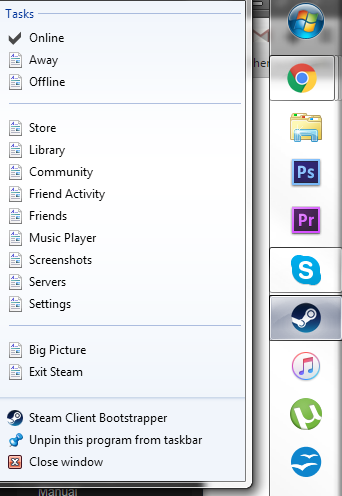
I'm completely at a loss for what to do. Any help would be amazing! It's just a small issue, but I see it so much, it's so annoying. I made this account just for help.
I'm not sure if this has anything to do with it (It probably does), but recently I tried out Windows 10. I was fiddling around with the "My PC" area, trying to basically turn it into what I have my Libraries section as right now, because my Library customization was completely destroyed, including my extra 2 that I'd created. While doing this, I noticed that the "My Documents" folder had been replaced with the default, which was full of stuff that had been put there by games, as opposed to "My Real Documents" (creative name, I know). So, I used a program to put it into the "My PC" area (At least I think that's where it was, but I'm not totally sure, some other area, might have been Quick Access), and then I replaced it's icon to the document icon so it would look nicer.
A little while later, (like 2 hours) I reverted back to Windows 7, and I recently noticed that the icon changes I made on 10 affected some tiny random spots in 7, even though Windows claimed that all of my stuff would go back to what it had backed up. Apparently not.
Any help is very much appreciated.
Thanks!
--Matt
Basically, the title explains it as best I could. In certain places, I'm finding a random document icon instead of where there was no icon before-hand. If you don't know what I mean, here's some screenshots.
I'm completely at a loss for what to do. Any help would be amazing! It's just a small issue, but I see it so much, it's so annoying. I made this account just for help.
I'm not sure if this has anything to do with it (It probably does), but recently I tried out Windows 10. I was fiddling around with the "My PC" area, trying to basically turn it into what I have my Libraries section as right now, because my Library customization was completely destroyed, including my extra 2 that I'd created. While doing this, I noticed that the "My Documents" folder had been replaced with the default, which was full of stuff that had been put there by games, as opposed to "My Real Documents" (creative name, I know). So, I used a program to put it into the "My PC" area (At least I think that's where it was, but I'm not totally sure, some other area, might have been Quick Access), and then I replaced it's icon to the document icon so it would look nicer.
A little while later, (like 2 hours) I reverted back to Windows 7, and I recently noticed that the icon changes I made on 10 affected some tiny random spots in 7, even though Windows claimed that all of my stuff would go back to what it had backed up. Apparently not.
Any help is very much appreciated.
Thanks!
--Matt
My Computer
At a glance
Windows 7 Home Premium, 64 bitIntel i5-3470 @ 3.20GHz12GB DDR3, 8GB Kingston, 4GB Corsair, each at...ASUS GeForce GTX 960 STRIX OC Edition, 4GB\
- Computer type
- PC/Desktop
- Computer Manufacturer/Model Number
- Custom Build
- OS
- Windows 7 Home Premium, 64 bit
- CPU
- Intel i5-3470 @ 3.20GHz
- Motherboard
- ASUS P8 H61-M LE/CSM R2.0
- Memory
- 12GB DDR3, 8GB Kingston, 4GB Corsair, each at ~666MHz
- Graphics Card(s)
- ASUS GeForce GTX 960 STRIX OC Edition, 4GB\
- Sound Card
- Onboard Motherboard sound
- Monitor(s) Displays
- 2 ASUS Monitors of some sort
- Screen Resolution
- 1920x1080, 1440x900
- Hard Drives
- Samsung 850 EVO, 500GB
Western Digital Green, 2TB
- Case
- Corsair Carbide 300R
- Keyboard
- Logitech K360
- Mouse
- Logitech M210 (temp)
- Antivirus
- Avast! Antivirus
- Browser
- Google Chrome


