Need help with a Windows backup problem.
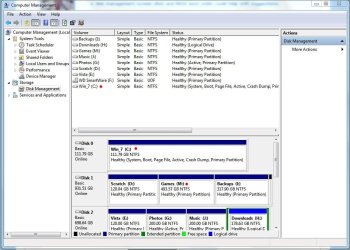
I'm trying to create a system image of my OS drive (C). This is an SSD drive. Anyway whenever I attempt to create the image, Windows Backup automatically selects my game drive (M) along with C drive and I can’t deselect it. In short I have no choice but to have both drives selected.
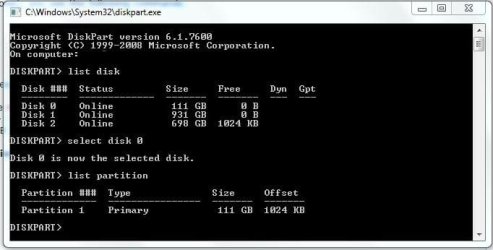
Now, I do have the MBR on the "C" drive and there are no boot records, files, or folders of any kind on the "M" drive. Yes, I have show all hidden files and folders in folder view enabled.
And to double check that C doesn’t need M, I’ve physically removed it and all other drives from the system, and C boots up just fine.
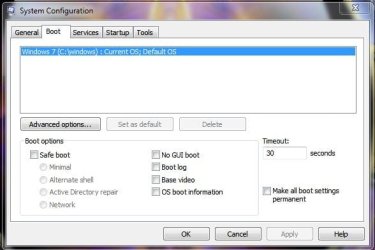
Also, there are no other OS’s loaded into the boot loader, just Window 7. I’ve even used this fix again just be sure everything was on C drive - http://www.sevenforums.com/installation-setup/83800-boot-loader-separate-partition.html#post726684
BTW I did create a system image of just C drive by leaving the other drives disconnected, after which I re-connected the drives, tried to create another system image and yes, Windows Backup is STILL insisting on adding the M drive as well.
Anyone have any thoughts on what’s going on? It’s really annoying.
Thanks
I'm trying to create a system image of my OS drive (C). This is an SSD drive. Anyway whenever I attempt to create the image, Windows Backup automatically selects my game drive (M) along with C drive and I can’t deselect it. In short I have no choice but to have both drives selected.
Now, I do have the MBR on the "C" drive and there are no boot records, files, or folders of any kind on the "M" drive. Yes, I have show all hidden files and folders in folder view enabled.
And to double check that C doesn’t need M, I’ve physically removed it and all other drives from the system, and C boots up just fine.
Also, there are no other OS’s loaded into the boot loader, just Window 7. I’ve even used this fix again just be sure everything was on C drive - http://www.sevenforums.com/installation-setup/83800-boot-loader-separate-partition.html#post726684
BTW I did create a system image of just C drive by leaving the other drives disconnected, after which I re-connected the drives, tried to create another system image and yes, Windows Backup is STILL insisting on adding the M drive as well.
Anyone have any thoughts on what’s going on? It’s really annoying.
Thanks
My Computer
- Computer type
- PC/Desktop
- Computer Manufacturer/Model Number
- Custom built by me.
- OS
- Windows 10 Pro
- CPU
- Intel Core i7-4770K (3.5Ghz)
- Motherboard
- Gigabyte G1 Sniper 5 (F10 Bios)
- Memory
- 32 gig Corsair Dominator Platinum (4x8Gig)
- Graphics Card(s)
- Sapphire Tri-X R9 Fury
- Sound Card
- Soundblaster ZXR
- Monitor(s) Displays
- NEC PA242W 24" LCD Monitor
- Screen Resolution
- 1920 x 1200
- Hard Drives
- Primary - Samsung 850 Pro (512gig), Samsung 840 Pro (256gig), 2TB WD Caviar Black.
- PSU
- EVGA Supernova 1000 G2
- Case
- Cooler Master HAF X
- Cooling
- Corsair H100i with Corsair Air Series SP120 Quiet Fans
- Keyboard
- Logitech Wireless Wave
- Mouse
- Logitech Performance MX
- Internet Speed
- High Speed Cable
- Antivirus
- Norton Security
- Browser
- IE11
- Other Info
- Memory Timings - 1866MHz @ 9-9-9-27-1T @ 1.5 volts