3.25GB of RAM in W7 Ultimate 64 bit

northlondon01

New member
Member
Local time
2:03 PM
Messages
41
Hi there,

I recently upgraded to a 64 bit version of Windows 7 Ultimate to make use of all my 4GB of RAM, however when I still only have access to 3.25GB.

I have a Foxconn 946GZ7MA-8KS2H mobo, with a 2.5Ghz Q6600, I don't think I have the latest BIOS version, but Foxconn said not to flash it unless something is going wrong (I'm not sure this classes as something going wrong or not!).

I've read numerous posts online about integrated graphics and maybe even the integrated 7.1 sound card and LAN using the memory.

I tried the various options with memory in msconfig, unchecking the box and checking it with 4096MB and I still got 3.25GB.

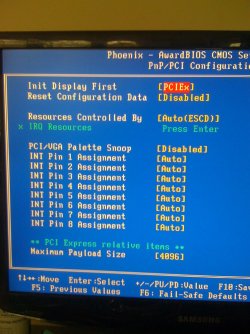
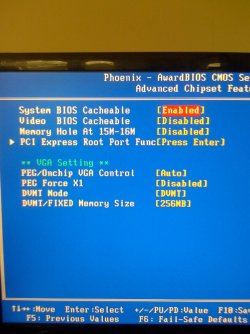
I'm really not that sure about BIOS stuff, changing memory mapping (if my mobo can even do that?) etc, but I've take photos of the various screens and would really appreciate it if someone could point me in the right direction or confirm that this is what I'm stuck with! I'll post them in the following posts.

Thanks alot.

NL
 

My Computer My Computer

At a glance

Windows 7 Ultimate 32bitIntel Core 2 Quad 2.4ghz4GB (3.25GB usable)HD5670
Computer Manufacturer/Model Number
Evesham
OS
Windows 7 Ultimate 32bit
CPU
Intel Core 2 Quad 2.4ghz
Motherboard
Foxconn946 7MA Seris
Memory
4GB (3.25GB usable)
Graphics Card(s)
HD5670
Screen Resolution
1050
Hard Drives
250GB western digital (C)
1TB Samsung F3 (D)
Please post a screenshot of the memory tab in resource monitor
Enable memory remap in your BIOS if that feature is available

The hardware takes up the other 0.75 GB of memory. You can view this in Resource Monitor. Start > type "resource" > Open Resource Monitor > Memory Tab > Physical Memory.
 

My Computer My Computer

At a glance

Windows 10 Pro x64, Arch LinuxIntel Core 2 Quad Q8200 OC'd 3.08GHz8GB DDR2 900MhzMSI GT730 2GB GDDR5 (Kepler)
Computer type
PC/Desktop
Computer Manufacturer/Model Number
Custom Build
OS
Windows 10 Pro x64, Arch Linux
CPU
Intel Core 2 Quad Q8200 OC'd 3.08GHz
Motherboard
Asus Rampage formula LGA775
Memory
8GB DDR2 900Mhz
Graphics Card(s)
MSI GT730 2GB GDDR5 (Kepler)
Sound Card
Supreme FX2
Monitor(s) Displays
Samsung LS22F350 LED
Screen Resolution
1080P
Hard Drives
Kingston SSDNow UV400 120GB, 500GB Hitachi, 2TB Samsung, 500GB Seagate FreeAgent, 640GB Samsung, 160GB Toshiba (Arch)
PSU
AeroCool 500W Bronze
Cooling
Cooler Master V6 + 3X fans
Keyboard
Prolink keyboard
Mouse
Logitech M705
Internet Speed
1MiB/s
Browser
Chrome Beta
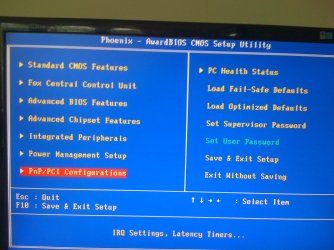
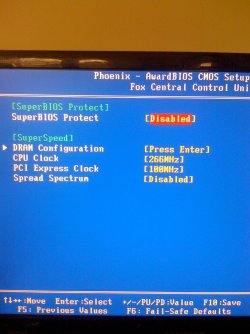
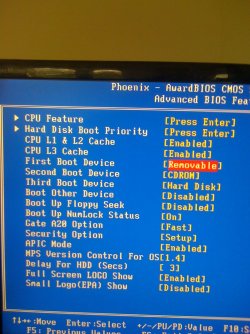
Here are the first lot of images of my BIOS...

I've attached the main/front page of my BIOS, the Standard Features page; the Fox Central Control Unit page; the Advanced Features page and Advanced Chipset Features page for now.

There are five more to come in the next post.

Thanks again!

and FYI, the file I got for the latest BIOS versions looks like it's version 642F1P44 (judging from the name at the end of the zip file I got from the website).
 

Attachments

  • BIOS - front page.jpg
    BIOS - front page.jpg
    193.3 KB · Views: 50
  • BIOS - Standard Features.jpg
    BIOS - Standard Features.jpg
    210.6 KB · Views: 45
  • BIOS - Fox Central Control Unit.jpg
    BIOS - Fox Central Control Unit.jpg
    206.5 KB · Views: 35
  • BIOS - Advanced BIOS Features.jpg
    BIOS - Advanced BIOS Features.jpg
    237.4 KB · Views: 31
  • BIOS - Advanced Chipset Features.jpg
    BIOS - Advanced Chipset Features.jpg
    191.5 KB · Views: 136

My Computer My Computer

At a glance

Windows 7 Ultimate 32bitIntel Core 2 Quad 2.4ghz4GB (3.25GB usable)HD5670
Computer Manufacturer/Model Number
Evesham
OS
Windows 7 Ultimate 32bit
CPU
Intel Core 2 Quad 2.4ghz
Motherboard
Foxconn946 7MA Seris
Memory
4GB (3.25GB usable)
Graphics Card(s)
HD5670
Screen Resolution
1050
Hard Drives
250GB western digital (C)
1TB Samsung F3 (D)
Your main board can only map 4GB of memory, so when you put in the video and sound cards, it has to map there memory as well.
So unless you buy a better main board, your stuck at 3.25GB.


My Computer My Computer

At a glance

Windows 10 Pro x64, Arch LinuxIntel Core 2 Quad Q8200 OC'd 3.08GHz8GB DDR2 900MhzMSI GT730 2GB GDDR5 (Kepler)
Computer type
PC/Desktop
Computer Manufacturer/Model Number
Custom Build
OS
Windows 10 Pro x64, Arch Linux
CPU
Intel Core 2 Quad Q8200 OC'd 3.08GHz
Motherboard
Asus Rampage formula LGA775
Memory
8GB DDR2 900Mhz
Graphics Card(s)
MSI GT730 2GB GDDR5 (Kepler)
Sound Card
Supreme FX2
Monitor(s) Displays
Samsung LS22F350 LED
Screen Resolution
1080P
Hard Drives
Kingston SSDNow UV400 120GB, 500GB Hitachi, 2TB Samsung, 500GB Seagate FreeAgent, 640GB Samsung, 160GB Toshiba (Arch)
PSU
AeroCool 500W Bronze
Cooling
Cooler Master V6 + 3X fans
Keyboard
Prolink keyboard
Mouse
Logitech M705
Internet Speed
1MiB/s
Browser
Chrome Beta
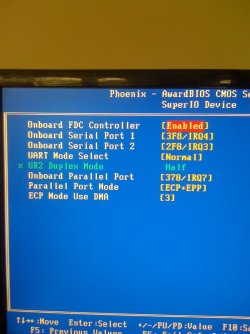
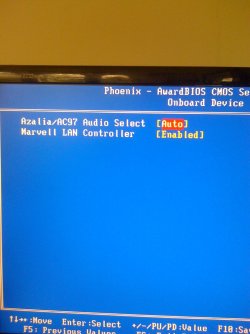
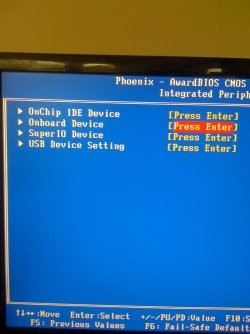
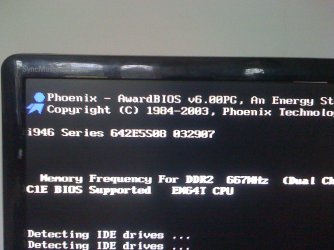
Here are the last pictures, with the onboard/superIO from the Integrated Peripherals page, plus the PNP/PCI Config screen.

Will post the Resource Monitor afterwards. I can't see anything like memory mapping in the BIOS, but I may just be being a little slow!

Thanks again!
 

Attachments

  • BIOS - SuperIO Device.jpg
    BIOS - SuperIO Device.jpg
    178.4 KB · Views: 16
  • BIOS - Onboard Devices.jpg
    BIOS - Onboard Devices.jpg
    167.1 KB · Views: 13
  • BIOS - Integrated Peripherals.jpg
    BIOS - Integrated Peripherals.jpg
    160.1 KB · Views: 21
  • BIOS - bootup screen.jpg
    BIOS - bootup screen.jpg
    212.6 KB · Views: 12
  • BIOS - PnP-PCI Config.jpg
    BIOS - PnP-PCI Config.jpg
    220.5 KB · Views: 37

My Computer My Computer

At a glance

Windows 7 Ultimate 32bitIntel Core 2 Quad 2.4ghz4GB (3.25GB usable)HD5670
Computer Manufacturer/Model Number
Evesham
OS
Windows 7 Ultimate 32bit
CPU
Intel Core 2 Quad 2.4ghz
Motherboard
Foxconn946 7MA Seris
Memory
4GB (3.25GB usable)
Graphics Card(s)
HD5670
Screen Resolution
1050
Hard Drives
250GB western digital (C)
1TB Samsung F3 (D)
Here are the last pictures, with the onboard/superIO from the Integrated Peripherals page, plus the PNP/PCI Config screen.

Will post the Resource Monitor afterwards. I can't see anything like memory mapping in the BIOS, but I may just be being a little slow!

Thanks again!

I noticed that your Intel Chipset does not support memory remapping, this would have enabled all the RAM to be used. Other hardware may be using the 0.75GB of RAM, the resource monitor screenshot will confirm it
 

My Computer My Computer

At a glance

Windows 10 Pro x64, Arch LinuxIntel Core 2 Quad Q8200 OC'd 3.08GHz8GB DDR2 900MhzMSI GT730 2GB GDDR5 (Kepler)
Computer type
PC/Desktop
Computer Manufacturer/Model Number
Custom Build
OS
Windows 10 Pro x64, Arch Linux
CPU
Intel Core 2 Quad Q8200 OC'd 3.08GHz
Motherboard
Asus Rampage formula LGA775
Memory
8GB DDR2 900Mhz
Graphics Card(s)
MSI GT730 2GB GDDR5 (Kepler)
Sound Card
Supreme FX2
Monitor(s) Displays
Samsung LS22F350 LED
Screen Resolution
1080P
Hard Drives
Kingston SSDNow UV400 120GB, 500GB Hitachi, 2TB Samsung, 500GB Seagate FreeAgent, 640GB Samsung, 160GB Toshiba (Arch)
PSU
AeroCool 500W Bronze
Cooling
Cooler Master V6 + 3X fans
Keyboard
Prolink keyboard
Mouse
Logitech M705
Internet Speed
1MiB/s
Browser
Chrome Beta
Oh ok, thanks yowanvista.

Will there be any benefit from having 64bit then? As I'm still getting the same 3.25GB I had in 32bit. And it will take me a fair while to update and install all the software etc. I might as well give this 64bit back to my mate and use the backup I made of 32bit last night!

Thanks for your help. My resource monitor showed 770MB for hardware.

Would updating the BIOS enable memory mapping or is a new mobo the only option. This PC is coming up to 4 years old now!

Thanks again.
 

My Computer My Computer

At a glance

Windows 7 Ultimate 32bitIntel Core 2 Quad 2.4ghz4GB (3.25GB usable)HD5670
Computer Manufacturer/Model Number
Evesham
OS
Windows 7 Ultimate 32bit
CPU
Intel Core 2 Quad 2.4ghz
Motherboard
Foxconn946 7MA Seris
Memory
4GB (3.25GB usable)
Graphics Card(s)
HD5670
Screen Resolution
1050
Hard Drives
250GB western digital (C)
1TB Samsung F3 (D)
Oh ok, thanks yowanvista.

Will there be any benefit from having 64bit then? As I'm still getting the same 3.25GB I had in 32bit. And it will take me a fair while to update and install all the software etc. I might as well give this 64bit back to my mate and use the backup I made of 32bit last night!

Thanks for your help. My resource monitor showed 770MB for hardware.

Would updating the BIOS enable memory mapping or is a new mobo the only option. This PC is coming up to 4 years old now!

Thanks again.
Upgrade your Mobo if you want to use all your RAM, don't go back to 32-bit since 64-bit is slightly faster ;)

Would updating the BIOS enable memory mapping or is a new mobo the only option.
Your chipset doesn't seem to support Memory Remap
 

My Computer My Computer

At a glance

Windows 10 Pro x64, Arch LinuxIntel Core 2 Quad Q8200 OC'd 3.08GHz8GB DDR2 900MhzMSI GT730 2GB GDDR5 (Kepler)
Computer type
PC/Desktop
Computer Manufacturer/Model Number
Custom Build
OS
Windows 10 Pro x64, Arch Linux
CPU
Intel Core 2 Quad Q8200 OC'd 3.08GHz
Motherboard
Asus Rampage formula LGA775
Memory
8GB DDR2 900Mhz
Graphics Card(s)
MSI GT730 2GB GDDR5 (Kepler)
Sound Card
Supreme FX2
Monitor(s) Displays
Samsung LS22F350 LED
Screen Resolution
1080P
Hard Drives
Kingston SSDNow UV400 120GB, 500GB Hitachi, 2TB Samsung, 500GB Seagate FreeAgent, 640GB Samsung, 160GB Toshiba (Arch)
PSU
AeroCool 500W Bronze
Cooling
Cooler Master V6 + 3X fans
Keyboard
Prolink keyboard
Mouse
Logitech M705
Internet Speed
1MiB/s
Browser
Chrome Beta
Thanks again mate.

Think I'll keep what I've got for now, and will probably just upgrade completely at some point. Hopefully in the near future!
 

My Computer My Computer

At a glance

Windows 7 Ultimate 32bitIntel Core 2 Quad 2.4ghz4GB (3.25GB usable)HD5670
Computer Manufacturer/Model Number
Evesham
OS
Windows 7 Ultimate 32bit
CPU
Intel Core 2 Quad 2.4ghz
Motherboard
Foxconn946 7MA Seris
Memory
4GB (3.25GB usable)
Graphics Card(s)
HD5670
Screen Resolution
1050
Hard Drives
250GB western digital (C)
1TB Samsung F3 (D)
Here are the last pictures, with the onboard/superIO from the Integrated Peripherals page, plus the PNP/PCI Config screen.

Will post the Resource Monitor afterwards. I can't see anything like memory mapping in the BIOS, but I may just be being a little slow!

Thanks again!

I noticed that your Intel Chipset does not support memory remapping, this would have enabled all the RAM to be used. Other hardware may be using the 0.75GB of RAM, the resource monitor screenshot will confirm it

Hi yowanvista,

While I understand where you your going - http://www.sevenforums.com/performance-maintenance/120721-3-gigs-ram-4-a.html#post1039241, I'm a little confused as to how you came to your conclusion by those screen shots?

I did notice "Maximum Payload Size" for his memory but..... :confused:


And yeah, Resorce Monitor would help a lot ;)

Thanks.
 

My Computer My Computer

At a glance

Windows 10 ProIntel Core i7-4770K (3.5Ghz)32 gig Corsair Dominator Platinum (4x8Gig)Sapphire Tri-X R9 Fury
Computer type
PC/Desktop
Computer Manufacturer/Model Number
Custom built by me.
OS
Windows 10 Pro
CPU
Intel Core i7-4770K (3.5Ghz)
Motherboard
Gigabyte G1 Sniper 5 (F10 Bios)
Memory
32 gig Corsair Dominator Platinum (4x8Gig)
Graphics Card(s)
Sapphire Tri-X R9 Fury
Sound Card
Soundblaster ZXR
Monitor(s) Displays
NEC PA242W 24" LCD Monitor
Screen Resolution
1920 x 1200
Hard Drives
Primary - Samsung 850 Pro (512gig), Samsung 840 Pro (256gig), 2TB WD Caviar Black.
PSU
EVGA Supernova 1000 G2
Case
Cooler Master HAF X
Cooling
Corsair H100i with Corsair Air Series SP120 Quiet Fans
Keyboard
Logitech Wireless Wave
Mouse
Logitech Performance MX
Internet Speed
High Speed Cable
Antivirus
Norton Security
Browser
IE11
Other Info
Memory Timings - 1866MHz @ 9-9-9-27-1T @ 1.5 volts
Here are the last pictures, with the onboard/superIO from the Integrated Peripherals page, plus the PNP/PCI Config screen.

Will post the Resource Monitor afterwards. I can't see anything like memory mapping in the BIOS, but I may just be being a little slow!

Thanks again!

I noticed that your Intel Chipset does not support memory remapping, this would have enabled all the RAM to be used. Other hardware may be using the 0.75GB of RAM, the resource monitor screenshot will confirm it

Hi yowanvista,

While I understand where you your going - http://www.sevenforums.com/performance-maintenance/120721-3-gigs-ram-4-a.html#post1039241, I'm a little confused as to how you came to your conclusion by those screen shots?

And yeah, Resorce Monitor would help a lot ;)

Thanks.

Poster confirmed in post #7 that 770MB is being used by hardware ;)
 

My Computer My Computer

At a glance

Windows 10 Pro x64, Arch LinuxIntel Core 2 Quad Q8200 OC'd 3.08GHz8GB DDR2 900MhzMSI GT730 2GB GDDR5 (Kepler)
Computer type
PC/Desktop
Computer Manufacturer/Model Number
Custom Build
OS
Windows 10 Pro x64, Arch Linux
CPU
Intel Core 2 Quad Q8200 OC'd 3.08GHz
Motherboard
Asus Rampage formula LGA775
Memory
8GB DDR2 900Mhz
Graphics Card(s)
MSI GT730 2GB GDDR5 (Kepler)
Sound Card
Supreme FX2
Monitor(s) Displays
Samsung LS22F350 LED
Screen Resolution
1080P
Hard Drives
Kingston SSDNow UV400 120GB, 500GB Hitachi, 2TB Samsung, 500GB Seagate FreeAgent, 640GB Samsung, 160GB Toshiba (Arch)
PSU
AeroCool 500W Bronze
Cooling
Cooler Master V6 + 3X fans
Keyboard
Prolink keyboard
Mouse
Logitech M705
Internet Speed
1MiB/s
Browser
Chrome Beta
Poster confirmed in post #7 that 770MB is being used by hardware ;)

That seals the deal for me. Missed that one :)

I also noticed he has a 946 board - older than these....

The chipset must support at least 8 GB of address space. Chipsets that have this capability include the following:
  • Intel 975X
  • Intel P965
  • Intel 955X on Socket 775
  • Chipsets that support AMD processors that use socket F, socket 940, socket 939, or socket AM2. These chipsets include any AMD socket and CPU combination in which the memory controller resides in the CPU.

So this clued me in - should have posted that thought when I asked the question ;)

Anyway thanks.
 

My Computer My Computer

At a glance

Windows 10 ProIntel Core i7-4770K (3.5Ghz)32 gig Corsair Dominator Platinum (4x8Gig)Sapphire Tri-X R9 Fury
Computer type
PC/Desktop
Computer Manufacturer/Model Number
Custom built by me.
OS
Windows 10 Pro
CPU
Intel Core i7-4770K (3.5Ghz)
Motherboard
Gigabyte G1 Sniper 5 (F10 Bios)
Memory
32 gig Corsair Dominator Platinum (4x8Gig)
Graphics Card(s)
Sapphire Tri-X R9 Fury
Sound Card
Soundblaster ZXR
Monitor(s) Displays
NEC PA242W 24" LCD Monitor
Screen Resolution
1920 x 1200
Hard Drives
Primary - Samsung 850 Pro (512gig), Samsung 840 Pro (256gig), 2TB WD Caviar Black.
PSU
EVGA Supernova 1000 G2
Case
Cooler Master HAF X
Cooling
Corsair H100i with Corsair Air Series SP120 Quiet Fans
Keyboard
Logitech Wireless Wave
Mouse
Logitech Performance MX
Internet Speed
High Speed Cable
Antivirus
Norton Security
Browser
IE11
Other Info
Memory Timings - 1866MHz @ 9-9-9-27-1T @ 1.5 volts
I loaded my 32bit image on to another drive and exactly the same memory was allocated - 770MB. Thanks for taking a look at this though!

I've looked at other motherboards, but I can't see it'd be worth it with my ageing set up! I'm more annoyed that I bought an extra 2GB stick when and only got 0.25GB more than if I'd have kept the existing 1GB stick in there! I will at some point get a new mobo/CPU, PSU and RAM. My case, drives etc are all perfectly fine, so it won't be a massive new purchase.

Just wondering, would having the 4GB in there, with .75GB allocated to the hardware and 3.25GB for the rest make it run better than just having 3GB in total?

It seems odd to sell motherboards with the capacity for 4GB, that can't give you 4GB of RAM though!
 

My Computer My Computer

At a glance

Windows 7 Ultimate 32bitIntel Core 2 Quad 2.4ghz4GB (3.25GB usable)HD5670
Computer Manufacturer/Model Number
Evesham
OS
Windows 7 Ultimate 32bit
CPU
Intel Core 2 Quad 2.4ghz
Motherboard
Foxconn946 7MA Seris
Memory
4GB (3.25GB usable)
Graphics Card(s)
HD5670
Screen Resolution
1050
Hard Drives
250GB western digital (C)
1TB Samsung F3 (D)
My Computer My Computer

At a glance

Windows 10 Pro (x64)Intel Core i7-3930K (3.2GHz - 4.5GHz)4x Samsung 4GB PC3-12800 DDR3 (16GB 1600MHz)Nvidia Geforce GTX 690
Computer type
PC/Desktop
Computer Manufacturer/Model Number
Alienware Aurora ALX R4
OS
Windows 10 Pro (x64)
CPU
Intel Core i7-3930K (3.2GHz - 4.5GHz)
Motherboard
Alienware Aurora-R4 x79
Memory
4x Samsung 4GB PC3-12800 DDR3 (16GB 1600MHz)
Graphics Card(s)
Nvidia Geforce GTX 690
Sound Card
SteelSeries Siberia Elite
Monitor(s) Displays
Dell UltraSharp U3011
Screen Resolution
2560x1600
Hard Drives
Samsung 850 Pro 256 GB, Seagate 1TB Desktop Hybrid HDD, 2x Western Digital 4TB Green HDD
PSU
875W Some Dell PSU <.<
Case
Alienware Aurora ALX
Cooling
Custom Liquid Cooling (EK CPU & GPU blocks) dual EK 480RAD
Keyboard
Logitech G710+ Mechanical
Mouse
Logitech G700s
Internet Speed
Verizon Fios (50 mbps average)
Other Info
Server: Intel NUC D54250WYK: i5-4250U, 16GB, 256 GB mSATA, Windows Server 2012 R2

My Computer My Computer

At a glance

Windows 10 Pro. EFI boot partition, full EFI ...i7 4770k 4.4GHz (44-44-43-43 turbo) @ 1.248V16GB (8GBx2) @2200 MHz G.skill Sniper 10-11-1...MSI GTX 970 Gaming 4G
Computer type
PC/Desktop
Computer Manufacturer/Model Number
Home built (GeneO industries)/Model 4
OS
Windows 10 Pro. EFI boot partition, full EFI boot
CPU
i7 4770k 4.4GHz (44-44-43-43 turbo) @ 1.248V
Motherboard
ASUS Maximus VI Hero
Memory
16GB (8GBx2) @2200 MHz G.skill Sniper 10-11-10-30-1, 1.6V
Graphics Card(s)
MSI GTX 970 Gaming 4G
Sound Card
Onboard SupremeFX Audio
Monitor(s) Displays
NEC Spectraview 2490WUXi-SV
Screen Resolution
1920 x 1200
Hard Drives
Samsung 850 Pro 256GB (OS), Samsung 2x 128GB 840 Pro SSD in RAID0, 3x WD Blue 6Gb/s 1TB RAID0, WD 2TB Black external USB 3.0, 2TB WD20EARS Green external USB 3.0, 2x 500GB Seagate and 1 750 GB external USB, 1x 350GB external USB3
PSU
Seasonic X-850 (2012 KM3 model)
Case
Fractal Design Define R4
Cooling
NH-D14, NF-F12, NF-A15; NF-P14, NF-P12,NF-A14, S12A PWM
Keyboard
Cooler Master Storm Quickfire Rapid - Brown
Mouse
Logitech G602
Internet Speed
126.4 Mb/s down, 24.3 Mb/s up
Other Info
USB 3.0 x8 , SATA III x8, eSATA, USB 2.0 x6. Samsung DVD R/W drive.

WEI: CPU 7.8, Memory 7.9, Graphics 7.9, Disk 7.9

My Computer My Computer

At a glance

Windows 10 Pro (x64)Intel Core i7-3930K (3.2GHz - 4.5GHz)4x Samsung 4GB PC3-12800 DDR3 (16GB 1600MHz)Nvidia Geforce GTX 690
Computer type
PC/Desktop
Computer Manufacturer/Model Number
Alienware Aurora ALX R4
OS
Windows 10 Pro (x64)
CPU
Intel Core i7-3930K (3.2GHz - 4.5GHz)
Motherboard
Alienware Aurora-R4 x79
Memory
4x Samsung 4GB PC3-12800 DDR3 (16GB 1600MHz)
Graphics Card(s)
Nvidia Geforce GTX 690
Sound Card
SteelSeries Siberia Elite
Monitor(s) Displays
Dell UltraSharp U3011
Screen Resolution
2560x1600
Hard Drives
Samsung 850 Pro 256 GB, Seagate 1TB Desktop Hybrid HDD, 2x Western Digital 4TB Green HDD
PSU
875W Some Dell PSU <.<
Case
Alienware Aurora ALX
Cooling
Custom Liquid Cooling (EK CPU & GPU blocks) dual EK 480RAD
Keyboard
Logitech G710+ Mechanical
Mouse
Logitech G700s
Internet Speed
Verizon Fios (50 mbps average)
Other Info
Server: Intel NUC D54250WYK: i5-4250U, 16GB, 256 GB mSATA, Windows Server 2012 R2

My Computer My Computer

At a glance

Win 7 Ultimate x64FX-8350 @ 4.6 GHz so farADATA XPG V1 Series Black 8GB DDR3 1600Sapphire R9 270x Dual-X
Computer type
PC/Desktop
Computer Manufacturer/Model Number
Me
OS
Win 7 Ultimate x64
CPU
FX-8350 @ 4.6 GHz so far
Motherboard
Asus M5A97 EVO
Memory
ADATA XPG V1 Series Black 8GB DDR3 1600
Graphics Card(s)
Sapphire R9 270x Dual-X
Sound Card
Xonar DGX w/ Corsair Vengence 1300
Monitor(s) Displays
Acer S232HL Abid
Screen Resolution
1920x1080
Hard Drives
120 GB OCZ Vertex 3
500 GB Seagate 7200.12
PSU
Antec Earthwatts 650W Green
Case
Antec Three Hundred
Cooling
Cooler Master 212 EVO
Keyboard
Logitech G510
Mouse
Logitech G500s
Internet Speed
35000/3000
What stormy said. And depending on your MB you may want this feature Disabled! Which the OP has done.

In certain motherboards, this feature may actually render all RAM above the 15th MB off-limits to the OS! In this case, you will effectively have only 14MB of RAM, irrespective of how much RAM your system actually has.


Google search as well - memory hole at 15m-16m
 

My Computer My Computer

At a glance

Windows 10 ProIntel Core i7-4770K (3.5Ghz)32 gig Corsair Dominator Platinum (4x8Gig)Sapphire Tri-X R9 Fury
Computer type
PC/Desktop
Computer Manufacturer/Model Number
Custom built by me.
OS
Windows 10 Pro
CPU
Intel Core i7-4770K (3.5Ghz)
Motherboard
Gigabyte G1 Sniper 5 (F10 Bios)
Memory
32 gig Corsair Dominator Platinum (4x8Gig)
Graphics Card(s)
Sapphire Tri-X R9 Fury
Sound Card
Soundblaster ZXR
Monitor(s) Displays
NEC PA242W 24" LCD Monitor
Screen Resolution
1920 x 1200
Hard Drives
Primary - Samsung 850 Pro (512gig), Samsung 840 Pro (256gig), 2TB WD Caviar Black.
PSU
EVGA Supernova 1000 G2
Case
Cooler Master HAF X
Cooling
Corsair H100i with Corsair Air Series SP120 Quiet Fans
Keyboard
Logitech Wireless Wave
Mouse
Logitech Performance MX
Internet Speed
High Speed Cable
Antivirus
Norton Security
Browser
IE11
Other Info
Memory Timings - 1866MHz @ 9-9-9-27-1T @ 1.5 volts
I think that i for basic video mapping and is very small - not the 256M used for PCI.
What?

It is not the address space that PCI/PCI-express graphics maps to. It is a smaller space for legacy cards that you want diabled as already mentioned.

As yowanvista already said, this chipset doesn't support memory remapping.
 

My Computer My Computer

At a glance

Windows 10 Pro. EFI boot partition, full EFI ...i7 4770k 4.4GHz (44-44-43-43 turbo) @ 1.248V16GB (8GBx2) @2200 MHz G.skill Sniper 10-11-1...MSI GTX 970 Gaming 4G
Computer type
PC/Desktop
Computer Manufacturer/Model Number
Home built (GeneO industries)/Model 4
OS
Windows 10 Pro. EFI boot partition, full EFI boot
CPU
i7 4770k 4.4GHz (44-44-43-43 turbo) @ 1.248V
Motherboard
ASUS Maximus VI Hero
Memory
16GB (8GBx2) @2200 MHz G.skill Sniper 10-11-10-30-1, 1.6V
Graphics Card(s)
MSI GTX 970 Gaming 4G
Sound Card
Onboard SupremeFX Audio
Monitor(s) Displays
NEC Spectraview 2490WUXi-SV
Screen Resolution
1920 x 1200
Hard Drives
Samsung 850 Pro 256GB (OS), Samsung 2x 128GB 840 Pro SSD in RAID0, 3x WD Blue 6Gb/s 1TB RAID0, WD 2TB Black external USB 3.0, 2TB WD20EARS Green external USB 3.0, 2x 500GB Seagate and 1 750 GB external USB, 1x 350GB external USB3
PSU
Seasonic X-850 (2012 KM3 model)
Case
Fractal Design Define R4
Cooling
NH-D14, NF-F12, NF-A15; NF-P14, NF-P12,NF-A14, S12A PWM
Keyboard
Cooler Master Storm Quickfire Rapid - Brown
Mouse
Logitech G602
Internet Speed
126.4 Mb/s down, 24.3 Mb/s up
Other Info
USB 3.0 x8 , SATA III x8, eSATA, USB 2.0 x6. Samsung DVD R/W drive.

WEI: CPU 7.8, Memory 7.9, Graphics 7.9, Disk 7.9
Back
Top