Solved Windows 7 Pro 32-bit vs 64-bit?

Frank O

New member
Local time
12:56 PM
Messages
26
Recently I bought a license for Windows 7 Pro, which I plan to install as a virtual OS. In order to minimize security issues, it will not have internet access. I'll be taking files to/from it on a thumb drive.

The license allows me to install it in either 32-bit or 64-bit version. I'm trying to figure out which might be more useful to have. I already have Windows XP 32-bit set up as a virtual OS, so I don't need Windows 7 to do XP mode (which I hear is tough to set up these days anyway). I also have DOS 5, Windows 10 64-bit, and Windows 11 64-bit.

Between all of those versions, is there a niche that Windows 7 can fill in terms of backwards compatibility with certain software or whatever? If so, is either 32-bit or 64-bit the better way to go? Or do my other Windows versions already pretty much have the waterfront covered? Thanks --
 

My Computer

Computer Manufacturer/Model Number
Acer Aspire
OS
Windows 7
CPU
i7
Hi

As your staying OFFLINE IN REALLITY you do not need a licence.

even during the grace period, (first 30 days) you can update.... use the simplex pack see link

The 64 bit W7 setup utilizes both 32/64 bit program options therefor your best bet


Update your Win 7 installation media
 

My Computer

Computer type
PC/Desktop
Computer Manufacturer/Model Number
medionl/Aspire 6930G/acer x55a
OS
W7 home premium 32bit/W7HP 64bit/w10 tp insider ring
CPU
E5300 dual core
Motherboard
medion MS7366
Memory
3gb
Graphics Card(s)
Nvidia Geforce 7100 Nforce 630i
Monitor(s) Displays
avixc
Internet Speed
n (isp resticted to 72)
Antivirus
mse/pands
Browser
palemoon
Other Info
Belkin Fd7050 n USB using Railink RT2870 drivers, more upto date
...I already have Windows XP 32-bit set up as a virtual OS, so I don't need Windows 7 to do XP mode (which I hear is tough to set up these days anyway). I also have DOS 5, Windows 10 64-bit, and Windows 11 64-bit.

Between all of those versions, is there a niche that Windows 7 can fill in terms of backwards compatibility with certain software or whatever? If so, is either 32-bit or 64-bit the better way to go? Or do my other Windows versions already pretty much have the waterfront covered? Thanks --
About the only compelling reason to choose 32 bit over 64 bit would be if you had older 16 bit software you needed to run. But you have XP for that, and any software that old probably pre-dates XP, so should run in XP.

Another reason could be if you are short on space. A 32 bit version of any OS should have a smaller footprint than the 64 bit one. I have a VM running Windows 8.1 so that I can answer questions specifically about W8/8.1. I only run it up occasionally. I chose the 32 bit version just so that it wouldn't waste too much of my storage space.
 

My Computers

System One System Two

  • Computer type
    Laptop
    Computer Manufacturer/Model Number
    Toshiba satellite C650D
    OS
    Windows 7 Home Premium x64
    CPU
    AMD V120
    Memory
    4GB
    Internet Speed
    150 Mbps
    Antivirus
    MSE
    Browser
    IE11, Edge, Firefox
    Other Info
    I also have W7 Pro on my System Two, and several W7 Hyper-V VMs. My other machines run Windows 10/11. Their specs are in my Ten Forums & Eleven Forum profiles.
  • Computer type
    Laptop
    System Manufacturer/Model Number
    Lenovo Thinkpad T430
    OS
    Windows 7 Pro x64
    CPU
    Intel i5-3320M
    Memory
    8 GB
    Hard Drives
    250GB Samsung SSD 860 EVO
    Other Info
    Antivirus: MSE
Thanks for both of the responses. Storage capacity isn't an issue, so it sounds like Win 7 Pro 64-bit is what I'll be installing.
 

My Computer

Computer Manufacturer/Model Number
Acer Aspire
OS
Windows 7
CPU
i7
For the updates use Simplix. Very good.
 

My Computers

System One System Two

  • Computer type
    PC/Desktop
    Computer Manufacturer/Model Number
    custom build
    OS
    Windows 7 HP 64
    CPU
    i5 6600K - 800MHz to 4200MHz
    Motherboard
    GA-Z170-HD3P
    Memory
    4+4G GSkill DDR4 3000
    Graphics Card(s)
    IG - Intel 530
    Monitor(s) Displays
    Samsung 226BW
    Screen Resolution
    1680x1050
    Hard Drives
    (1) -1 SM951 – 128GB M.2 AHCI PCIe SSD drive for Windows 7 and Lubuntu
    (2) -1 WD SATA 3 - 1T for Data
    (3) -1 WD SATA 3 - 1T for backup
    PSU
    Thermaltake 450W TR2 gold
    Keyboard
    Old and good Chicony mechanical keyboard
    Mouse
    Logitech mX performance - 9 buttons (had to disable some)
    Internet Speed
    500Mb/s
    Browser
    Firefox 64
    Other Info
    TinyWall firewall
  • Computer type
    Laptop
    System Manufacturer/Model Number
    Asus Q550LF
    OS
    Windows 7 Pro
    CPU
    i7-4500U 800MHz to 3.0GHz
    Motherboard
    Asus Q550LF
    Memory
    (4+4)G DDR3 1600
    Graphics Card(s)
    IG intel 4400 + NVIDIA GeForce GT 745M
    Sound Card
    Realtek
    Monitor(s) Displays
    LG Display LP156WF4-SPH1
    Screen Resolution
    1920 x 1080
    Hard Drives
    BX500 120G SSD for Windows and programs +
    1T HDD for data
    Internet Speed
    500 Mb/s
    Browser
    Firefox
    Other Info
    TinyWall firewall
I just tried installing the .iso file provided by the Microsoft reseller I bought the license from. I get an error, ""A required CD/DVD drive device driver is missing. If you have a driver floppy disk, CD, DVD, or USB flash drive, please insert it now." There's no way to move past that. It appears from searches that the most common cause of this error is a corrupt .iso file.

I can go back and ask the reseller, but is there a trustable source for a Win 7 Pro 64-bit .iso file? The links I found for microsoft.com all pointed to statements saying that support for Windows 7 had ended.
 

My Computer

Computer Manufacturer/Model Number
Acer Aspire
OS
Windows 7
CPU
i7
If you are installing from usb stick , that message could be missing usb3 driver in the installation media
 

My Computers

System One System Two

  • Computer type
    PC/Desktop
    OS
    7 X64
    CPU
    i5 8400
    Motherboard
    gigabyte b365m ds3h
    Memory
    2x8gb 3200mhz
    Hard Drives
    various
    PSU
    pure power 11 400w cm
    Case
    Coolermaster
    Cooling
    cryorig m9i
  • Computer type
    PC/Desktop
    OS
    7x64
    CPU
    g5400
    Motherboard
    ga b365m ds3h
    Memory
    8gb ddr4 2400
    PSU
    xfx pro 450w
If you are installing from usb stick


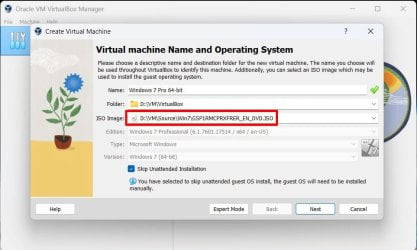
Actually installing in a virtual box, from an .iso file on the same machine. Has worked great recently with Win 10 and XP, just seeing this error with 7.
 

My Computer

Computer Manufacturer/Model Number
Acer Aspire
OS
Windows 7
CPU
i7
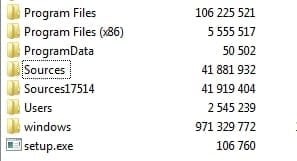
usually indicates setup.exe cant find sources\install.wim and associated files

it is asking for a driver because it assumes the appropriate sources folder and contents is on the root of storage media it can't see, which requires a driver.

can also happen if it doesnt recognize install.wim or the associated setup files as matching.

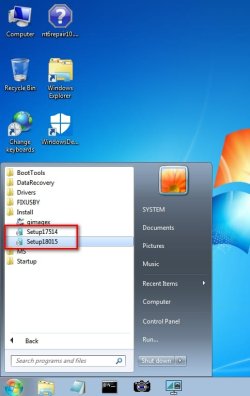
It is why I have usb3 and nvme drivers integrated into boot.wim as well as both sets of setup files

both-sources.jpg

both-sources-start-menu.jpg

it is also posible in your that case there is some corruption which prevents setup.exe from finding what it wants.
 

My Computers

System One System Two

  • Computer type
    PC/Desktop
    OS
    7 X64
    CPU
    i5 8400
    Motherboard
    gigabyte b365m ds3h
    Memory
    2x8gb 3200mhz
    Hard Drives
    various
    PSU
    pure power 11 400w cm
    Case
    Coolermaster
    Cooling
    cryorig m9i
  • Computer type
    PC/Desktop
    OS
    7x64
    CPU
    g5400
    Motherboard
    ga b365m ds3h
    Memory
    8gb ddr4 2400
    PSU
    xfx pro 450w
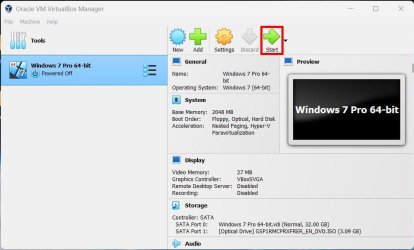
Thanks for the suggestions. The reseller appears to think that instead of installing the .iso file from a directory on the VM host computer's internal SSD, I need to burn it on a usb thumb drive or a blank DVD. Will give that a shot.
 

My Computer

Computer Manufacturer/Model Number
Acer Aspire
OS
Windows 7
CPU
i7

Attachments

  • 1 VB Win7 Pro.jpg
    1 VB Win7 Pro.jpg
    140.7 KB · Views: 0
  • 2 VB Win7 Pro.jpg
    2 VB Win7 Pro.jpg
    113.8 KB · Views: 0
  • 3 VB Win7 Pro.jpg
    3 VB Win7 Pro.jpg
    111.4 KB · Views: 0

My Computers

System One System Two

  • Computer type
    PC/Desktop
    Computer Manufacturer/Model Number
    Custom build
    OS
    Windows 7 Home Premium 64-bits
    CPU
    AMD FX-8350
    Motherboard
    Gigabyte GA-990FXA-UD3 (AM3+)
    Memory
    GSKILL Ripjaw-X PC3 12800 8GB (2x4GB)
    Graphics Card(s)
    ASUS ROG STRIX GTX 1060 6GB
    Sound Card
    Integrated
    Monitor(s) Displays
    Asus VE228H (21.5-in)
    Screen Resolution
    1920x1080 60Hz
    Hard Drives
    SAMSUNG 870 EVO 2.5 Inch SATA SSD (1TB)
    SAMSUNG 870 EVO 2.5 Inch SATA SSD (1TB)
    SAMSUNG 870 EVO 2.5 Inch SATA SSD (1TB)
    PSU
    Corsair RM750x (750 watts)
    Case
    Corsair Carbide Series 200R
    Cooling
    Corsair Hydro Series H60 (CWCH60)
    Keyboard
    Logitech Elite
    Mouse
    Logitech M510 Wireless Mouse
    Internet Speed
    Comcast Gigabit Extra (1200Mbps down / 35Mbps up)
    Antivirus
    Malwarebytes
    Browser
    Firefox, Edge, Chrome
    Other Info
    ASUS DRW-24B1ST DVD-RW (24X) optical drive
    Seagate Expansion Desk (5TB) external SATA/USB HDD
    Comcast XB8 Internet Gateway
  • Computer type
    PC/Desktop
    System Manufacturer/Model Number
    Custom
    OS
    Windows 7 Pro (64-bit)
    CPU
    AMD Phenom II 960T X4
    Motherboard
    ASUS M4N82 Deluxe
    Memory
    Corsair XMS2 DDR2-800 8GB (4x2GB)
    Graphics Card(s)
    ASUS ENGTX560 DCII OC/2DI/1GD5 1GB
    Monitor(s) Displays
    Samsung 930B 19-inch LCD
    Screen Resolution
    1280x1024
    Hard Drives
    Samsung SSD 870 EVO 1000 GB (Windows 10)
    Seagate ST1000DM003 1000 GB (Windows 7)
    PSU
    Antec TruePower (new) TP-650
    Case
    Antec Three Hundred
    Cooling
    AMD stock cooler from FX8350
    Mouse
    Logitech M100
    Internet Speed
    Xfinity Gigabit Extra 1200/35 Mbps
For the updates use Simplix. Very good.


Thanks for the suggestion.

I got my issues sorted out, and Win 7 Pro 64-bit is now installed and activated. It wasn't until later that I noticed the version installed is SP1. Will Simplix take care of SP1 -> SP3 in addition to whatever other updates it installs? I see under Control Panel > System, below "Service Pack 1," there's a hyperlink that says "Get more features with a new edition of Windows 7." I wasn't sure if clicking on that would be a good way to proceed. Definitely would want to skip telemetry/tracking.
 

My Computer

Computer Manufacturer/Model Number
Acer Aspire
OS
Windows 7
CPU
i7
there is no sp2 or sp3. They stopped doing service packs after sp1. Win10 and 11 dont have sp , they are no more. Just updates.
 

My Computers

System One System Two

  • Computer type
    PC/Desktop
    OS
    7 X64
    CPU
    i5 8400
    Motherboard
    gigabyte b365m ds3h
    Memory
    2x8gb 3200mhz
    Hard Drives
    various
    PSU
    pure power 11 400w cm
    Case
    Coolermaster
    Cooling
    cryorig m9i
  • Computer type
    PC/Desktop
    OS
    7x64
    CPU
    g5400
    Motherboard
    ga b365m ds3h
    Memory
    8gb ddr4 2400
    PSU
    xfx pro 450w

My Computer

Computer Manufacturer/Model Number
Acer Aspire
OS
Windows 7
CPU
i7
Back
Top