Solved 4 GB of Physical Memory but 1.74 GB Usable

deepeyes

New member
Member
Local time
8:11 AM
Messages
37
Hello All,

I have of course read extensively on this issue and of course there are all sorts of opinions out there about if Windows 7 is using the correct amount of memory. However, it seems to me that my computer is using more than everyone else.

Some specs:
Windows 7 Home Premium x64
Hp Pavilion DV6 3160us laptop
Quad Core AMD CPU
4 GB of installed RAM. Showing 1.74 GB usable. The performance monitor shows that over 2GB is being held for hardware.

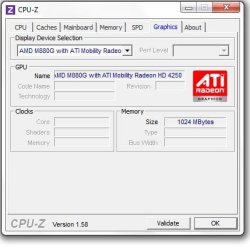
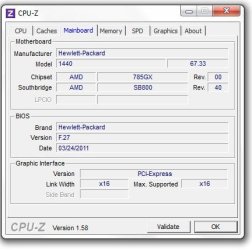
Attaching CPU Z screen shots.

I cannot access BIOS settings to enable remapping (its not even available as an option).
The msconfig fix that people are posting has been done.
Any thoughts on how to reduce the usage?
 

Attachments
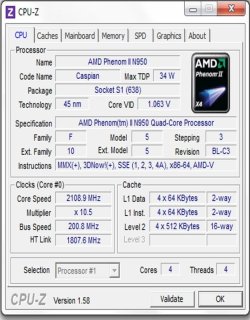
  • CPU.jpg
    CPU.jpg
    71.6 KB · Views: 69
  • Graphics.jpg
    Graphics.jpg
    25.4 KB · Views: 82
  • Mainboard.jpg
    Mainboard.jpg
    27.4 KB · Views: 79
  • Resource Monitor.png
    Resource Monitor.png
    54.5 KB · Views: 185

My Computer My Computer

At a glance

Windows 7 64 bit
OS
Windows 7 64 bit
Check your motherboard. It showin the 1.74827362 number because some of that ram is saved for video ram.
 

My Computer My Computer

At a glance

Windows 7 Ultimate x86/Snow Leopard 10.6.6i/U...AMD Phenom x6 1055T @ 2.88GHz8GB DDR3 1333 RAMATI Radeon HD 5450
Computer Manufacturer/Model Number
Homemade
OS
Windows 7 Ultimate x86/Snow Leopard 10.6.6i/Ubuntu 11.10/Android
CPU
AMD Phenom x6 1055T @ 2.88GHz
Motherboard
Biostar A870U3
Memory
8GB DDR3 1333 RAM
Graphics Card(s)
ATI Radeon HD 5450
Sound Card
Integrated
Monitor(s) Displays
Dell IN1910N
Screen Resolution
1366x768x32
Hard Drives
1TB HDD
PSU
450W PCU
Internet Speed
Wired: OMFG SO FAST; Wireless: WTFFF Y U SO SLOW?!
The BIOS has reserved the 2.3Gb for hardware use. There should be an option in your BIOS to set the video "aperture" size. Even when set to auto, I've never seen it that large though. There could be a problem with your BIOS recognizing the hardware you have installed. First check to be sure your BIOS is up to date. Then check the options under the System menu for memory mapping. It could be called something else. I'm not familiar with the BIOS used in HPs and they're a little stingy with info but check to see if there's hardware options turned on for things you don't have. (Bluetooth, multiple LAN adapters, touch screen, etc.)
 

My Computer My Computer

At a glance

Windows 7 Pro-x64i7-2600 3.4GHz - 3.8GHz Turbo8Gb - 2x4GB, Muskin 991770 PC3-1333Integrated Intel HD 2000
Computer type
PC/Desktop
Computer Manufacturer/Model Number
Built 2/11/2011
OS
Windows 7 Pro-x64
CPU
i7-2600 3.4GHz - 3.8GHz Turbo
Motherboard
Intel DH67BL-B3
Memory
8Gb - 2x4GB, Muskin 991770 PC3-1333
Graphics Card(s)
Integrated Intel HD 2000
Sound Card
Integrated Intel 10.1 HD, RealTek ALC892
Monitor(s) Displays
Asus LCD VH222H, Haier HL24XSL2a
Screen Resolution
1920x1080, 1920x1080
Hard Drives
Crucial SSD C300-128Gb,
Western Digital WD5002AALX - 500Gb,
Western Digital WD7501AALS - 750Gb
PSU
Seasonic 650W 80+ Gold Modular
Case
Rosewill Defender
Cooling
Stock CPU, Four 120mm case fans, PCH fan added
Keyboard
Logitech EX100 Y-RBH94 Wireless
Mouse
Logitech EX100 M-RCE95 Wireless
Internet Speed
3.0/1.5 Mbs
Antivirus
Microsoft Security Essentials
Browser
Microsoft Internet Explorer 11
Other Info
Antec Veris Premier-Multimedia IR Station,
Cyber Accoustics-3602 Speakers,
AFT XM-5U Card Reader,
Hauppauge TV-HVR-2250,
Sony LX300 USB Turntable
Are you using the onboard video or a separate PCI-E videocard?
 

My Computer My Computer

At a glance

Windows 7 Professional SP1 32-bitIntel Core 2 Duo E6600 2.4GHz4GB DDR2-667 (4x1GB in dual-channel config)nVidia GeForce 9800 GT
Computer type
PC/Desktop
Computer Manufacturer/Model Number
Custom-built
OS
Windows 7 Professional SP1 32-bit
CPU
Intel Core 2 Duo E6600 2.4GHz
Motherboard
Asus PL5D2
Memory
4GB DDR2-667 (4x1GB in dual-channel config)
Graphics Card(s)
nVidia GeForce 9800 GT
Sound Card
Creative X-Fi XtremeMusic
Monitor(s) Displays
Acer P236H
Screen Resolution
1920x1200 (DVI)
Hard Drives
OCZ SSD Vertex Plus 60GB SATA (Firmware 3.55), 64MB cache
Hitachi HD321KJ SATA, 320GB, 7200rpm, 16MB cache
PSU
Antec TruePower 2.0
Case
Cooler Master Centurion
Cooling
Too many fans
Keyboard
Standard
Mouse
Microsoft wireless optical mouse
Internet Speed
AT&T U-verse (18mbit/sec)
Antivirus
Microsoft Security Essentials
Browser
Firefox
Other Info
Other devices:
Compaq CQ-60 laptop
Google Nexus 7 (2012) tablet
Nvidia SHIELD tablet (US/LTE)
Hardkernel ODROID-XU single-board computer (Samsung Exynos 5420)

My Computer My Computer

At a glance

Win 7 Ultimate x64FX-8350 @ 4.6 GHz so farADATA XPG V1 Series Black 8GB DDR3 1600Sapphire R9 270x Dual-X
Computer type
PC/Desktop
Computer Manufacturer/Model Number
Me
OS
Win 7 Ultimate x64
CPU
FX-8350 @ 4.6 GHz so far
Motherboard
Asus M5A97 EVO
Memory
ADATA XPG V1 Series Black 8GB DDR3 1600
Graphics Card(s)
Sapphire R9 270x Dual-X
Sound Card
Xonar DGX w/ Corsair Vengence 1300
Monitor(s) Displays
Acer S232HL Abid
Screen Resolution
1920x1080
Hard Drives
120 GB OCZ Vertex 3
500 GB Seagate 7200.12
PSU
Antec Earthwatts 650W Green
Case
Antec Three Hundred
Cooling
Cooler Master 212 EVO
Keyboard
Logitech G510
Mouse
Logitech G500s
Internet Speed
35000/3000
You might also check your MSCONFIG settings by typing "msconfig" (no quotes) in the search bar and making sure the Maximum memory box is not ticked.


My Computer My Computer

At a glance

Windows 10 ProIntel Core i7-4770K (3.5Ghz)32 gig Corsair Dominator Platinum (4x8Gig)Sapphire Tri-X R9 Fury
Computer type
PC/Desktop
Computer Manufacturer/Model Number
Custom built by me.
OS
Windows 10 Pro
CPU
Intel Core i7-4770K (3.5Ghz)
Motherboard
Gigabyte G1 Sniper 5 (F10 Bios)
Memory
32 gig Corsair Dominator Platinum (4x8Gig)
Graphics Card(s)
Sapphire Tri-X R9 Fury
Sound Card
Soundblaster ZXR
Monitor(s) Displays
NEC PA242W 24" LCD Monitor
Screen Resolution
1920 x 1200
Hard Drives
Primary - Samsung 850 Pro (512gig), Samsung 840 Pro (256gig), 2TB WD Caviar Black.
PSU
EVGA Supernova 1000 G2
Case
Cooler Master HAF X
Cooling
Corsair H100i with Corsair Air Series SP120 Quiet Fans
Keyboard
Logitech Wireless Wave
Mouse
Logitech Performance MX
Internet Speed
High Speed Cable
Antivirus
Norton Security
Browser
IE11
Other Info
Memory Timings - 1866MHz @ 9-9-9-27-1T @ 1.5 volts
The only thing in BIOS that I could change is SVM Support which I have. There is no option for changing mapping. Bios is up to date.
Will look at some of the devices that are on the computer. I do know that there is bluetooth adapter that is usually on.

When you say check your mother board... what do you mean?

I'm using the on board video card.

I will look into the memory sticks. But if they are being recognized and used then wouldn't that mean there shouldn't be a problem with them being seated properly?

By the way I LOVE how on the spec page at HP the graphics are "icthable" instead of "switchable"
 

My Computer My Computer

At a glance

Windows 7 64 bit
OS
Windows 7 64 bit
You might also check your MSCONFIG settings by typing "msconfig" (no quotes) in the search bar and making sure the Maximum memory box is not ticked.

Yes, did that. Was no turned on. Plus the number of CPU processors was not ticked as well.
 

My Computer My Computer

At a glance

Windows 7 64 bit
OS
Windows 7 64 bit
It is possible that one of the sticks moved a bit from a bump or even just every day use. You would think they wouldn't move, but it is possible. It also doesn't take much for a stick to be misaligned in a slot for it not to be read/used corrected. Could even be that there is/was a bit of dust in the slot or on a stick when they were inserted, and that too can cause what you are seeing.
 

My Computer My Computer

At a glance

Win 7 Ultimate x64FX-8350 @ 4.6 GHz so farADATA XPG V1 Series Black 8GB DDR3 1600Sapphire R9 270x Dual-X
Computer type
PC/Desktop
Computer Manufacturer/Model Number
Me
OS
Win 7 Ultimate x64
CPU
FX-8350 @ 4.6 GHz so far
Motherboard
Asus M5A97 EVO
Memory
ADATA XPG V1 Series Black 8GB DDR3 1600
Graphics Card(s)
Sapphire R9 270x Dual-X
Sound Card
Xonar DGX w/ Corsair Vengence 1300
Monitor(s) Displays
Acer S232HL Abid
Screen Resolution
1920x1080
Hard Drives
120 GB OCZ Vertex 3
500 GB Seagate 7200.12
PSU
Antec Earthwatts 650W Green
Case
Antec Three Hundred
Cooling
Cooler Master 212 EVO
Keyboard
Logitech G510
Mouse
Logitech G500s
Internet Speed
35000/3000
It is possible that one of the sticks moved a bit from a bump or even just every day use. You would think they wouldn't move, but it is possible. It also doesn't take much for a stick to be misaligned in a slot for it not to be read/used corrected. Could even be that there is/was a bit of dust in the slot or on a stick when they were inserted, and that too can cause what you are seeing.

This is a good point. Will check it out right now, post back any results
 

My Computer My Computer

At a glance

Windows 7 64 bit
OS
Windows 7 64 bit
Sorry I missed that you'd already checked MSCONFIG.

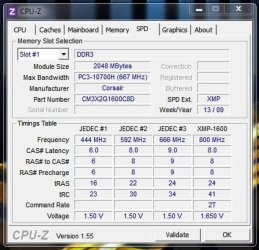
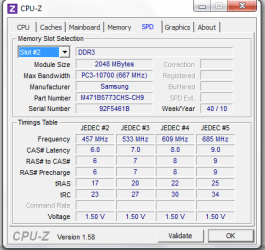
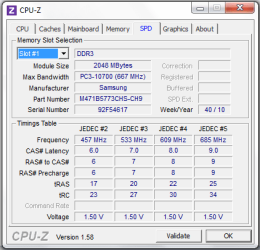
Can you show us what your SPD tab in CPU-Z says?
CPUZ Memory tab.JPG

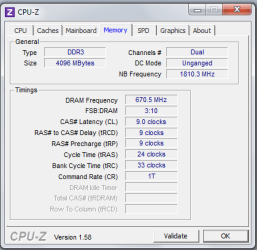
What does the Memory tab say?
CPUZ  Memory 1.JPG

And I'm thinking that if your system is showing that you have 4gig of memory installed, which resource manager does show, then the memory sticks are being read. The question then is why is the system reserving so much RAM?
 

My Computer My Computer

At a glance

Windows 10 ProIntel Core i7-4770K (3.5Ghz)32 gig Corsair Dominator Platinum (4x8Gig)Sapphire Tri-X R9 Fury
Computer type
PC/Desktop
Computer Manufacturer/Model Number
Custom built by me.
OS
Windows 10 Pro
CPU
Intel Core i7-4770K (3.5Ghz)
Motherboard
Gigabyte G1 Sniper 5 (F10 Bios)
Memory
32 gig Corsair Dominator Platinum (4x8Gig)
Graphics Card(s)
Sapphire Tri-X R9 Fury
Sound Card
Soundblaster ZXR
Monitor(s) Displays
NEC PA242W 24" LCD Monitor
Screen Resolution
1920 x 1200
Hard Drives
Primary - Samsung 850 Pro (512gig), Samsung 840 Pro (256gig), 2TB WD Caviar Black.
PSU
EVGA Supernova 1000 G2
Case
Cooler Master HAF X
Cooling
Corsair H100i with Corsair Air Series SP120 Quiet Fans
Keyboard
Logitech Wireless Wave
Mouse
Logitech Performance MX
Internet Speed
High Speed Cable
Antivirus
Norton Security
Browser
IE11
Other Info
Memory Timings - 1866MHz @ 9-9-9-27-1T @ 1.5 volts
Alright just pulled both out switched them up. Same thing. 1.74 GB usable.

I thought maybe you had been onto something since I had just recently taken it in to a repair for some maintenance. No avail
 

Attachments

  • Memory slot 2.png
    Memory slot 2.png
    12.3 KB · Views: 22
  • Memory slot 1.png
    Memory slot 1.png
    12 KB · Views: 25
  • memory.png
    memory.png
    11.6 KB · Views: 22

My Computer My Computer

At a glance

Windows 7 64 bit
OS
Windows 7 64 bit
I will have to go here soon, be available maybe by 2 PM Eastern
 

My Computer My Computer

At a glance

Windows 7 64 bit
OS
Windows 7 64 bit
I thought maybe you had been onto something since I had just recently taken it in to a repair for some maintenance. No avail

Did you have "RAM" issues before taking it in for maintenance? In other words did the repair shop do something to change your memory values?

And yeah all your installed memory is being detected as shown by Resource Manager, and now CPU-Z. So we know the motherboard is at least seeing all the memory.

Yeah, find out if the shop did something to cause your system to reserve so much RAM.

Let us know.

BTW do you have all Windows updates installed, including SP1?
 

My Computer My Computer

At a glance

Windows 10 ProIntel Core i7-4770K (3.5Ghz)32 gig Corsair Dominator Platinum (4x8Gig)Sapphire Tri-X R9 Fury
Computer type
PC/Desktop
Computer Manufacturer/Model Number
Custom built by me.
OS
Windows 10 Pro
CPU
Intel Core i7-4770K (3.5Ghz)
Motherboard
Gigabyte G1 Sniper 5 (F10 Bios)
Memory
32 gig Corsair Dominator Platinum (4x8Gig)
Graphics Card(s)
Sapphire Tri-X R9 Fury
Sound Card
Soundblaster ZXR
Monitor(s) Displays
NEC PA242W 24" LCD Monitor
Screen Resolution
1920 x 1200
Hard Drives
Primary - Samsung 850 Pro (512gig), Samsung 840 Pro (256gig), 2TB WD Caviar Black.
PSU
EVGA Supernova 1000 G2
Case
Cooler Master HAF X
Cooling
Corsair H100i with Corsair Air Series SP120 Quiet Fans
Keyboard
Logitech Wireless Wave
Mouse
Logitech Performance MX
Internet Speed
High Speed Cable
Antivirus
Norton Security
Browser
IE11
Other Info
Memory Timings - 1866MHz @ 9-9-9-27-1T @ 1.5 volts
The next thing to do is see what's running at start-up. Could be the shop loaded tracing or diagnostic software and there's some big hog driver loading.
 

My Computer My Computer

At a glance

Windows 7 Pro-x64i7-2600 3.4GHz - 3.8GHz Turbo8Gb - 2x4GB, Muskin 991770 PC3-1333Integrated Intel HD 2000
Computer type
PC/Desktop
Computer Manufacturer/Model Number
Built 2/11/2011
OS
Windows 7 Pro-x64
CPU
i7-2600 3.4GHz - 3.8GHz Turbo
Motherboard
Intel DH67BL-B3
Memory
8Gb - 2x4GB, Muskin 991770 PC3-1333
Graphics Card(s)
Integrated Intel HD 2000
Sound Card
Integrated Intel 10.1 HD, RealTek ALC892
Monitor(s) Displays
Asus LCD VH222H, Haier HL24XSL2a
Screen Resolution
1920x1080, 1920x1080
Hard Drives
Crucial SSD C300-128Gb,
Western Digital WD5002AALX - 500Gb,
Western Digital WD7501AALS - 750Gb
PSU
Seasonic 650W 80+ Gold Modular
Case
Rosewill Defender
Cooling
Stock CPU, Four 120mm case fans, PCH fan added
Keyboard
Logitech EX100 Y-RBH94 Wireless
Mouse
Logitech EX100 M-RCE95 Wireless
Internet Speed
3.0/1.5 Mbs
Antivirus
Microsoft Security Essentials
Browser
Microsoft Internet Explorer 11
Other Info
Antec Veris Premier-Multimedia IR Station,
Cyber Accoustics-3602 Speakers,
AFT XM-5U Card Reader,
Hauppauge TV-HVR-2250,
Sony LX300 USB Turntable
The next thing to do is see what's running at start-up. Could be the shop loaded tracing or diagnostic software and there's some big hog driver loading.

Yeah but that's probably not going to account for why nearly 2gig of memory is being held in Hardware Reserved.

Hardware Reserved (gray) This is physical memory that is set aside by the BIOS and other hardware drivers (especially graphics adapters). This memory cannot be used for processes or system functions.

Here's a good article explaining Windows 7 memory usage: What's the best way to measure? | ZDNet

Doesn't hurt to check though :)
 

My Computer My Computer

At a glance

Windows 10 ProIntel Core i7-4770K (3.5Ghz)32 gig Corsair Dominator Platinum (4x8Gig)Sapphire Tri-X R9 Fury
Computer type
PC/Desktop
Computer Manufacturer/Model Number
Custom built by me.
OS
Windows 10 Pro
CPU
Intel Core i7-4770K (3.5Ghz)
Motherboard
Gigabyte G1 Sniper 5 (F10 Bios)
Memory
32 gig Corsair Dominator Platinum (4x8Gig)
Graphics Card(s)
Sapphire Tri-X R9 Fury
Sound Card
Soundblaster ZXR
Monitor(s) Displays
NEC PA242W 24" LCD Monitor
Screen Resolution
1920 x 1200
Hard Drives
Primary - Samsung 850 Pro (512gig), Samsung 840 Pro (256gig), 2TB WD Caviar Black.
PSU
EVGA Supernova 1000 G2
Case
Cooler Master HAF X
Cooling
Corsair H100i with Corsair Air Series SP120 Quiet Fans
Keyboard
Logitech Wireless Wave
Mouse
Logitech Performance MX
Internet Speed
High Speed Cable
Antivirus
Norton Security
Browser
IE11
Other Info
Memory Timings - 1866MHz @ 9-9-9-27-1T @ 1.5 volts
Did you have "RAM" issues before taking it in for maintenance? In other words did the repair shop do something to change your memory values?

If you mean the 1.74 GB as a problem then yes I have always had this problem since purchasing, its just now becoming a bit of a problem because there are programs that are requiring 2 GB or more of RAM than my system is willing to give up.'

Yeah, find out if the shop did something to cause your system to reserve so much RAM.

So I called the guy up who had actually done the work on my computer. He stated that he had not done anything with the memory except do a routine diagnostic on it. He stated that the amount of paging that my system has allocated to it could be a problem. He stated that I could set the paging to what I felt the computer would need.

Do you guys think that would work?


BTW do you have all Windows updates installed, including SP1?

Yes my computer is up to date. This was sort of the reason that I took my computer in because I was getting Blue Screens due to drivers that were incompatible with the system. So this guy went in and took care of the drivers that were causing problems and I would assume updating the ones that need it.


Good article by the way!
 

My Computer My Computer

At a glance

Windows 7 64 bit
OS
Windows 7 64 bit
I'm aware of the "old" definition of hardware reserved but perhaps you've forgotten about EFI/UEFI and how it can run outside of the OS and use the RAM for anything it wants to. It's part of the Bootstrap procedure and occurs before the OS begins to run. The Reserved RAM has been blocked out by the BIOS for some reason. I'm only suggesting the OP look for unusual start programs (when Windows starts) that may be interfacing with the BIOS. This could also be a root virus. It's just a suggestion as to keep all options for diagnostics open.

Booting

UEFI does not rely on a working boot sector only, but needs a special partition table referring to a special partition containing a specially located file with a standardized name depending on the actual architecture to boot.
Boot loaders are a class of UEFI applications. As such, they are stored as files on a file system that can be accessed by the firmware. Boot variables, stored in NVRAM, indicate the paths to the loaders. Boot loaders can also be auto-detected by firmware, for instance to enable booting on removable devices.
It is common for UEFI firmware to include a boot manager, to allow the user to select and load the operating system among the possible options.

The EFI shell

EFI provides a shell environment The shell can be used to execute other EFI applications.
Extensions to EFI can be loaded from virtually any storage device attached to the computer. For example, an original equipment manufacturer can distribute systems with an EFI partition on the hard drive, which would add additional functions to the standard EFI firmware stored on the motherboard's ROM.
 

My Computer My Computer

At a glance

Windows 7 Pro-x64i7-2600 3.4GHz - 3.8GHz Turbo8Gb - 2x4GB, Muskin 991770 PC3-1333Integrated Intel HD 2000
Computer type
PC/Desktop
Computer Manufacturer/Model Number
Built 2/11/2011
OS
Windows 7 Pro-x64
CPU
i7-2600 3.4GHz - 3.8GHz Turbo
Motherboard
Intel DH67BL-B3
Memory
8Gb - 2x4GB, Muskin 991770 PC3-1333
Graphics Card(s)
Integrated Intel HD 2000
Sound Card
Integrated Intel 10.1 HD, RealTek ALC892
Monitor(s) Displays
Asus LCD VH222H, Haier HL24XSL2a
Screen Resolution
1920x1080, 1920x1080
Hard Drives
Crucial SSD C300-128Gb,
Western Digital WD5002AALX - 500Gb,
Western Digital WD7501AALS - 750Gb
PSU
Seasonic 650W 80+ Gold Modular
Case
Rosewill Defender
Cooling
Stock CPU, Four 120mm case fans, PCH fan added
Keyboard
Logitech EX100 Y-RBH94 Wireless
Mouse
Logitech EX100 M-RCE95 Wireless
Internet Speed
3.0/1.5 Mbs
Antivirus
Microsoft Security Essentials
Browser
Microsoft Internet Explorer 11
Other Info
Antec Veris Premier-Multimedia IR Station,
Cyber Accoustics-3602 Speakers,
AFT XM-5U Card Reader,
Hauppauge TV-HVR-2250,
Sony LX300 USB Turntable
Win 7 is exceptional at memory management, if\when you start an application or game, much of the now assigned memory will be freed to use for the app. I'ts not a problem and it doesn't need fixing.
 

My Computer My Computer

At a glance

Windows 7 home premium x64AMD FX-4100 AM3+ 3.6GHz 12MB Black EditionCrsair vengeance 12Gb DDR3 1600MHz CL9Asus GTX 560 1GB
Computer Manufacturer/Model Number
DIY
OS
Windows 7 home premium x64
CPU
AMD FX-4100 AM3+ 3.6GHz 12MB Black Edition
Motherboard
Asus M5A97 Pro
Memory
Crsair vengeance 12Gb DDR3 1600MHz CL9
Graphics Card(s)
Asus GTX 560 1GB
Sound Card
Realtek onboard
Monitor(s) Displays
Hanns G 1680x1050 native
Hard Drives
OCZ 128Gb Petrol ssd
2x500 Gb Samsung
PSU
OCZ StealthXstream II 500W
Internet Speed
8Mb or better
Win 7 is exceptional at memory management, if\when you start an application or game, much of the now assigned memory will be freed to use for the app. I'ts not a problem and it doesn't need fixing.
You're right but I don't think this includes the BIOS "hardware reserved" memory. It's sitting at over 2GB.

Without seeing the BIOS settings or finding any documentation, it's going to be tough finding it.

Perhaps the OP could photograph the BIOS screens? :confused:
 

My Computer My Computer

At a glance

Windows 7 Pro-x64i7-2600 3.4GHz - 3.8GHz Turbo8Gb - 2x4GB, Muskin 991770 PC3-1333Integrated Intel HD 2000
Computer type
PC/Desktop
Computer Manufacturer/Model Number
Built 2/11/2011
OS
Windows 7 Pro-x64
CPU
i7-2600 3.4GHz - 3.8GHz Turbo
Motherboard
Intel DH67BL-B3
Memory
8Gb - 2x4GB, Muskin 991770 PC3-1333
Graphics Card(s)
Integrated Intel HD 2000
Sound Card
Integrated Intel 10.1 HD, RealTek ALC892
Monitor(s) Displays
Asus LCD VH222H, Haier HL24XSL2a
Screen Resolution
1920x1080, 1920x1080
Hard Drives
Crucial SSD C300-128Gb,
Western Digital WD5002AALX - 500Gb,
Western Digital WD7501AALS - 750Gb
PSU
Seasonic 650W 80+ Gold Modular
Case
Rosewill Defender
Cooling
Stock CPU, Four 120mm case fans, PCH fan added
Keyboard
Logitech EX100 Y-RBH94 Wireless
Mouse
Logitech EX100 M-RCE95 Wireless
Internet Speed
3.0/1.5 Mbs
Antivirus
Microsoft Security Essentials
Browser
Microsoft Internet Explorer 11
Other Info
Antec Veris Premier-Multimedia IR Station,
Cyber Accoustics-3602 Speakers,
AFT XM-5U Card Reader,
Hauppauge TV-HVR-2250,
Sony LX300 USB Turntable
Back
Top