
You are using an out of date browser. It may not display this or other websites correctly.
You should upgrade or use an alternative browser.
You should upgrade or use an alternative browser.
Solved 4 GB of Physical Memory but 1.74 GB Usable
- Thread starter deepeyes
- Start date

When the demand increases, the discrete graphics card takes over and GPU memory is copied to RAM to feed the display(s) connected via the integrated graphics.
Yes, it copies its output to the integrated graphics' framebuffer. The only thing I'm not sure is where the single, normal, unswitchable discrete graphics keep their framebuffer - in RAM or in their video memory? :sarc:
My Computer
At a glance
Windows 7 x64 Ultimate SP1Core i7-2630QM6 GB DDR3Nvidia GT 540M / Intel HD 3000 - Optimus swit...
- Computer Manufacturer/Model Number
- Asus N73SV
- OS
- Windows 7 x64 Ultimate SP1
- CPU
- Core i7-2630QM
- Motherboard
- Intel HM 65
- Memory
- 6 GB DDR3
- Graphics Card(s)
- Nvidia GT 540M / Intel HD 3000 - Optimus switching
- Sound Card
- HD Audio (Intel Azalia/Realtek) ALC269
- Monitor(s) Displays
- LED flat panel
- Screen Resolution
- 1920 x 1080
- Hard Drives
- 2x Seagate Momentus 640 GB - 1,28 TB in total
- Internet Speed
- 4 MB/256 kbps
- Other Info
- External HDs
WD Elements 1,5 TB
WD MyBook 500 GB

Video memory. A discrete card will only take from/use system ram when it fills the available VRAM and needs more.
My Computer
At a glance
Win 7 Ultimate x64FX-8350 @ 4.6 GHz so farADATA XPG V1 Series Black 8GB DDR3 1600Sapphire R9 270x Dual-X
- Computer type
- PC/Desktop
- Computer Manufacturer/Model Number
- Me
- OS
- Win 7 Ultimate x64
- CPU
- FX-8350 @ 4.6 GHz so far
- Motherboard
- Asus M5A97 EVO
- Memory
- ADATA XPG V1 Series Black 8GB DDR3 1600
- Graphics Card(s)
- Sapphire R9 270x Dual-X
- Sound Card
- Xonar DGX w/ Corsair Vengence 1300
- Monitor(s) Displays
- Acer S232HL Abid
- Screen Resolution
- 1920x1080
- Hard Drives
- 120 GB OCZ Vertex 3
500 GB Seagate 7200.12
- PSU
- Antec Earthwatts 650W Green
- Case
- Antec Three Hundred
- Cooling
- Cooler Master 212 EVO
- Keyboard
- Logitech G510
- Mouse
- Logitech G500s
- Internet Speed
- 35000/3000
No. Max memory is not ticked
"Good point too Sygnus21. What happens if you check max memory box and set it to 4096?"
Will try this soon.
"Chipset > Northbridge Configuration > Memory Configuration > DCT Ungangned Mode=?
It wasn't clear what options were available but "AUTO" seemed to be for Unganged mode (split controllers). AMD's logic on this seems to be bass-ackwards. Appearently, they like to bury things deep in menus too."
I have no idea on how to get to this to do what you're asking... is this in the BIOS?
owever I am curious as to what’s switchable GPU memory?
"Is there a switch or button that enables you to change the amount of memory used by the GPU? If so has the OP played around with the switch to see if the reserved memory decreases?"
Switchable graphics pretty much just seems to be a power saving feature when you unplug the laptop you can set the performance level for the graphics card down so you won't run through so much power. That is the cosmetic aspect of it. As for what its actually doing underneath, I have no idea. I don't really use that option because I usually have my laptop plugged in.
"There is one quick way to check if that is what it is. deepeyes I assume when you got it it has 2x2 GB sticks in it and you replaced those with 2x4 GB sticks. If that is the ase try running it with 1x2 and 1x4, and see if the 6 GB total is available."
No I'm still using the sticks that it came with. 2x 2GB stick
"Good point too Sygnus21. What happens if you check max memory box and set it to 4096?"
Will try this soon.
"Chipset > Northbridge Configuration > Memory Configuration > DCT Ungangned Mode=?
It wasn't clear what options were available but "AUTO" seemed to be for Unganged mode (split controllers). AMD's logic on this seems to be bass-ackwards. Appearently, they like to bury things deep in menus too."
I have no idea on how to get to this to do what you're asking... is this in the BIOS?
owever I am curious as to what’s switchable GPU memory?
"Is there a switch or button that enables you to change the amount of memory used by the GPU? If so has the OP played around with the switch to see if the reserved memory decreases?"
Switchable graphics pretty much just seems to be a power saving feature when you unplug the laptop you can set the performance level for the graphics card down so you won't run through so much power. That is the cosmetic aspect of it. As for what its actually doing underneath, I have no idea. I don't really use that option because I usually have my laptop plugged in.
"There is one quick way to check if that is what it is. deepeyes I assume when you got it it has 2x2 GB sticks in it and you replaced those with 2x4 GB sticks. If that is the ase try running it with 1x2 and 1x4, and see if the 6 GB total is available."
No I'm still using the sticks that it came with. 2x 2GB stick
Attachments

My Computer
At a glance
Windows 7 64 bit
- OS
- Windows 7 64 bit

It could be that cyclic is correct. Just went back and double checked and that laptop only supports up to 8 GB. Makes me wonder if it isn't running into this,
The system memory that is reported in the System Information dialog box in Windows Vista is less than you expect if 4 GB of RAM is installed
which would/should only happen on an AMD system when the max amount of memory is installed, and for whatever reason the motherboard/computer manufacturer limits it in the bios as well. Wouldn't be the first time I have seen HP computers with unexplainable/stupid restrictions in the bios.
There is one quick way to check if that is what it is. deepeyes I assume when you got it it has 2x2 GB sticks in it and you replaced those with 2x4 GB sticks. If that is the ase try running it with 1x2 and 1x4, and see if the 6 GB total is available..
Hmmm.... I don't see where the OP mentions he has 8gig of memory installed?
Some specs:
Windows 7 Home Premium x64
Hp Pavilion DV6 3160us laptop
Quad Core AMD CPU
4 GB of installed RAM. Showing 1.74 GB usable. The performance monitor shows that over 2GB is being held for hardware.
Even his CPU-Z here says he only has 4gig installed - http://www.sevenforums.com/performa...-memory-but-1-74-gb-usable-2.html#post1649377. This is also confirmed in the Process Monitor screenshot he provides in his original post.
Anyway I still don't understand why there's 2gig of memory reserved for hardware and still feel this isn't normal. But on the other hand this is an HP laptop with an AMD board, neither of which I know nothing about so.....

Edit I see the OP confirmed he only has 4gig installed.
@ deepeyes, yeah it seems the switchable graphics may be AMD's powerplay for their power saving feature on their graphics cards. OK.
My Computer
At a glance
Windows 10 ProIntel Core i7-4770K (3.5Ghz)32 gig Corsair Dominator Platinum (4x8Gig)Sapphire Tri-X R9 Fury
- Computer type
- PC/Desktop
- Computer Manufacturer/Model Number
- Custom built by me.
- OS
- Windows 10 Pro
- CPU
- Intel Core i7-4770K (3.5Ghz)
- Motherboard
- Gigabyte G1 Sniper 5 (F10 Bios)
- Memory
- 32 gig Corsair Dominator Platinum (4x8Gig)
- Graphics Card(s)
- Sapphire Tri-X R9 Fury
- Sound Card
- Soundblaster ZXR
- Monitor(s) Displays
- NEC PA242W 24" LCD Monitor
- Screen Resolution
- 1920 x 1200
- Hard Drives
- Primary - Samsung 850 Pro (512gig), Samsung 840 Pro (256gig), 2TB WD Caviar Black.
- PSU
- EVGA Supernova 1000 G2
- Case
- Cooler Master HAF X
- Cooling
- Corsair H100i with Corsair Air Series SP120 Quiet Fans
- Keyboard
- Logitech Wireless Wave
- Mouse
- Logitech Performance MX
- Internet Speed
- High Speed Cable
- Antivirus
- Norton Security
- Browser
- IE11
- Other Info
- Memory Timings - 1866MHz @ 9-9-9-27-1T @ 1.5 volts
Yeah sorry about that. Was reading a thread that had that problem and got them mixed up. Not enough coffee at the time. 
Now with that out of the way, what happens if you run it with one stick at a time? If you haven't tried that, also run it with each stick individually as well as each stick by itself in each memory slot.
Now with that out of the way, what happens if you run it with one stick at a time? If you haven't tried that, also run it with each stick individually as well as each stick by itself in each memory slot.
My Computer
At a glance
Win 7 Ultimate x64FX-8350 @ 4.6 GHz so farADATA XPG V1 Series Black 8GB DDR3 1600Sapphire R9 270x Dual-X
- Computer type
- PC/Desktop
- Computer Manufacturer/Model Number
- Me
- OS
- Win 7 Ultimate x64
- CPU
- FX-8350 @ 4.6 GHz so far
- Motherboard
- Asus M5A97 EVO
- Memory
- ADATA XPG V1 Series Black 8GB DDR3 1600
- Graphics Card(s)
- Sapphire R9 270x Dual-X
- Sound Card
- Xonar DGX w/ Corsair Vengence 1300
- Monitor(s) Displays
- Acer S232HL Abid
- Screen Resolution
- 1920x1080
- Hard Drives
- 120 GB OCZ Vertex 3
500 GB Seagate 7200.12
- PSU
- Antec Earthwatts 650W Green
- Case
- Antec Three Hundred
- Cooling
- Cooler Master 212 EVO
- Keyboard
- Logitech G510
- Mouse
- Logitech G500s
- Internet Speed
- 35000/3000

My Computer
At a glance
Windows 7 64 bit
- OS
- Windows 7 64 bit
"Now with that out of the way, what happens if you run it with one stick at a time? If you haven't tried that, also run it with each stick individually as well as each stick by itself in each memory slot."
I have not done all those configurations, but I will try them. It gets freaking slow is what happens !)
I have not done all those configurations, but I will try them. It gets freaking slow is what happens !)
My Computer
At a glance
Windows 7 64 bit
- OS
- Windows 7 64 bit
My Computer
At a glance
Windows 7 64 bit
- OS
- Windows 7 64 bit
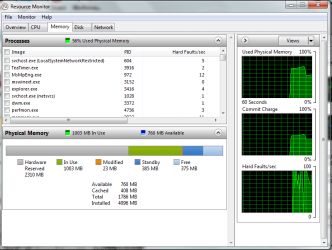
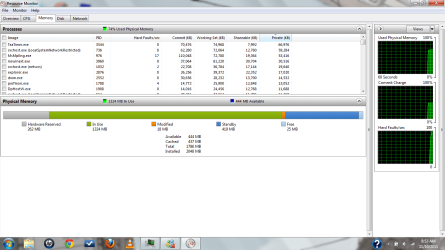
Alright did the max memory setting. First picture is BEFORE I turned on the setting. The second is AFTER I turned on the setting. Not much difference.
Yeah I basically makes no difference. Anyway I'd leave it off.
The only thing I can think of is that it's an issue with the way the motherboard and BIOS is configured. It may be a memory mapping issue with the board, and or BIOS.
BTW I doubt your video card uses 2gig of memory so again, I see no reason why that much memory needs to be reserved.
My Computer
At a glance
Windows 10 ProIntel Core i7-4770K (3.5Ghz)32 gig Corsair Dominator Platinum (4x8Gig)Sapphire Tri-X R9 Fury
- Computer type
- PC/Desktop
- Computer Manufacturer/Model Number
- Custom built by me.
- OS
- Windows 10 Pro
- CPU
- Intel Core i7-4770K (3.5Ghz)
- Motherboard
- Gigabyte G1 Sniper 5 (F10 Bios)
- Memory
- 32 gig Corsair Dominator Platinum (4x8Gig)
- Graphics Card(s)
- Sapphire Tri-X R9 Fury
- Sound Card
- Soundblaster ZXR
- Monitor(s) Displays
- NEC PA242W 24" LCD Monitor
- Screen Resolution
- 1920 x 1200
- Hard Drives
- Primary - Samsung 850 Pro (512gig), Samsung 840 Pro (256gig), 2TB WD Caviar Black.
- PSU
- EVGA Supernova 1000 G2
- Case
- Cooler Master HAF X
- Cooling
- Corsair H100i with Corsair Air Series SP120 Quiet Fans
- Keyboard
- Logitech Wireless Wave
- Mouse
- Logitech Performance MX
- Internet Speed
- High Speed Cable
- Antivirus
- Norton Security
- Browser
- IE11
- Other Info
- Memory Timings - 1866MHz @ 9-9-9-27-1T @ 1.5 volts
I have one stick in slot 2 I think
Here is perf mon
SO we all know that is can run on 256 MB of RAM... the question is why does it need to just suck all that up to 2 GB.
Edit - sorry 262 MB
Stormy is this looking like some sort of memory mapping issue here? Look how much reserved memroy is released when he goes down to one stick. Instead of it nearly being 2gig, it's now down to 262MB!
@ deepeyes, use the same slot but see what happens with the other stick?
Let us know.
My Computer
At a glance
Windows 10 ProIntel Core i7-4770K (3.5Ghz)32 gig Corsair Dominator Platinum (4x8Gig)Sapphire Tri-X R9 Fury
- Computer type
- PC/Desktop
- Computer Manufacturer/Model Number
- Custom built by me.
- OS
- Windows 10 Pro
- CPU
- Intel Core i7-4770K (3.5Ghz)
- Motherboard
- Gigabyte G1 Sniper 5 (F10 Bios)
- Memory
- 32 gig Corsair Dominator Platinum (4x8Gig)
- Graphics Card(s)
- Sapphire Tri-X R9 Fury
- Sound Card
- Soundblaster ZXR
- Monitor(s) Displays
- NEC PA242W 24" LCD Monitor
- Screen Resolution
- 1920 x 1200
- Hard Drives
- Primary - Samsung 850 Pro (512gig), Samsung 840 Pro (256gig), 2TB WD Caviar Black.
- PSU
- EVGA Supernova 1000 G2
- Case
- Cooler Master HAF X
- Cooling
- Corsair H100i with Corsair Air Series SP120 Quiet Fans
- Keyboard
- Logitech Wireless Wave
- Mouse
- Logitech Performance MX
- Internet Speed
- High Speed Cable
- Antivirus
- Norton Security
- Browser
- IE11
- Other Info
- Memory Timings - 1866MHz @ 9-9-9-27-1T @ 1.5 volts
"The only thing I can think of is that it's an issue with the way the motherboard and BIOS is configured. It may be a memory mapping issue with the board, and or BIOS."
And without the ability to do pretty much anything in BIOS that will be a problem. The only thing that is available is SVM support which people said to turn on if you have an AMD. So I did. Nothing really changed.
And without the ability to do pretty much anything in BIOS that will be a problem. The only thing that is available is SVM support which people said to turn on if you have an AMD. So I did. Nothing really changed.
My Computer
At a glance
Windows 7 64 bit
- OS
- Windows 7 64 bit
Yeah this is one that you might have to give tech support a call on. You can even point them to this thread. I've done it before and it makes a world of difference in explaining things.
My Computer
At a glance
Windows 10 ProIntel Core i7-4770K (3.5Ghz)32 gig Corsair Dominator Platinum (4x8Gig)Sapphire Tri-X R9 Fury
- Computer type
- PC/Desktop
- Computer Manufacturer/Model Number
- Custom built by me.
- OS
- Windows 10 Pro
- CPU
- Intel Core i7-4770K (3.5Ghz)
- Motherboard
- Gigabyte G1 Sniper 5 (F10 Bios)
- Memory
- 32 gig Corsair Dominator Platinum (4x8Gig)
- Graphics Card(s)
- Sapphire Tri-X R9 Fury
- Sound Card
- Soundblaster ZXR
- Monitor(s) Displays
- NEC PA242W 24" LCD Monitor
- Screen Resolution
- 1920 x 1200
- Hard Drives
- Primary - Samsung 850 Pro (512gig), Samsung 840 Pro (256gig), 2TB WD Caviar Black.
- PSU
- EVGA Supernova 1000 G2
- Case
- Cooler Master HAF X
- Cooling
- Corsair H100i with Corsair Air Series SP120 Quiet Fans
- Keyboard
- Logitech Wireless Wave
- Mouse
- Logitech Performance MX
- Internet Speed
- High Speed Cable
- Antivirus
- Norton Security
- Browser
- IE11
- Other Info
- Memory Timings - 1866MHz @ 9-9-9-27-1T @ 1.5 volts

It could very well be a remapping issue as that screen shot with only a single stick shows it working as it should, with ~256 MB dedicated to the onboard video. And knowing how HP likes to configure their bioses to hide and/or disable settings that those of us that build our own take for granted, I wouldn't be the least bit surprised that not only is the remapping option hidden, but also set to disabled to boot.
deepeyes I realize it will be a pain to do, but can you run it with each stick individually in each slot just to rule out the memory sticks and slots as a possible problem. If it ends up working as shown in your last screen shot then I'm thinking it is safe to say it is a remapping issue. And if that is what it is the only way to fix it is to contact HP and hope that they have or will provide a bios update with it fixed.
deepeyes I realize it will be a pain to do, but can you run it with each stick individually in each slot just to rule out the memory sticks and slots as a possible problem. If it ends up working as shown in your last screen shot then I'm thinking it is safe to say it is a remapping issue. And if that is what it is the only way to fix it is to contact HP and hope that they have or will provide a bios update with it fixed.
My Computer
At a glance
Win 7 Ultimate x64FX-8350 @ 4.6 GHz so farADATA XPG V1 Series Black 8GB DDR3 1600Sapphire R9 270x Dual-X
- Computer type
- PC/Desktop
- Computer Manufacturer/Model Number
- Me
- OS
- Win 7 Ultimate x64
- CPU
- FX-8350 @ 4.6 GHz so far
- Motherboard
- Asus M5A97 EVO
- Memory
- ADATA XPG V1 Series Black 8GB DDR3 1600
- Graphics Card(s)
- Sapphire R9 270x Dual-X
- Sound Card
- Xonar DGX w/ Corsair Vengence 1300
- Monitor(s) Displays
- Acer S232HL Abid
- Screen Resolution
- 1920x1080
- Hard Drives
- 120 GB OCZ Vertex 3
500 GB Seagate 7200.12
- PSU
- Antec Earthwatts 650W Green
- Case
- Antec Three Hundred
- Cooling
- Cooler Master 212 EVO
- Keyboard
- Logitech G510
- Mouse
- Logitech G500s
- Internet Speed
- 35000/3000
Alright. So when I placed one stick in the top slot (I'll call it slot 1) the computer would not even post. The same thing happened with stick two in slot 1. However when I placed the single stick in slot 2 it booted with 262 MB being reserved.
My Computer
At a glance
Windows 7 64 bit
- OS
- Windows 7 64 bit
It could very well be a remapping issue as that screen shot with only a single stick shows it working as it should, with ~256 MB dedicated to the onboard video. And knowing how HP likes to configure their bioses to hide and/or disable settings that those of us that build our own take for granted, I wouldn't be the least bit surprised that not only is the remapping option hidden, but also set to disabled to boot.
Yeah I'm thinking the same thing. Thanks.
Would be interesting to see how many pre-built systems (desktops/laptops) out there are configured this way? :shock:
My Computer
At a glance
Windows 10 ProIntel Core i7-4770K (3.5Ghz)32 gig Corsair Dominator Platinum (4x8Gig)Sapphire Tri-X R9 Fury
- Computer type
- PC/Desktop
- Computer Manufacturer/Model Number
- Custom built by me.
- OS
- Windows 10 Pro
- CPU
- Intel Core i7-4770K (3.5Ghz)
- Motherboard
- Gigabyte G1 Sniper 5 (F10 Bios)
- Memory
- 32 gig Corsair Dominator Platinum (4x8Gig)
- Graphics Card(s)
- Sapphire Tri-X R9 Fury
- Sound Card
- Soundblaster ZXR
- Monitor(s) Displays
- NEC PA242W 24" LCD Monitor
- Screen Resolution
- 1920 x 1200
- Hard Drives
- Primary - Samsung 850 Pro (512gig), Samsung 840 Pro (256gig), 2TB WD Caviar Black.
- PSU
- EVGA Supernova 1000 G2
- Case
- Cooler Master HAF X
- Cooling
- Corsair H100i with Corsair Air Series SP120 Quiet Fans
- Keyboard
- Logitech Wireless Wave
- Mouse
- Logitech Performance MX
- Internet Speed
- High Speed Cable
- Antivirus
- Norton Security
- Browser
- IE11
- Other Info
- Memory Timings - 1866MHz @ 9-9-9-27-1T @ 1.5 volts
Alright. So when I placed one stick in the top slot (I'll call it slot 1) the computer would not even post. The same thing happened with stick two in slot 1. However when I placed the single stick in slot 2 it booted with 262 MB being reserved.
Yeah that's probably the motherboard saying you have to have this slot populated before the system recognizes a stick is installed. Not unusual.
My Computer
At a glance
Windows 10 ProIntel Core i7-4770K (3.5Ghz)32 gig Corsair Dominator Platinum (4x8Gig)Sapphire Tri-X R9 Fury
- Computer type
- PC/Desktop
- Computer Manufacturer/Model Number
- Custom built by me.
- OS
- Windows 10 Pro
- CPU
- Intel Core i7-4770K (3.5Ghz)
- Motherboard
- Gigabyte G1 Sniper 5 (F10 Bios)
- Memory
- 32 gig Corsair Dominator Platinum (4x8Gig)
- Graphics Card(s)
- Sapphire Tri-X R9 Fury
- Sound Card
- Soundblaster ZXR
- Monitor(s) Displays
- NEC PA242W 24" LCD Monitor
- Screen Resolution
- 1920 x 1200
- Hard Drives
- Primary - Samsung 850 Pro (512gig), Samsung 840 Pro (256gig), 2TB WD Caviar Black.
- PSU
- EVGA Supernova 1000 G2
- Case
- Cooler Master HAF X
- Cooling
- Corsair H100i with Corsair Air Series SP120 Quiet Fans
- Keyboard
- Logitech Wireless Wave
- Mouse
- Logitech Performance MX
- Internet Speed
- High Speed Cable
- Antivirus
- Norton Security
- Browser
- IE11
- Other Info
- Memory Timings - 1866MHz @ 9-9-9-27-1T @ 1.5 volts
Alright. So when I placed one stick in the top slot (I'll call it slot 1) the computer would not even post. The same thing happened with stick two in slot 1. However when I placed the single stick in slot 2 it booted with 262 MB being reserved.
That's beginning to make it look like the first slot may be defective. Any warranty left on it? If so at this point I would definitely be contacting HP and see what they have to say. It could be as sygnus21 said and it takes both slots populated to boot, but I would still see what HP has to say.
My Computer
At a glance
Win 7 Ultimate x64FX-8350 @ 4.6 GHz so farADATA XPG V1 Series Black 8GB DDR3 1600Sapphire R9 270x Dual-X
- Computer type
- PC/Desktop
- Computer Manufacturer/Model Number
- Me
- OS
- Win 7 Ultimate x64
- CPU
- FX-8350 @ 4.6 GHz so far
- Motherboard
- Asus M5A97 EVO
- Memory
- ADATA XPG V1 Series Black 8GB DDR3 1600
- Graphics Card(s)
- Sapphire R9 270x Dual-X
- Sound Card
- Xonar DGX w/ Corsair Vengence 1300
- Monitor(s) Displays
- Acer S232HL Abid
- Screen Resolution
- 1920x1080
- Hard Drives
- 120 GB OCZ Vertex 3
500 GB Seagate 7200.12
- PSU
- Antec Earthwatts 650W Green
- Case
- Antec Three Hundred
- Cooling
- Cooler Master 212 EVO
- Keyboard
- Logitech G510
- Mouse
- Logitech G500s
- Internet Speed
- 35000/3000