Hi
First off to check your processor max frequency, you can use CPU-Z or even good old System properties to tell you what the frequency is. Eg: if it says Intel Core 2 Duo @ 2.00 GHz.... thats you max frequency for each core ....
There are several tools to test and verify system PPM support.Below are some of them
• Windows Resource Monitor
This tool lets you view a quick summary of the processor usage versus the processor speed. This tool is included with Windows. eg

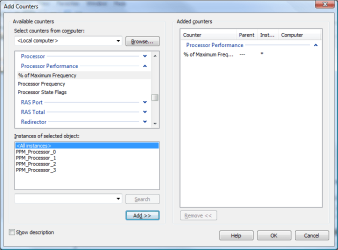
• Windows Reliability and Performance Monitor
This tool lets you view a plot of the current speed of each processor core against the processor usage. It also provides logging and graphical display capabilities. This tool is included with Windows.eg
• Event Viewer
This tool lets you view entries in the system event log. The system event log includes entries that contain summary information about platform PPM capabilities and error messages that were logged when ACPI processor objects failed validation checks. This tool is included with Windows.
• PowerCfg
This command-line tool lets you view or change the processor power policy, including power policy values that are not exposed in the Control Panel Power Options application. This tool is included with Windows.
• Pwrtest
This command-line tool lets you view detailed information about system PPM capabilities and provides test and logging capabilities for multiple power management scenarios. This tool is included with the Windows Driver Kit (WDK).
To view supported PPM states .... use the command below.. This give you for each core of the processor --- the performance states and the idle states supported by the processor.
Code:
Microsoft Windows [Version 6.1.7601]
Copyright (c) 2009 Microsoft Corporation.  All rights reserved.

C:\Program Files (x86)\Windows Kits\8.0\Tools\x64>pwrtest /info:ppm


InstanceName: ACPI\GenuineIntel_-_Intel64_Family_6_Model_15_-_Intel(R)_Core(TM)2
_Duo_CPU_____T5750__@_2.00GHz\_0_0

Processor Performance States
  PerfStates:
    Max Transition Latency:  10 us
    Number of States:        12

    State  Speed (Mhz)    Type
    -----  ------------   ----
      0     2000 (100%)   Performance
      1     1667 ( 83%)   Performance
      2     1333 ( 66%)   Performance
      3     1000 ( 50%)   Performance
      4     1000 ( 50%)   Throttle
      5      870 ( 43%)   Throttle
      6      750 ( 37%)   Throttle
      7      620 ( 31%)   Throttle
      8      500 ( 25%)   Throttle
      9      370 ( 18%)   Throttle
      10     250 ( 12%)   Throttle
      11     120 (  6%)   Throttle


InstanceName: ACPI\GenuineIntel_-_Intel64_Family_6_Model_15_-_Intel(R)_Core(TM)2
_Duo_CPU_____T5750__@_2.00GHz\_1_0

Processor Performance States
  PerfStates:
    Max Transition Latency:  10 us
    Number of States:        12

    State  Speed (Mhz)    Type
    -----  ------------   ----
      0     2000 (100%)   Performance
      1     1667 ( 83%)   Performance
      2     1333 ( 66%)   Performance
      3     1000 ( 50%)   Performance
      4     1000 ( 50%)   Throttle
      5      870 ( 43%)   Throttle
      6      750 ( 37%)   Throttle
      7      620 ( 31%)   Throttle
      8      500 ( 25%)   Throttle
      9      370 ( 18%)   Throttle
      10     250 ( 12%)   Throttle
      11     120 (  6%)   Throttle


InstanceName: PPM_Processor_0

Kernel Idle States: (3 states)

  TargetState:       2
  Type:              0
  TargetProcessors:  0x1
  State 0:
    Latency:          1 us
    Power:            1000 mWatts
    TimeCheck:        97414 QPC ticks (50 ms)
    PromotePercent:   10%
    DemotePercent:    5%
    StateType:        C1
    IdleHandler:      Present
    Context:          Present
  State 1:
    Latency:          1 us
    Power:            500 mWatts
    TimeCheck:        97414 QPC ticks (50 ms)
    PromotePercent:   10%
    DemotePercent:    5%
    StateType:        C2
    IdleHandler:      Present
    Context:          Present
  State 2:
    Latency:          57 us
    Power:            100 mWatts
    TimeCheck:        97414 QPC ticks (50 ms)
    PromotePercent:   10%
    DemotePercent:    5%
    StateType:        C3
    IdleHandler:      Present
    Context:          Present


InstanceName: PPM_Processor_1

Kernel Idle States: (3 states)

  TargetState:       2
  Type:              0
  TargetProcessors:  0x2
  State 0:
    Latency:          1 us
    Power:            1000 mWatts
    TimeCheck:        97414 QPC ticks (50 ms)
    PromotePercent:   10%
    DemotePercent:    5%
    StateType:        C1
    IdleHandler:      Present
    Context:          Present
  State 1:
    Latency:          1 us
    Power:            500 mWatts
    TimeCheck:        97414 QPC ticks (50 ms)
    PromotePercent:   10%
    DemotePercent:    5%
    StateType:        C2
    IdleHandler:      Present
    Context:          Present
  State 2:
    Latency:          57 us
    Power:            100 mWatts
    TimeCheck:        97414 QPC ticks (50 ms)
    PromotePercent:   10%
    DemotePercent:    5%
    StateType:        C3
    IdleHandler:      Present
    Context:          Present


C:\Program Files (x86)\Windows Kits\8.0\Tools\x64>
The below shows an example of the output of Pwrtest when it is run in sampling mode. Watch at 75000ms when i started running MSE... the idle states of each core are changed as well as the performance states and increased to cope up with the load ....
Code:
C:\Program Files (x86)\Windows Kits\8.0\Tools\x64>pwrtest /ppm
      Elapsed  Idle   C1   C2   C3  P-     Freq    Freq     Perf/
Cpu      [ms]   [%]  [%]  [%]  [%]  State   [%]   [MHz]  Throttle
---   -------  ----  ---  ---  ---  -----  ----   -----  --------
  0      4992    92    0    0  100      3    50    1000         P
  1      4992    88    0    0   99      3    50    1000         P
  0      9999    97    0    0  100      3    50    1000         P
  1      9999    96    0    0  100      3    50    1000         P
  0     14991    87    0    0  100      3    50    1000         P
  1     14991    82    0    0  100      3    50    1000         P
  0     19998    90    0    0  100      3    50    1000         P
  1     19998    90    0    0  100      3    50    1000         P
  0     24990    99    0    0  100      3    50    1000         P
  1     24990    98    0    0  100      3    50    1000         P
  0     29997    99    0    0  100      3    50    1000         P
  1     29997    97    0    0  100      3    50    1000         P
  0     34989    98    0    0  100      3    50    1000         P
  1     34989    98    0    0  100      3    50    1000         P
  0     39996    98    0    0  100      3    50    1000         P
  1     39996    99    0    0  100      3    50    1000         P
  0     44988    98    0    0  100      3    50    1000         P
  1     44988    98    0    0  100      3    50    1000         P
  0     49995    96    0    0  100      3    50    1000         P
  1     49995    98    0    0  100      3    50    1000         P
  0     55002    82    0    0  100      3    50    1000         P
  1     55002    83    0    0  100      3    50    1000         P
  0     59994    96    0    0  100      3    50    1000         P
  1     59994    98    0    0  100      3    50    1000         P
  0     65001    97    0    0  100      3    50    1000         P
  1     65001    97    0    0  100      3    50    1000         P
  0     69993    90    0    0  100      3    50    1000         P
  1     69993    85    0    0  100      3    50    1000         P
  0     75000    55    0    0   99      3    50    1000         P
  1     75000    34    3    8   87      3    50    1000         P
  0     79992    69    0    0  100      2    66    1333         P
  1     79992    26    1   11   87      2    66    1333         P
  0     84999    88    0    0  100      3    50    1000         P
  1     84999    62    2    4   93      3    50    1000         P
  0     89991    80    0    0  100      2    66    1333         P
  1     89991    30    1    6   91      2    66    1333         P
  0     94998    79    0    0  100      3    50    1000         P
  1     94998    49    1    3   95      3    50    1000         P
  0    100005    70    0    0  100      3    50    1000         P
  1    100005    33    0    3   96      3    50    1000         P
  0    104997    73    0    0  100      3    50    1000         P
  1    104997    45    0    7   92      3    50    1000         P
  0    110004    84    0    0  100      3    50    1000         P
  1    110004    47    0    1   98      3    50    1000         P
^C
C:\Program Files (x86)\Windows Kits\8.0\Tools\x64>
In another related question.... what you are trying to achieve is something called Core Parking. i have attached a doc for your reference.... most of what you want to achieve can be done through the registry by looking at the respective GUID
View attachment Core Parking.pdf
There is one other tool called
Manage Parked CPU Utility you could also try .... but i am not sure wheather you could induvidually manage the core....since core parking works on certain class of multicore processors. just give it a try and let me know..



