
Solved Which processes can I eliminate

joeyd219

New member
Local time
4:37 AM
Messages
5
My physical memory has been running high recently, even if I'm not doing anything. The CPU can get a little high too. As a consequence of this, my computer freezes a lot. Which of these processes can I eliminate to make my computer run better? Processes.PNG
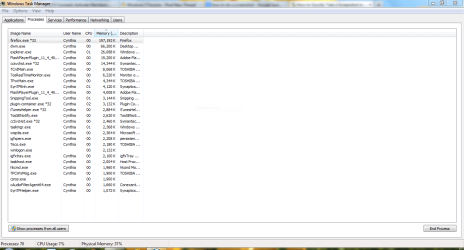
Oh, and why does it say there are eighty-something processes going, but I can only see 20 or 30?

Thank you!

BTW, the photo is a bit small, sorry, this is my first post.
 

My Computer

Computer Manufacturer/Model Number
Toshiba Satelite
OS
Windows 7 home premium 64 bit

My Computer

Computer type
PC/Desktop
Computer Manufacturer/Model Number
home built
OS
Multi-Boot W7_Pro_x64 W8.1_Pro_x64 W10_Pro_x64 +Linux_VMs +Chromium_VM
CPU
AMD Athlon II x4 620
Motherboard
Gigabyte GA-MA785G-UD3H
Memory
6GB GSkill DDR2 800
Graphics Card(s)
AMD 4670 GPU + AMD 4200 IGP
Sound Card
on board Realtek ALC889A
Monitor(s) Displays
RCA 40" LCD TV, Insignia 32" LCD TV, HP 15" LCD monitor
Screen Resolution
1680 x 1050
Hard Drives
OCZ Vertex 3 120GB,
Samsung F3 1TB (3),
Several others - WD, Seagate, Hitachi, ...
PSU
Corsair 500 W
Case
Rosewill mid tower
Cooling
CM 90mm rifle
Keyboard
Gyration wireless, Logitech wireless, Dell USB wired
Mouse
Gyration wireless, Logitech wireless, V7 USB wired
Internet Speed
Spectrum - 100Mbps D / 10Mbps U
Antivirus
Avast, MBAM3, EMET, WinPatrol
Browser
Pale Moon, Firefox, IE
Other Info
2 multi-boot PC's
Mainly HTPC/Office/Gen purpose (no gaming).
Trendnet USB KVM.
LG DVD burner/Blue Ray Player.
Tray system for removable SATA backup drives.

Not currently OCd, under-volted.
I use Hybrid sleep, rarely re-boot or shutdown.

Hauppauge HD-PVR, Avermedia PCIe TV Tuner, Hauppauge PCI TV Tuner.
1. You don't see them all because you did not click "Show processes from all users".

2. Don't stop any processes - you just don't know for what they are used. It is smarter to disable all Startup programs except the AV program and those that you started yourself - e.g. Sidebar (gadgets).

3. Most of those running processes do not use any CPU time most of the time - only when they are needed. They may, however, use some RAM.
 

My Computer

Computer Manufacturer/Model Number
HP, Dell, Gateway, Toshiba - 4 laptops and 2 desktops
OS
Vista, Windows7, Mint Mate, Zorin, Windows 8
CPU
from 1.6GHz Duo to i7
Monitor(s) Displays
2x HP w2207
Hard Drives
5x HDD, 7x SSD, 12x Externals
Keyboard
with trackball - no mices
Mouse
Trackball mice
Internet Speed
DSL 6000
Thank you, I'll leave it alone for now. Very helpful, thank you!
 

My Computer

Computer Manufacturer/Model Number
Toshiba Satelite
OS
Windows 7 home premium 64 bit
Back
Top