Solved Virus Deletion Now Makes Internet Access Impossible

netsh int ip reset : did do the trick? If so... I don't know what was wrong.


YES, with every idea from this thread, I followed guru instructions as closely as I could, then rebooted, then tested IE, FF, & Chrome.

It was your last concept (quoted herein) that did the trick. But, it may have been an accumulation of fixes that you & Golden & Indiana posed that led to your final idea working. I don't know because I'm not an expert. But I certainly am delighted by the help I received from you and the others.

I don't want to mark it as solved as yet. I have to move copy temporary files into my email client, merge and purge them, then run a full test. Tomorrow. I'll report further. Good job and thank you.

Also, it should be noted that in answer to this thread, JMScreator has raised a valid issue which merits some attention. Your thoughts on that, Kaktus, Indiana, Golden?
 

My Computer My Computer

At a glance

Windows 7 643.00 gig AMD Athlon II x4 6406136 Megabytes Installed MemoryNVIDIA GeForce GTS 450
Computer type
PC/Desktop
Computer Manufacturer/Model Number
HP HPE-500Z
OS
Windows 7 64
CPU
3.00 gig AMD Athlon II x4 640
Motherboard
FOXCONN 2A92 1.01, BIOS: American Megatrends 6.09
Memory
6136 Megabytes Installed Memory
Graphics Card(s)
NVIDIA GeForce GTS 450
Sound Card
Realtek HD Audio & NVIDIA HD Audio 4x
Monitor(s) Displays
Twin Dell 2405FPW 24.2
Screen Resolution
1920 x 1200
Hard Drives
Hitachi HDS721010CLA332 SCSI 1000.20 GB;
Seagate ST31000528AS SCSI 1000.20 GB
Keyboard
IBM KB8923
Mouse
HP MODGUO
Antivirus
AVG
Browser
Firefox 26.0 + IE-11 + Chrome
OKAY I just found a solution (THANK YOU VERY MUCH, Kaktussoft and Indiacarnie)


Here's what I discovered, and is why it is now working for Florida Rene.
I deleted EVERY AdpeekProxy.dll and Don't forget the AdpeekProxy64.dll in the system32 folder! AVG doesn't detect that! So find everything that is related to Adpeek and delete it. Then the browsers will stop working after doing the AVG scan and deleting Adpeek completely.

Run this bat file that Indiacarnie mentioned:

Code:
@Echo off
netsh winsock reset all
netsh int ip reset all
shutdown -r -t 0
del %0
(Run as administrator... otherwise it doesn't work)

This will fix it. Thank you! And remember! It was a team effort! I have been working on this for 2 days straight in a row! However, as I own a business in Computer Repair, I do have the tools and such. I have literally been imaging the client's hard-drive back and forth between working internet and non-working internet, and finally that AdpeekProxy.dll was the very thing that caused this problem. The "netsh winsock reset all" command fixes the Proxy Reference. So it no longer is looking for Adpeek virus.
Check this link out. It tells you what winsock reset does netsh winsock reset
This command in cmd should show you a list of all/any changes made to the winsock catalog!
Code:
netsh winsock audit trail

(If anyone found something else regarding this issue... please do share! and also if someone could post a list of file locations for Adpeek that AVG does NOT detect, such as the AdpeekProxy DLL in system32. Thank you!)

I am glad to say that this terrible and extremely painful annoyance has been solved.

So remember... Don't get Scorpion Saver or Adpeek.. they're really bad.


~jmscreator
Computer Smith, MA
 
Last edited:

My Computer My Computer

At a glance

Windows 7 64bit Home Premium
Computer type
PC/Desktop
OS
Windows 7 64bit Home Premium
My apologies to jmscreator but I'm a little leery of self proclaimed "experts" in any field. I WOULD NOT personally replace that .dll file. The .bat file I gave you in post #16 should have done the trick as it contained all the commands that eventually led to your net being restored. In my haste I may have forgotten/neglected to mention that any .bat file should be run as an administrator (Elevated Command Prompt). And for this I deeply apologize for wasting your time and that of the other members helping you.

The .bat file I suggested, and what it does is available on the net without too much searching. I know because that's where I got it and I've had it saved for over a year now in my "tools" folder. Its worked before in similar situations and dumbfounded me when it didn't work for you. Again, my apologies for neglecting something so basic as running it as an elevated command. (I've since made a note to myself in my tools folder so this doesn't happen again)

Yes, its becoming increasingly more common for malware to change/rewrite system files. That's why I suggested a repair install/clean install when my original posting of the "fix" didn't "fix" the problem.

I'm just happy that your machine is up and running. (I'll catch heat for this, but maybe you should consider a different anti-virus also. AVG is not like it used to be and there are many other free alternatives that perform better and faster.) Also, when downloading anything pay extra attention as you install, unchecking any and all things you don't want. Everybody, it seems, wants to install the little extra's that lead to this kind of thing. Save any programs/things you download and scan them first before installing. I know this advice is very basic, but after my slip-up earlier vis-a -vis the command prompt, I'd rather err on the side of caution.
 

My Computer My Computer

At a glance

Windows 10x64 Build 1709Intel i7 7700HQ Kaby Lake16 GB DDR4 @2400Nvidia Geforce GTX 1060
Computer type
Laptop
Computer Manufacturer/Model Number
MSI GE72VR Apache Pro-416
OS
Windows 10x64 Build 1709
CPU
Intel i7 7700HQ Kaby Lake
Motherboard
Micro-Star Intl. MS-179B (U3C1)
Memory
16 GB DDR4 @2400
Graphics Card(s)
Nvidia Geforce GTX 1060
Screen Resolution
1920x1080 120Hz
Hard Drives
256 GB Nvme M.2 SSD

1TB HDD@7200
Cooling
Cooler Blast 4
Keyboard
Steel Series
Antivirus
Bit Defender Free
Browser
Edge
My apologies to jmscreator but I'm a little leery of self proclaimed "experts" in any field. I WOULD NOT personally replace that .dll file.

I understand what you are saying here, but the AdpeekProxy DLL is a virus. Go look up online, and you will clearly see that everyone has detected it as a virus. This Proxy DLL is used in replace of the system DLL
(mswsock.dll to be exact) What it does is acts like the mswsock.dll, but also tracks information and such. This DLL should be removed, as AVG knows it's a virus too. However, when you reset the winsock catalog, it puts the OS proxy settings to refer back to the mswsock.dll. So it will work again, but remember to get rid of those bad Adpeek DLLs.
As far as my self proclaimed expertise, I am not an "Expert" at computer technology, however with my many years of advanced experience, I can figure out how to repair computers. This is why I am now running a business. As far as running it as Admin, it's no trouble at all. I always run it as admin, I was just throwing that out there so other's wouldn't get confused.
My website is still under construction, so it's just a contact form.

www.computersmithservices.com


~jmscreator
 

My Computer My Computer

At a glance

Windows 7 64bit Home Premium
Computer type
PC/Desktop
OS
Windows 7 64bit Home Premium
netsh winsock reset : That has solved it I think.
Although the poster posted that didn't solve it (even after reboot). He did "netsh int ip reset" as well. tcp/ip was running fine... no reason to reset actually.

There wasn't a generic http proxy in the tcp/ip stack Netsh Commands for Windows Hypertext Transfer Protocol (WINHTTP)
Neither was there a proxyserver defined in internet explorer (and most likey not in other browsers).

Only common tcp/ip stuff which could cause these http errors is winsock Winsock - Wikipedia, the free encyclopedia

It supports Layered Service Providers. a Layered Service Provider can intercept and modify inbound and outbound Internet traffic. It allows processing of all the TCP/IP traffic taking place between the Internet and the applications that are accessing the Internet (such as a web browser, the email client, etc.). For example, it could be used by malware to redirect web browers to rogue websites, or to block access to sites like Windows Update. Alternatively, a computer security program could scan network traffic for viruses or other threats.
Layered Service Provider - Wikipedia, the free encyclopedia

There can be more Layered Service Providers (LSP) chained together. You deleted the DLL (the LSP)... the cause of the problem.

netsh winsock reset : that resetted the LSP chain to default standard order. Maybe virusscanner isn't working corectly now (maybe we deleted that LSP as well[?]). Uninstall and install AVG again
 

My Computer My Computer

At a glance

Microsoft Windows 7 Home Premium 64-bits 7601...Intel(R) Core(TM) i3 CPU M 370 @ 2.40GHz4,00 GBATI Mobility Radeon HD 5400 Series
Computer type
Laptop
Computer Manufacturer/Model Number
ACER ASPIRE 5742G
OS
Microsoft Windows 7 Home Premium 64-bits 7601 Multiprocessor Free Service Pack 1
CPU
Intel(R) Core(TM) i3 CPU M 370 @ 2.40GHz
Motherboard
Acer Aspire 5742G
Memory
4,00 GB
Graphics Card(s)
ATI Mobility Radeon HD 5400 Series
Sound Card
(1) AMD High Definition Audio Device (2) Realtek High Defi
Screen Resolution
1366 x 768 x 32 bits (4294967296 colors) @ 60 Hz
Hard Drives
WDC WD5000BEVT-22ZAT0
netsh winsock reset : That has solved it I think.

Maybe virusscanner isn't working corectly now (maybe we deleted that LSP as well[?]). Uninstall and install AVG again

Another good suggestion from Kaktussoft. So, I have removed AVG from the previously-infected computer and after it reboots, I'll install it from a fresh download I've already made and report on my tests later, hopefully today.

Thank you all once again.

BTW, is AVG the best free anti-virus program today?
 

My Computer My Computer

At a glance

Windows 7 643.00 gig AMD Athlon II x4 6406136 Megabytes Installed MemoryNVIDIA GeForce GTS 450
Computer type
PC/Desktop
Computer Manufacturer/Model Number
HP HPE-500Z
OS
Windows 7 64
CPU
3.00 gig AMD Athlon II x4 640
Motherboard
FOXCONN 2A92 1.01, BIOS: American Megatrends 6.09
Memory
6136 Megabytes Installed Memory
Graphics Card(s)
NVIDIA GeForce GTS 450
Sound Card
Realtek HD Audio & NVIDIA HD Audio 4x
Monitor(s) Displays
Twin Dell 2405FPW 24.2
Screen Resolution
1920 x 1200
Hard Drives
Hitachi HDS721010CLA332 SCSI 1000.20 GB;
Seagate ST31000528AS SCSI 1000.20 GB
Keyboard
IBM KB8923
Mouse
HP MODGUO
Antivirus
AVG
Browser
Firefox 26.0 + IE-11 + Chrome
All is NOT well...yet.

Removed AVG per Kaktussoft recommendation. Restart did NOT work. Hung up forever.
Tried "normally" reboot. Would NOT work.
Tried "Last Good" reboot. Would NOT work.
Tried "Safe with Networking." Worked. Updated MalwareBytes.
Ran MalwareBytes. Found and removed 51 threats, mostly with Adpeak in their file names.
Removed them all. (see attached .txt file)
Ran Agent Ransack. Found "Peak Files.jpg.lnk" shortcut under \Users\Rene\AppData\Roaming\Microsoft\Windows\Recent
Deleted that file via Ransack

Most of the files found at 11:02 a.m. EST today included this verbiage:
PUP.OPTIONAL.Adpeak
PUP.OPTIONAL.DefaultTabA
PUP.OPTIONAL.GreatArcadeHits.A
PUP.OPTIONAL.ScorpionSaver

Your comments would be appreciated on this listing found by MalwareBytes and how to permanently end this fracas (THANK YOU):
 

Attachments

My Computer My Computer

At a glance

Windows 7 643.00 gig AMD Athlon II x4 6406136 Megabytes Installed MemoryNVIDIA GeForce GTS 450
Computer type
PC/Desktop
Computer Manufacturer/Model Number
HP HPE-500Z
OS
Windows 7 64
CPU
3.00 gig AMD Athlon II x4 640
Motherboard
FOXCONN 2A92 1.01, BIOS: American Megatrends 6.09
Memory
6136 Megabytes Installed Memory
Graphics Card(s)
NVIDIA GeForce GTS 450
Sound Card
Realtek HD Audio & NVIDIA HD Audio 4x
Monitor(s) Displays
Twin Dell 2405FPW 24.2
Screen Resolution
1920 x 1200
Hard Drives
Hitachi HDS721010CLA332 SCSI 1000.20 GB;
Seagate ST31000528AS SCSI 1000.20 GB
Keyboard
IBM KB8923
Mouse
HP MODGUO
Antivirus
AVG
Browser
Firefox 26.0 + IE-11 + Chrome
More lurking problems.

After the above post, ran MalwareBytes and AVG again. Both said no threats.

Did a restart and again updated MalwareBytes. Ran it again.
It found 30 new threats (see attached txt file). Removed them all.

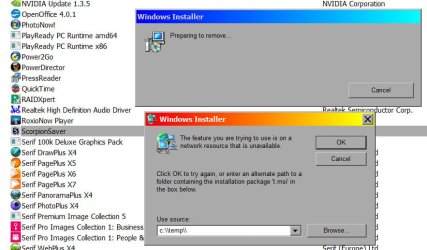
Went to Add/Remove and found Scorpion Saver again. Tried to delete it. Attached screen print shows what happened. Used Agent Ransack to search for missing file t.msi. Not found on C:\ or any other partition.

Went to Piriform and downloaded/installed updated version of CCleaner. Ran new CCleaner. Took forever compared with previous version. Found and deleted only normal internet histories etc.

Went to Start Folder to see if something is strange there. Found nothing weird that I can determine.

I will restart and again run scans.
 

Attachments

My Computer My Computer

At a glance

Windows 7 643.00 gig AMD Athlon II x4 6406136 Megabytes Installed MemoryNVIDIA GeForce GTS 450
Computer type
PC/Desktop
Computer Manufacturer/Model Number
HP HPE-500Z
OS
Windows 7 64
CPU
3.00 gig AMD Athlon II x4 640
Motherboard
FOXCONN 2A92 1.01, BIOS: American Megatrends 6.09
Memory
6136 Megabytes Installed Memory
Graphics Card(s)
NVIDIA GeForce GTS 450
Sound Card
Realtek HD Audio & NVIDIA HD Audio 4x
Monitor(s) Displays
Twin Dell 2405FPW 24.2
Screen Resolution
1920 x 1200
Hard Drives
Hitachi HDS721010CLA332 SCSI 1000.20 GB;
Seagate ST31000528AS SCSI 1000.20 GB
Keyboard
IBM KB8923
Mouse
HP MODGUO
Antivirus
AVG
Browser
Firefox 26.0 + IE-11 + Chrome
My apologies Kattussoft.

Run your A/V in safe mode and Malwarbytes too for that matter just to be safe. PUP = Potentially Unwanted Program. (NO you don't want any of these.) It looks like Malwarebytes successfully got them. You can also run Superantispyware (which I highly recommend) (Full scan)

There is no "best" Anti-Virus as its a matter of taste. There ARE leaders in the field (we have multiple threads pertaining to this subject so I will not recommend one. I used Avast until this morning when I changed to Bit Defender. Avast is near the top at detection rates but I personally don't care for the new UI and its increasing amounts of nag balloons.)
 

My Computer My Computer

At a glance

Windows 10x64 Build 1709Intel i7 7700HQ Kaby Lake16 GB DDR4 @2400Nvidia Geforce GTX 1060
Computer type
Laptop
Computer Manufacturer/Model Number
MSI GE72VR Apache Pro-416
OS
Windows 10x64 Build 1709
CPU
Intel i7 7700HQ Kaby Lake
Motherboard
Micro-Star Intl. MS-179B (U3C1)
Memory
16 GB DDR4 @2400
Graphics Card(s)
Nvidia Geforce GTX 1060
Screen Resolution
1920x1080 120Hz
Hard Drives
256 GB Nvme M.2 SSD

1TB HDD@7200
Cooling
Cooler Blast 4
Keyboard
Steel Series
Antivirus
Bit Defender Free
Browser
Edge

My Computer My Computer

At a glance

Windows 10 Pro. 64/ version 1709 Windows 7 Pr...Intel i7-6800K @ 4.3Corsair Platinum 16 gig @2400EVGA GTX 1070 OC
Computer type
PC/Desktop
Computer Manufacturer/Model Number
Home made Desktop
OS
Windows 10 Pro. 64/ version 1709 Windows 7 Pro/64
CPU
Intel i7-6800K @ 4.3
Motherboard
ASUS X-99 Deluxe II
Memory
Corsair Platinum 16 gig @2400
Graphics Card(s)
EVGA GTX 1070 OC
Monitor(s) Displays
Asus 27" LED LCD/VE278Q
Screen Resolution
1920-1080 or 1280-720 HDMI
Hard Drives
INTEL SSD 730-240 Gb Sata 3.0/
PSU
EVGA Platium 1200W
Case
Phanteks Luxe Tempered Glass 8 fans/ one radiator
Cooling
XSPC/ Water Cooled CPU
Keyboard
Das 4 Professional
Mouse
Logitech M705/MX Anywhere 2-S
Internet Speed
100 mbits
Antivirus
Microsoft Security Essentials/ Malwarebytes Premium 3.0/ SAS
Browser
I.E. 11 default/Firefox/ ISP Time Warner Cable/Spectrum
Other Info
LG BluRay Burner/
Sound system-KLipsch-THX/
Icy Dock ssd Hot Swap bays.
ScorpionSaver has been removed already by malwarebytes on your system. It's only on the list (fake info).
Search in registry for ScorpionSaver. Is it in some UNINSTALL branch? If so... delete it.

Also Scorpion Saver Removal Guide

So delete:
folder C:\Program Files\ScorpionSaver Services\
folder C:\Windows\Installer\{6E810AB6-F34E-49A3-A93F-9E503660F718}\
C:\Windows\SysWOW64\AdpeakProxy*.*
C:\Windows\System32\AdpeakProxy*.*
 

My Computer My Computer

At a glance

Microsoft Windows 7 Home Premium 64-bits 7601...Intel(R) Core(TM) i3 CPU M 370 @ 2.40GHz4,00 GBATI Mobility Radeon HD 5400 Series
Computer type
Laptop
Computer Manufacturer/Model Number
ACER ASPIRE 5742G
OS
Microsoft Windows 7 Home Premium 64-bits 7601 Multiprocessor Free Service Pack 1
CPU
Intel(R) Core(TM) i3 CPU M 370 @ 2.40GHz
Motherboard
Acer Aspire 5742G
Memory
4,00 GB
Graphics Card(s)
ATI Mobility Radeon HD 5400 Series
Sound Card
(1) AMD High Definition Audio Device (2) Realtek High Defi
Screen Resolution
1366 x 768 x 32 bits (4294967296 colors) @ 60 Hz
Hard Drives
WDC WD5000BEVT-22ZAT0
Did you get back up and running?

BTDT yesterday and today.

[FONT=&quot]1. REMOVE ScorpionSaver[/FONT]
[FONT=&quot]2. Run : ipconfig /flushdns[/FONT]
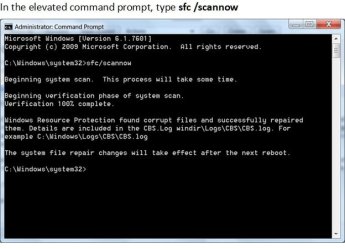
[FONT=&quot]3. Run : sfc /scannow[/FONT][FONT=&quot][/FONT]
[FONT=&quot]3. Start your browser. I/E. FireFox. [/FONT]
 

Attachments

  • Adware removal and repair 2.jpg
    Adware removal and repair 2.jpg
    34.7 KB · Views: 42

My Computer My Computer

At a glance

Win7 32bit
Computer type
PC/Desktop
Computer Manufacturer/Model Number
Dell 745
OS
Win7 32bit
Antivirus
AVG
Browser
FF
cCleaner has a tool to remove "fake" entries in the install list.

Launch cCleaner -> click Tools in the left hand pane -> select Uninstall from the tools list -> select the program you wish to remove from the list -> click on Delete Entry in the righthand option list.

This ONLY removes the program from the list, it does not uninstall or affect the program in any other way.
ScorpionSaver has been removed already by malwarebytes on your system. It's only on the list (fake info).
Search in registry for ScorpionSaver. Is it in some UNINSTALL branch? If so... delete it.
If all else fails, you need a bigger hammmer. There are nine scanners in this guide, so it takes a while to run through all of them.
Bill​
 

My Computer My Computer

At a glance

x64 (6.3.9600) Win8.1 Pro & soon dual boot x6...AMD A6-3420M APU with Radeon(tm) HD Graphics6.00 GBAMD Radeon(TM) HD 6520G
Computer type
Laptop
Computer Manufacturer/Model Number
HP Pavilion dv6-6c10us
OS
x64 (6.3.9600) Win8.1 Pro & soon dual boot x64 (6.1.7601) Win7_SP1 HomePrem
CPU
AMD A6-3420M APU with Radeon(tm) HD Graphics
Motherboard
Hewlett-Packard 1805
Memory
6.00 GB
Graphics Card(s)
AMD Radeon(TM) HD 6520G
Sound Card
(1) AMD High Definition Audio Device (2) IDT High Definiti
Monitor(s) Displays
HP W2072a 20" LCD (1600 x 900) @ 60 Hz
Screen Resolution
1366 x 768 x 32 bits (4294967296 colors) @ 60 Hz
Hard Drives
ST640LM0 00 HM641JI SATA Disk Device
Keyboard
Logitech k520 wireless KB
Mouse
Logitech m320 wireless mouse (bundled with KB)
Internet Speed
15/5 | 54 MB Wireless 'n'
Antivirus
Realtime: Defender or Avast | On-demand: Malwarebytes, ESET
Browser
IE 11 on Win8, IE 10 on win 7
Other Info
Media: [Gimp, Audacity, VLC] || Comm: [WEmail 2012, Skype] || Productivity: [OpenOffice,| Textpad] || Utils: [Sysinternals, cCleaner, Speccy, Defraggler]
ScorpionSaver has been removed already by malwarebytes on your system. It's only on the list (fake info).
Search in registry for ScorpionSaver. Is it in some UNINSTALL branch? If so... delete it.

Also Scorpion Saver Removal Guide

So delete:
folder C:\Program Files\ScorpionSaver Services\
folder C:\Windows\Installer\{6E810AB6-F34E-49A3-A93F-9E503660F718}\
C:\Windows\SysWOW64\AdpeakProxy*.*
C:\Windows\System32\AdpeakProxy*.*

Thank you. You are most helpful.

Ran full scans with AVG and SuperAntiSpyware again today and all was fine. Also ran MalwareBytes again, same report. I will next try running them in Safe Mode to be sure.

Searched for the 4 files you listed. Can't find any of them. Maybe we have eliminated the problem since all is running well today. I'll do the Safe Mode Scans and some more testing later today and tomorrow, and then report back.

Again, many thanks.
 

My Computer My Computer

At a glance

Windows 7 643.00 gig AMD Athlon II x4 6406136 Megabytes Installed MemoryNVIDIA GeForce GTS 450
Computer type
PC/Desktop
Computer Manufacturer/Model Number
HP HPE-500Z
OS
Windows 7 64
CPU
3.00 gig AMD Athlon II x4 640
Motherboard
FOXCONN 2A92 1.01, BIOS: American Megatrends 6.09
Memory
6136 Megabytes Installed Memory
Graphics Card(s)
NVIDIA GeForce GTS 450
Sound Card
Realtek HD Audio & NVIDIA HD Audio 4x
Monitor(s) Displays
Twin Dell 2405FPW 24.2
Screen Resolution
1920 x 1200
Hard Drives
Hitachi HDS721010CLA332 SCSI 1000.20 GB;
Seagate ST31000528AS SCSI 1000.20 GB
Keyboard
IBM KB8923
Mouse
HP MODGUO
Antivirus
AVG
Browser
Firefox 26.0 + IE-11 + Chrome
cCleaner has a tool to remove "fake" entries in the install list.

Launch cCleaner -> click Tools in the left hand pane -> select Uninstall from the tools list -> select the program you wish to remove from the list -> click on Delete Entry in the righthand option list.

This ONLY removes the program from the list, it does not uninstall or affect the program in any other way.
ScorpionSaver has been removed already by malwarebytes on your system. It's only on the list (fake info).
Search in registry for ScorpionSaver. Is it in some UNINSTALL branch? If so... delete it.
If all else fails, you need a bigger hammmer. There are nine scanners in this guide, so it takes a while to run through all of them.

Bill​

Hi Bill.

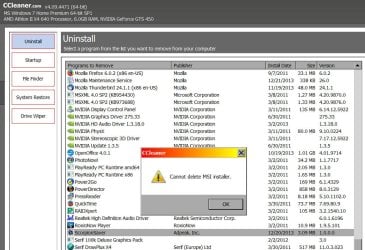
Tried your CCleaner suggestion and the attached jpg shows you what happened.

I am proceeding as indicated in my above post responding to Kaktussoft.

P.S. to KAKTUS: Since I can not consider myself even close to being a pro, I have made it a firm rule to never manually attempt to amend or emend the Registry. I'll use some of the PCTools variety of software to edit the Registry, but not me personally. It's just something that I don't feel comfortable with.
 

Attachments

  • CCleaner Scorpion.jpg
    CCleaner Scorpion.jpg
    125.3 KB · Views: 2

My Computer My Computer

At a glance

Windows 7 643.00 gig AMD Athlon II x4 6406136 Megabytes Installed MemoryNVIDIA GeForce GTS 450
Computer type
PC/Desktop
Computer Manufacturer/Model Number
HP HPE-500Z
OS
Windows 7 64
CPU
3.00 gig AMD Athlon II x4 640
Motherboard
FOXCONN 2A92 1.01, BIOS: American Megatrends 6.09
Memory
6136 Megabytes Installed Memory
Graphics Card(s)
NVIDIA GeForce GTS 450
Sound Card
Realtek HD Audio & NVIDIA HD Audio 4x
Monitor(s) Displays
Twin Dell 2405FPW 24.2
Screen Resolution
1920 x 1200
Hard Drives
Hitachi HDS721010CLA332 SCSI 1000.20 GB;
Seagate ST31000528AS SCSI 1000.20 GB
Keyboard
IBM KB8923
Mouse
HP MODGUO
Antivirus
AVG
Browser
Firefox 26.0 + IE-11 + Chrome
Hmmm....

That's odd - you clicked on Delete Entry, not Uninstall, right?

cCleaner should have removed the registry install entry for ScorpionSaver - at least that's how I understand the process. Your image seems to indicate it is trying to delete an msi file. It might be 'protected' in the registry - not sure.

In a Windows Explorer window, select the c:\ drive and enter the following in the search box (the word OR must be capitalized)
Scorpion OR Adpeak

post a screenshot of the search results
 

My Computer My Computer

At a glance

x64 (6.3.9600) Win8.1 Pro & soon dual boot x6...AMD A6-3420M APU with Radeon(tm) HD Graphics6.00 GBAMD Radeon(TM) HD 6520G
Computer type
Laptop
Computer Manufacturer/Model Number
HP Pavilion dv6-6c10us
OS
x64 (6.3.9600) Win8.1 Pro & soon dual boot x64 (6.1.7601) Win7_SP1 HomePrem
CPU
AMD A6-3420M APU with Radeon(tm) HD Graphics
Motherboard
Hewlett-Packard 1805
Memory
6.00 GB
Graphics Card(s)
AMD Radeon(TM) HD 6520G
Sound Card
(1) AMD High Definition Audio Device (2) IDT High Definiti
Monitor(s) Displays
HP W2072a 20" LCD (1600 x 900) @ 60 Hz
Screen Resolution
1366 x 768 x 32 bits (4294967296 colors) @ 60 Hz
Hard Drives
ST640LM0 00 HM641JI SATA Disk Device
Keyboard
Logitech k520 wireless KB
Mouse
Logitech m320 wireless mouse (bundled with KB)
Internet Speed
15/5 | 54 MB Wireless 'n'
Antivirus
Realtime: Defender or Avast | On-demand: Malwarebytes, ESET
Browser
IE 11 on Win8, IE 10 on win 7
Other Info
Media: [Gimp, Audacity, VLC] || Comm: [WEmail 2012, Skype] || Productivity: [OpenOffice,| Textpad] || Utils: [Sysinternals, cCleaner, Speccy, Defraggler]
ipconfig /flushdns

[FONT=&quot]Command prompt run :[/FONT] [FONT=&quot]ipconfig /flushdns

[/FONT]
[FONT=&quot]It cleaned up the errors from the AVG removal. Last week I removed the adware, later I restarted the computer. That is when I noticed I had a bigger problem. I ran several restore points until I got a clean one. Then the sht hit again. Warned of the coming problem, I started cleaning and searching for a fix.[/FONT]


[FONT=&quot]This process worked for me on Win7 32bit to keep my browser connection.[/FONT]
 
Last edited:

My Computer My Computer

At a glance

Win7 32bit
Computer type
PC/Desktop
Computer Manufacturer/Model Number
Dell 745
OS
Win7 32bit
Antivirus
AVG
Browser
FF
Hi Florida Rene :)

Please download AdwCleaner by Xplode and save to your Desktop.
  • Double click on AdwCleaner.exe to run the tool.
    Vista/Windows 7/8 users right-click and select Run As Administrator.
  • Click on the Scan button.
  • AdwCleaner will begin...be patient as the scan may take some time to complete.
  • After the scan has finished, click on the Report button...a logfile (AdwCleaner[R#].txt) will open in Notepad for review (where the largest value of # represents the most recent report).
  • The contents of the log file may be confusing. Unless you see a program name that you know should not be removed, don't worry about it. If you see an entry you want to keep, let me know about it.
  • Copy and paste the contents of that logfile in your next reply.
  • A copy of all logfiles are saved in the C:\AdwCleaner folder which was created when running the tool.

Using AdwCleaner v3: Scan & Clean:
Double click on AdwCleaner.exe to run the tool again.
Click on the Scan button.
AdwCleaner will begin to scan your computer like it did before.
After the scan has finished...

This time click on the Clean button.
Press OK when asked to close all programs and follow the onscreen prompts.
Press OK again to allow AdwCleaner to restart the computer and complete the removal process.
After rebooting, a logfile report (AdwCleaner[S#].txt) will open automatically (where the largest value of # represents the most recent report).
Copy and paste the contents of that logfile in your next reply.
A copy of that logfile will also be saved in the C:\AdwCleaner folder
 

My Computer My Computer

At a glance

Windows 7 Ultimate 32bit SP1Intel(R) Core(TM)2 Quad CPU @ 2.40GHz, 2400 MHz4 GBATI Radeon HD 2600 Pro
Computer type
PC/Desktop
Computer Manufacturer/Model Number
Bruce ... somewhere in his 40's
OS
Windows 7 Ultimate 32bit SP1
CPU
Intel(R) Core(TM)2 Quad CPU @ 2.40GHz, 2400 MHz
Motherboard
INTEL/D975XBX2
Memory
4 GB
Graphics Card(s)
ATI Radeon HD 2600 Pro
Monitor(s) Displays
Samsung SyncMaster 914v
Screen Resolution
1280 x 1024
Hard Drives
2/500GB each ... ST3500630AS ATA Device.
One is not connected
PSU
Rocketfish 700 W
Case
G.Skill Gigabyte Chassis
Keyboard
Standard PS/2 Keyboard
Mouse
Microsoft PS/2 Mouse
Internet Speed
DSL
Antivirus
Avira Internet Security
Browser
IE 11
Other Info
ATI HDMI Audio
SLARTYBART: Yes, I clicked on Delete Entry. I will try your other suggestion as soon as I can.

KAKTUSSOFT: Mbam in SafeMode with Networking reports about 15 instances of Scorpion and some movie links I never saw before. I'm weary now and will try again tomorrow night.

JACEE: I downloaded the AdwCleaner.exe file from Bleeping Computer and got the following warning I've never seen before: "This program is not commonly downloaded and could harm your computer." So, I'm hesitant.

INDIANACARNIE: I am trying to avoid a Repair/Install as I've heard that it often results in having to re-install all your software...and I have a ton of graphics programs and other software packages that I've upgraded and patched a number of times (like various Corel, Adobe, and Serif products that need frequent patching).

I must say that I am very heartened and pleased by the helpful suggestions on this Forum. But I'm puzzled (and frustrated) too. For instance, MalwareBytes reported no infections 7 hours ago (normally) and now found a lot of them (safe with networking).

Thank you all again.
 

My Computer My Computer

At a glance

Windows 7 643.00 gig AMD Athlon II x4 6406136 Megabytes Installed MemoryNVIDIA GeForce GTS 450
Computer type
PC/Desktop
Computer Manufacturer/Model Number
HP HPE-500Z
OS
Windows 7 64
CPU
3.00 gig AMD Athlon II x4 640
Motherboard
FOXCONN 2A92 1.01, BIOS: American Megatrends 6.09
Memory
6136 Megabytes Installed Memory
Graphics Card(s)
NVIDIA GeForce GTS 450
Sound Card
Realtek HD Audio & NVIDIA HD Audio 4x
Monitor(s) Displays
Twin Dell 2405FPW 24.2
Screen Resolution
1920 x 1200
Hard Drives
Hitachi HDS721010CLA332 SCSI 1000.20 GB;
Seagate ST31000528AS SCSI 1000.20 GB
Keyboard
IBM KB8923
Mouse
HP MODGUO
Antivirus
AVG
Browser
Firefox 26.0 + IE-11 + Chrome
AdWCleaner is completely safe to download and use - its just your AV being overzealous.
 

My Computer My Computer

At a glance

Windows 10 Pro x64 ; Xubuntu x64Intel i7 860 @ 2.80 GHz O/C'ed to 4.0GHz16GB Corsair Vengance DDR3 @ 661 MHz Dual Cha...EVGA NVidia GTX 560 1024MB
Computer type
PC/Desktop
Computer Manufacturer/Model Number
Golden Mk. I.4
OS
Windows 10 Pro x64 ; Xubuntu x64
CPU
Intel i7 860 @ 2.80 GHz O/C'ed to 4.0GHz
Motherboard
Gigabyte P55A-UD3R Rev.1. Award BIOS F13
Memory
16GB Corsair Vengance DDR3 @ 661 MHz Dual Channel (9-9-9-24)
Graphics Card(s)
EVGA NVidia GTX 560 1024MB
Sound Card
Realtek Integrated
Monitor(s) Displays
Dual Samsung SyncMaster 2494HS
Screen Resolution
1920*1080 and 1920*1080
Hard Drives
1*Samsung 840 EVO 120GB SSD;
1*OCZ Vertex 2 60GB SSD;
2*Samsung F3 SpinPoint 1TB in RAID0;
1*Samsung F1 SpinPoint 1TB;
2*Western Digital 1TB External USB 3.0
1*Western Digital 500GB External USB 3.0
1*Seagate 500GB External USB 2.0
PSU
Thermaltake ToughPower QFan 750W
Case
Thermaltake Element S VK60001W2Z
Cooling
Corsair H60 Water Cooling, 2*230mm and 2*80mm case fans
Keyboard
Logitech G110
Mouse
Logitech MX518
Back
Top